VectorStyler
    • Categories
    • Unread
    • Recent
    • Tags
    • Popular
    • Register
    • Login

    I would like to make a brush... a simple brush
    Scheduled Pinned Locked Moved Questions and Support
    28 Posts 5 Posters 33.6k Views 5 Watching
    Loading More Posts
    • Oldest to Newest
    • Newest to Oldest
    • Most Votes
    Reply
    • Reply as topic
    Log in to reply
    This topic has been deleted. Only users with topic management privileges can see it.
    • VectorStylerV Offline
      VectorStyler @B-Vs-V
      last edited by

      @PatrickM said in I would like to make a brush... a simple brush:

      In this image, the circles are bent a little bit. If the issue is the size (width) of the brush, than that can be fixed by either creating a smaller group first, or by setting the Scaling in the Pattern Brush view to a smaller value.
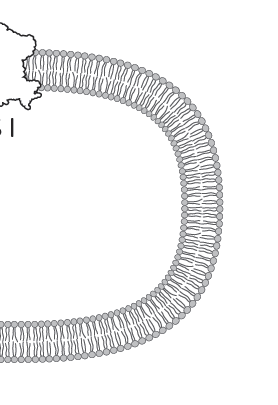
      0_1648230776619_3c76cc17-8c8a-487e-b5ea-e303e6e1dc27-image.png

      B 1 Reply Last reply Reply Quote 0
      • B Offline
        B-Vs-V @VectorStyler
        last edited by B-Vs-V

        @vectoradmin said in I would like to make a brush... a simple brush:

        @PatrickM said in I would like to make a brush... a simple brush:

        In this image, the circles are bent a little bit. If the issue is the size (width) of the brush, than that can be fixed by either creating a smaller group first, or by setting the Scaling in the Pattern Brush view to a smaller value.

        yes, sure, it is not perfect but there is not so much objects' distortion. To be honnest, I don't remember how I did this in AI & the kind of brush I'd chosen.

        Sure I will continue to dig in VS... I won't give up but I need more time to test all these brushes setup, time I don't have much right now 😓 .

        PS : I've tried to open an old AI file (not related to this issue) and VS crashed. I suppose VS send you the crash report.

        W11 Pro 25H2 - 12th Gen Intel(R) i7-12700K 3.61 GHz - RAM 64 Go - NVIDIA GF GTX 4070 Ti - Intuos - Dell UP3216Q / Eizo ColorEdge
        W11 Pro 25H2 - 12th Gen Intel(R) i7-12700KF 3.60 GHz -RAM 64 Go - NVIDIA GF GTX 3080 - IntuosPro- ProArt PA329C

        VectorStylerV 1 Reply Last reply Reply Quote 0
        • VectorStylerV Offline
          VectorStyler @B-Vs-V
          last edited by

          @PatrickM Got the crash report. I will try to fix based on that, if you can send me the file by email to csraba at vectorstyler.com it would help replicating the issue (file will be removed, once the bug is fixed).

          1 Reply Last reply Reply Quote 0
          • B Offline
            B-Vs-V @VectorStyler
            last edited by

            @vectoradmin said in I would like to make a brush... a simple brush:

            @PatrickM said in I would like to make a brush... a simple brush:

            thanks but it doesn't work like I would like:

            What would be a good way to have in this case?

            @vectoradmin Would it be possible to add this option to repeat the pattern for this type of brushes?

            W11 Pro 25H2 - 12th Gen Intel(R) i7-12700K 3.61 GHz - RAM 64 Go - NVIDIA GF GTX 4070 Ti - Intuos - Dell UP3216Q / Eizo ColorEdge
            W11 Pro 25H2 - 12th Gen Intel(R) i7-12700KF 3.60 GHz -RAM 64 Go - NVIDIA GF GTX 3080 - IntuosPro- ProArt PA329C

            VectorStylerV 1 Reply Last reply Reply Quote 1
            • VectorStylerV Offline
              VectorStyler @B-Vs-V
              last edited by

              @PatrickM said in I would like to make a brush... a simple brush:

              Would it be possible to add this option to repeat the pattern for this type of brushes?

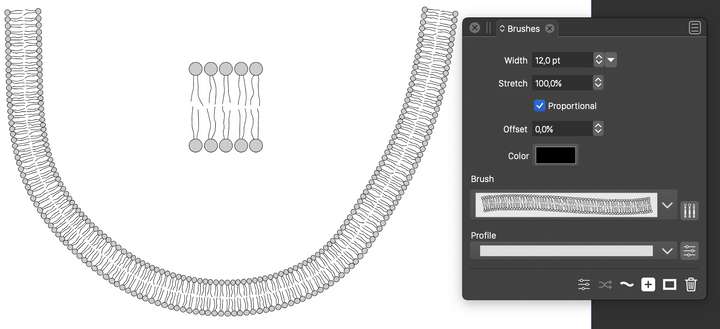
              The pattern is repeated along the path. If I understand correctly the problem is that the shapes get stretched.
              On the other hand, if we do not stretch the shapes (rigid shapes), then they get overlapped.

              If we would keep the whole pattern content rigid (not possible at this time), then the overlapping would get worse.

              I think the best option is that I will try to figure out the difference between what VS does and what is in the example form that AI file. For that it would be great if you could send me the AI file, and would also help in finding the reason for the crash 🙂

              B 1 Reply Last reply Reply Quote 0
              • B Offline
                B-Vs-V @VectorStyler
                last edited by

                @vectoradmin I did test the same simple drawing in VS and AD.

                Although not vector, the brush is fine in AD in a sense I get what I wish:
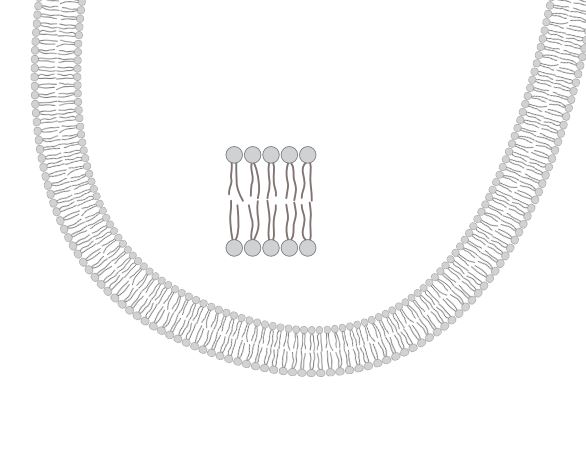
                0_1648454985349_AD.JPG

                This is wrong in VS:
                0_1648455005385_VS.JPG
                and I don't know how to get it

                I don't have time to go further but every one can try this.
                P.

                W11 Pro 25H2 - 12th Gen Intel(R) i7-12700K 3.61 GHz - RAM 64 Go - NVIDIA GF GTX 4070 Ti - Intuos - Dell UP3216Q / Eizo ColorEdge
                W11 Pro 25H2 - 12th Gen Intel(R) i7-12700KF 3.60 GHz -RAM 64 Go - NVIDIA GF GTX 3080 - IntuosPro- ProArt PA329C

                VectorStylerV 1 Reply Last reply Reply Quote 0
                • VectorStylerV Offline
                  VectorStyler @B-Vs-V
                  last edited by

                  @PatrickM Attached the file with the vector pattern brush example: 0_1648459966486_patternbrush3.vstyler
                  0_1648459995129_patternbrush.png

                  1 Reply Last reply Reply Quote 2
                  • B Offline
                    B-Vs-V
                    last edited by

                    @vectoradmin Great and perfect and all vectors !!
                    Could you do a quick (but detailed) video to see where I miss the point doing this ?
                    Thanks in advance.
                    P.

                    W11 Pro 25H2 - 12th Gen Intel(R) i7-12700K 3.61 GHz - RAM 64 Go - NVIDIA GF GTX 4070 Ti - Intuos - Dell UP3216Q / Eizo ColorEdge
                    W11 Pro 25H2 - 12th Gen Intel(R) i7-12700KF 3.60 GHz -RAM 64 Go - NVIDIA GF GTX 3080 - IntuosPro- ProArt PA329C

                    VectorStylerV 1 Reply Last reply Reply Quote 0
                    • VectorStylerV Offline
                      VectorStyler @B-Vs-V
                      last edited by

                      @PatrickM https://recordit.co/uPU6wgT2Q8

                      B 1 Reply Last reply Reply Quote 2
                      • B Offline
                        B-Vs-V @VectorStyler
                        last edited by

                        @vectoradmin said in I would like to make a brush... a simple brush:

                        @PatrickM https://recordit.co/uPU6wgT2Q8

                        @vectoradmin Thank you very much for your help and presence on this forum 👍

                        W11 Pro 25H2 - 12th Gen Intel(R) i7-12700K 3.61 GHz - RAM 64 Go - NVIDIA GF GTX 4070 Ti - Intuos - Dell UP3216Q / Eizo ColorEdge
                        W11 Pro 25H2 - 12th Gen Intel(R) i7-12700KF 3.60 GHz -RAM 64 Go - NVIDIA GF GTX 3080 - IntuosPro- ProArt PA329C

                        1 Reply Last reply Reply Quote 2
                        • F Offline
                          FanVidder @VectorStyler
                          last edited by FanVidder

                          @VectorStyler Thanks for this. I've had Vectorstyler for years and I just give up trying to use it as it seems to do so much but looks SO COMPLICATED. Are there any tutorial sites that guide you through the basics? I've tried Youtube, but not found any that help.

                          BoldlineB S 2 Replies Last reply Reply Quote 1
                          • BoldlineB Online
                            Boldline @FanVidder
                            last edited by

                            @FanVidder What task(s) are you trying to complete?

                            🍎 macOS Tahoe 26.2, Mac mini (M1, 2020), Chip Apple M1, Memory 16 GB
                            Cintiq 27QHD Display and LG Ultra HD Display

                            F 1 Reply Last reply Reply Quote 0
                            • F Offline
                              FanVidder @Boldline
                              last edited by

                              @Boldline actually, I've just found a site containing enough tutorials to get me started. I find the workspace really daunting (I use Illustrator at college and I also have Affinity, but I can't afford Adobe at home). How do I set up my workspace so that all the panels are available? Thanks.
                              I managed to find the Tutorials page on here.

                              1 Reply Last reply Reply Quote 1
                              • S Offline
                                Subpath @FanVidder
                                last edited by Subpath

                                @FanVidder

                                I don't find the basic steps all that complicated. CorelDraw was my main
                                application before VS, i know a few other vector graphic apps too. It took
                                me a while to get used to the new terminology.

                                It might look complicated, and some functions are harder to understand.
                                Just take your time and go step by step.

                                Yes, there aren't many tutorials on YouTube, probably due to the still small
                                user base. I do post tutorials here in the forum from time to time, but I have
                                no interest in dealing with YouTube; it's just too much effort.

                                The best thing to do is search the forum, check out the tutorial section, or simply ask.

                                Win 11
                                CPU: AMD Ryzen 5 9600X, 6-core.
                                GPU: Nvidia Geforce RTX 5070.

                                1 Reply Last reply Reply Quote 0
                                • First post
                                  Last post