VectorStyler
    • Categories
    • Unread
    • Recent
    • Tags
    • Popular
    • Register
    • Login

    Warp - middle point of an effect?

    Scheduled Pinned Locked Moved Questions and Support
    22 Posts 3 Posters 31.6k Views 3 Watching
    Loading More Posts
    • Oldest to Newest
    • Newest to Oldest
    • Most Votes
    Reply
    • Reply as topic
    Log in to reply
    This topic has been deleted. Only users with topic management privileges can see it.
    • S Offline
      Subpath
      last edited by

      @plrang

      In my attempts Envelope worked only with Vector objects
      and it did not work if a Bitmap was included.

      I don't know if Enevelop doesn't work with bitmaps in general.
      Maybe only a flag has to be set.

      @VectorStyler
      Does Envelope work also with Bitmaps ?
      If yes, what need to be set ?

      Win 11
      CPU: AMD Ryzen 5 9600X, 6-core.
      GPU: Nvidia Geforce RTX 5070.

      VectorStylerV 1 Reply Last reply Reply Quote 0
      • VectorStylerV Offline
        VectorStyler @Subpath
        last edited by

        @Subpath said in Warp - middle point of an effect?:

        Does Envelope work also with Bitmaps ?

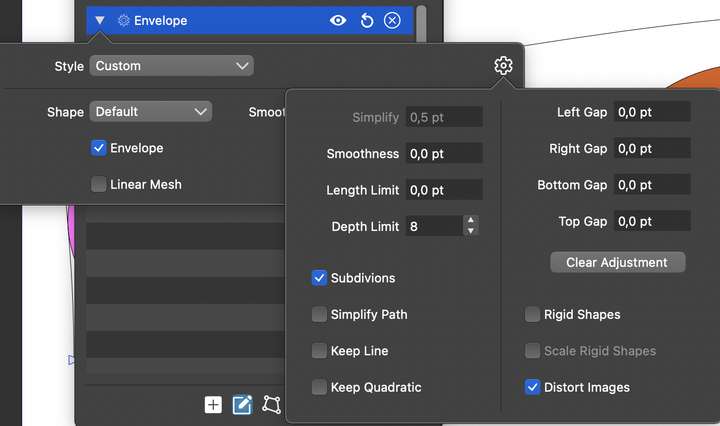
        Yes it should work: open the Envelope (or other) effect options and click on the settings icon in the top right corner.
        This opens the distortion options popover. Enable the "Distort Images" option.
        0_1656571632515_envelope.png

        S 1 Reply Last reply Reply Quote 1
        • ? Offline
          A Former User
          last edited by

          @VectorStyler @Subpath

          Here is a longer envelope with nested shapes - clip. That green rectangle is a container for using the envelope. As you can see all the transformations work except that one where I'm trying to use nodes added to the rectangle.
          It worked once, but I can't replicate it since I was so sure about the solution I forgot it ;->

          Some additional thoughts:

          If WARP has the options as Arching etc, in my opinion they should allow to change the position of the effect center. Otherwise it's a lost opportunity and in fact the whole WARP menu is a preset which is duplicating the Envelope a bit (when it works).

          That way this stuff takes too much place and because it's scattered here and there it's hard to manage.

          Again thanks a lot for your help!

          S VectorStylerV 2 Replies Last reply Reply Quote 1
          • ? Offline
            A Former User @Subpath
            last edited by A Former User

            @Subpath
            Thanks for your helpful vids.
            I tried the envelope on a group of the flag elements and it worked as in your example.
            But I need that clipping rectangle to make the flag shorter sometimes and with that rectangle I can't make it work :-}.
            I just don't want to adjust the width each time I need to change something.

            S 1 Reply Last reply Reply Quote 0
            • S Offline
              Subpath @Guest
              last edited by Subpath

              @plrang

              Unfortunately do not know where the problem could be.

              Here is a video that I have leaned on your flag.
              I use only vector objects.
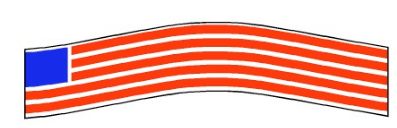
              The video step by step

              0_1656586406212_Enevelop with clipped.png

              Win 11
              CPU: AMD Ryzen 5 9600X, 6-core.
              GPU: Nvidia Geforce RTX 5070.

              1 Reply Last reply Reply Quote 0
              • S Offline
                Subpath @VectorStyler
                last edited by

                @VectorStyler

                Thank you, didnt know that

                Win 11
                CPU: AMD Ryzen 5 9600X, 6-core.
                GPU: Nvidia Geforce RTX 5070.

                1 Reply Last reply Reply Quote 0
                • S Offline
                  Subpath @Guest
                  last edited by

                  @plrang

                  Well, I think the warp options are fine.
                  Is a quick and easy way to some warp types.
                  Sometimes users just need only that.

                  And the Envelope are for more specific needs.

                  Win 11
                  CPU: AMD Ryzen 5 9600X, 6-core.
                  GPU: Nvidia Geforce RTX 5070.

                  1 Reply Last reply Reply Quote 0
                  • ? Offline
                    A Former User
                    last edited by

                    @Subpath Thanks, your videos helped, you would make great tutorials on Tiktok or YT.
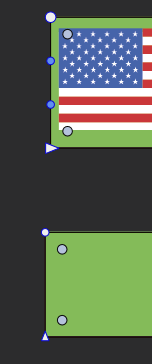
                    @VectorStyler I think your point about the nodes was also correct, because here is the difference between the working and not working rectangle (as an envelope).

                    Seems like the second one got converted to a curve or something.
                    0_1656592451472_d434d1d9-31f4-49c4-9f74-da8a3994f2c3-image.png

                    S 1 Reply Last reply Reply Quote 2
                    • S Offline
                      Subpath @Guest
                      last edited by

                      @plrang

                      ...Thanks, your videos helped, you would make great tutorials on Tiktok or YT...

                      Glady
                      I've thought about it before, but so far I couldn't decide to do it.
                      Because it is quite a lot of work.

                      Win 11
                      CPU: AMD Ryzen 5 9600X, 6-core.
                      GPU: Nvidia Geforce RTX 5070.

                      1 Reply Last reply Reply Quote 0
                      • VectorStylerV Offline
                        VectorStyler @Guest
                        last edited by

                        @plrang said in Warp - middle point of an effect?:

                        Here is a longer envelope with nested shapes - clip.

                        In the very last step (at 1.11), it looks like the envelope is not edited anymore, only the group clipping shape. In the shape effects panel, the second button should be active, not the third.

                        I added the center point editing to the new features backlog, and if all goes well, it could make it into version 1.2 (sometimes this autumn).

                        1 Reply Last reply Reply Quote 0
                        • ? Offline
                          A Former User
                          last edited by A Former User

                          @Subpath Yeas it can be a lot of work, byt on Tiktok people manage to share less than 1 minute long tutorials, you should check that out.

                          @VectorStyler That 1.11 is just one of many tries I had. 2023 autumn gonna be extraordinary.

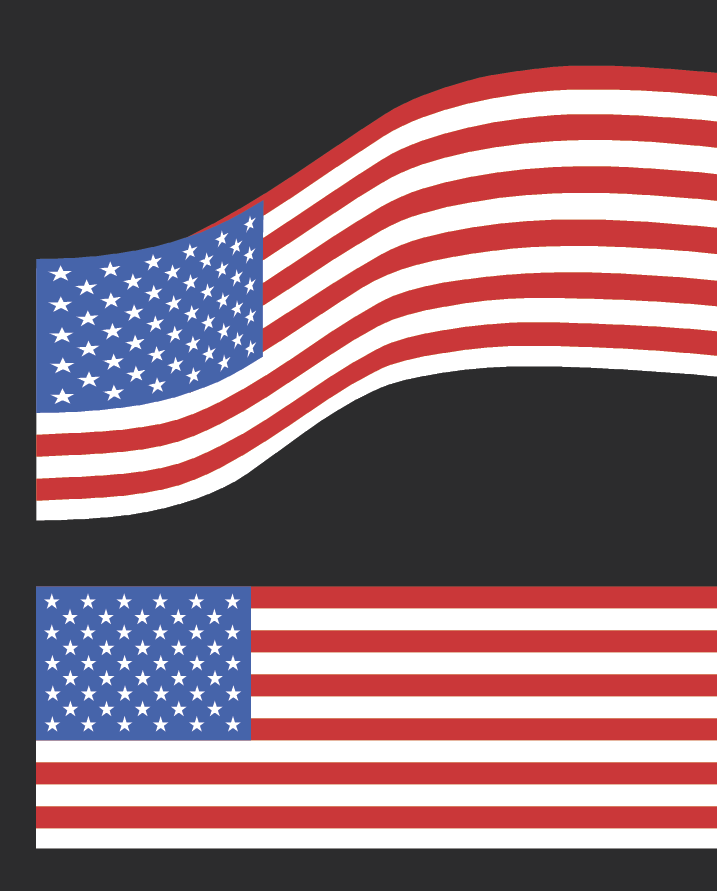
                          There is still one problem, here is a simple Envelope nicely working, yet those distortion are bit too much. Can that be fixed?
                          I can allow distortions to a certain level, but would like to know if there is anything I can do to improve it.
                          0_1656626103164_c1143fd5-6969-4f12-8279-3437306f9ab3-image.png

                          VectorStylerV S 2 Replies Last reply Reply Quote 0
                          • VectorStylerV Offline
                            VectorStyler @Guest
                            last edited by

                            @plrang said in Warp - middle point of an effect?:

                            @VectorStyler That 1.11 is just one of many tries I had. 2023 autumn gonna be extraordinary.

                            1.2 is planned for 2022 autumn (no exact date).

                            There is still one problem, here is a simple Envelope nicely working, yet those distortion are bit too much. Can that be fixed?

                            Not sure exactly which part is too distorted, are these the red stripes? Some distortion options like Smoothness and Subdivision (seen in the screenshot sent earlier in this thread) can be used to control huw much distortion occurs.

                            ? 1 Reply Last reply Reply Quote 0
                            • S Offline
                              Subpath @Guest
                              last edited by Subpath

                              @plrang

                              ... yet those distortion are bit too much ...

                              to set more Nodes (select one Node and press + Key)
                              or try a different curve Typ (Quadratic / Cubic)
                              could also be helpful

                              Win 11
                              CPU: AMD Ryzen 5 9600X, 6-core.
                              GPU: Nvidia Geforce RTX 5070.

                              1 Reply Last reply Reply Quote 0
                              • ? Offline
                                A Former User @VectorStyler
                                last edited by

                                @VectorStyler Sorry, I was dead tired, 2022;)

                                Yes, stripes and that blue part of the flag got some offset from the stripes. Additional options didn't fix that. Well I can live with that and fix things by hand. That's my first use of this effect, so gonna test it more later with some production ready design.

                                @Subpath Tried that, your earlier vids explained everything, tx.

                                VectorStylerV 1 Reply Last reply Reply Quote 1
                                • VectorStylerV Offline
                                  VectorStyler @Guest
                                  last edited by

                                  @plrang @plrang One thing to do is to add nodes to the stripes, where the blue part ends, so that they can be distorted in similar way.

                                  ? 1 Reply Last reply Reply Quote 0
                                  • ? Offline
                                    A Former User @VectorStyler
                                    last edited by

                                    @VectorStyler OK, gonna keep that in mind, thanks.

                                    1 Reply Last reply Reply Quote 0
                                    • First post
                                      Last post