VectorStyler
    • Categories
    • Unread
    • Recent
    • Tags
    • Popular
    • Register
    • Login

    "...Flow text in and around any shape..."

    Scheduled Pinned Locked Moved Questions and Support
    30 Posts 5 Posters 38.7k Views 4 Watching
    Loading More Posts
    • Oldest to Newest
    • Newest to Oldest
    • Most Votes
    Reply
    • Reply as topic
    Log in to reply
    This topic has been deleted. Only users with topic management privileges can see it.
    • VectorStylerV Offline
      VectorStyler @Guest
      last edited by

      @plrang said in "...Flow text in and around any shape...":

      I couldn't set the text inside of a shape BECAUSE I had the "Transform in text editor" checked, cause I like it.

      I think this could be a bug, added to the backlog.

      1 Reply Last reply Reply Quote 0
      • VectorStylerV Offline
        VectorStyler @Guest
        last edited by

        @plrang BTW: the shape of the text frame can be changed to any shape. First, the Shape Editor tool can be used to edit the shape. Convert to Curves will convert the shape (of the frame) into a path.

        But the more useful feature here is to use Shape presets or styles to change the shape of the frame. Any shape can be saved as a preset (or a style) and then selected to be the shape of another object.

        And then there is the Copy / Paste Shape feature, where the shape of an object can be changed by copying and pasting the shape (only) from another object.

        ? 1 Reply Last reply Reply Quote 0
        • ? Offline
          A Former User @VectorStyler
          last edited by

          @VectorStyler Thank you, since finally got it working, gonna test it. That could be a good template engine for some of my designs.

          1 Reply Last reply Reply Quote 0
          • S Offline
            Subpath
            last edited by

            ...BTW: the shape of the text frame can be changed to any shape...

            and i like to mention the miraculous " Shape Picker Tool " 👌 ☺

            Here a Video

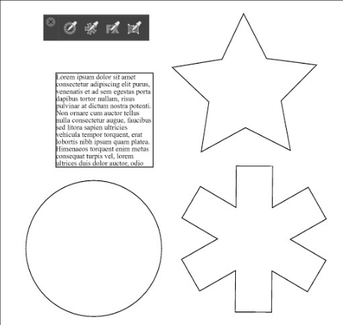
            0_1656705213809_Shape Picker Tool.png

            Win 11
            CPU: AMD Ryzen 5 9600X, 6-core.
            GPU: Nvidia Geforce RTX 5070.

            ? 1 Reply Last reply Reply Quote 2
            • ? Offline
              A Former User @Subpath
              last edited by

              @Subpath
              I'm testing it, could you check the Text Frame Options?
              I guess the PREVIEW doesn't work which makes things much more difficult.
              Gotta re-enable it to see any changes.

              S 1 Reply Last reply Reply Quote 1
              • ? Offline
                A Former User
                last edited by

                @VectorStyler Also on my end entering the Lorem Ipsum, and then scaling the text up moves everything down. Can't make a shorter text with bigger font to stick to the top.

                VectorStylerV 1 Reply Last reply Reply Quote 1
                • BoldlineB Offline
                  Boldline @Guest
                  last edited by

                  @plrang I understand where you're coming from on that. There's a balance to find between making sure what is already developed is user friendly and smooth to operate and then also making sure the features are being developed and added consistently.
                  Seeing the number of bug fixes just this year alone and how much better VS operates makes me happy every time I see bug fix builds.

                  From my own experiences with VS and being active in the forum and from what I understand from what @VectorStyler has shared, he's always focused top priority on bug fixes all along and then adds in new features as he is able to do so.

                  He's released a couple of strictly bug fixes recently even after saying he was primarily focused on new features and updates and fixes for the upcoming 1.2 version. It's very possible we'll see another couple bug fix builds before 1.2 hits in September if the issues are big enough to warrant a build.

                  I think we're going to have a consistent stream of bug fixes for the foreseeable future, and while the developer has stressed they are his top priority, it's also not going to stop the improved features from being developed and added.

                  🍎 macOS Tahoe 26.2, Mac mini (M1, 2020), Chip Apple M1, Memory 16 GB
                  Cintiq 27QHD Display and LG Ultra HD Display

                  ? 1 Reply Last reply Reply Quote 1
                  • S Offline
                    Subpath @Guest
                    last edited by Subpath

                    @plrang , @VectorStyler

                    ...I'm testing it, could you check the Text Frame Options?...

                    yes, preview does not work here either

                    Win 11
                    CPU: AMD Ryzen 5 9600X, 6-core.
                    GPU: Nvidia Geforce RTX 5070.

                    1 Reply Last reply Reply Quote 1
                    • ? Offline
                      A Former User @Boldline
                      last edited by A Former User

                      @Boldline Understood, I work on daily Blender builds, so I'm used to it. But a less experienced user, if doesn't want to go to the forum, might have a hard time.

                      Here is what i got:

                      Text scaling moves Lorem down / Text Frame Options > Preview - doesn't work

                      BoldlineB 1 Reply Last reply Reply Quote 1
                      • BoldlineB Offline
                        Boldline @Guest
                        last edited by

                        @plrang I agree we want VS to not have immediate issues a new beginner would run into for sure.

                        🍎 macOS Tahoe 26.2, Mac mini (M1, 2020), Chip Apple M1, Memory 16 GB
                        Cintiq 27QHD Display and LG Ultra HD Display

                        1 Reply Last reply Reply Quote 1
                        • VectorStylerV Offline
                          VectorStyler @Guest
                          last edited by

                          @plrang said in "...Flow text in and around any shape...":

                          @VectorStyler Also on my end entering the Lorem Ipsum, and then scaling the text up moves everything down. Can't make a shorter text with bigger font to stick to the top.

                          This is not clear for me. Is it by increasing the font size? If you have a recording it could help.

                          Will fix the preview issue.

                          ? 1 Reply Last reply Reply Quote 0
                          • ? Offline
                            A Former User @VectorStyler
                            last edited by

                            @VectorStyler here is the video
                            https://www.vectorstyler.com/forum/topic/2153/flow-text-in-and-around-any-shape/22

                            S 1 Reply Last reply Reply Quote 1
                            • S Offline
                              Subpath @Guest
                              last edited by

                              @plrang

                              video link doesnt work
                              leads only to this post here

                              Win 11
                              CPU: AMD Ryzen 5 9600X, 6-core.
                              GPU: Nvidia Geforce RTX 5070.

                              ? 1 Reply Last reply Reply Quote 0
                              • ? Offline
                                A Former User @Subpath
                                last edited by A Former User

                                @Subpath It's a link to the post, anyway I'm adding it here @VectorStyler

                                Text scaling moves Lorem down / Text Frame Options > Preview - doesn't work

                                S VectorStylerV 2 Replies Last reply Reply Quote 2
                                • S Offline
                                  Subpath @Guest
                                  last edited by

                                  @plrang

                                  ah, got it. It's the same vid as above
                                  I thought it was a different one

                                  Win 11
                                  CPU: AMD Ryzen 5 9600X, 6-core.
                                  GPU: Nvidia Geforce RTX 5070.

                                  1 Reply Last reply Reply Quote 0
                                  • VectorStylerV Offline
                                    VectorStyler @Guest
                                    last edited by

                                    @plrang said in "...Flow text in and around any shape...":

                                    Text scaling moves Lorem down / Text Frame Options > Preview - doesn't work

                                    Got it! I see the following issues here:

                                    • preview is not auto updated.
                                    • there is text line overflow in some cases.
                                    • and about the frame distances, when the frame is not rectangular only the top inset is used to create uniform gap around the shape. For non-rectangular shapes, the top/bottom/left/right does not make much sense.
                                    ? 1 Reply Last reply Reply Quote 0
                                    • ? Offline
                                      A Former User @VectorStyler
                                      last edited by

                                      @VectorStyler Don't forget the main issue, where I scale the text UP and the whole paragraph is moving down, even if it's top could still fit the shape.

                                      1 Reply Last reply Reply Quote 1
                                      • First post
                                        Last post