<?xml version="1.0" encoding="UTF-8"?><rss xmlns:dc="http://purl.org/dc/elements/1.1/" xmlns:content="http://purl.org/rss/1.0/modules/content/" xmlns:atom="http://www.w3.org/2005/Atom" version="2.0"><channel><title><![CDATA[Trim between two nodes]]></title><description><![CDATA[<p dir="auto">Using the shape editor tool (A), is there a way to simply remove the line between two nodes ?<br />
In AI, you simply click the line with the direct selection tool (A) and hit delete - it deletes the line between the two nodes.<br />
There's probably a specialist tool in VS, but keeping a toolset to the absolute minimum is always my preference - bit like using the handy screwdriver to open the paint tin rather trying to find the correct tool - an old spoon handle <img src="https://www.vectorstyler.com/forum/assets/plugins/nodebb-plugin-emoji/emoji/android/1f642.png?v=ec4d969cc53" class="not-responsive emoji emoji-android emoji--slightly_smiling_face" style="height:23px;width:auto;vertical-align:middle" title=":-)" alt="🙂" /></p>
<p dir="auto">Neil</p>
]]></description><link>https://www.vectorstyler.com/forum/topic/2252/trim-between-two-nodes</link><generator>RSS for Node</generator><lastBuildDate>Fri, 15 May 2026 05:34:29 GMT</lastBuildDate><atom:link href="https://www.vectorstyler.com/forum/topic/2252.rss" rel="self" type="application/rss+xml"/><pubDate>Mon, 25 Jul 2022 20:52:42 GMT</pubDate><ttl>60</ttl><item><title><![CDATA[Reply to Trim between two nodes on Wed, 18 Jan 2023 20:23:47 GMT]]></title><description><![CDATA[<p dir="auto"><a class="plugin-mentions-user plugin-mentions-a" href="/forum/user/boldline" aria-label="Profile: Boldline">@<bdi>Boldline</bdi></a> said in <a href="/forum/post/17347">Trim between two nodes</a>:</p>
<blockquote>
<p dir="auto"><a class="plugin-mentions-user plugin-mentions-a" href="/forum/user/igull" aria-label="Profile: Igull">@<bdi>Igull</bdi></a> are you wanting the option to remove a segment entirely, leaving an open path?</p>
</blockquote>
<p dir="auto">Yes, that's correct.</p>
<blockquote>
<p dir="auto">If this gets implemented, would it take away the current "click a segment/node and hit backspace/delete to delete the node and click backspace/delete a second time to delete the whole object"?</p>
</blockquote>
<p dir="auto">No, that would still stand - I also like the idea of hitting backspace/delete a second time to delete the complete object.<br />
IIRC, in AI, selecting the segment then hitting delete, deletes the segment, but leaves the two adjacent nodes highlighted - hitting delete again would delete the complete object as it has both ends of it's vector selected.</p>
<p dir="auto">Neil</p>
]]></description><link>https://www.vectorstyler.com/forum/post/17351</link><guid isPermaLink="true">https://www.vectorstyler.com/forum/post/17351</guid><dc:creator><![CDATA[Igull]]></dc:creator><pubDate>Wed, 18 Jan 2023 20:23:47 GMT</pubDate></item><item><title><![CDATA[Reply to Trim between two nodes on Wed, 18 Jan 2023 16:13:01 GMT]]></title><description><![CDATA[<p dir="auto"><a class="plugin-mentions-user plugin-mentions-a" href="/forum/user/jayanta-das" aria-label="Profile: Jayanta-Das">@<bdi>Jayanta-Das</bdi></a> said in <a href="/forum/post/17345">Trim between two nodes</a>:</p>
<blockquote>
<p dir="auto"><a class="plugin-mentions-user plugin-mentions-a" href="/forum/user/vectorstyler" aria-label="Profile: VectorStyler">@<bdi>VectorStyler</bdi></a> I was searching for the easiest way to delete segment and found this thread. There is a simple way to delete segment in AD with node tool holding CTRL and click will delete the segment.<br />
<a href="https://recordit.co/KOsCjU2eXX" rel="nofollow ugc">Example in AD</a></p>
</blockquote>
<p dir="auto">This looks like a great solution - glad it will be in 1.2!</p>
]]></description><link>https://www.vectorstyler.com/forum/post/17348</link><guid isPermaLink="true">https://www.vectorstyler.com/forum/post/17348</guid><dc:creator><![CDATA[Boldline]]></dc:creator><pubDate>Wed, 18 Jan 2023 16:13:01 GMT</pubDate></item><item><title><![CDATA[Reply to Trim between two nodes on Wed, 18 Jan 2023 16:10:32 GMT]]></title><description><![CDATA[<p dir="auto"><a class="plugin-mentions-user plugin-mentions-a" href="/forum/user/vectorstyler" aria-label="Profile: VectorStyler">@<bdi>VectorStyler</bdi></a> said in <a href="/forum/post/13803">Trim between two nodes</a>:</p>
<blockquote>
<p dir="auto"><a class="plugin-mentions-user plugin-mentions-a" href="/forum/user/igull" aria-label="Profile: Igull">@<bdi>Igull</bdi></a> said in <a href="/forum/post/13802">Trim between two nodes</a>:</p>
<blockquote>
<p dir="auto">Is it possible to implement this feature, using the shape editor tool, click a segment and hit backspace/delete to delete that segment rather than delete the whole object</p>
</blockquote>
<p dir="auto">It is in the backlog.</p>
</blockquote>
<p dir="auto"><a class="plugin-mentions-user plugin-mentions-a" href="/forum/user/igull" aria-label="Profile: Igull">@<bdi>Igull</bdi></a> are you wanting the option to remove a segment entirely, leaving an open path?</p>
<p dir="auto">If this gets implemented, would it take away the current "click a segment/node and hit backspace/delete to delete the node and click backspace/delete a second time to delete the whole object"?</p>
<p dir="auto">I had advocated for this current option mentioned above and would like to be sure it's still an option in VS going forward as i use it quite often to quickly remove things</p>
]]></description><link>https://www.vectorstyler.com/forum/post/17347</link><guid isPermaLink="true">https://www.vectorstyler.com/forum/post/17347</guid><dc:creator><![CDATA[Boldline]]></dc:creator><pubDate>Wed, 18 Jan 2023 16:10:32 GMT</pubDate></item><item><title><![CDATA[Reply to Trim between two nodes on Wed, 18 Jan 2023 15:58:10 GMT]]></title><description><![CDATA[<p dir="auto"><a class="plugin-mentions-user plugin-mentions-a" href="/forum/user/jayanta-das" aria-label="Profile: Jayanta-Das">@<bdi>Jayanta-Das</bdi></a> It is in the backlog for 1.2</p>
]]></description><link>https://www.vectorstyler.com/forum/post/17346</link><guid isPermaLink="true">https://www.vectorstyler.com/forum/post/17346</guid><dc:creator><![CDATA[VectorStyler]]></dc:creator><pubDate>Wed, 18 Jan 2023 15:58:10 GMT</pubDate></item><item><title><![CDATA[Reply to Trim between two nodes on Wed, 18 Jan 2023 15:45:58 GMT]]></title><description><![CDATA[<p dir="auto"><a class="plugin-mentions-user plugin-mentions-a" href="/forum/user/vectorstyler" aria-label="Profile: VectorStyler">@<bdi>VectorStyler</bdi></a> I was searching for the easiest way to delete segment and found this thread. There is a simple way to delete segment in AD with node tool holding CTRL and click will delete the segment.<br />
<a href="https://recordit.co/KOsCjU2eXX" rel="nofollow ugc">Example in AD</a></p>
]]></description><link>https://www.vectorstyler.com/forum/post/17345</link><guid isPermaLink="true">https://www.vectorstyler.com/forum/post/17345</guid><dc:creator><![CDATA[Jayanta Das]]></dc:creator><pubDate>Wed, 18 Jan 2023 15:45:58 GMT</pubDate></item><item><title><![CDATA[Reply to Trim between two nodes on Mon, 22 Aug 2022 14:18:23 GMT]]></title><description><![CDATA[<p dir="auto"><a class="plugin-mentions-user plugin-mentions-a" href="/forum/user/vectorstyler" aria-label="Profile: VectorStyler">@<bdi>VectorStyler</bdi></a> said in <a href="/forum/post/13803">Trim between two nodes</a>:</p>
<blockquote>
<p dir="auto"><a class="plugin-mentions-user plugin-mentions-a" href="/forum/user/igull" aria-label="Profile: Igull">@<bdi>Igull</bdi></a> said in <a href="/forum/post/13802">Trim between two nodes</a>:</p>
<blockquote>
<p dir="auto">Is it possible to implement this feature, using the shape editor tool, click a segment and hit backspace/delete to delete that segment rather than delete the whole object</p>
</blockquote>
<p dir="auto">It is in the backlog.</p>
</blockquote>
<p dir="auto"><img src="https://www.vectorstyler.com/forum/assets/plugins/nodebb-plugin-emoji/emoji/android/1f44d.png?v=ec4d969cc53" class="not-responsive emoji emoji-android emoji--+1" style="height:23px;width:auto;vertical-align:middle" title=":+1:" alt="👍" /> <img src="https://www.vectorstyler.com/forum/assets/plugins/nodebb-plugin-emoji/emoji/android/1f44d.png?v=ec4d969cc53" class="not-responsive emoji emoji-android emoji--+1" style="height:23px;width:auto;vertical-align:middle" title=":+1:" alt="👍" /></p>
<p dir="auto">Neil</p>
]]></description><link>https://www.vectorstyler.com/forum/post/13812</link><guid isPermaLink="true">https://www.vectorstyler.com/forum/post/13812</guid><dc:creator><![CDATA[Igull]]></dc:creator><pubDate>Mon, 22 Aug 2022 14:18:23 GMT</pubDate></item><item><title><![CDATA[Reply to Trim between two nodes on Mon, 22 Aug 2022 12:47:39 GMT]]></title><description><![CDATA[<p dir="auto"><a class="plugin-mentions-user plugin-mentions-a" href="/forum/user/igull" aria-label="Profile: Igull">@<bdi>Igull</bdi></a> said in <a href="/forum/post/13802">Trim between two nodes</a>:</p>
<blockquote>
<p dir="auto">Is it possible to implement this feature, using the shape editor tool, click a segment and hit backspace/delete to delete that segment rather than delete the whole object</p>
</blockquote>
<p dir="auto">It is in the backlog.</p>
]]></description><link>https://www.vectorstyler.com/forum/post/13803</link><guid isPermaLink="true">https://www.vectorstyler.com/forum/post/13803</guid><dc:creator><![CDATA[VectorStyler]]></dc:creator><pubDate>Mon, 22 Aug 2022 12:47:39 GMT</pubDate></item><item><title><![CDATA[Reply to Trim between two nodes on Mon, 22 Aug 2022 12:15:01 GMT]]></title><description><![CDATA[<p dir="auto"><a class="plugin-mentions-user plugin-mentions-a" href="/forum/user/vectorstyler" aria-label="Profile: VectorStyler">@<bdi>VectorStyler</bdi></a></p>
<p dir="auto">Is it possible to implement this feature, using the shape editor tool, click a segment and hit backspace/delete to delete that segment rather than delete the whole object ?</p>
<p dir="auto">TIA</p>
<p dir="auto">Neil</p>
]]></description><link>https://www.vectorstyler.com/forum/post/13802</link><guid isPermaLink="true">https://www.vectorstyler.com/forum/post/13802</guid><dc:creator><![CDATA[Igull]]></dc:creator><pubDate>Mon, 22 Aug 2022 12:15:01 GMT</pubDate></item><item><title><![CDATA[Reply to Trim between two nodes on Tue, 26 Jul 2022 15:58:05 GMT]]></title><description><![CDATA[<p dir="auto"><a class="plugin-mentions-user plugin-mentions-a" href="/forum/user/subpath" aria-label="Profile: Subpath">@<bdi>Subpath</bdi></a> and <a class="plugin-mentions-user plugin-mentions-a" href="/forum/user/igull" aria-label="Profile: Igull">@<bdi>Igull</bdi></a><br />
It's OK with me to use just the triangle mark for both node placement and segment highlight.</p>
]]></description><link>https://www.vectorstyler.com/forum/post/13065</link><guid isPermaLink="true">https://www.vectorstyler.com/forum/post/13065</guid><dc:creator><![CDATA[b77]]></dc:creator><pubDate>Tue, 26 Jul 2022 15:58:05 GMT</pubDate></item><item><title><![CDATA[Reply to Trim between two nodes on Tue, 26 Jul 2022 15:52:51 GMT]]></title><description><![CDATA[<p dir="auto"><a class="plugin-mentions-user plugin-mentions-a" href="/forum/user/igull" aria-label="Profile: Igull">@<bdi>Igull</bdi></a></p>
<p dir="auto">you right, extended my post above<br />
to set that triangle alone would fit it for me</p>
]]></description><link>https://www.vectorstyler.com/forum/post/13064</link><guid isPermaLink="true">https://www.vectorstyler.com/forum/post/13064</guid><dc:creator><![CDATA[Subpath]]></dc:creator><pubDate>Tue, 26 Jul 2022 15:52:51 GMT</pubDate></item><item><title><![CDATA[Reply to Trim between two nodes on Tue, 26 Jul 2022 15:51:12 GMT]]></title><description><![CDATA[<p dir="auto"><a class="plugin-mentions-user plugin-mentions-a" href="/forum/user/subpath" aria-label="Profile: Subpath">@<bdi>Subpath</bdi></a> said in <a href="/forum/post/13062">Trim between two nodes</a>:</p>
<blockquote>
<p dir="auto">could highlight that segment in complementary color a way ?</p>
</blockquote>
<p dir="auto">TBH, that would be nice, but adds icing on the cake <img src="https://www.vectorstyler.com/forum/assets/plugins/nodebb-plugin-emoji/emoji/android/1f642.png?v=ec4d969cc53" class="not-responsive emoji emoji-android emoji--slightly_smiling_face" style="height:23px;width:auto;vertical-align:middle" title=":-)" alt="🙂" /> I'd be happy with leaving the triangle - knowing that I was about to hit delete and remove it all anyway <img src="https://www.vectorstyler.com/forum/assets/plugins/nodebb-plugin-emoji/emoji/android/1f642.png?v=ec4d969cc53" class="not-responsive emoji emoji-android emoji--slightly_smiling_face" style="height:23px;width:auto;vertical-align:middle" title=":-)" alt="🙂" /></p>
<p dir="auto">Neil</p>
]]></description><link>https://www.vectorstyler.com/forum/post/13063</link><guid isPermaLink="true">https://www.vectorstyler.com/forum/post/13063</guid><dc:creator><![CDATA[Igull]]></dc:creator><pubDate>Tue, 26 Jul 2022 15:51:12 GMT</pubDate></item><item><title><![CDATA[Reply to Trim between two nodes on Tue, 26 Jul 2022 15:51:26 GMT]]></title><description><![CDATA[<p dir="auto"><a class="plugin-mentions-user plugin-mentions-a" href="/forum/user/b77" aria-label="Profile: b77">@<bdi>b77</bdi></a></p>
<p dir="auto">well for me where also enough to set that Triangle</p>
<p dir="auto">could highlight that segment in complementary color be a way ?</p>
]]></description><link>https://www.vectorstyler.com/forum/post/13062</link><guid isPermaLink="true">https://www.vectorstyler.com/forum/post/13062</guid><dc:creator><![CDATA[Subpath]]></dc:creator><pubDate>Tue, 26 Jul 2022 15:51:26 GMT</pubDate></item><item><title><![CDATA[Reply to Trim between two nodes on Tue, 26 Jul 2022 15:49:18 GMT]]></title><description><![CDATA[<p dir="auto"><a class="plugin-mentions-user plugin-mentions-a" href="/forum/user/b77" aria-label="Profile: b77">@<bdi>b77</bdi></a> said in <a href="/forum/post/13059">Trim between two nodes</a>:</p>
<blockquote>
<p dir="auto">It's just that I thought highlighting the segment somehow would have been better.<br />
But I can't think of an elegant way to highlight the segment without making things look more busy than they already are when in node editing (with so many nodes and Bézier handles).</p>
</blockquote>
<p dir="auto">TBH, I just checked AI - it highlights the <strong>whole</strong> path (not wonderful really !) So, your idea of placing an X or as is, an arrow/triangle will work just fine I think ?<br />
That way, everything will remain the same for mode editing etc.</p>
<p dir="auto">Neil</p>
]]></description><link>https://www.vectorstyler.com/forum/post/13061</link><guid isPermaLink="true">https://www.vectorstyler.com/forum/post/13061</guid><dc:creator><![CDATA[Igull]]></dc:creator><pubDate>Tue, 26 Jul 2022 15:49:18 GMT</pubDate></item><item><title><![CDATA[Reply to Trim between two nodes on Tue, 26 Jul 2022 15:53:58 GMT]]></title><description><![CDATA[<p dir="auto"><a class="plugin-mentions-user plugin-mentions-a" href="/forum/user/igull" aria-label="Profile: Igull">@<bdi>Igull</bdi></a> I agree that the <strong>⊳</strong> node marking can work for what it now does (show the place where if you click the [+] key it will add a node) and also "mark" the clicked segment for deletion.</p>
<p dir="auto">It's just that I thought highlighting the segment somehow would have been better.</p>
<p dir="auto">But I can't think of an elegant way to highlight the segment without making things look more busy than they already are when in node editing (with so many nodes and Bézier handles).</p>
]]></description><link>https://www.vectorstyler.com/forum/post/13059</link><guid isPermaLink="true">https://www.vectorstyler.com/forum/post/13059</guid><dc:creator><![CDATA[b77]]></dc:creator><pubDate>Tue, 26 Jul 2022 15:53:58 GMT</pubDate></item><item><title><![CDATA[Reply to Trim between two nodes on Tue, 26 Jul 2022 14:37:09 GMT]]></title><description><![CDATA[<p dir="auto"><a class="plugin-mentions-user plugin-mentions-a" href="/forum/user/b77" aria-label="Profile: b77">@<bdi>b77</bdi></a> said in <a href="/forum/post/13055">Trim between two nodes</a>:</p>
<blockquote>
<p dir="auto">There is no way to click a segment to select it.<br />
Not sure a single click could mark a possible node location (as it currently does) AND also select that segment without confusing users?</p>
</blockquote>
<p dir="auto">Using the Shape Editor tool, if you single click a segment, it leaves a stationary indicator "arrow" at that point, so VS <em>must</em> know that it is a segment as it has just marked it with the arrow ?<br />
All VS needs to do is NOT delete the <strong>whole</strong> path when backspace is hit, but only the segment  - problem solved <img src="https://www.vectorstyler.com/forum/assets/plugins/nodebb-plugin-emoji/emoji/android/1f642.png?v=ec4d969cc53" class="not-responsive emoji emoji-android emoji--slightly_smiling_face" style="height:23px;width:auto;vertical-align:middle" title=":-)" alt="🙂" /></p>
<p dir="auto">Selecting a node and hitting backspace/delete whatever would still remain and not confusing at all. You would also still be able to double click to produce a node.<br />
Further, VS allows you to drag that segment to produce a curve (<strong>GREAT</strong> feature BTW !!!) - so it definitely knows it's a segment.</p>
<p dir="auto">In essence the only thing that needs to change is to <em>not</em> delete the whole path but <em>only</em> the segment (as I suspect the original intention was <img src="https://www.vectorstyler.com/forum/assets/plugins/nodebb-plugin-emoji/emoji/android/1f642.png?v=ec4d969cc53" class="not-responsive emoji emoji-android emoji--slightly_smiling_face" style="height:23px;width:auto;vertical-align:middle" title=":-)" alt="🙂" /> )</p>
<p dir="auto">Neil</p>
]]></description><link>https://www.vectorstyler.com/forum/post/13057</link><guid isPermaLink="true">https://www.vectorstyler.com/forum/post/13057</guid><dc:creator><![CDATA[Igull]]></dc:creator><pubDate>Tue, 26 Jul 2022 14:37:09 GMT</pubDate></item><item><title><![CDATA[Reply to Trim between two nodes on Tue, 26 Jul 2022 12:10:15 GMT]]></title><description><![CDATA[<p dir="auto"><a class="plugin-mentions-user plugin-mentions-a" href="/forum/user/igull" aria-label="Profile: Igull">@<bdi>Igull</bdi></a> The first tool (the one with a ⊖) should delete any <em>selected</em> nodes.</p>
<p dir="auto">There is no way to click a segment to select it.<br />
Not sure a single click could mark a possible node location (as it currently does) AND also select that segment without confusing users?</p>
<p dir="auto">The second tool (the one with a ⊕) does the same thing a double-click on the path does — it adds a node to that segment.</p>
<p dir="auto"><a class="plugin-mentions-user plugin-mentions-a" href="/forum/user/vectorstyler" aria-label="Profile: VectorStyler">@<bdi>VectorStyler</bdi></a> If no nodes are selected, I don't think clicking the ⊖ node button should delete the entire path instead.</p>
<p dir="auto">Double-clicking the path to add a node and hitting Option-delete is the fastest method to do what you asked initially.</p>
]]></description><link>https://www.vectorstyler.com/forum/post/13055</link><guid isPermaLink="true">https://www.vectorstyler.com/forum/post/13055</guid><dc:creator><![CDATA[b77]]></dc:creator><pubDate>Tue, 26 Jul 2022 12:10:15 GMT</pubDate></item><item><title><![CDATA[Reply to Trim between two nodes on Tue, 26 Jul 2022 11:55:21 GMT]]></title><description><![CDATA[<p dir="auto">I've just been trawling through the path commands to see if anything else was available for this and noticed two commands - one of which may not function as originally intended ...</p>
<p dir="auto">In the help file, the command is <img src="/forum/assets/uploads/files/1658835894933-screenshot-2022-07-26-at-12.43.16.png" alt="0_1658835894829_Screenshot 2022-07-26 at 12.43.16.png" class=" img-fluid img-markdown" /><br />
<em>Remove the selected nodes from the edited path</em> - the <strong>tooltip</strong> for this in VS is <em>Delete the selected objects or shape nodes (backspace)</em>.</p>
<p dir="auto">Now, using the shape editor tool, if you click on a segment of a path, the small triangle appears as normal, but if you hit delete, it deletes the <strong>complete</strong> path. The complete path is not fully selected at this point - just the segment.</p>
<p dir="auto">In the help file, the command is <img src="/forum/assets/uploads/files/1658835951277-screenshot-2022-07-26-at-12.43.24.png" alt="0_1658835951184_Screenshot 2022-07-26 at 12.43.24.png" class=" img-fluid img-markdown" />  - <em>Create new nodes at the selected inner location of a segment, or at the middle of the segment following the selected node</em>  the <strong>tooltip</strong> for this is <em>Insert a new node into the shape segment at the selected location (+)</em>.</p>
<p dir="auto">What would make sense (to me at least <img src="https://www.vectorstyler.com/forum/assets/plugins/nodebb-plugin-emoji/emoji/android/1f642.png?v=ec4d969cc53" class="not-responsive emoji emoji-android emoji--slightly_smiling_face" style="height:23px;width:auto;vertical-align:middle" title=":-)" alt="🙂" /> ) would be that these two complementary tools are used to simply insert and remove nodes ? The addition of <em>Delete the selected objects</em> would imply that along with any selected nodes, the selected segment object was to be deleted or if the whole object were selected, then that should be deleted ?</p>
<p dir="auto">It would seem to me that this was the original intended function of this and would solve the issue (nearly <img src="https://www.vectorstyler.com/forum/assets/plugins/nodebb-plugin-emoji/emoji/android/1f642.png?v=ec4d969cc53" class="not-responsive emoji emoji-android emoji--slightly_smiling_face" style="height:23px;width:auto;vertical-align:middle" title=":-)" alt="🙂" /> ) as when selecting a node, you have the options of the backspace key or using this tool - both of which perform the same function ?</p>
<p dir="auto">Neil</p>
]]></description><link>https://www.vectorstyler.com/forum/post/13053</link><guid isPermaLink="true">https://www.vectorstyler.com/forum/post/13053</guid><dc:creator><![CDATA[Igull]]></dc:creator><pubDate>Tue, 26 Jul 2022 11:55:21 GMT</pubDate></item><item><title><![CDATA[Reply to Trim between two nodes on Tue, 26 Jul 2022 11:41:10 GMT]]></title><description><![CDATA[<p dir="auto"><a class="plugin-mentions-user plugin-mentions-a" href="/forum/user/igull" aria-label="Profile: Igull">@<bdi>Igull</bdi></a></p>
<p dir="auto">I am wondering in this case too.<br />
moreover, that the Path part can quasi be marked with that Triangle</p>
<p dir="auto">maybe <a class="plugin-mentions-user plugin-mentions-a" href="/forum/user/vectorstyler" aria-label="Profile: VectorStyler">@<bdi>VectorStyler</bdi></a> VS sees this too and has mercy with us <img src="https://www.vectorstyler.com/forum/assets/plugins/nodebb-plugin-emoji/emoji/android/1f642.png?v=ec4d969cc53" class="not-responsive emoji emoji-android emoji--slightly_smiling_face" style="height:23px;width:auto;vertical-align:middle" title=":)" alt="🙂" /></p>
]]></description><link>https://www.vectorstyler.com/forum/post/13052</link><guid isPermaLink="true">https://www.vectorstyler.com/forum/post/13052</guid><dc:creator><![CDATA[Subpath]]></dc:creator><pubDate>Tue, 26 Jul 2022 11:41:10 GMT</pubDate></item><item><title><![CDATA[Reply to Trim between two nodes on Tue, 26 Jul 2022 11:11:05 GMT]]></title><description><![CDATA[<p dir="auto"><a class="plugin-mentions-user plugin-mentions-a" href="/forum/user/b77" aria-label="Profile: b77">@<bdi>b77</bdi></a> <a class="plugin-mentions-user plugin-mentions-a" href="/forum/user/vectorstyler" aria-label="Profile: vectorstyler">@<bdi>vectorstyler</bdi></a> <a class="plugin-mentions-user plugin-mentions-a" href="/forum/user/subpath" aria-label="Profile: Subpath">@<bdi>Subpath</bdi></a></p>
<p dir="auto">Thanks for all the suggestions !</p>
<p dir="auto">TBH, they all seem a bit long-winded to simply delete a segment <img src="https://www.vectorstyler.com/forum/assets/plugins/nodebb-plugin-emoji/emoji/android/1f642.png?v=ec4d969cc53" class="not-responsive emoji emoji-android emoji--slightly_smiling_face" style="height:23px;width:auto;vertical-align:middle" title=":-)" alt="🙂" /><br />
I think the double-click then option+backspace is about the tidiest for now <img src="https://www.vectorstyler.com/forum/assets/plugins/nodebb-plugin-emoji/emoji/android/1f642.png?v=ec4d969cc53" class="not-responsive emoji emoji-android emoji--slightly_smiling_face" style="height:23px;width:auto;vertical-align:middle" title=":-)" alt="🙂" /><br />
Having to add a node to a segment to then delete it along with the now two segments is rather unintuitive ?</p>
<p dir="auto">I'm wondering if adding a simple click with the mouse then hit backspace is a possible implementation that could be added - it seems far more natural - select and delete ?<br />
If so, I can add it to the suggestions box <img src="https://www.vectorstyler.com/forum/assets/plugins/nodebb-plugin-emoji/emoji/android/1f642.png?v=ec4d969cc53" class="not-responsive emoji emoji-android emoji--slightly_smiling_face" style="height:23px;width:auto;vertical-align:middle" title=":-)" alt="🙂" /></p>
<p dir="auto">Again, thanks for the help.</p>
<p dir="auto">Neil</p>
]]></description><link>https://www.vectorstyler.com/forum/post/13049</link><guid isPermaLink="true">https://www.vectorstyler.com/forum/post/13049</guid><dc:creator><![CDATA[Igull]]></dc:creator><pubDate>Tue, 26 Jul 2022 11:11:05 GMT</pubDate></item><item><title><![CDATA[Reply to Trim between two nodes on Tue, 26 Jul 2022 10:55:12 GMT]]></title><description><![CDATA[<p dir="auto">In the case of a already open path<br />
"Break Shape" could be useful.<br />
(select a open Path with Shape Editor tool and look<br />
at the Right Click Menü)<br />
hat no Shortcut yet, but you could set one</p>
<p dir="auto">select a node then "Break Shape" hit Backspace or Delete</p>
<p dir="auto">you could also set that Triangle like in the Video above<br />
and "Break Apart" and hit Backspace or Delete</p>
]]></description><link>https://www.vectorstyler.com/forum/post/13048</link><guid isPermaLink="true">https://www.vectorstyler.com/forum/post/13048</guid><dc:creator><![CDATA[Subpath]]></dc:creator><pubDate>Tue, 26 Jul 2022 10:55:12 GMT</pubDate></item><item><title><![CDATA[Reply to Trim between two nodes on Tue, 26 Jul 2022 10:57:51 GMT]]></title><description><![CDATA[<p dir="auto"><a class="plugin-mentions-user plugin-mentions-a" href="/forum/user/igull" aria-label="Profile: Igull">@<bdi>Igull</bdi></a></p>
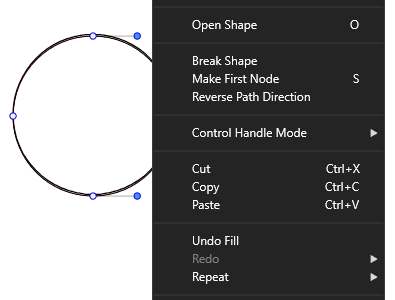
<p dir="auto">I think the Command "Open Shape" Shortcut "o"<br />
could also be useful<br />
(you found it in Right Click Menü of the shape editor tool<br />
i you have select a Curve)<br />
.<br />
Edited:<br />
Forgot to mention is only useful in the case of a closed Shape<br />
and not on already open paths<br />
("Break Shape" is helpful in this case, see my post below)<br />
.<br />
.<br />
<img src="/forum/assets/uploads/files/1658829590759-open-shape.png" alt="0_1658829514199_Open shape.png" class=" img-fluid img-markdown" /><br />
.<br />
.<br />
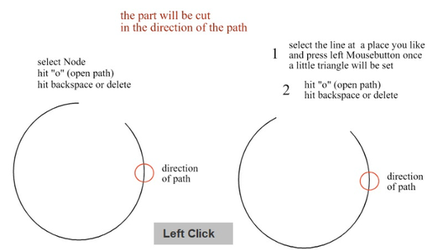
<a href="https://recordit.co/221DUkEm9N" rel="nofollow ugc">See Video here how it works:</a><br />
.<br />
<img src="/forum/assets/uploads/files/1658829818186-open-shape-2.png" alt="0_1658829741992_open-shape-2.png" class=" img-fluid img-markdown" /></p>
]]></description><link>https://www.vectorstyler.com/forum/post/13047</link><guid isPermaLink="true">https://www.vectorstyler.com/forum/post/13047</guid><dc:creator><![CDATA[Subpath]]></dc:creator><pubDate>Tue, 26 Jul 2022 10:57:51 GMT</pubDate></item><item><title><![CDATA[Reply to Trim between two nodes on Tue, 26 Jul 2022 06:14:04 GMT]]></title><description><![CDATA[<p dir="auto"><a class="plugin-mentions-user plugin-mentions-a" href="/forum/user/igull" aria-label="Profile: Igull">@<bdi>Igull</bdi></a> One way to delete a single segment is to separate the path at one of the nodes, and then delete the node.</p>
]]></description><link>https://www.vectorstyler.com/forum/post/13043</link><guid isPermaLink="true">https://www.vectorstyler.com/forum/post/13043</guid><dc:creator><![CDATA[VectorStyler]]></dc:creator><pubDate>Tue, 26 Jul 2022 06:14:04 GMT</pubDate></item><item><title><![CDATA[Reply to Trim between two nodes on Mon, 25 Jul 2022 21:03:03 GMT]]></title><description><![CDATA[<p dir="auto"><a class="plugin-mentions-user plugin-mentions-a" href="/forum/user/igull" aria-label="Profile: Igull">@<bdi>Igull</bdi></a> If you select a node and hit Option-Backspace, both segments connected to it will be deleted.</p>
<p dir="auto">So instead of click to select the segment like in AI, double-click to add a node to that segment then hit Option-Backspace.</p>
]]></description><link>https://www.vectorstyler.com/forum/post/13035</link><guid isPermaLink="true">https://www.vectorstyler.com/forum/post/13035</guid><dc:creator><![CDATA[b77]]></dc:creator><pubDate>Mon, 25 Jul 2022 21:03:03 GMT</pubDate></item></channel></rss>