VectorStyler
    • Categories
    • Unread
    • Recent
    • Tags
    • Popular
    • Register
    • Login

    Align single object to the artboard without enabling the special button for that

    Scheduled Pinned Locked Moved Features and Ideas
    26 Posts 5 Posters 38.4k Views 3 Watching
    Loading More Posts
    • Oldest to Newest
    • Newest to Oldest
    • Most Votes
    Reply
    • Reply as topic
    Log in to reply
    This topic has been deleted. Only users with topic management privileges can see it.
    • b77B Offline
      b77
      last edited by b77

      Would there be an issue, conflict or confusion if the eight (always visible) Alignment buttons
      in the context bar would align a single object to the artboard?

      I know we have the 'Align selected objects to the artboard' button at the bottom of the
      Alignment panel, but this means opening the panel and enabling that, aligning then
      probably reverting to the default 'Align to bounding box' mode.

      For a single object this faster approach would work nice, IMO.

      MacBook Pro (Intel) running Monterey 12.6.4

      VectorStylerV 2 Replies Last reply Reply Quote 1
      • VectorStylerV Offline
        VectorStyler @b77
        last edited by

        @b77 I think this is doable, added it to the backlog.

        1 Reply Last reply Reply Quote 3
        • VectorStylerV Offline
          VectorStyler @b77
          last edited by

          @b77 This feature should be available in build 1.1.062

          b77B 1 Reply Last reply Reply Quote 1
          • b77B Offline
            b77 @VectorStyler
            last edited by

            @VectorStyler Nice!

            MacBook Pro (Intel) running Monterey 12.6.4

            1 Reply Last reply Reply Quote 0
            • BoldlineB Offline
              Boldline
              last edited by

              I feel on the fence about this change. There are times I want to do a quick align to artboard for sure, but many other times I like the quick option to align things to each other. For those like @b77 who align a lot of things to the artboard while working, this is perfect... for myself who mostly aligns things to one another, this severely limits the shortcut. I'm not against the idea behind this, I'm just wondering if it's an incomplete fix

              🍎 macOS Tahoe 26.2, Mac mini (M1, 2020), Chip Apple M1, Memory 16 GB
              Cintiq 27QHD Display and LG Ultra HD Display

              b77B IgullI 2 Replies Last reply Reply Quote 0
              • b77B Offline
                b77 @Boldline
                last edited by b77

                @Boldline But the Alignment buttons work like they did before for multiple selected objects.
                Only if a single object is selected it gets aligned to the artboard.

                MacBook Pro (Intel) running Monterey 12.6.4

                BoldlineB 1 Reply Last reply Reply Quote 2
                • BoldlineB Offline
                  Boldline @b77
                  last edited by

                  @b77 said in Align single object to the artboard without enabling the special button for that:

                  @Boldline But the Alignment buttons work like they did before for multiple selected objects.
                  Only if a single object is selected it gets aligned to the artboard.

                  Thanks for explaining this - I had tested it before writing the previous comment, but I must have not noticed I had it set to artboard align, which negates the test. I just tried it again now that I understand and I LOVE it! thank you for suggesting it - no longer on the fence lol!

                  🍎 macOS Tahoe 26.2, Mac mini (M1, 2020), Chip Apple M1, Memory 16 GB
                  Cintiq 27QHD Display and LG Ultra HD Display

                  b77B 1 Reply Last reply Reply Quote 1
                  • b77B Offline
                    b77 @Boldline
                    last edited by

                    @Boldline Great! πŸ‘

                    MacBook Pro (Intel) running Monterey 12.6.4

                    BoldlineB 1 Reply Last reply Reply Quote 0
                    • BoldlineB Offline
                      Boldline @b77
                      last edited by

                      @b77 these are the little things that make all the difference in work efficiency. @VectorStyler has already added a ton of these types of things and collectively we've added more - your suggestion here is a great one! The more a user digs into using VS and discovers these subtle but powerful things that show the program is designed not based on cheap shiny objects but rather well thought out tools

                      🍎 macOS Tahoe 26.2, Mac mini (M1, 2020), Chip Apple M1, Memory 16 GB
                      Cintiq 27QHD Display and LG Ultra HD Display

                      1 Reply Last reply Reply Quote 1
                      • BoldlineB Offline
                        Boldline
                        last edited by

                        @VectorStyler I really like the automatic align to artboard if one object is selected. I think that works great for single shapes selected with the transform tool.

                        I did run into an issue today where I was editing a few selected nodes of a shape in the area outside the artboard and it wanted to align them to the artboard when I was trying to just align them to one another. Just now I ran another test and the same issue occurs when the art is on the artboard and you select a few nodes from that object and try to align them - it aligns them to the artboard itself. Can that setting be set potentially to just the shapes and not affect nodes individually?
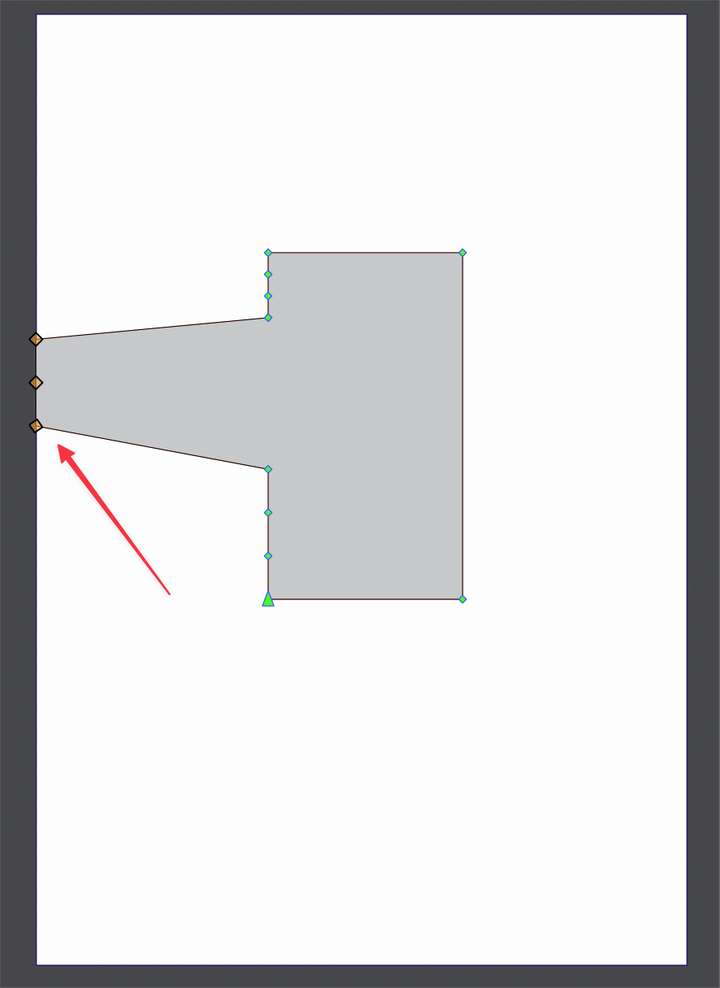
                        0_1666063943358_e7d262af-d483-4cc1-83e2-3ab2dc14398a-BLD 2022-10-17 at 23.29.59.png

                        🍎 macOS Tahoe 26.2, Mac mini (M1, 2020), Chip Apple M1, Memory 16 GB
                        Cintiq 27QHD Display and LG Ultra HD Display

                        VectorStylerV 1 Reply Last reply Reply Quote 0
                        • VectorStylerV Offline
                          VectorStyler @Boldline
                          last edited by

                          @Boldline said in Align single object to the artboard without enabling the special button for that:

                          wanted to align them to the artboard when I was trying to just align them to one another

                          Yes, this seems to be a bug. Will be fixed ASAP.

                          1 Reply Last reply Reply Quote 0
                          • IgullI Offline
                            Igull @Boldline
                            last edited by

                            @Boldline said in Align single object to the artboard without enabling the special button for that:

                            I feel on the fence about this change.

                            I was a bit like that too - untilI I just tried it - great idea - nobody would ever find that feature either LOL πŸ™‚ πŸ™‚

                            What would be even better (for me at any rate πŸ™‚ ) would be to have an adjustable offset involved - I never actually want anything on the edge of the artboard, always offset around 2-10mm - is that doable ? That would save a load of time for me, I'm always moving stuff a specific distance away from the edge of panels (artboard).

                            Neil

                            iMac 27" 2015 Catalina 32Gb, MacBook Pro 13" 2016 Monterey 8Gb, Mac Mini M2 2023 8Gb

                            b77B 1 Reply Last reply Reply Quote 1
                            • b77B Offline
                              b77 @Igull
                              last edited by

                              @Igull If I remember correctly, in your case drawings get sent to a laser cutter or a CNC?

                              What happens if the artboard has a bleed β€” how is this interpreted by the CNC driver?

                              MacBook Pro (Intel) running Monterey 12.6.4

                              IgullI 1 Reply Last reply Reply Quote 0
                              • IgullI Offline
                                Igull @b77
                                last edited by

                                @b77 said in Align single object to the artboard without enabling the special button for that:

                                What happens if the artboard has a bleed

                                I imagine that it will look for the nearest first-aid box πŸ™‚

                                While I think that a bleed must be some kind of offset/outline, it's not at term I'm used to - tell me about it - it might be of use !

                                Neil

                                iMac 27" 2015 Catalina 32Gb, MacBook Pro 13" 2016 Monterey 8Gb, Mac Mini M2 2023 8Gb

                                BoldlineB b77B 2 Replies Last reply Reply Quote 0
                                • BoldlineB Offline
                                  Boldline @Igull
                                  last edited by

                                  @Igull said in Align single object to the artboard without enabling the special button for that:

                                  tell me about it - it might be of use !

                                  It has nothing to do with bloodletting; a practice performed a couple centuries ago! πŸ™‚

                                  🍎 macOS Tahoe 26.2, Mac mini (M1, 2020), Chip Apple M1, Memory 16 GB
                                  Cintiq 27QHD Display and LG Ultra HD Display

                                  IgullI 1 Reply Last reply Reply Quote 0
                                  • IgullI Offline
                                    Igull @Boldline
                                    last edited by

                                    @Boldline said in Align single object to the artboard without enabling the special button for that:

                                    It has nothing to do with bloodletting; a practice performed a couple centuries ago!

                                    β›‘ πŸ˜€

                                    iMac 27" 2015 Catalina 32Gb, MacBook Pro 13" 2016 Monterey 8Gb, Mac Mini M2 2023 8Gb

                                    1 Reply Last reply Reply Quote 0
                                    • b77B Offline
                                      b77 @Igull
                                      last edited by b77

                                      @Igull Bleed is needed in printing β€” here is an explanation: https://www.prepressure.com/design/basics/bleed

                                      CNCs are not printing presses, but if you need objects to be at 10 mm distance from the edge of the board that is getting cut
                                      with the laser, adding 10 mm bleed around the artboard in VS might be what you need β€” if the software driving the CNC works
                                      with that (if it adds the bleed to the whole).

                                      (Nothing against having a special offset value in the Alignment panel, but maybe using bleed solves it for what you need).

                                      MacBook Pro (Intel) running Monterey 12.6.4

                                      b77B IgullI 2 Replies Last reply Reply Quote 0
                                      • b77B Offline
                                        b77 @b77
                                        last edited by

                                        Btw, 'Show Artboard Bleed' is in the View menu > Margins.

                                        MacBook Pro (Intel) running Monterey 12.6.4

                                        1 Reply Last reply Reply Quote 0
                                        • BoldlineB Offline
                                          Boldline
                                          last edited by

                                          It would be interesting if one could choose to align to guidelines (unless this is already in VS and I didn't see it)

                                          🍎 macOS Tahoe 26.2, Mac mini (M1, 2020), Chip Apple M1, Memory 16 GB
                                          Cintiq 27QHD Display and LG Ultra HD Display

                                          1 Reply Last reply Reply Quote 1
                                          • W Offline
                                            William Kansepa
                                            last edited by

                                            Yes, @Boldline, @VectorStyler this is one of the features I am missing from Illustrator; the ability to align and distribute to guides.


                                            HPβ€’Windows 11 Proβ€’11th Gen Intel(R) Core(TM) i7-1165G7 @ 2.80GHz 2.70 GHzβ€’ RAM: 16.0 GB (DDR4)

                                            VectorStylerV 1 Reply Last reply Reply Quote 1
                                            • First post
                                              Last post