<?xml version="1.0" encoding="UTF-8"?><rss xmlns:dc="http://purl.org/dc/elements/1.1/" xmlns:content="http://purl.org/rss/1.0/modules/content/" xmlns:atom="http://www.w3.org/2005/Atom" version="2.0"><channel><title><![CDATA[Brush tool doesn&#x27;t respond on stylus pressure Xp Pen Deco 01 V2 tablet and Win 10]]></title><description><![CDATA[<p dir="auto">I'm using Xp Pen Deco 01 V2 tablet. I selected pressure mode.</p>
<p dir="auto">In my case only base stroke in pencil tool responds for stylus pressure.</p>
<p dir="auto">Other types of brushes like artistic, pattern or bristle doesn't .</p>
<p dir="auto">Is it meant to be like this? "Live" stylus pressure is crucial.</p>
<p dir="auto">I don't have such a problem in other software (ex. Affinity Designer)</p>
]]></description><link>https://www.vectorstyler.com/forum/topic/2681/brush-tool-doesn-t-respond-on-stylus-pressure-xp-pen-deco-01-v2-tablet-and-win-10</link><generator>RSS for Node</generator><lastBuildDate>Sat, 18 Jul 2026 03:59:32 GMT</lastBuildDate><atom:link href="https://www.vectorstyler.com/forum/topic/2681.rss" rel="self" type="application/rss+xml"/><pubDate>Thu, 24 Nov 2022 12:35:16 GMT</pubDate><ttl>60</ttl><item><title><![CDATA[Reply to Brush tool doesn&#x27;t respond on stylus pressure Xp Pen Deco 01 V2 tablet and Win 10 on Wed, 25 Jan 2023 10:31:27 GMT]]></title><description><![CDATA[<p dir="auto"><a class="plugin-mentions-user plugin-mentions-a" href="/forum/user/vectorstyler" aria-label="Profile: VectorStyler">@<bdi>VectorStyler</bdi></a> Drawing content doesn't matter.<br />
This can be replicated with an empty document.</p>
]]></description><link>https://www.vectorstyler.com/forum/post/17435</link><guid isPermaLink="true">https://www.vectorstyler.com/forum/post/17435</guid><dc:creator><![CDATA[Harry]]></dc:creator><pubDate>Wed, 25 Jan 2023 10:31:27 GMT</pubDate></item><item><title><![CDATA[Reply to Brush tool doesn&#x27;t respond on stylus pressure Xp Pen Deco 01 V2 tablet and Win 10 on Wed, 25 Jan 2023 10:25:56 GMT]]></title><description><![CDATA[<p dir="auto"><a class="plugin-mentions-user plugin-mentions-a" href="/forum/user/harry" aria-label="Profile: Harry">@<bdi>Harry</bdi></a> This description is detailed enough for now.<br />
I will try to find a solution for this before the next build.</p>
<p dir="auto">One thing: does it depend on what is in the current drawing?<br />
Can this be replicated with an empty document? (maybe with just a rectangle in it).</p>
]]></description><link>https://www.vectorstyler.com/forum/post/17433</link><guid isPermaLink="true">https://www.vectorstyler.com/forum/post/17433</guid><dc:creator><![CDATA[VectorStyler]]></dc:creator><pubDate>Wed, 25 Jan 2023 10:25:56 GMT</pubDate></item><item><title><![CDATA[Reply to Brush tool doesn&#x27;t respond on stylus pressure Xp Pen Deco 01 V2 tablet and Win 10 on Wed, 25 Jan 2023 10:07:43 GMT]]></title><description><![CDATA[<p dir="auto"><a class="plugin-mentions-user plugin-mentions-a" href="/forum/user/vectorstyler" aria-label="Profile: VectorStyler">@<bdi>VectorStyler</bdi></a> said in <a href="/forum/post/17431">Brush tool doesn't respond on stylus pressure Xp Pen Deco 01 V2 tablet and Win 10</a>:</p>
<blockquote>
<p dir="auto"><a class="plugin-mentions-user plugin-mentions-a" href="/forum/user/harry" aria-label="Profile: Harry">@<bdi>Harry</bdi></a> I try to fix these, but I have to replicate first.</p>
</blockquote>
<p dir="auto">Can I help you somehow?</p>
]]></description><link>https://www.vectorstyler.com/forum/post/17432</link><guid isPermaLink="true">https://www.vectorstyler.com/forum/post/17432</guid><dc:creator><![CDATA[Harry]]></dc:creator><pubDate>Wed, 25 Jan 2023 10:07:43 GMT</pubDate></item><item><title><![CDATA[Reply to Brush tool doesn&#x27;t respond on stylus pressure Xp Pen Deco 01 V2 tablet and Win 10 on Wed, 25 Jan 2023 09:38:31 GMT]]></title><description><![CDATA[<p dir="auto"><a class="plugin-mentions-user plugin-mentions-a" href="/forum/user/harry" aria-label="Profile: Harry">@<bdi>Harry</bdi></a> I try to fix these, but I have to replicate first.</p>
]]></description><link>https://www.vectorstyler.com/forum/post/17431</link><guid isPermaLink="true">https://www.vectorstyler.com/forum/post/17431</guid><dc:creator><![CDATA[VectorStyler]]></dc:creator><pubDate>Wed, 25 Jan 2023 09:38:31 GMT</pubDate></item><item><title><![CDATA[Reply to Brush tool doesn&#x27;t respond on stylus pressure Xp Pen Deco 01 V2 tablet and Win 10 on Wed, 25 Jan 2023 09:30:18 GMT]]></title><description><![CDATA[<p dir="auto"><a class="plugin-mentions-user plugin-mentions-a" href="/forum/user/vectorstyler" aria-label="Profile: VectorStyler">@<bdi>VectorStyler</bdi></a> Update as of Build 1.1.076:</p>
<ul>
<li>stylus pressure works!</li>
<li>"calligraphic strokes" are much better now!</li>
<li>after VS fresh start, I can draw with stylus with no problems</li>
</ul>
<p dir="auto">but:</p>
<ul>
<li>when I change any value with drop down menu or slider using the stylus (like brush width, font size etc.), my problems with the mouse are starting right away.</li>
</ul>
<p dir="auto">That means:</p>
<ul>
<li>no panning with mouse wheel click</li>
<li>cannot move / edit nodes, objects etc</li>
<li>can only draw straight lines with the mouse (no diagonals means I can't draw most of the shapes)</li>
</ul>
<p dir="auto">And since it is still hard to pick drop down menus / values and impossible to select flyout menus with the stylus, it makes VS workable only with the mouse.</p>
<p dir="auto">I don't want to be a PIA, byt is there any slightest chance to fix stylus sensitivity for XP Pen graphic tablets?</p>
]]></description><link>https://www.vectorstyler.com/forum/post/17430</link><guid isPermaLink="true">https://www.vectorstyler.com/forum/post/17430</guid><dc:creator><![CDATA[Harry]]></dc:creator><pubDate>Wed, 25 Jan 2023 09:30:18 GMT</pubDate></item><item><title><![CDATA[Reply to Brush tool doesn&#x27;t respond on stylus pressure Xp Pen Deco 01 V2 tablet and Win 10 on Sat, 03 Dec 2022 11:05:40 GMT]]></title><description><![CDATA[<p dir="auto"><a class="plugin-mentions-user plugin-mentions-a" href="/forum/user/harry" aria-label="Profile: Harry">@<bdi>Harry</bdi></a> I will try to replicate this.</p>
]]></description><link>https://www.vectorstyler.com/forum/post/16452</link><guid isPermaLink="true">https://www.vectorstyler.com/forum/post/16452</guid><dc:creator><![CDATA[VectorStyler]]></dc:creator><pubDate>Sat, 03 Dec 2022 11:05:40 GMT</pubDate></item><item><title><![CDATA[Reply to Brush tool doesn&#x27;t respond on stylus pressure Xp Pen Deco 01 V2 tablet and Win 10 on Sat, 03 Dec 2022 10:45:14 GMT]]></title><description><![CDATA[<p dir="auto"><a class="plugin-mentions-user plugin-mentions-a" href="/forum/user/vectorstyler" aria-label="Profile: VectorStyler">@<bdi>VectorStyler</bdi></a> said in <a href="/forum/post/16431">Brush tool doesn't respond on stylus pressure Xp Pen Deco 01 V2 tablet and Win 10</a>:</p>
<blockquote>
<p dir="auto"><a class="plugin-mentions-user plugin-mentions-a" href="/forum/user/harry" aria-label="Profile: Harry">@<bdi>Harry</bdi></a> said in <a href="/forum/post/16430">Brush tool doesn't respond on stylus pressure Xp Pen Deco 01 V2 tablet and Win 10</a>:</p>
<blockquote>
<ol start="4">
<li>various problems with the mouse (existed also in previous builds):</li>
</ol>
</blockquote>
<p dir="auto">How to replicate these?</p>
</blockquote>
<p dir="auto">Tested on Win 10 and XP Pen Deco 01 v2:</p>
<ul>
<li>run VS with new document - mouse works ok</li>
<li><strong>click on the fly out menu with the stylus and select Pencil tool</strong> - mouse has no panning with wheel click, cannot move / edit nodes, objects etc., can only draw straight lines with the mouse</li>
</ul>
]]></description><link>https://www.vectorstyler.com/forum/post/16451</link><guid isPermaLink="true">https://www.vectorstyler.com/forum/post/16451</guid><dc:creator><![CDATA[Harry]]></dc:creator><pubDate>Sat, 03 Dec 2022 10:45:14 GMT</pubDate></item><item><title><![CDATA[Reply to Brush tool doesn&#x27;t respond on stylus pressure Xp Pen Deco 01 V2 tablet and Win 10 on Fri, 02 Dec 2022 14:56:00 GMT]]></title><description><![CDATA[<p dir="auto"><a class="plugin-mentions-user plugin-mentions-a" href="/forum/user/harry" aria-label="Profile: Harry">@<bdi>Harry</bdi></a> said in <a href="/forum/post/16430">Brush tool doesn't respond on stylus pressure Xp Pen Deco 01 V2 tablet and Win 10</a>:</p>
<blockquote>
<ol start="4">
<li>various problems with the mouse (existed also in previous builds):</li>
</ol>
</blockquote>
<p dir="auto">How to replicate these?</p>
]]></description><link>https://www.vectorstyler.com/forum/post/16431</link><guid isPermaLink="true">https://www.vectorstyler.com/forum/post/16431</guid><dc:creator><![CDATA[VectorStyler]]></dc:creator><pubDate>Fri, 02 Dec 2022 14:56:00 GMT</pubDate></item><item><title><![CDATA[Reply to Brush tool doesn&#x27;t respond on stylus pressure Xp Pen Deco 01 V2 tablet and Win 10 on Fri, 02 Dec 2022 14:34:08 GMT]]></title><description><![CDATA[<p dir="auto"><strong>My observations in build 1.1.068:</strong> (windows Ink enabled)</p>
<p dir="auto">1.I got pen pressure for brushes - great!<br />
2. no more "cotton buds" lines - great!<br />
3. after changing brush fill or outline color in Color panel, brush width is reset to default - a bug?<br />
4. various problems with the mouse (existed also in previous builds):</p>
<ul>
<li>after fresh VS start mouse works ok, but after some drawing with stylus (changing to pencil tool might be a problem) there are following problems:</li>
<li>no panning with mouse wheel click</li>
<li>cannot move / edit nodes, objects etc</li>
<li>can only draw straight lines with the mouse</li>
</ul>
<ol start="5">
<li>problems with stylus sensitivity still exist</li>
<li>stylus pressure works only with Windows Ink enabled</li>
</ol>
]]></description><link>https://www.vectorstyler.com/forum/post/16430</link><guid isPermaLink="true">https://www.vectorstyler.com/forum/post/16430</guid><dc:creator><![CDATA[Harry]]></dc:creator><pubDate>Fri, 02 Dec 2022 14:34:08 GMT</pubDate></item><item><title><![CDATA[Reply to Brush tool doesn&#x27;t respond on stylus pressure Xp Pen Deco 01 V2 tablet and Win 10 on Wed, 30 Nov 2022 18:12:20 GMT]]></title><description><![CDATA[<p dir="auto"><a class="plugin-mentions-user plugin-mentions-a" href="/forum/user/jayanta-das" aria-label="Profile: Jayanta-Das">@<bdi>Jayanta-Das</bdi></a> said in <a href="/forum/post/16327">Brush tool doesn't respond on stylus pressure Xp Pen Deco 01 V2 tablet and Win 10</a>:</p>
<blockquote>
<p dir="auto">Update: Pressure doesn't work all the time with other brushes.</p>
</blockquote>
<p dir="auto">Yes, I just found this out yesterday, and this one can be replicated.<br />
Fix will be available soon.</p>
]]></description><link>https://www.vectorstyler.com/forum/post/16328</link><guid isPermaLink="true">https://www.vectorstyler.com/forum/post/16328</guid><dc:creator><![CDATA[VectorStyler]]></dc:creator><pubDate>Wed, 30 Nov 2022 18:12:20 GMT</pubDate></item><item><title><![CDATA[Reply to Brush tool doesn&#x27;t respond on stylus pressure Xp Pen Deco 01 V2 tablet and Win 10 on Wed, 30 Nov 2022 17:32:28 GMT]]></title><description><![CDATA[<blockquote>
<p dir="auto">Are there issues only with the Brush tool, or the Pen tool also?</p>
</blockquote>
<p dir="auto"><strong>Update: Pressure doesn't work all the time with other brushes.</strong></p>
]]></description><link>https://www.vectorstyler.com/forum/post/16327</link><guid isPermaLink="true">https://www.vectorstyler.com/forum/post/16327</guid><dc:creator><![CDATA[Jayanta Das]]></dc:creator><pubDate>Wed, 30 Nov 2022 17:32:28 GMT</pubDate></item><item><title><![CDATA[Reply to Brush tool doesn&#x27;t respond on stylus pressure Xp Pen Deco 01 V2 tablet and Win 10 on Wed, 30 Nov 2022 14:36:19 GMT]]></title><description><![CDATA[<blockquote>
<p dir="auto">Are there issues only with the Brush tool, or the Pen tool also?</p>
</blockquote>
<p dir="auto">Pressure is working with other brushes also. The issues are with Wacom pen <a href="https://recordit.co/l9UCrtpNAe" rel="nofollow ugc">can be seen in this video</a>:</p>
<ol>
<li>Hovering over tools and command in tool bar and context bar sometimes the description doesn't show.</li>
<li>Sometime I have to click 2/3 times to select a from the horizontal list of tools.</li>
<li>Scrolling by clicking the Scroll bar closes the list (ex. <a href="https://recordit.co/uL1SepKXau" rel="nofollow ugc">recording</a>)</li>
</ol>
]]></description><link>https://www.vectorstyler.com/forum/post/16325</link><guid isPermaLink="true">https://www.vectorstyler.com/forum/post/16325</guid><dc:creator><![CDATA[Jayanta Das]]></dc:creator><pubDate>Wed, 30 Nov 2022 14:36:19 GMT</pubDate></item><item><title><![CDATA[Reply to Brush tool doesn&#x27;t respond on stylus pressure Xp Pen Deco 01 V2 tablet and Win 10 on Wed, 30 Nov 2022 06:36:19 GMT]]></title><description><![CDATA[<p dir="auto"><a class="plugin-mentions-user plugin-mentions-a" href="/forum/user/jayanta-das" aria-label="Profile: Jayanta-Das">@<bdi>Jayanta-Das</bdi></a> said in <a href="/forum/post/16315">Brush tool doesn't respond on stylus pressure Xp Pen Deco 01 V2 tablet and Win 10</a>:</p>
<blockquote>
<p dir="auto">I am also having same issues with Wacom Tablet in Windows 11.</p>
</blockquote>
<p dir="auto">Are there issues only with the Brush tool, or the Pen tool also?</p>
]]></description><link>https://www.vectorstyler.com/forum/post/16317</link><guid isPermaLink="true">https://www.vectorstyler.com/forum/post/16317</guid><dc:creator><![CDATA[VectorStyler]]></dc:creator><pubDate>Wed, 30 Nov 2022 06:36:19 GMT</pubDate></item><item><title><![CDATA[Reply to Brush tool doesn&#x27;t respond on stylus pressure Xp Pen Deco 01 V2 tablet and Win 10 on Wed, 30 Nov 2022 03:47:18 GMT]]></title><description><![CDATA[<blockquote>
<p dir="auto">I noticed that in VS I have problems with flyout and drop down menus - sometimes I have to select the command few times or press stylus hard). Moreover, after hovering on command icon, it's description doesn't pop up (but it pops up while hovering with mouse).</p>
</blockquote>
<p dir="auto">I am also having same issues with Wacom Tablet in Windows 11.</p>
]]></description><link>https://www.vectorstyler.com/forum/post/16315</link><guid isPermaLink="true">https://www.vectorstyler.com/forum/post/16315</guid><dc:creator><![CDATA[Jayanta Das]]></dc:creator><pubDate>Wed, 30 Nov 2022 03:47:18 GMT</pubDate></item><item><title><![CDATA[Reply to Brush tool doesn&#x27;t respond on stylus pressure Xp Pen Deco 01 V2 tablet and Win 10 on Tue, 29 Nov 2022 11:25:06 GMT]]></title><description><![CDATA[<p dir="auto"><a class="plugin-mentions-user plugin-mentions-a" href="/forum/user/harry" aria-label="Profile: Harry">@<bdi>Harry</bdi></a> Found the problem, fix will be available soon.</p>
]]></description><link>https://www.vectorstyler.com/forum/post/16284</link><guid isPermaLink="true">https://www.vectorstyler.com/forum/post/16284</guid><dc:creator><![CDATA[VectorStyler]]></dc:creator><pubDate>Tue, 29 Nov 2022 11:25:06 GMT</pubDate></item><item><title><![CDATA[Reply to Brush tool doesn&#x27;t respond on stylus pressure Xp Pen Deco 01 V2 tablet and Win 10 on Tue, 29 Nov 2022 11:01:42 GMT]]></title><description><![CDATA[<p dir="auto">After system and registry cleaning with CCleaner, I got my pen pressure back.<br />
It is - as previous - only in pencil tool AND only with Windows Ink enabled.</p>
<p dir="auto"><strong>My observations:</strong></p>
<ol>
<li>with pencil tool every pressure mode like: None, Selected, Pressure, Velocity and Inverted Velocity work good,</li>
<li>with brush tool all pressure modes work good, but only for "base" - simplest brush,</li>
<li>with brush tool using other types of brushes (artistic, bristle etc.), pressure mode seems to be stuck in "Selected" - no "none", no pen pressure, no velocity,</li>
<li>with "Brushes with the Pencil tool" option enabled in Preferences\Changing Opotions there is no change - everything works like in points 1-3 above.</li>
</ol>
<p dir="auto">VS is currently my only vector/graphic app with which I have to turn on the Windows Ink in order to get stylus pressure working. I would like to avoid Windows Ink.</p>
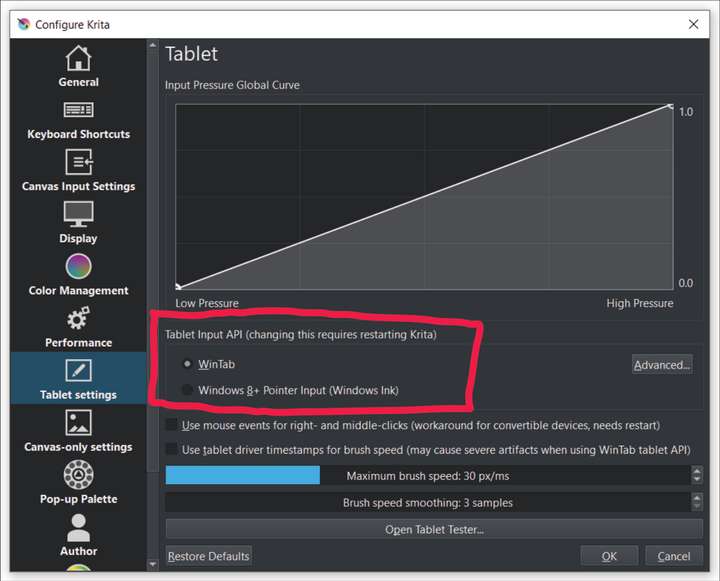
<p dir="auto">I wondered if we could have some choice with tablet's driver input ex. like in Krita:<br />
<img src="/forum/assets/uploads/files/1669717198476-30a6404c-1601-4a63-9d3e-b332e73bf0d4-image-resized.png" alt="0_1669717196755_30a6404c-1601-4a63-9d3e-b332e73bf0d4-image.png" class=" img-fluid img-markdown" /></p>
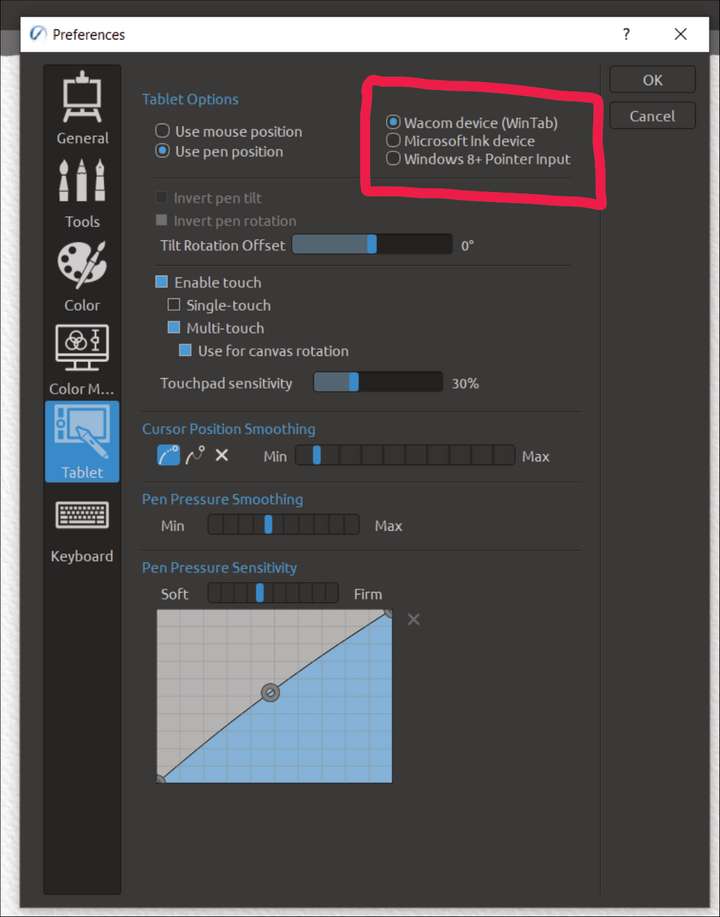
<p dir="auto">or like in Rebelle:<br />
<img src="/forum/assets/uploads/files/1669717905915-99f1515f-5ee2-4f03-ac67-95f3dc6230ae-image-resized.png" alt="0_1669717904574_99f1515f-5ee2-4f03-ac67-95f3dc6230ae-image.png" class=" img-fluid img-markdown" /></p>
]]></description><link>https://www.vectorstyler.com/forum/post/16278</link><guid isPermaLink="true">https://www.vectorstyler.com/forum/post/16278</guid><dc:creator><![CDATA[Harry]]></dc:creator><pubDate>Tue, 29 Nov 2022 11:01:42 GMT</pubDate></item><item><title><![CDATA[Reply to Brush tool doesn&#x27;t respond on stylus pressure Xp Pen Deco 01 V2 tablet and Win 10 on Fri, 25 Nov 2022 17:31:54 GMT]]></title><description><![CDATA[<p dir="auto">In Rebelle 5, in "Tablet Options" I set "Wacom device (WinTab)" and that configuration works best.</p>
<p dir="auto">Other options are:</p>
<ul>
<li>"Microsoft Ink Device"</li>
<li>"Windows 8+ Pointer Input"</li>
</ul>
<p dir="auto">Krita works best with WinTab also.</p>
<p dir="auto">I hope it helps.</p>
]]></description><link>https://www.vectorstyler.com/forum/post/16177</link><guid isPermaLink="true">https://www.vectorstyler.com/forum/post/16177</guid><dc:creator><![CDATA[Harry]]></dc:creator><pubDate>Fri, 25 Nov 2022 17:31:54 GMT</pubDate></item><item><title><![CDATA[Reply to Brush tool doesn&#x27;t respond on stylus pressure Xp Pen Deco 01 V2 tablet and Win 10 on Fri, 25 Nov 2022 09:01:40 GMT]]></title><description><![CDATA[<p dir="auto">@Blunieb said in <a href="/forum/post/16161">Brush tool doesn't respond on stylus pressure Xp Pen Deco 01 V2 tablet and Win 10</a>:</p>
<blockquote>
<p dir="auto">There is also massive fluttering of image layer in Layers Panel while dragging and dropping layer with stylus.</p>
</blockquote>
<p dir="auto">Got it. This might be a different issue. I will try to replicate this with the wacom tablet.</p>
<p dir="auto">As for the Xp Pen Deco 01 V2 pressure compatibility, this might be a bit harder, but will try to fix it.</p>
]]></description><link>https://www.vectorstyler.com/forum/post/16162</link><guid isPermaLink="true">https://www.vectorstyler.com/forum/post/16162</guid><dc:creator><![CDATA[VectorStyler]]></dc:creator><pubDate>Fri, 25 Nov 2022 09:01:40 GMT</pubDate></item><item><title><![CDATA[Reply to Brush tool doesn&#x27;t respond on stylus pressure Xp Pen Deco 01 V2 tablet and Win 10 on Fri, 25 Nov 2022 08:52:23 GMT]]></title><description><![CDATA[<p dir="auto">There is also massive fluttering of image layer in Layers Panel while dragging and dropping layer with stylus.<br />
That makes layer moving very hard and frustrating.</p>
]]></description><link>https://www.vectorstyler.com/forum/post/16161</link><guid isPermaLink="true">https://www.vectorstyler.com/forum/post/16161</guid><dc:creator><![CDATA[Harry]]></dc:creator><pubDate>Fri, 25 Nov 2022 08:52:23 GMT</pubDate></item><item><title><![CDATA[Reply to Brush tool doesn&#x27;t respond on stylus pressure Xp Pen Deco 01 V2 tablet and Win 10 on Thu, 24 Nov 2022 21:59:28 GMT]]></title><description><![CDATA[<p dir="auto">@Blunieb said in <a href="/forum/post/16156">Brush tool doesn't respond on stylus pressure Xp Pen Deco 01 V2 tablet and Win 10</a>:</p>
<blockquote>
<p dir="auto">I'm using Windows 10 with windows ink enabled (with windows ink disabled I can only draw straight lines in VS but other apps work ok).</p>
</blockquote>
<p dir="auto">As I wrote earlier, I've tried this already. Xp Pen driver called Pentablet has the option to turn Windows Ink on and off. I've tried both states already - neither works.</p>
]]></description><link>https://www.vectorstyler.com/forum/post/16159</link><guid isPermaLink="true">https://www.vectorstyler.com/forum/post/16159</guid><dc:creator><![CDATA[Harry]]></dc:creator><pubDate>Thu, 24 Nov 2022 21:59:28 GMT</pubDate></item><item><title><![CDATA[Reply to Brush tool doesn&#x27;t respond on stylus pressure Xp Pen Deco 01 V2 tablet and Win 10 on Thu, 24 Nov 2022 20:32:28 GMT]]></title><description><![CDATA[<p dir="auto">@Blunieb Another thing to try: in Windows there is a "Use Windows Ink" option for some tablets.<br />
Is there such an option for the Xp Pen, and if so, try both states.</p>
]]></description><link>https://www.vectorstyler.com/forum/post/16158</link><guid isPermaLink="true">https://www.vectorstyler.com/forum/post/16158</guid><dc:creator><![CDATA[VectorStyler]]></dc:creator><pubDate>Thu, 24 Nov 2022 20:32:28 GMT</pubDate></item><item><title><![CDATA[Reply to Brush tool doesn&#x27;t respond on stylus pressure Xp Pen Deco 01 V2 tablet and Win 10 on Thu, 24 Nov 2022 20:12:40 GMT]]></title><description><![CDATA[<p dir="auto">@Blunieb I open a bug on this one, and will try to find a fix ASAP.</p>
]]></description><link>https://www.vectorstyler.com/forum/post/16157</link><guid isPermaLink="true">https://www.vectorstyler.com/forum/post/16157</guid><dc:creator><![CDATA[VectorStyler]]></dc:creator><pubDate>Thu, 24 Nov 2022 20:12:40 GMT</pubDate></item><item><title><![CDATA[Reply to Brush tool doesn&#x27;t respond on stylus pressure Xp Pen Deco 01 V2 tablet and Win 10 on Thu, 24 Nov 2022 19:49:07 GMT]]></title><description><![CDATA[<p dir="auto">My problems with stylus pressure occurs only in VS. Every other app I've tested (Affinity Designer, Inkscape, Krita, Rebelle 5) work without pressure problem.</p>
<p dir="auto">I'm using Windows 10 with windows ink enabled (with windows ink disabled I can only draw straight lines in VS but other apps work ok).</p>
<p dir="auto">I selected "Pressure", I tried every pressure option for pencil and brush - stylus pressure in VS still doesn't work</p>
<p dir="auto">I noticed that in VS I have problems with flyout and drop down menus - sometimes I have to select the command few times or press stylus hard). Moreover, after hovering on command icon, it's description doesn't pop up (but it pops up while hovering with mouse).</p>
<p dir="auto">I tried 4 different Xp Pen drivers and system restoring - now I don't have stylus pressure at all in VS (other apps work perfectly) <img src="https://www.vectorstyler.com/forum/assets/plugins/nodebb-plugin-emoji/emoji/android/1f61e.png?v=ec4d969cc53" class="not-responsive emoji emoji-android emoji--disappointed" style="height:23px;width:auto;vertical-align:middle" title=":(" alt="😞" /></p>
]]></description><link>https://www.vectorstyler.com/forum/post/16156</link><guid isPermaLink="true">https://www.vectorstyler.com/forum/post/16156</guid><dc:creator><![CDATA[Harry]]></dc:creator><pubDate>Thu, 24 Nov 2022 19:49:07 GMT</pubDate></item><item><title><![CDATA[Reply to Brush tool doesn&#x27;t respond on stylus pressure Xp Pen Deco 01 V2 tablet and Win 10 on Thu, 24 Nov 2022 13:51:16 GMT]]></title><description><![CDATA[<p dir="auto">@Blunieb Is this on Windows 11?</p>
<p dir="auto">There is a know problem with VS on Windows 11 and tablet pressure.</p>
<p dir="auto">On other platforms (Mac and Win10), the context panel contains the Pressure drop down when the brush tool is selected, where the "Pressure" (again) option should be selected.</p>
]]></description><link>https://www.vectorstyler.com/forum/post/16136</link><guid isPermaLink="true">https://www.vectorstyler.com/forum/post/16136</guid><dc:creator><![CDATA[VectorStyler]]></dc:creator><pubDate>Thu, 24 Nov 2022 13:51:16 GMT</pubDate></item></channel></rss>