VectorStyler
    • Categories
    • Unread
    • Recent
    • Tags
    • Popular
    • Register
    • Login

    Japanese

    Scheduled Pinned Locked Moved Questions and Support
    40 Posts 5 Posters 99.0k Views 1 Watching
    Loading More Posts
    • Oldest to Newest
    • Newest to Oldest
    • Most Votes
    Reply
    • Reply as topic
    Log in to reply
    This topic has been deleted. Only users with topic management privileges can see it.
    • 861475_VctSt8 Offline
      861475_VctSt @ash-f
      last edited by

      @ash-f

      VS does not recognize fonts related to the mac OS system.
      This has been a problem since the beginning of the beta version.
      Try it with "Morisawa" or "FontWorks".

      Let's think about what to do with system-related fonts later.

      LIc. 0 OS10.15.7
      MacBook Air (13-inch, Mid 2012) / Intel Core i5, 8GB / Intel HD Graphics 4000
      LIc. 1 OS13.6.7
      MacBook Pro (14-inch, 2023) / Apple M2 Pro, 16GB / Apple GPU

      1 Reply Last reply Reply Quote 0
      • A Offline
        ash-f @VectorStyler
        last edited by

        @vectoradmin
        Thank you.
        Please refer this page.
        Besides MS Gothic, MS P Gothics, they are built-in fonts on Windows.
        https://docs.microsoft.com/en-us/typography/fonts/windows_10_font_list#japanese-supplemental-fonts

        I can see 3rd party Japanese fonts such as KozGo/KozMin(Adobe) or Noto Serif/Not Sans(Google) though.

        VectorStylerV 2 Replies Last reply Reply Quote 0
        • VectorStylerV Offline
          VectorStyler @ash-f
          last edited by

          @ash-f Is editing in the vertical text frame working with 3rd party fonts?

          A 1 Reply Last reply Reply Quote 0
          • A Offline
            ash-f @VectorStyler
            last edited by

            @vectoradmin
            No. doesn't work regardless of which font I use.

            VectorStylerV 1 Reply Last reply Reply Quote 0
            • VectorStylerV Offline
              VectorStyler @ash-f
              last edited by

              @ash-f Looks like on Windows, the installed TTC (truetype collection) fonts are not detected. This is a bug, and will be fixed in the next build.
              It can be worked around by copying these fonts into a user created folder and using Text -> Font Manager -> Add Folder to add this folder as fonts to VectorStyler.

              1 Reply Last reply Reply Quote 0
              • VectorStylerV Offline
                VectorStyler @ash-f
                last edited by

                @ash-f I tested with some 3rd party fonts and it worked here. Can you send me an example file by email. Thanks!

                A 1 Reply Last reply Reply Quote 0
                • A Offline
                  ash-f @VectorStyler
                  last edited by

                  @vectoradmin
                  Sending a file does not explain what happens I guess.
                  See what happens when typing Japanese with the video linked below.
                  https://share.getcloudapp.com/jkuLArKv

                  VectorStylerV 1 Reply Last reply Reply Quote 0
                  • VectorStylerV Offline
                    VectorStyler @ash-f
                    last edited by

                    @ash-f Uploaded a fix (1.0.023) on the Windows issues.

                    A 1 Reply Last reply Reply Quote 0
                    • A Offline
                      ash-f @VectorStyler
                      last edited by

                      @vectoradmin Missing fonts are shown now.
                      But the input problem still remains.
                      Did you try typing with Microsoft IME(Japanese)?

                      This is Microsoft IME Hiragana mode commonly used to input Japanese
                      https://share.getcloudapp.com/6qu8bNdl

                      This is my setting.
                      https://share.getcloudapp.com/bLuAlOPy

                      VectorStylerV 1 Reply Last reply Reply Quote 0
                      • VectorStylerV Offline
                        VectorStyler @ash-f
                        last edited by

                        @ash-f Yes I use Microsoft IME for input, and I tested it with the new build. The build from yesterday did have a problem that I could replicate it, and at least for me it is fixed.

                        I tested it again just now with version 1.0.023 (not the development one, but updated as a user). I create a text frame, delete the lorem, and start typing with Japanese input method set to Hiragana (the right click option on the input method icon).

                        When the frame is empty, the input method candidates are shown in the middle of the window, but otherwise it works.

                        A 861475_VctSt8 4 Replies Last reply Reply Quote 0
                        • A Offline
                          ash-f @VectorStyler
                          last edited by ash-f

                          @vectoradmin You should empty the text frame first and start typing from a Japanese character.
                          When you hit the enter(break the line), typed sentence will disappear.
                          I believe this is involving text conversion system(selecting words from candidates)
                          Because the app does not recognize the state of text correctly, I often see similar problem in non-Japanese apps.

                          1 Reply Last reply Reply Quote 0
                          • A Offline
                            ash-f @VectorStyler
                            last edited by

                            @vectoradmin I noticed that I need to hit the right arrow to settle the text.
                            It should be settled when I hit the enter key.
                            I see blue high light on the text remains even after I hit the enter, this means text is not settled I guess.
                            That's why the text disappears when I break the line.

                            1 Reply Last reply Reply Quote 0
                            • 861475_VctSt8 Offline
                              861475_VctSt @VectorStyler
                              last edited by

                              @vectoradmin

                              Similar issues occur on the Mac.
                              I will post it on Windows as well.

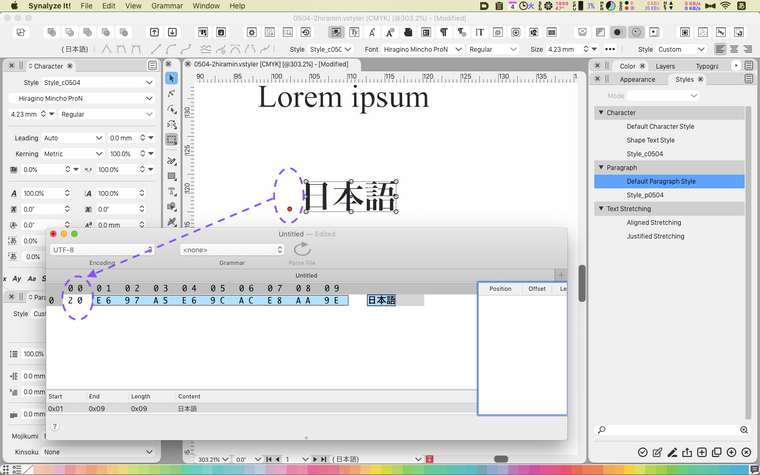
                              I frequently change the input mode while working in Japanese. Input mode from kana to romaji, from romaji to kana. If you switch between them with the "kana" key and the "eiji" key, VS will enter unnecessary code there. In my case this was the cause of this problem. (Ref. Fig)
                              If you switch with [option + space], no extra code will be entered.
                              0_1620109375221_0504.png

                              Evacuated resolution of this issue
                              The VS text consists of "Default character" and "Default paragraph". This is similar to Illustrator. (Different from InDesign.) Characterstyle is superior, so characterstyle is inherited without specifying some parts of the corresponding paragraphstyle.

                              The first thing to do when working in Japanese.
                              Prepare your own "complete Japanese character style" and the corresponding "complete Japanese paragraph style".

                              To change the mode while working, use [option + space] or pull down from the menu.

                              I presume that this issue is an obstacle when testing other CJK features.

                              LIc. 0 OS10.15.7
                              MacBook Air (13-inch, Mid 2012) / Intel Core i5, 8GB / Intel HD Graphics 4000
                              LIc. 1 OS13.6.7
                              MacBook Pro (14-inch, 2023) / Apple M2 Pro, 16GB / Apple GPU

                              1 Reply Last reply Reply Quote 1
                              • A Offline
                                ash-f @VectorStyler
                                last edited by

                                @vectoradmin
                                When I hit the enter key while typing, the text cursor will be set to before the last letter.

                                Also the candidates are shown on the text which is annoying.
                                Preferably I like it to be shown "inline", place where I'm typing. just like MS Word does.

                                https://share.getcloudapp.com/7KuPrDXz

                                VectorStylerV 1 Reply Last reply Reply Quote 1
                                • VectorStylerV Offline
                                  VectorStyler @ash-f
                                  last edited by

                                  @ash-f This issue is still an open bug. Will try to fix as soon as possible.

                                  1 Reply Last reply Reply Quote 1
                                  • First post
                                    Last post
