Curvature tool
-
@Boldline A Curvature tool is on the Roadmap - Phase 3

https://www.vectorstyler.com/roadmap/
Hopefully it will have a mode where the segments are curved directly when drawing, not just after finishing the path.
MacBook Pro (Intel) running Monterey 12.6.4
-
@Boldline Yes, this is in the backlog.
-
@Boldline Yes, this is the Curvature tool from Adobe Illustrator, and I also like it ,and it is already on the Roadmap;
https://youtu.be/zHV_kbRRA00?si=9nyCwmTTSBicLgJ0 -
@VectorStyler Will the curvature tool make it with the next version 1.3?
-
@FastVector said in Curvature tool:
Will the curvature tool make it with the next version 1.3?
I will try to add have it in 1.3.
-
Please, can I add a bit of commentary to this?
@VectorStyler @Boldline: Curvature tool is a very poor substitute for Bezigon Tool. Really, it implements a portion of Bezigon, namely, turning corner nodes to curve nodes. But guess where it fails? Tangential nodes, which allow for smooth transition between corner and smooth nodes. So, if it were really up to me, I'd add the Bezigon and one up Curvature tool.
Work: Windows 11 | Intel i9 14900HS (24 Cores/32 Threads) | GeForce RTX 4070 | 64 GB RAM
Personal: Windows 11 | Amd Ryzen 9 7950X (16 Core, 32 Threads) | GeForce RTX 3060 | 32 GB RAM -
@b77: You're asking for the Bezigon Tool without realising. That's exactly what it does.
-
@Daniel I just posted a discussion post with the title‘’‘ [What tools are efficient for drawing curves In one step?] ’, can you go there and explain Bezigon it
-
@Daniel said in Curvature tool:
Please, can I add a bit of commentary to this?
@VectorStyler @Boldline: Curvature tool is a very poor substitute for Bezigon Tool. Really, it implements a portion of Bezigon, namely, turning corner nodes to curve nodes. But guess where it fails? Tangential nodes, which allow for smooth transition between corner and smooth nodes. So, if it were really up to me, I'd add the Bezigon and one up Curvature tool.
Interesting point. I'd be willing to wait on adding a dedicated curvature tool to first see if the Bezigon tool was sufficient enough
-
@Daniel What’s the Difference Between the Curvature Tool and the Spiro Path Tool? Is the Bezigon Tool better than the Curvature Tool and the Spiro Path Tool?
-
@Honor: Spiro Path tool is specifically meant to draw full arc splines. That is each consecutive segment is circular. This is useful when you're doing baroque decorative work, such as found in old architecture around the capital for pillars or grills.
Curvature tool is a simple tool that reverses the logic of the typical cubic bezier pen tool, which is found in most software.
In a normal pen tool, you click at 45 degree points and drag to balance handles to create smooth curves. This takes practice.
Instead, you click straight line segments at 45 degree points and AFTERWARDS double click nodes. The tool's algorithm automatically converts sharp, corner nodes to smooth nodes and creates smooth, balanced curves.
Bezigon Tool performs the balancing of handles right when you draw the curves depending on what modifier you use while you click.
If you merely click click and click, you draw straight line curves.
If you click, then alt click and click to close the curve, this creates a sharp corner node, followed by a smooth, balanced node, followed by a sharp node. Hence a semi circle. |) like this.
Bezigon was designed to intelligently preempt user intention by combining Bezier curve creation and polygonal, straight line curve creation. The normal pen tool does not understand what you intend to do based on your click patterns. You are responsible for balancing the handles.
Bezigon 'understands' this. Once you use it only one time, you cannot imagine doing it any other way for drawing geometric shapes. Bezigon is meant for drawing geometric shapes. Such as in flat icons. Or typography. Or technical drawings such as engineering plans.
It's not meant for organic shapes. For that the best spline is Catmull Rom. Which has no handles and curves are averaged and smoothed as you go.
Curvature tool is a poor implementation of the logic of Bezigon. Curvature tool relies on you telling the software how want the nodes to be AFTER you've drawn them. Bezigon Tool tells the software how the nodes need to be WHILE you're drawing them. This the biggest difference. Bezigon relies on three types of nodes. Corner and smooth. Which you're aware of. But there's a tangent node, which allows smooth transition between the two types of nodes.
 ️: heart is a good shape to explain tangent nodes. There are two sharp and two smooth nodes. The two sharp nodes are opposite each other, between the two round arcs. The smooth nodes create the arcs. But how do you create a transition between these two? You need a tangential node, at the sides. Where the straight line goes up from the bottom, curves inward and meets the other half of the heart. The tangent nodes are on either sides.
 -
Based on your descriptions, I can already tell that it’s an excellent tool. I really hope we’ll see the Bezigon Tool added to VectorStyler in the near future. And hopefully, in the following stages, the developer might also consider adding a Spiro Path Tool to the app as well. Thank you for the detailed explanation @Daniel
-
@Honor: it is. If you wish to try it, sign up for a trial account in Gravit Designer and check it out.
No need to provide card details.
And the great thing is, the curves drawn in bezigon Tool are still just ordinary Bezier splines. You can change it in any way.
Whereas as the Spiro Path in Inkscape needs to be changed. They loose their arc spline nature.
-
I just had a chance to try it out, and I definitely think it would work much better together with VectorStyler’s tools. I hope it will be included in version 1.3 @Daniel
-
@Honor: the guy who wrote Gravit, did so as a challenge over a weekend argument with his friends who said vector software can't be Web apps.
-
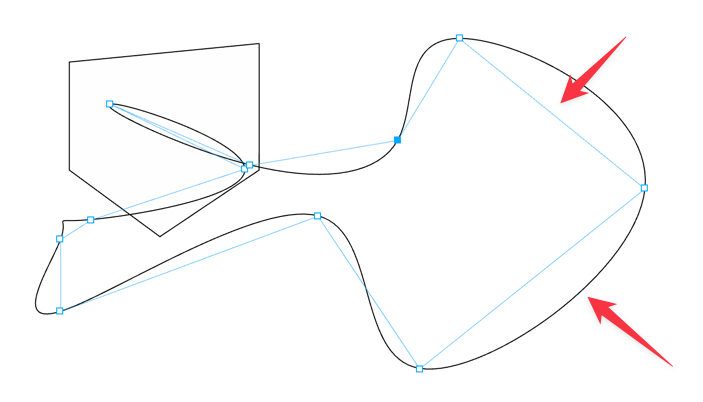
@Daniel playing around with graphite, I noticed how it displayed a straight guideline line between points. made me think of this discussion we've had lately about adding different path creation tools to VS
🍎 macOS Tahoe 26.2, Mac mini (M1, 2020), Chip Apple M1, Memory 16 GB
Cintiq 27QHD Display and LG Ultra HD Display -
@Boldline: That's interesting. It appears like guides for 30, 45, 60 degree angles. I might have to check this.
-
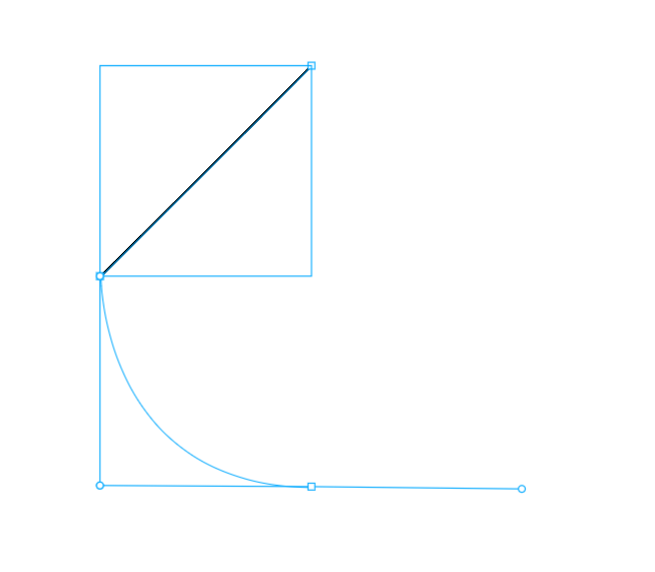
@Boldline: Yup, it is a right-angle, 45-degree guide, meant to help create smooth curves. Like this. It is quite useful. I'll add to the XLS thread for visibility.
-
@Daniel @Subpath I appreciate all the effort you've made to share about the spline tools and pen tool options that would really elevate VS in terms of professional use. I already love how the pen tool functions and appreciate the hard work @VectorStyler has made to get it to this point. Adding the options you and others have discussed on this thread would really take it to another level professionally. I can already see how my use of VS would be enhanced by all of this
-
@Daniel I’ve had the chance to spend more time testing the Bezigon tool, and it’s honestly a really impressive feature. I’m really looking forward to seeing more tools like this added to VectorStyler.
@Daniel said in Curvature tool:
@Honor: the guy who wrote Gravit, did so as a challenge over a weekend argument with his friends who said vector software can't be Web apps.
Wow, that’s seriously impressive!



