VectorStyler
    • Categories
    • Unread
    • Recent
    • Tags
    • Popular
    • Register
    • Login

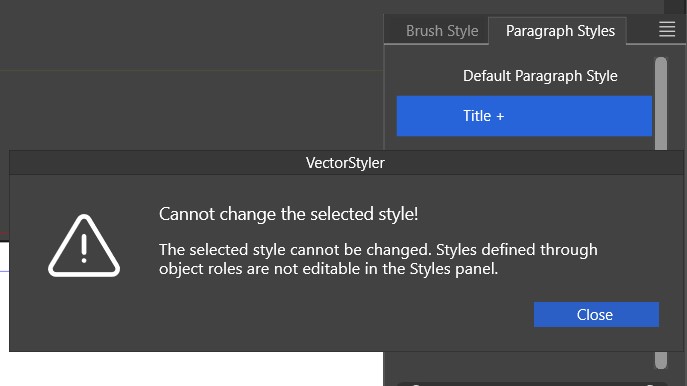
    Paragraph style - can't be changed through the panel
    Scheduled Pinned Locked Moved VectorStyler 1.2 beta
    49 Posts 2 Posters 113.0k Views 2 Watching
    Loading More Posts
    • Oldest to Newest
    • Newest to Oldest
    • Most Votes
    Reply
    • Reply as topic
    Log in to reply
    This topic has been deleted. Only users with topic management privileges can see it.
    • B Offline
      B-Vs-V @VectorStyler
      last edited by

      @VectorStyler said in Paragraph style - can't be changed through the panel:

      @Pat said in Paragraph style - can't be changed through the panel:

      would it be possible to apply styles with a simple (mouse/pen) click?

      Yes, in the panel menu -> Listing Mode, select "Edit on Double Click". Then single click will apply.

      That's something. I'm convinced that this option isn't very useful. I don't remember how it is in InDesign but I think that styles are applied by a simple click.

      Updating a style after modifying the text still doesn't work.

      I tried to replicate this, but the paragraph style was updated here.
      If you can send a file for this one, it might help replicating it. Thanks!

      I've recorded the issue and will sent you the mp4.

      W11 Pro 25H2 - 12th Gen Intel(R) i7-12700K 3.61 GHz - RAM 64 Go - NVIDIA GF GTX 4070 Ti - Intuos - Dell UP3216Q / Eizo ColorEdge
      W11 Pro 25H2 - 12th Gen Intel(R) i7-12700KF 3.60 GHz -RAM 64 Go - NVIDIA GF GTX 3080 - IntuosPro- ProArt PA329C

      VectorStylerV 1 Reply Last reply Reply Quote 0
      • VectorStylerV Offline
        VectorStyler @B-Vs-V
        last edited by

        @Pat Got the recording, thanks!

        B 1 Reply Last reply Reply Quote 0
        • B Offline
          B-Vs-V @VectorStyler
          last edited by

          @VectorStyler I hope this helps and that what I want to show is made clear ☺

          W11 Pro 25H2 - 12th Gen Intel(R) i7-12700K 3.61 GHz - RAM 64 Go - NVIDIA GF GTX 4070 Ti - Intuos - Dell UP3216Q / Eizo ColorEdge
          W11 Pro 25H2 - 12th Gen Intel(R) i7-12700KF 3.60 GHz -RAM 64 Go - NVIDIA GF GTX 3080 - IntuosPro- ProArt PA329C

          VectorStylerV 1 Reply Last reply Reply Quote 1
          • VectorStylerV Offline
            VectorStyler @B-Vs-V
            last edited by

            @Pat said in Paragraph style - can't be changed through the panel:

            I hope this helps and that what I want to show is made clear

            Replicated. I found two issues:

            • the paragraph changes after updating (should not). This can be fixed with a Control+R refresh
            • the [+] marker on the name should go away after applying the paragraph style.

            I will try to fix this problems for the next build.

            B 2 Replies Last reply Reply Quote 0
            • B Offline
              B-Vs-V @VectorStyler
              last edited by

              @VectorStyler Yes, that's right. Thanks ☺ I'll resume testing with the next build.

              W11 Pro 25H2 - 12th Gen Intel(R) i7-12700K 3.61 GHz - RAM 64 Go - NVIDIA GF GTX 4070 Ti - Intuos - Dell UP3216Q / Eizo ColorEdge
              W11 Pro 25H2 - 12th Gen Intel(R) i7-12700KF 3.60 GHz -RAM 64 Go - NVIDIA GF GTX 3080 - IntuosPro- ProArt PA329C

              1 Reply Last reply Reply Quote 1
              • B Offline
                B-Vs-V @VectorStyler
                last edited by

                @VectorStyler ...is still not working ☹ :

                • changing the font style of a paragraph
                • define a new paragraph style (e.g., title)
                • the new style appears in the list
                  But:
                • it can be applied to another paragraph without taking all the defined criteria into account
                • it can be applied to another paragraph but reverting to the default style is not correct, as the text may retain the font size of the new style
                • ...

                I think it would be a good idea to test these text styles in depth. As long as it doesn't work, it will be impossible to use VS for in-depth text control in a layout.

                W11 Pro 25H2 - 12th Gen Intel(R) i7-12700K 3.61 GHz - RAM 64 Go - NVIDIA GF GTX 4070 Ti - Intuos - Dell UP3216Q / Eizo ColorEdge
                W11 Pro 25H2 - 12th Gen Intel(R) i7-12700KF 3.60 GHz -RAM 64 Go - NVIDIA GF GTX 3080 - IntuosPro- ProArt PA329C

                VectorStylerV 2 Replies Last reply Reply Quote 1
                • VectorStylerV Offline
                  VectorStyler @B-Vs-V
                  last edited by

                  @Pat Added this to the backlog. Will try to replicate this and test it more.

                  1 Reply Last reply Reply Quote 0
                  • VectorStylerV Offline
                    VectorStyler @B-Vs-V
                    last edited by

                    @Pat said in Paragraph style - can't be changed through the panel:

                    I could not replicate these two, or I did not understood them:

                    it can be applied to another paragraph without taking all the defined criteria into account
                    it can be applied to another paragraph but reverting to the default style is not correct, as the text may retain the font size of the new style

                    B 1 Reply Last reply Reply Quote 0
                    • B Offline
                      B-Vs-V @VectorStyler
                      last edited by

                      @VectorStyler I've just tried again and had different issues. I've recorded it and I'm sending you the video.

                      W11 Pro 25H2 - 12th Gen Intel(R) i7-12700K 3.61 GHz - RAM 64 Go - NVIDIA GF GTX 4070 Ti - Intuos - Dell UP3216Q / Eizo ColorEdge
                      W11 Pro 25H2 - 12th Gen Intel(R) i7-12700KF 3.60 GHz -RAM 64 Go - NVIDIA GF GTX 3080 - IntuosPro- ProArt PA329C

                      VectorStylerV 1 Reply Last reply Reply Quote 1
                      • VectorStylerV Offline
                        VectorStyler @B-Vs-V
                        last edited by

                        @Pat Got it. Thanks!

                        This can be replicated.

                        B 1 Reply Last reply Reply Quote 0
                        • B Offline
                          B-Vs-V @VectorStyler
                          last edited by B-Vs-V

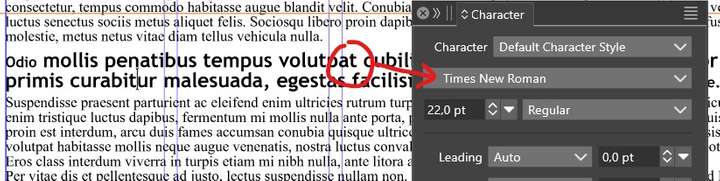
                          @VectorStyler testing the paragraph styles: so far so good except that the chosen font is still not displayed in the character panel:
                          0_1701793920529_p1.jpg

                          Edit: no, synchronisation is not always working as it should. Sorry, I stop testing this up to the next updates.

                          W11 Pro 25H2 - 12th Gen Intel(R) i7-12700K 3.61 GHz - RAM 64 Go - NVIDIA GF GTX 4070 Ti - Intuos - Dell UP3216Q / Eizo ColorEdge
                          W11 Pro 25H2 - 12th Gen Intel(R) i7-12700KF 3.60 GHz -RAM 64 Go - NVIDIA GF GTX 3080 - IntuosPro- ProArt PA329C

                          VectorStylerV 2 Replies Last reply Reply Quote 0
                          • VectorStylerV Offline
                            VectorStyler @B-Vs-V
                            last edited by

                            @Pat There is still work to do here.

                            1 Reply Last reply Reply Quote 0
                            • VectorStylerV Offline
                              VectorStyler @B-Vs-V
                              last edited by

                              @Pat said in Paragraph style - can't be changed through the panel:

                              synchronisation is not always working as it should

                              Does this refer to the character panel update, or to the paragraph style creation from the "Paragraph Style" panel?

                              B 1 Reply Last reply Reply Quote 0
                              • B Offline
                                B-Vs-V @VectorStyler
                                last edited by

                                @VectorStyler Paragraphe style panel.

                                W11 Pro 25H2 - 12th Gen Intel(R) i7-12700K 3.61 GHz - RAM 64 Go - NVIDIA GF GTX 4070 Ti - Intuos - Dell UP3216Q / Eizo ColorEdge
                                W11 Pro 25H2 - 12th Gen Intel(R) i7-12700KF 3.60 GHz -RAM 64 Go - NVIDIA GF GTX 3080 - IntuosPro- ProArt PA329C

                                VectorStylerV 1 Reply Last reply Reply Quote 0
                                • VectorStylerV Offline
                                  VectorStyler @B-Vs-V
                                  last edited by

                                  @Pat said in Paragraph style - can't be changed through the panel:

                                  Paragraphe style panel.

                                  I made a recording of the paragraph style syncing: https://recordit.co/0kiu9aB4s9

                                  Maybe I do something different here, attached the file also: 0_1701886168646_paragraphstyle2.vstyler

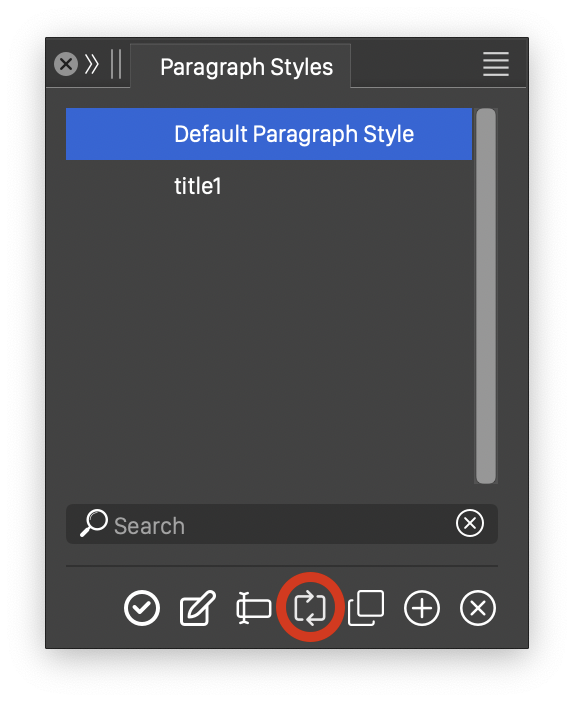
                                  In this file I have the default paragraph style and a new (not yet edited) "title1" style. In the text I changed some character and paragraph attributes, but still links to the default style at first.

                                  The syncing is done with he highlighted button (below).
                                  One problem: if the panel is set to apply the style in a single click, then syncing will not work, since by selecting the style (to sync) will apply the style, so there is nothing to sync.
                                  0_1701886228908_paragraphstyle.png

                                  B 1 Reply Last reply Reply Quote 0
                                  • B Offline
                                    B-Vs-V @VectorStyler
                                    last edited by B-Vs-V

                                    @VectorStyler I tried to repeat this problem but VS crashed (crash report sent).

                                    First, I was able to define a paragraph style and apply it to different parts of the text. It was easy to switch between the two styles.

                                    If I select a piece of text in a paragraph (with a paragraph style, e.g. title) and change the characteristics of the text (font, size, etc.), the synchronisation doesn't always work and I always ended up with "unstyled" text, and Ctrl+R does nothing.

                                    I didn't record this time, but it's like at the end of the video I sent you earlier.

                                    W11 Pro 25H2 - 12th Gen Intel(R) i7-12700K 3.61 GHz - RAM 64 Go - NVIDIA GF GTX 4070 Ti - Intuos - Dell UP3216Q / Eizo ColorEdge
                                    W11 Pro 25H2 - 12th Gen Intel(R) i7-12700KF 3.60 GHz -RAM 64 Go - NVIDIA GF GTX 3080 - IntuosPro- ProArt PA329C

                                    VectorStylerV 1 Reply Last reply Reply Quote 1
                                    • VectorStylerV Offline
                                      VectorStyler @B-Vs-V
                                      last edited by

                                      @Pat said in Paragraph style - can't be changed through the panel:

                                      I tried to repeat this problem but VS crashed (crash report sent).

                                      Got the crash report. Was the Guidelines panel open? Seems to be caused by that.

                                      Please send me the workspace and settings files (Help -> Reveal Workspace Folder).

                                      B 1 Reply Last reply Reply Quote 0
                                      • B Offline
                                        B-Vs-V @VectorStyler
                                        last edited by

                                        @VectorStyler Yes, it is.

                                        "Ressources" folder sent ☺

                                        W11 Pro 25H2 - 12th Gen Intel(R) i7-12700K 3.61 GHz - RAM 64 Go - NVIDIA GF GTX 4070 Ti - Intuos - Dell UP3216Q / Eizo ColorEdge
                                        W11 Pro 25H2 - 12th Gen Intel(R) i7-12700KF 3.60 GHz -RAM 64 Go - NVIDIA GF GTX 3080 - IntuosPro- ProArt PA329C

                                        1 Reply Last reply Reply Quote 1
                                        • B Offline
                                          B-Vs-V
                                          last edited by

                                          It is still not possible to synchronise a text modification with a paragraph style that has already been set up ☹

                                          W11 Pro 25H2 - 12th Gen Intel(R) i7-12700K 3.61 GHz - RAM 64 Go - NVIDIA GF GTX 4070 Ti - Intuos - Dell UP3216Q / Eizo ColorEdge
                                          W11 Pro 25H2 - 12th Gen Intel(R) i7-12700KF 3.60 GHz -RAM 64 Go - NVIDIA GF GTX 3080 - IntuosPro- ProArt PA329C

                                          VectorStylerV 1 Reply Last reply Reply Quote 0
                                          • VectorStylerV Offline
                                            VectorStyler @B-Vs-V
                                            last edited by

                                            @Pat said in Paragraph style - can't be changed through the panel:

                                            It is still not possible to synchronise a text modification with a paragraph style that has already been set up

                                            To change the style from the selected text or to apply the style onto the selected text?

                                            B 1 Reply Last reply Reply Quote 0
                                            • First post
                                              Last post