VectorStyler
    • Categories
    • Unread
    • Recent
    • Tags
    • Popular
    • Register
    • Login

    Shape effect, option panel
    Scheduled Pinned Locked Moved VectorStyler 1.2 beta
    24 Posts 2 Posters 36.1k Views 2 Watching
    Loading More Posts
    • Oldest to Newest
    • Newest to Oldest
    • Most Votes
    Reply
    • Reply as topic
    Log in to reply
    This topic has been deleted. Only users with topic management privileges can see it.
    • B Offline
      B-Vs-V @VectorStyler
      last edited by B-Vs-V

      @VectorStyler Thank you again ☺

      I seem to remember that with Adobe Illustrator, all one had to do was place a shortcut from another directory, even from another hard disk, in the default directory and you had access to all the stuff (brushes, etc.) one had created. Is it the same with VS (sorry to ask before testing myself).

      Also, I'd like to change the size of a complex blended object and I can't find the option to adapt the strokes. They keep their size and all the object's nuances become masked by the strokes.

      W11 Pro 25H2 - 12th Gen Intel(R) i7-12700K 3.61 GHz - RAM 64 Go - NVIDIA GF GTX 4070 Ti - Intuos - Dell UP3216Q / Eizo ColorEdge
      W11 Pro 25H2 - 12th Gen Intel(R) i7-12700KF 3.60 GHz -RAM 64 Go - NVIDIA GF GTX 3080 - IntuosPro- ProArt PA329C

      VectorStylerV 1 Reply Last reply Reply Quote 0
      • VectorStylerV Offline
        VectorStyler @B-Vs-V
        last edited by

        @Pat said in Shape effect, option panel:

        I seem to remember that with Adobe Illustrator, all one had to do was place a shortcut from another directory, even from another hard disk, in the default directory and you had access to all the stuff (brushes, etc.) one had created. Is it the same with VS (sorry to ask before testing myself).

        Yes, this is the same. In Styles -> Preset Manager click Create Group. Give a name and select a folder. Works for VS preset files only.

        Also, I'd like to change the size of a complex blended object and I can't find the option to adapt the strokes. They keep their size and all the object's nuances become masked by the strokes.

        Group the blend with its two sources and on the group enable Object Options -> Geometry -> Transformed Stroke.

        B 1 Reply Last reply Reply Quote 1
        • B Offline
          B-Vs-V @VectorStyler
          last edited by

          @VectorStyler said in Shape effect, option panel:

          @Pat About Presets vs Styles:

          Presets: are saved globally, available in all documents in the future. Can be saved into preset collections and placed in some user folder, etc. But presets are never "linked", changing the preset will not update their uses. Managed with the Presets panel and Styles->Preset Manager command.

          Styles: saved in the current document only, can be exported / imported (also see the new Data Source functionality). Styles are always "linked", after applying on some object, if the style is changed all objects using it are updated.
          This goes for any attribute that allows saving styles.
          Managed with the Styles panel and the Styles->Document Styles command.

          @VectorStyler I'd like to create and start using brushes and I see that it's also possible to save them as presets and/or styles. Is this the same concept for brushes? Where are they saved (can I select a specific directory)?
          Many thanks for your feedback

          W11 Pro 25H2 - 12th Gen Intel(R) i7-12700K 3.61 GHz - RAM 64 Go - NVIDIA GF GTX 4070 Ti - Intuos - Dell UP3216Q / Eizo ColorEdge
          W11 Pro 25H2 - 12th Gen Intel(R) i7-12700KF 3.60 GHz -RAM 64 Go - NVIDIA GF GTX 3080 - IntuosPro- ProArt PA329C

          VectorStylerV 1 Reply Last reply Reply Quote 0
          • VectorStylerV Offline
            VectorStyler @B-Vs-V
            last edited by

            @Pat said in Shape effect, option panel:

            I'd like to create and start using brushes and I see that it's also possible to save them as presets and/or styles. Is this the same concept for brushes?

            yes, same concept.

            Where are they saved (can I select a specific directory)?

            Styles are saved only in the document

            Presets are saved in the app user folder (similar place as the settings and workspace).
            It is possible to create additional presets folders, in Preset Manager -> Create Group
            Then when saving new presets and giving the name, select the group.

            B 1 Reply Last reply Reply Quote 1
            • B Offline
              B-Vs-V @VectorStyler
              last edited by

              @VectorStyler Thank you for your invaluable help ☺

              W11 Pro 25H2 - 12th Gen Intel(R) i7-12700K 3.61 GHz - RAM 64 Go - NVIDIA GF GTX 4070 Ti - Intuos - Dell UP3216Q / Eizo ColorEdge
              W11 Pro 25H2 - 12th Gen Intel(R) i7-12700KF 3.60 GHz -RAM 64 Go - NVIDIA GF GTX 3080 - IntuosPro- ProArt PA329C

              1 Reply Last reply Reply Quote 0
              • B Offline
                B-Vs-V @VectorStyler
                last edited by

                @VectorStyler said in Shape effect, option panel:

                @Pat said in Shape effect, option panel:

                Also, I'd like to change the size of a complex blended object and I can't find the option to adapt the strokes. They keep their size and all the object's nuances become masked by the strokes.

                Group the blend with its two sources and on the group enable Object Options -> Geometry -> Transformed Stroke.

                @VectorStyler Well, it is not ok...

                Before:

                0_1701246514625_b.jpg

                After [Object Options -> Geometry -> Transformed Stroke]
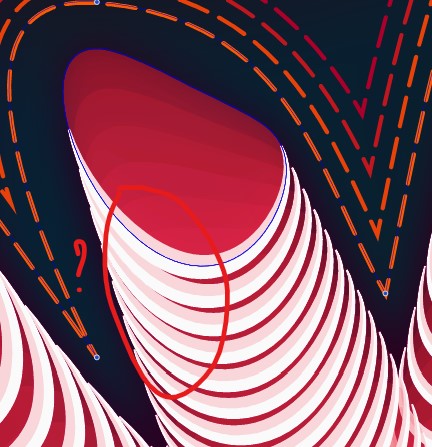
                0_1701246557210_a.jpg

                W11 Pro 25H2 - 12th Gen Intel(R) i7-12700K 3.61 GHz - RAM 64 Go - NVIDIA GF GTX 4070 Ti - Intuos - Dell UP3216Q / Eizo ColorEdge
                W11 Pro 25H2 - 12th Gen Intel(R) i7-12700KF 3.60 GHz -RAM 64 Go - NVIDIA GF GTX 3080 - IntuosPro- ProArt PA329C

                VectorStylerV 1 Reply Last reply Reply Quote 1
                • VectorStylerV Offline
                  VectorStyler @B-Vs-V
                  last edited by

                  @Pat I opened a bug on this one.

                  Are these stroke styles inside a blend object?

                  B 1 Reply Last reply Reply Quote 0
                  • B Offline
                    B-Vs-V @VectorStyler
                    last edited by

                    @VectorStyler yes, it is.
                    I've sent you this file before, but I can send it again if you need it.

                    W11 Pro 25H2 - 12th Gen Intel(R) i7-12700K 3.61 GHz - RAM 64 Go - NVIDIA GF GTX 4070 Ti - Intuos - Dell UP3216Q / Eizo ColorEdge
                    W11 Pro 25H2 - 12th Gen Intel(R) i7-12700KF 3.60 GHz -RAM 64 Go - NVIDIA GF GTX 3080 - IntuosPro- ProArt PA329C

                    VectorStylerV 1 Reply Last reply Reply Quote 0
                    • VectorStylerV Offline
                      VectorStyler @B-Vs-V
                      last edited by

                      @Pat Please send it again, the version on the screenshot.

                      B 2 Replies Last reply Reply Quote 0
                      • B Offline
                        B-Vs-V @VectorStyler
                        last edited by

                        @VectorStyler File sent ☺

                        W11 Pro 25H2 - 12th Gen Intel(R) i7-12700K 3.61 GHz - RAM 64 Go - NVIDIA GF GTX 4070 Ti - Intuos - Dell UP3216Q / Eizo ColorEdge
                        W11 Pro 25H2 - 12th Gen Intel(R) i7-12700KF 3.60 GHz -RAM 64 Go - NVIDIA GF GTX 3080 - IntuosPro- ProArt PA329C

                        1 Reply Last reply Reply Quote 1
                        • B Offline
                          B-Vs-V @VectorStyler
                          last edited by

                          @VectorStyler I don't know if this should be fixed but it is not, and playing with stroke width leads to weird effects.

                          W11 Pro 25H2 - 12th Gen Intel(R) i7-12700K 3.61 GHz - RAM 64 Go - NVIDIA GF GTX 4070 Ti - Intuos - Dell UP3216Q / Eizo ColorEdge
                          W11 Pro 25H2 - 12th Gen Intel(R) i7-12700KF 3.60 GHz -RAM 64 Go - NVIDIA GF GTX 3080 - IntuosPro- ProArt PA329C

                          VectorStylerV 1 Reply Last reply Reply Quote 0
                          • VectorStylerV Offline
                            VectorStyler @B-Vs-V
                            last edited by

                            @Pat said in Shape effect, option panel:

                            I don't know if this should be fixed but it is not, and playing with stroke width leads to weird effects.

                            Not yet fixed, but there are issues with replicating.
                            In the example, there was a Shape Effect on top of the blend group.
                            Shape effects do not scale strokes (by default), but it can be set of "expand" and the "distort" strokes.

                            B 1 Reply Last reply Reply Quote 0
                            • B Offline
                              B-Vs-V @VectorStyler
                              last edited by

                              @VectorStyler said in Shape effect, option panel:

                              @Pat said in Shape effect, option panel:

                              I don't know if this should be fixed but it is not, and playing with stroke width leads to weird effects.

                              In the example, there was a Shape Effect on top of the blend group.
                              Shape effects do not scale strokes (by default), but it can be set of "expand" and the "distort" strokes.

                              @VectorStyler Yes, I also thought that the shape effects could be a problem and I tried without them but it was even worse: the strokes suddenly disappeared and it was impossible to get them back.

                              W11 Pro 25H2 - 12th Gen Intel(R) i7-12700K 3.61 GHz - RAM 64 Go - NVIDIA GF GTX 4070 Ti - Intuos - Dell UP3216Q / Eizo ColorEdge
                              W11 Pro 25H2 - 12th Gen Intel(R) i7-12700KF 3.60 GHz -RAM 64 Go - NVIDIA GF GTX 3080 - IntuosPro- ProArt PA329C

                              VectorStylerV 1 Reply Last reply Reply Quote 0
                              • VectorStylerV Offline
                                VectorStyler @B-Vs-V
                                last edited by

                                @Pat said in Shape effect, option panel:

                                the strokes suddenly disappeared and it was impossible to get them back.

                                I will try to replicate this.

                                1 Reply Last reply Reply Quote 1
                                • First post
                                  Last post