VectorStyler
    • Categories
    • Unread
    • Recent
    • Tags
    • Popular
    • Register
    • Login

    Regarding the halftone repeater types
    Scheduled Pinned Locked Moved Features and Ideas
    76 Posts 6 Posters 204.6k Views 4 Watching
    Loading More Posts
    • Oldest to Newest
    • Newest to Oldest
    • Most Votes
    Reply
    • Reply as topic
    Log in to reply
    This topic has been deleted. Only users with topic management privileges can see it.
    • VectorStylerV Offline
      VectorStyler @Li Xiao
      last edited by

      @Li-Xiao it would be interesting to know more about those techniques.

      L 2 Replies Last reply Reply Quote 1
      • L Offline
        Li Xiao @VectorStyler
        last edited by

        @VectorStyler There are many online programs and small applications available that can generate this type of effect. Some are free, while others require payment. I have also purchased some related software and even sought the assistance of developers to customize certain aspects. I have been gradually organizing them and will soon share them. VectorStyler can become even stronger and better in terms of its capabilities.

        1 Reply Last reply Reply Quote 3
        • L Offline
          Li Xiao @VectorStyler
          last edited by

          @VectorStyler VS's Repeater feature includes options for position, scaling, and rotation, but it lacks the option for skewing.

          Skew based on grayscale value, it looks beautiful when combined with scaling results.

          VBA generation is too slow, so I won't record a video.

          Reference files

          0_1711726476791_skew.jpg
          0_1711726267519_skew.pdf

          VectorStylerV 1 Reply Last reply Reply Quote 2
          • VectorStylerV Offline
            VectorStyler @Li Xiao
            last edited by

            @Li-Xiao I added this to the backlog. There might exist a different solution, that does not require an additional option.

            L 1 Reply Last reply Reply Quote 1
            • L Offline
              Li Xiao @VectorStyler
              last edited by

              @VectorStyler
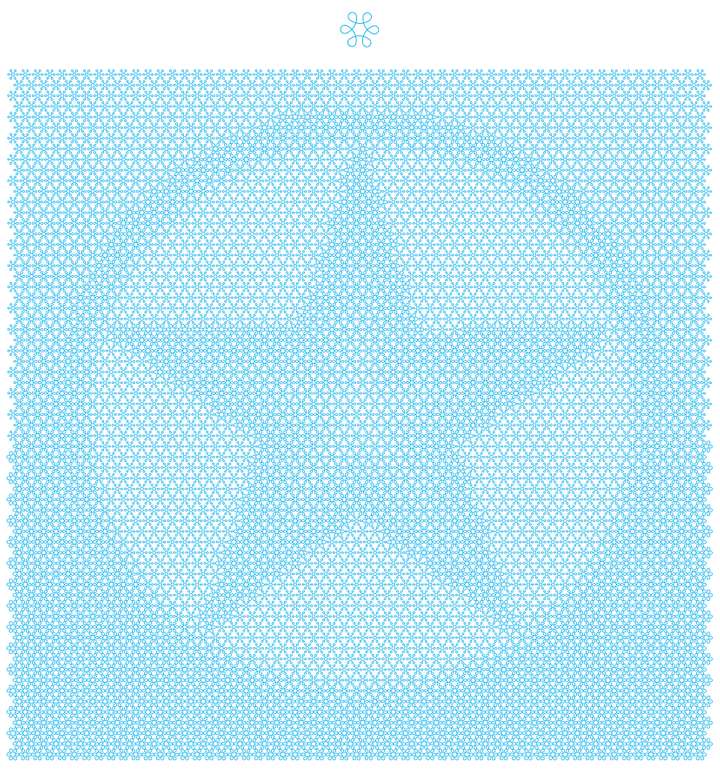
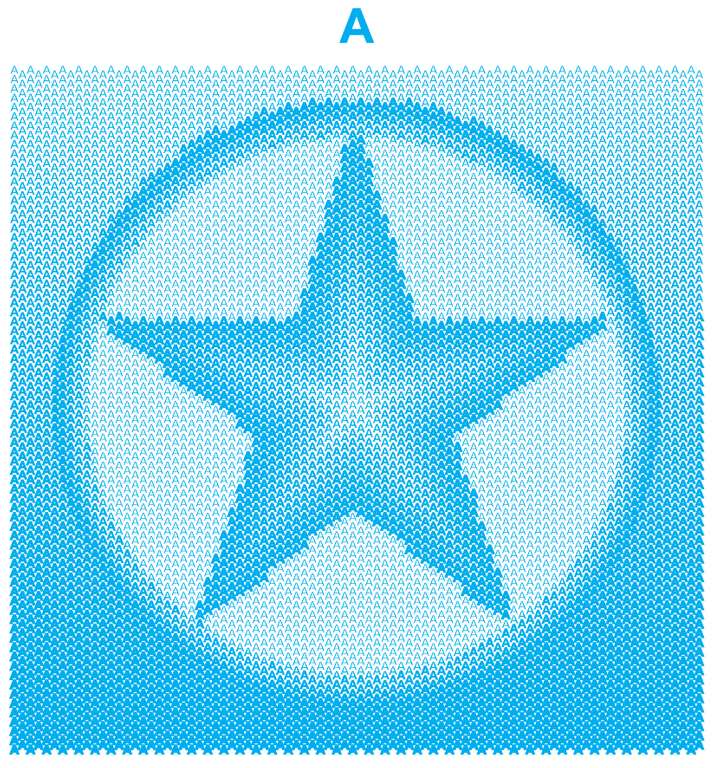
              The principle of offset halftone is that at a grayscale value of 50%, the object remains unchanged, while at grayscale values of 1-49%, it is offset inward, and at grayscale values of 51-100%, it is offset outward.
              0_1711824163968_Offset halftone Stroke.jpg
              0_1711824187854_Offset halftone Stroke.pdf
              0_1711824200076_Offset halftone Fill.jpg
              0_1711824210898_Offset halftone Fill A.pdf
              0_1711824218841_Offset halftone Fill VS.pdf

              VectorStylerV 1 Reply Last reply Reply Quote 1
              • VectorStylerV Offline
                VectorStyler @Li Xiao
                last edited by

                @Li-Xiao Were these created in VS?

                L 1 Reply Last reply Reply Quote 0
                • L Offline
                  Li Xiao @VectorStyler
                  last edited by

                  @VectorStyler I have attempted to achieve a similar effect in VS without success. This effect was created using a VBA script in CorelDRAW.

                  VectorStylerV 1 Reply Last reply Reply Quote 1
                  • VectorStylerV Offline
                    VectorStyler @Li Xiao
                    last edited by

                    @Li-Xiao I will get back later on this one with some form of solution in VS.

                    L 2 Replies Last reply Reply Quote 1
                    • L Offline
                      Li Xiao @VectorStyler
                      last edited by

                      @VectorStyler That's great! I'm looking forward to it. VBA in CorelDRAW can be slow, and this particular script was written by a friend of mine. Chrysanthos mentioned that he has written over a thousand macros for CorelDRAW, and some of them have interesting creative ideas. I like some of the ones he has written. He mentioned that he's not ready to sell them yet. Here is his Facebook group: https://www.facebook.com/groups/1907545242797003. However, now I don't need them anymore as most of the tasks can be accomplished using VS.

                      S 1 Reply Last reply Reply Quote 1
                      • S Offline
                        Subpath @Li Xiao
                        last edited by Subpath

                        @Li-Xiao

                        maybe you dit it already, i think you should also take
                        a look at "Cavalry" a procedural vector animation app,
                        at least for inspration, i think it will blow your mind

                        i was and be very impressed, looks a bit like
                        science fiction of vector graphics to me
                        and of course i still love VectorStyler 🙂

                        Win 11
                        CPU: AMD Ryzen 5 9600X, 6-core.
                        GPU: Nvidia Geforce RTX 5070.

                        1 Reply Last reply Reply Quote 1
                        • S Offline
                          Subpath
                          last edited by Subpath

                          here a video

                          0_1711827070193_cavalry.png

                          Win 11
                          CPU: AMD Ryzen 5 9600X, 6-core.
                          GPU: Nvidia Geforce RTX 5070.

                          L 1 Reply Last reply Reply Quote 1
                          • L Offline
                            Li Xiao @Subpath
                            last edited by

                            @Subpath Thank you! I have tried Cavalry, and it's really impressive. However, I'm not a fan of its subscription model. Although I have been subscribed to Adobe and Corel for a long time, I am considering canceling them when they expire.

                            S 1 Reply Last reply Reply Quote 1
                            • L Offline
                              Li Xiao @VectorStyler
                              last edited by Li Xiao

                              @VectorStyler
                              I tried using Repeater to create a dash effect halftone, but I couldn't replicate it successfully. When using a single line, there was an issue at 0 degrees, but it appeared normal when rotated by 0.1 degrees.

                              https://youtu.be/HM6uJBFQZAc

                              0_1711828473429_Dash Halftone.pdf

                              VectorStylerV 1 Reply Last reply Reply Quote 1
                              • VectorStylerV Offline
                                VectorStyler @Li Xiao
                                last edited by

                                @Li-Xiao said in Regarding the halftone repeater types:

                                I tried using Repeater to create a dash effect halftone, but I couldn't replicate it successfully.

                                I added this to the backlog.

                                1 Reply Last reply Reply Quote 1
                                • S Offline
                                  Subpath @Li Xiao
                                  last edited by Subpath

                                  @Li-Xiao

                                  I tried such a halftone effect in Cavalry but when I converted the result into curves
                                  the effect was gone. In the end it turned out that it was a bitmap effect.

                                  VectorStylers vector graphics results from the Repeater are then more impressive
                                  to me, even when Cavalry can do some cool tricks.
                                  But its made with Animation in Mind.

                                  Win 11
                                  CPU: AMD Ryzen 5 9600X, 6-core.
                                  GPU: Nvidia Geforce RTX 5070.

                                  L 1 Reply Last reply Reply Quote 1
                                  • L Offline
                                    Li Xiao @Subpath
                                    last edited by

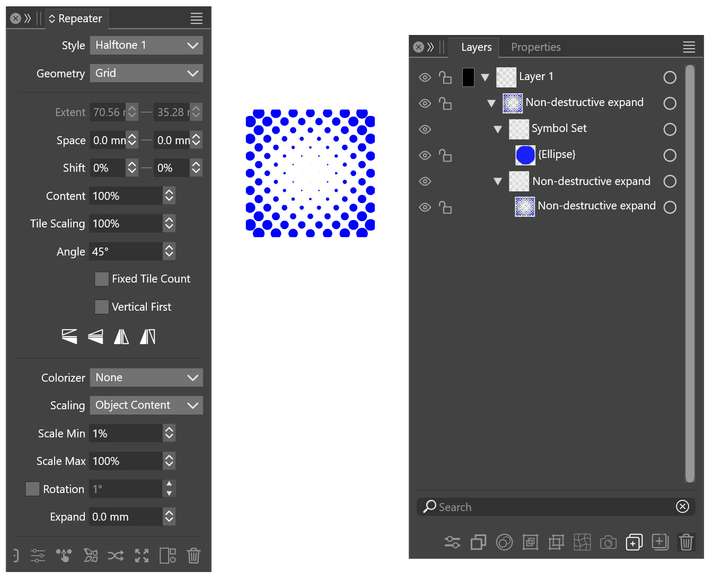
                                    @Subpath Yes, Repeater is incredibly powerful. However, it lacks a non-destructive expansion feature. Currently, image and gradient-based generation can only be overlaid with shape effects after expansion. It would be great to have non-destructive expansion added to Repeater as soon as possible.

                                    VectorStylerV 1 Reply Last reply Reply Quote 1
                                    • VectorStylerV Offline
                                      VectorStyler @Li Xiao
                                      last edited by

                                      @Li-Xiao said in Regarding the halftone repeater types:

                                      It would be great to have non-destructive expansion added to Repeater as soon as possible.

                                      How would this work? If the repeater is expanded, and the individual object copies can be modified, then it is destructive.

                                      L 1 Reply Last reply Reply Quote 0
                                      • F Offline
                                        fde101 Global Moderator
                                        last edited by

                                        Vectoraster is another app that is great for this, if you happen to be on a Mac.

                                        Not free, but it is a one-time payment.

                                        L 1 Reply Last reply Reply Quote 0
                                        • L Offline
                                          Li Xiao @VectorStyler
                                          last edited by

                                          @VectorStyler

                                          How would this work? If the repeater is expanded, and the individual object copies can be modified, then it is destructive.

                                          Non-destructive expansion, similar to virtual expansion, allows the results generated by Repeater to be reflected within the layer and remain in an editable state. This enables shape effects to be applied to the objects after virtual expansion. It doesn't require modifying individual objects after expansion; it's just to allow the application of shape effects to the overall object. Is there a way to achieve this type of expansion?
                                          0_1711879285967_Non-destructive expand.jpg

                                          VectorStylerV 1 Reply Last reply Reply Quote 0
                                          • VectorStylerV Offline
                                            VectorStyler @Li Xiao
                                            last edited by

                                            @Li-Xiao said in Regarding the halftone repeater types:

                                            Is there a way to achieve this type of expansion?

                                            In the Repeater panel menu: enable "Apply Shape Effects"

                                            L 1 Reply Last reply Reply Quote 0
                                            • First post
                                              Last post