VectorStyler
    • Categories
    • Unread
    • Recent
    • Tags
    • Popular
    • Register
    • Login

    Missing custom style in halftone within the image effects

    Scheduled Pinned Locked Moved Features and Ideas
    21 Posts 4 Posters 30.6k Views 4 Watching
    Loading More Posts
    • Oldest to Newest
    • Newest to Oldest
    • Most Votes
    Reply
    • Reply as topic
    Log in to reply
    This topic has been deleted. Only users with topic management privileges can see it.
    • VectorStylerV Offline
      VectorStyler @Li Xiao
      last edited by

      @Li-Xiao This goes to the features backlog. I will try to implement it in the repeater, as this looks like it should be a vector feature.

      L M 2 Replies Last reply Reply Quote 1
      • L Offline
        Li Xiao @VectorStyler
        last edited by

        @VectorStyler It would be fantastic to have support for it in Repeater. However, when there are too many objects, the computational speed might be slower compared to using the Halftone effect on images. The Halftone effect on images also offers some options that are not available in Repeater, such as image channels.

        VectorStylerV 1 Reply Last reply Reply Quote 1
        • VectorStylerV Offline
          VectorStyler @Li Xiao
          last edited by

          @Li-Xiao said in Missing custom style in halftone within the image effects:

          Halftone effect on images

          The problem is that Halftones are calculated when rendering the final on screen image. The repeaters are calculated once when the repeater object is changed, and they stay the same vectors when rendering.

          So this might be faster with repeaters.

          L 1 Reply Last reply Reply Quote 1
          • L Offline
            Li Xiao @VectorStyler
            last edited by Li Xiao

            @VectorStyler
            Thank you for the explanation.
            Are several filters of Artistic Halftone (https://pixeology.com/ArtisticHalftone/features.html) suitable for Repeater?

            VectorStylerV 1 Reply Last reply Reply Quote 1
            • VectorStylerV Offline
              VectorStyler @Li Xiao
              last edited by

              @Li-Xiao Stippling and Anyscreen could be suitable. but Stochastic Screening and Texture Halftone are not. But for these there might be extensions to the repeater or some other (new) vector feature.

              L 1 Reply Last reply Reply Quote 1
              • L Offline
                Li Xiao @VectorStyler
                last edited by

                @VectorStyler
                I'm really looking forward to it.
                Is this mycelium effect suitable for Repeater?
                https://onecm.com/v4/mycelium.html

                VectorStylerV 1 Reply Last reply Reply Quote 0
                • VectorStylerV Offline
                  VectorStyler @Li Xiao
                  last edited by

                  @Li-Xiao said in Missing custom style in halftone within the image effects:

                  Is this mycelium effect suitable for Repeater?

                  Not really. Here it looks like there are some random curves, with density adjusted to image tone.
                  I think these kind of effects will be specialized plugins later.

                  1 Reply Last reply Reply Quote 1
                  • M Offline
                    monsterfox @VectorStyler
                    last edited by

                    @VectorStyler This is just a case, I know that VS can also do it. I want to ask, can this function be added in the repeater? Make it into a switch to fuse two adjacent shapes. Make a halftone effect. https://www.youtube.com/shorts/Au79csRg6QY?feature=share

                    VectorStylerV S 2 Replies Last reply Reply Quote 0
                    • VectorStylerV Offline
                      VectorStyler @monsterfox
                      last edited by

                      @monsterfox In the video, some of the shapes are handled differently than others, so this is not for the repeater.
                      But otherwise, yes this is doable in VS.

                      M 1 Reply Last reply Reply Quote 0
                      • S Offline
                        Subpath @monsterfox
                        last edited by Subpath

                        @monsterfox

                        take a look at this video from @encart to get the Idea
                        Note: Hold the Alt-Key and do the Boolean Union then
                        (this is Vectorstylers Combine Mode (Live BoooleanMode))

                        Here the Video

                        He post this in a Tutorial of mine which shows some
                        possibilities of the Combine Mode
                        https://www.vectorstyler.com/forum/topic/1963/easily-editable-arrow

                        Win 11
                        CPU: AMD Ryzen 5 9600X, 6-core.
                        GPU: Nvidia Geforce RTX 5070.

                        M 2 Replies Last reply Reply Quote 0
                        • M Offline
                          monsterfox @VectorStyler
                          last edited by

                          @VectorStyler Okay, I just want to figure out how the fusion effect of adjacent graphics in the halftone effect is achieved, and it feels similar to the effect in the video, so I put forward a suggestion.

                          VectorStylerV 1 Reply Last reply Reply Quote 0
                          • M Offline
                            monsterfox @Subpath
                            last edited by

                            @Subpath Thank you for the tutorial link. I will try the halftone effect and see if the graphic fusion works.

                            1 Reply Last reply Reply Quote 1
                            • VectorStylerV Offline
                              VectorStyler @monsterfox
                              last edited by

                              @monsterfox Similar steps as in the video, but you have to expand the repeater.

                              1 Reply Last reply Reply Quote 0
                              • M Offline
                                monsterfox @Subpath
                                last edited by

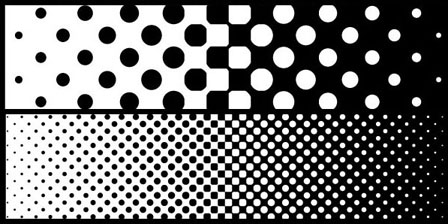
                                @Subpath The effect is not the same as I imagined. 0_1717947713567_mmexport1717947698681.jpg
                                1 Reply Last reply Reply Quote 0
                                • S Offline
                                  Subpath
                                  last edited by Subpath

                                  @monsterfox

                                  I don't know what you had in mind,
                                  and I'm not sure if what was shown in the video
                                  is possible with the repeater

                                  In the meantime i figure out that the Affinity Designer
                                  Contour Tool works a bit different then the VectorStyler
                                  Contour Tool.

                                  Affinity Designer allows no Color in their Contour Tool
                                  which VectorStyler Contour Tool does not offer.

                                  To get the Effect shown in the Video in VS your Circle has
                                  to have a Stroke and "Use round joins on cusp corners" set.

                                  Here a video showing the principle in VS.

                                  It also takes a bit more work to do this with the Contour tool
                                  in VectorStyler than manually. But on the other hand, the
                                  Contour Tool produces interesting results.

                                  Win 11
                                  CPU: AMD Ryzen 5 9600X, 6-core.
                                  GPU: Nvidia Geforce RTX 5070.

                                  1 Reply Last reply Reply Quote 0
                                  • S Offline
                                    Subpath
                                    last edited by Subpath

                                    @monsterfox

                                    I gave the Repeater a go

                                    Repeate Circles with a Contour and
                                    "Use round joins on cusp corners" set like this

                                    Reduce the Space between them (in Repeater)
                                    to get the Effect
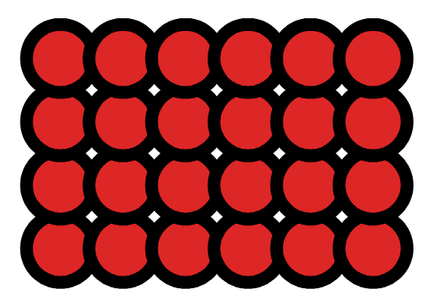
                                    0_1717959193080_Repeater-1.png
                                    .
                                    .
                                    Expand the Result from Repeater and
                                    delete the Circles you dont want to process.
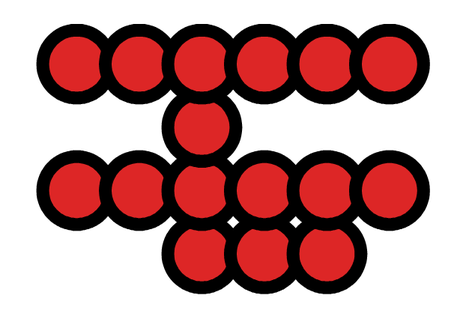
                                    0_1717959257076_Repeater-2.png
                                    .
                                    .
                                    Select the circles and do a Boolean Add.
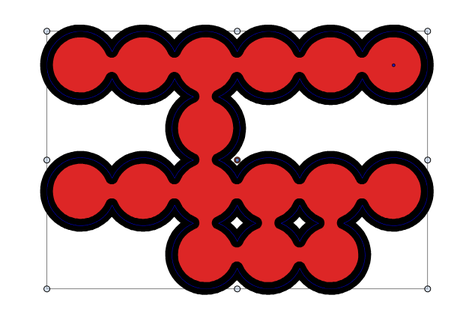
                                    0_1717959280052_Repeater-3.png

                                    0_1717959287467_Repeater-4.png

                                    Win 11
                                    CPU: AMD Ryzen 5 9600X, 6-core.
                                    GPU: Nvidia Geforce RTX 5070.

                                    M 1 Reply Last reply Reply Quote 0
                                    • M Offline
                                      monsterfox @Subpath
                                      last edited by

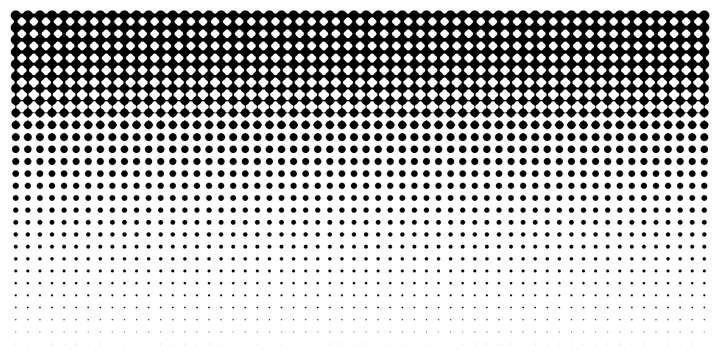
                                      @Subpath Really thank you for your enthusiasm. I have mastered the effect in your video. The effect I imagined should be like the bitmap in Photoshop, the halftone effect, and the circle graphics above 50 degrees of gray will fuse until 100 degrees of black.Their fused state is based on the current graphic, but my effect picture is not the same. The fused area is in a plum blossom state.

                                      S 1 Reply Last reply Reply Quote 0
                                      • S Offline
                                        Subpath @monsterfox
                                        last edited by

                                        @monsterfox

                                        Thank you, I don't see that as enthusiasm. When I saw your video,
                                        I remembered that Encart had already shown something similar.

                                        As far as I know, this fusion effect only works well with shapes of the
                                        same size. So I don't know how your idea could work.

                                        Win 11
                                        CPU: AMD Ryzen 5 9600X, 6-core.
                                        GPU: Nvidia Geforce RTX 5070.

                                        L 1 Reply Last reply Reply Quote 0
                                        • L Offline
                                          Li Xiao @Subpath
                                          last edited by

                                          @Subpath
                                          He wants to create Euclidean halftone using the Fusion Ball method. Currently, Repeater and Fusion Ball cannot achieve this. We are looking forward to version 1.3 to see if it can be done.

                                          Euclidean dot (Transforming Round Dot): Round/Square/Round
                                          https://workflowhelp.kodak.com/download/attachments/229783381/worddava24f2bf877b5355acdd16d960264293a.png?version=1&modificationDate=1686070462915&api=v2

                                          S 1 Reply Last reply Reply Quote 2
                                          • S Offline
                                            Subpath @Li Xiao
                                            last edited by Subpath

                                            @Li-Xiao

                                            In my opinion, the fusion effect is not suitable for replicating something like this.
                                            Because it only works well with shapes that are the same size and an contour/outline is needed.
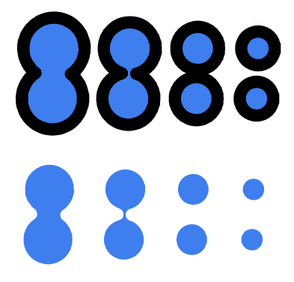

                                            0_1718259339331_Fusion-Effect.png

                                            Win 11
                                            CPU: AMD Ryzen 5 9600X, 6-core.
                                            GPU: Nvidia Geforce RTX 5070.

                                            1 Reply Last reply Reply Quote 2
                                            • First post
                                              Last post