<?xml version="1.0" encoding="UTF-8"?><rss xmlns:dc="http://purl.org/dc/elements/1.1/" xmlns:content="http://purl.org/rss/1.0/modules/content/" xmlns:atom="http://www.w3.org/2005/Atom" version="2.0"><channel><title><![CDATA[Using Canvas in the workflow]]></title><description><![CDATA[<p dir="auto">Sorry to revisit this point <img src="https://www.vectorstyler.com/forum/assets/plugins/nodebb-plugin-emoji/emoji/android/263a.png?v=ec4d969cc53" class="not-responsive emoji emoji-android emoji--relaxed" style="height:23px;width:auto;vertical-align:middle" title=":relaxed:" alt="☺" /> , but I'd like to make the most of VS's special features including "special" Canvas.<br />
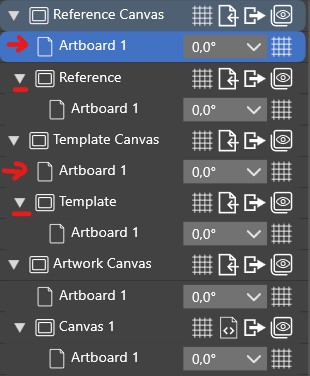
If I've understood everything correctly, by default there's a Canva Reference and a Canva Template, so you can include a special artboard in your workflow to place objects defined as references or symbols (or characterised by a specific style that can be reused). Placing these objects alone does not define them as such. We have to do that later, OK. Why is there a default Artboard and a sub-menu with a new Artboard?</p>
<p dir="auto"><img src="/forum/assets/uploads/files/1720167113117-c1.jpg" alt="0_1720167112556_c1.jpg" class=" img-fluid img-markdown" /></p>
<p dir="auto">When placed on these Canvas, are these "References" or "Symbols" objects automatically available for other new documents (or do we have to save or export them as such or 'I don't know'?)?<br />
If, by default, these objects are just objects with no specific "definition", what's the point of using these particular Canvas?<br />
Thanks <img src="https://www.vectorstyler.com/forum/assets/plugins/nodebb-plugin-emoji/emoji/android/263a.png?v=ec4d969cc53" class="not-responsive emoji emoji-android emoji--relaxed" style="height:23px;width:auto;vertical-align:middle" title=":relaxed:" alt="☺" /></p>
]]></description><link>https://www.vectorstyler.com/forum/topic/4475/using-canvas-in-the-workflow</link><generator>RSS for Node</generator><lastBuildDate>Sun, 17 May 2026 13:04:30 GMT</lastBuildDate><atom:link href="https://www.vectorstyler.com/forum/topic/4475.rss" rel="self" type="application/rss+xml"/><pubDate>Fri, 05 Jul 2024 08:13:08 GMT</pubDate><ttl>60</ttl><item><title><![CDATA[Reply to Using Canvas in the workflow on Sat, 06 Jul 2024 10:01:06 GMT]]></title><description><![CDATA[<p dir="auto">@Pat said in <a href="/forum/post/26237">Using Canvas in the workflow</a>:</p>
<blockquote>
<p dir="auto">So it makes more sense to work with presets for everything</p>
</blockquote>
<p dir="auto">Only if you want to use it in other documents also, and you do not want to link to the original, that is no automatic update if the original symbol or style definition changes.</p>
]]></description><link>https://www.vectorstyler.com/forum/post/26238</link><guid isPermaLink="true">https://www.vectorstyler.com/forum/post/26238</guid><dc:creator><![CDATA[VectorStyler]]></dc:creator><pubDate>Sat, 06 Jul 2024 10:01:06 GMT</pubDate></item><item><title><![CDATA[Reply to Using Canvas in the workflow on Sat, 06 Jul 2024 09:35:21 GMT]]></title><description><![CDATA[<p dir="auto"><a class="plugin-mentions-user plugin-mentions-a" href="/forum/user/vectorstyler" aria-label="Profile: VectorStyler">@<bdi>VectorStyler</bdi></a> So it makes more sense to work with presets for everything.</p>
]]></description><link>https://www.vectorstyler.com/forum/post/26237</link><guid isPermaLink="true">https://www.vectorstyler.com/forum/post/26237</guid><dc:creator><![CDATA[B-Vs-V]]></dc:creator><pubDate>Sat, 06 Jul 2024 09:35:21 GMT</pubDate></item><item><title><![CDATA[Reply to Using Canvas in the workflow on Sat, 06 Jul 2024 09:06:06 GMT]]></title><description><![CDATA[<p dir="auto">@Pat said in <a href="/forum/post/26235">Using Canvas in the workflow</a>:</p>
<blockquote>
<p dir="auto">Thus, a simple copy-paste would not maintain its symbol attribute and it's only maintained if you copy it to a Canvas of the same type</p>
</blockquote>
<p dir="auto">Yes, because you actually copy paste the "content" or "source" object of a symbol, not the symbol instance.</p>
<blockquote>
<p dir="auto">I've yet to test dynamic linking between objects (e.g., symboles) between documents.</p>
</blockquote>
<p dir="auto">The problem here is to know which other document (containing symbols) we want to use in our current edited document (using the symbol).<br />
We cannot just list all other documents containing styles or symbols to be "visible", this is what presets are for.</p>
<p dir="auto">So the way to "link" that document with symbols (or styles), is to add it in the Styles -&gt; Document Links into the "linked" document lists. These documents will stay separate files, but their content can be used as symbols or styles. Important to know, if that linked document changes, the edited document is updated (nothing is copied between documents).</p>
]]></description><link>https://www.vectorstyler.com/forum/post/26236</link><guid isPermaLink="true">https://www.vectorstyler.com/forum/post/26236</guid><dc:creator><![CDATA[VectorStyler]]></dc:creator><pubDate>Sat, 06 Jul 2024 09:06:06 GMT</pubDate></item><item><title><![CDATA[Reply to Using Canvas in the workflow on Sat, 06 Jul 2024 08:17:57 GMT]]></title><description><![CDATA[<p dir="auto"><a class="plugin-mentions-user plugin-mentions-a" href="/forum/user/vectorstyler" aria-label="Profile: VectorStyler">@<bdi>VectorStyler</bdi></a> Thus, a simple copy-paste would not maintain its symbol attribute and it's only maintained if you copy it to a Canva of the same type. This makes sense.</p>
<p dir="auto">I've yet to test dynamic linking between objects (e.g., symboles) between documents. I'm wondering whether the simplest/ easiest way - given the importance of symbols for some VS features- wouldn't be to save a template with a 'reference Canva' as symbol if, of course, the attribute of a Canva can be saved.</p>
]]></description><link>https://www.vectorstyler.com/forum/post/26235</link><guid isPermaLink="true">https://www.vectorstyler.com/forum/post/26235</guid><dc:creator><![CDATA[B-Vs-V]]></dc:creator><pubDate>Sat, 06 Jul 2024 08:17:57 GMT</pubDate></item><item><title><![CDATA[Reply to Using Canvas in the workflow on Sat, 06 Jul 2024 07:05:21 GMT]]></title><description><![CDATA[<p dir="auto"><a class="plugin-mentions-user plugin-mentions-a" href="/forum/user/boldline" aria-label="Profile: Boldline">@<bdi>Boldline</bdi></a> said in <a href="/forum/post/26232">Using Canvas in the workflow</a>:</p>
<blockquote>
<p dir="auto">f I drag or paste from the symbol file into a new file, it will get pasted as a symbol?</p>
</blockquote>
<p dir="auto">Yes, when pasted onto a reference canvas with the Symbol role enabled.</p>
<p dir="auto">Also: Open an AI file with tiling patterns, symbols or brushes and explore the canvases under the reference canvas category (not sure how this goes with older AI versions). This will give access to the content of those symbols, patterns or brushes.</p>
]]></description><link>https://www.vectorstyler.com/forum/post/26234</link><guid isPermaLink="true">https://www.vectorstyler.com/forum/post/26234</guid><dc:creator><![CDATA[VectorStyler]]></dc:creator><pubDate>Sat, 06 Jul 2024 07:05:21 GMT</pubDate></item><item><title><![CDATA[Reply to Using Canvas in the workflow on Fri, 05 Jul 2024 21:32:00 GMT]]></title><description><![CDATA[<p dir="auto">@Pat <a class="plugin-mentions-user plugin-mentions-a" href="/forum/user/vectorstyler" aria-label="Profile: VectorStyler">@<bdi>VectorStyler</bdi></a> So the way to utilize this is if I had a collection of objects I want to use as symbols in future projects, I could create a new file and define it with the symbol attribute and everything I build or paste in there becomes a symbol. Then If I have that symbol file opened alongside a new file I am working on, if I drag or paste from the symbol file into a new file, it will get pasted as a symbol?</p>
]]></description><link>https://www.vectorstyler.com/forum/post/26232</link><guid isPermaLink="true">https://www.vectorstyler.com/forum/post/26232</guid><dc:creator><![CDATA[Boldline]]></dc:creator><pubDate>Fri, 05 Jul 2024 21:32:00 GMT</pubDate></item><item><title><![CDATA[Reply to Using Canvas in the workflow on Fri, 05 Jul 2024 19:20:53 GMT]]></title><description><![CDATA[<p dir="auto"><a class="plugin-mentions-user plugin-mentions-a" href="/forum/user/vectorstyler" aria-label="Profile: VectorStyler">@<bdi>VectorStyler</bdi></a> I've just tested this by giving the Symbol attribute to Canva and, indeed, the objects I place in it do indeed immediately show up in the symbols list in the Symbols panel, great <img src="https://www.vectorstyler.com/forum/assets/plugins/nodebb-plugin-emoji/emoji/android/263a.png?v=ec4d969cc53" class="not-responsive emoji emoji-android emoji--relaxed" style="height:23px;width:auto;vertical-align:middle" title=":relaxed:" alt="☺" /> :</p>
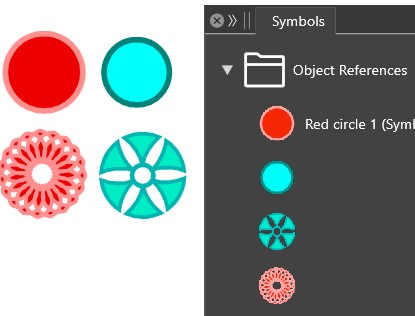
<p dir="auto"><img src="/forum/assets/uploads/files/1720207235627-c1.jpg" alt="0_1720207234945_c1.jpg" class=" img-fluid img-markdown" /></p>
]]></description><link>https://www.vectorstyler.com/forum/post/26231</link><guid isPermaLink="true">https://www.vectorstyler.com/forum/post/26231</guid><dc:creator><![CDATA[B-Vs-V]]></dc:creator><pubDate>Fri, 05 Jul 2024 19:20:53 GMT</pubDate></item><item><title><![CDATA[Reply to Using Canvas in the workflow on Fri, 05 Jul 2024 13:22:24 GMT]]></title><description><![CDATA[<p dir="auto"><a class="plugin-mentions-user plugin-mentions-a" href="/forum/user/vectorstyler" aria-label="Profile: VectorStyler">@<bdi>VectorStyler</bdi></a> said in <a href="/forum/post/26222">Using Canvas in the workflow</a>:</p>
<blockquote>
<p dir="auto">Just set a gradient for the object. Give a name to the object (in Layers panel or Object Options) and use the "Gradient Style" role.</p>
</blockquote>
<p dir="auto">Okay, thank you.<br />
VS makes me feel like a dummy sometimes.</p>
<p dir="auto">But now I have an object with a saved style in my layers panel.<br />
I delete the object and draw a new rectangle that I want to fill with the saved gradient. Where can I pick this up or assign it from?</p>
]]></description><link>https://www.vectorstyler.com/forum/post/26224</link><guid isPermaLink="true">https://www.vectorstyler.com/forum/post/26224</guid><dc:creator><![CDATA[Ayo]]></dc:creator><pubDate>Fri, 05 Jul 2024 13:22:24 GMT</pubDate></item><item><title><![CDATA[Reply to Using Canvas in the workflow on Fri, 05 Jul 2024 13:52:37 GMT]]></title><description><![CDATA[<p dir="auto"><a class="plugin-mentions-user plugin-mentions-a" href="/forum/user/vectorstyler" aria-label="Profile: VectorStyler">@<bdi>VectorStyler</bdi></a> I suppose that many users may like to have the same options everywhere at the click of a mouse, but that's not my case. This complicates (unnecessarily IMHO) the user interface... and VS is already particularly arduous because of all its possibilities and richness.<br />
I don't think there's any point in maintaining these Canvas roles in the options (hamburger menu of the panel) since there's already the roles menu in this panel menu <img src="https://www.vectorstyler.com/forum/assets/plugins/nodebb-plugin-emoji/emoji/android/263a.png?v=ec4d969cc53" class="not-responsive emoji emoji-android emoji--relaxed" style="height:23px;width:auto;vertical-align:middle" title=":relaxed:" alt="☺" /> ... just my opinion <img src="https://www.vectorstyler.com/forum/assets/plugins/nodebb-plugin-emoji/emoji/android/263a.png?v=ec4d969cc53" class="not-responsive emoji emoji-android emoji--relaxed" style="height:23px;width:auto;vertical-align:middle" title=":relaxed:" alt="☺" /></p>
]]></description><link>https://www.vectorstyler.com/forum/post/26223</link><guid isPermaLink="true">https://www.vectorstyler.com/forum/post/26223</guid><dc:creator><![CDATA[B-Vs-V]]></dc:creator><pubDate>Fri, 05 Jul 2024 13:52:37 GMT</pubDate></item><item><title><![CDATA[Reply to Using Canvas in the workflow on Fri, 05 Jul 2024 13:02:48 GMT]]></title><description><![CDATA[<p dir="auto"><a class="plugin-mentions-user plugin-mentions-a" href="/forum/user/ayo" aria-label="Profile: Ayo">@<bdi>Ayo</bdi></a> said in <a href="/forum/post/26220">Using Canvas in the workflow</a>:</p>
<blockquote>
<p dir="auto">I'm already struggling to save a simple gradient as a style and be able to use/alter/update it quickly</p>
</blockquote>
<p dir="auto">Just set a gradient for the object. Give a name to the object (in Layers panel or Object Options) and use the "Gradient Style" role.</p>
]]></description><link>https://www.vectorstyler.com/forum/post/26222</link><guid isPermaLink="true">https://www.vectorstyler.com/forum/post/26222</guid><dc:creator><![CDATA[VectorStyler]]></dc:creator><pubDate>Fri, 05 Jul 2024 13:02:48 GMT</pubDate></item><item><title><![CDATA[Reply to Using Canvas in the workflow on Fri, 05 Jul 2024 12:50:36 GMT]]></title><description><![CDATA[<p dir="auto">@Pat said in <a href="/forum/post/26219">Using Canvas in the workflow</a>:</p>
<blockquote>
<p dir="auto">I assume they're all identical.</p>
</blockquote>
<p dir="auto">Yes</p>
<blockquote>
<p dir="auto">What is a Canvas defined as Shape Canvas ? etc.</p>
</blockquote>
<p dir="auto">The shape of the objects on that canvas will become shape styles. Just like fill or stroke, in VS you can have shape styles that control the shape of the objects.<br />
Remember that these objects must have names.</p>
<blockquote>
<p dir="auto">I also notice that there's a long list of parameters for defining the nature of a canvas:</p>
</blockquote>
<p dir="auto">yes, same list as for the "Object Role", these are possible attributes use as styles.</p>
<blockquote>
<p dir="auto">For example, if I choose "Paragraph style", all the styles I define on this specific artboard of this specific Canvas will be styles I can apply to the design of artwork-type artbords?</p>
</blockquote>
<p dir="auto">In this case the paragraph formatting of text objects on the reference canvas will act as paragraph styles, that are listed in the "Paragraph Styles" panel and can be used as regular paragraph styles on the Artwork canvas.</p>
<blockquote>
<p dir="auto">One more question: how do I save these styles/symbols/etc. so that I can use them in all my documents?</p>
</blockquote>
<p dir="auto">You cannot save them for use in other documents, but you should be able to export them as presets using the Styles panel, and then import from presets into the other document<br />
But: there is a "Document Links" feature, where you can link to an other document and then the styles (including those from reference canvases) will become available.</p>
]]></description><link>https://www.vectorstyler.com/forum/post/26221</link><guid isPermaLink="true">https://www.vectorstyler.com/forum/post/26221</guid><dc:creator><![CDATA[VectorStyler]]></dc:creator><pubDate>Fri, 05 Jul 2024 12:50:36 GMT</pubDate></item><item><title><![CDATA[Reply to Using Canvas in the workflow on Fri, 05 Jul 2024 12:48:48 GMT]]></title><description><![CDATA[<p dir="auto">@Pat said in <a href="/forum/post/26219">Using Canvas in the workflow</a>:</p>
<blockquote>
<p dir="auto">I hope these questions will benefit to all VS users</p>
</blockquote>
<p dir="auto">Certainly, but I have the general feeling that it is all very, if not too complex for most users. I'm already struggling to save a simple gradient as a style and be able to use/alter/update it quickly. I get bogged down in gradient color -shapes -style and -presets panels and folders.<br />
This is also due to the multi-accessibility of things, which makes it seem more complex than it might be.</p>
]]></description><link>https://www.vectorstyler.com/forum/post/26220</link><guid isPermaLink="true">https://www.vectorstyler.com/forum/post/26220</guid><dc:creator><![CDATA[Ayo]]></dc:creator><pubDate>Fri, 05 Jul 2024 12:48:48 GMT</pubDate></item><item><title><![CDATA[Reply to Using Canvas in the workflow on Fri, 05 Jul 2024 12:25:01 GMT]]></title><description><![CDATA[<p dir="auto"><a class="plugin-mentions-user plugin-mentions-a" href="/forum/user/vectorstyler" aria-label="Profile: VectorStyler">@<bdi>VectorStyler</bdi></a> So I see <s>two</s> 3 ways of specifying the "nature" of a Canva: via the VS menu or via the Canvas panel menu or the Canva options. I assume they're all identical.</p>
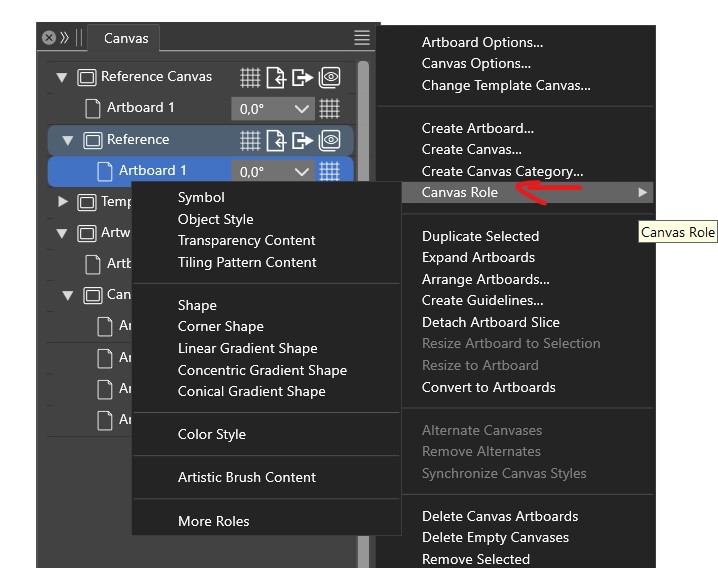
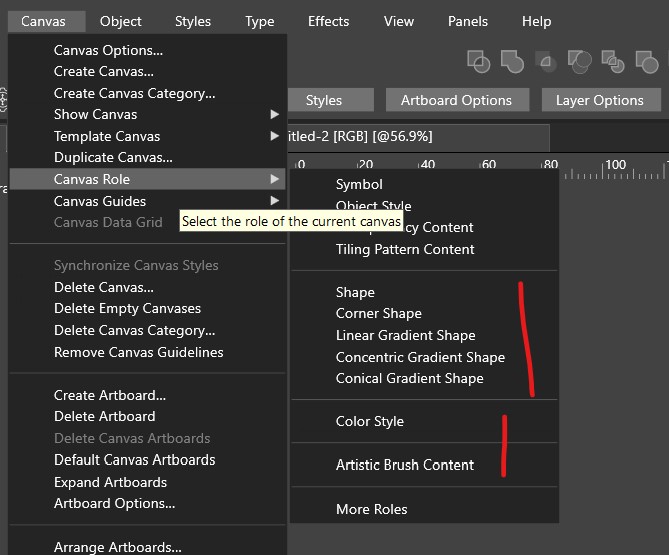
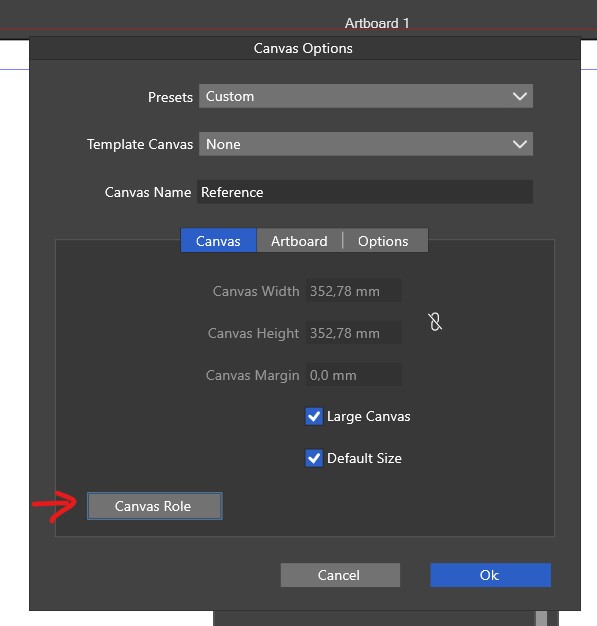
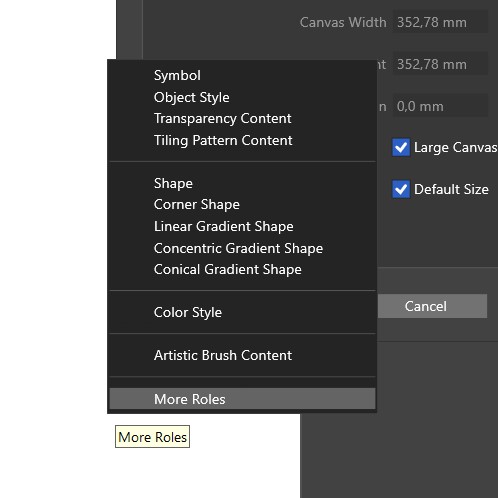
<p dir="auto"><img src="/forum/assets/uploads/files/1720182058718-c2.jpg" alt="0_1720182057879_c2.jpg" class=" img-fluid img-markdown" /></p>
<p dir="auto"><img src="/forum/assets/uploads/files/1720182100459-c3.jpg" alt="0_1720182100271_c3.jpg" class=" img-fluid img-markdown" /><br />
What is a Canva defined as Shape Canva ? etc.</p>
<p dir="auto"><img src="/forum/assets/uploads/files/1720182072306-c2-x27.jpg" alt="0_1720182072138_c2'.jpg" class=" img-fluid img-markdown" /></p>
<p dir="auto"><img src="/forum/assets/uploads/files/1720182118446-c2-x27-x27.jpg" alt="0_1720182118286_c2''.jpg" class=" img-fluid img-markdown" /></p>
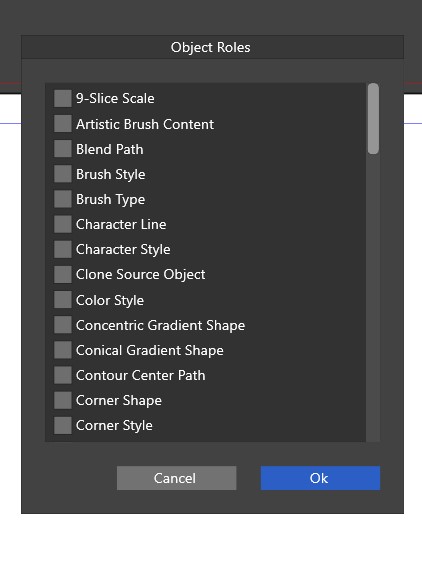
<p dir="auto">I also notice that there's a long list of parameters for defining the nature of a canva:</p>
<p dir="auto"><img src="/forum/assets/uploads/files/1720182152671-c4.jpg" alt="0_1720182152508_c4.jpg" class=" img-fluid img-markdown" /></p>
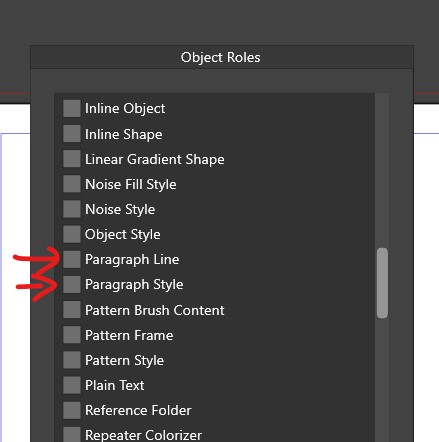
<p dir="auto">For example, if I choose "Paragraph style", all the styles I define on this specific artboard of this specific Canva will be styles I can apply to the design of artwork-type artbords?</p>
<p dir="auto"><img src="/forum/assets/uploads/files/1720182163930-c5.jpg" alt="0_1720182163774_c5.jpg" class=" img-fluid img-markdown" /><br />
What is 'Paragraph line' ?</p>
<p dir="auto">One more question: how do I save these styles/symbols/etc. so that I can use them in all my documents?<br />
Thanks <img src="https://www.vectorstyler.com/forum/assets/plugins/nodebb-plugin-emoji/emoji/android/263a.png?v=ec4d969cc53" class="not-responsive emoji emoji-android emoji--relaxed" style="height:23px;width:auto;vertical-align:middle" title=":relaxed:" alt="☺" />  I hope these questions will benefit to all VS users <img src="https://www.vectorstyler.com/forum/assets/plugins/nodebb-plugin-emoji/emoji/android/263a.png?v=ec4d969cc53" class="not-responsive emoji emoji-android emoji--relaxed" style="height:23px;width:auto;vertical-align:middle" title=":relaxed:" alt="☺" /></p>
]]></description><link>https://www.vectorstyler.com/forum/post/26219</link><guid isPermaLink="true">https://www.vectorstyler.com/forum/post/26219</guid><dc:creator><![CDATA[B-Vs-V]]></dc:creator><pubDate>Fri, 05 Jul 2024 12:25:01 GMT</pubDate></item><item><title><![CDATA[Reply to Using Canvas in the workflow on Fri, 05 Jul 2024 11:08:54 GMT]]></title><description><![CDATA[<p dir="auto">@Pat</p>
<p dir="auto">dont forget, other user learn something too<br />
me included <img src="https://www.vectorstyler.com/forum/assets/plugins/nodebb-plugin-emoji/emoji/android/1f642.png?v=ec4d969cc53" class="not-responsive emoji emoji-android emoji--slightly_smiling_face" style="height:23px;width:auto;vertical-align:middle" title=":)" alt="🙂" /></p>
]]></description><link>https://www.vectorstyler.com/forum/post/26218</link><guid isPermaLink="true">https://www.vectorstyler.com/forum/post/26218</guid><dc:creator><![CDATA[Subpath]]></dc:creator><pubDate>Fri, 05 Jul 2024 11:08:54 GMT</pubDate></item><item><title><![CDATA[Reply to Using Canvas in the workflow on Fri, 05 Jul 2024 10:54:34 GMT]]></title><description><![CDATA[<p dir="auto">@Pat said in <a href="/forum/post/26216">Using Canvas in the workflow</a>:</p>
<blockquote>
<p dir="auto">Sorry you had to repeat it dozens of times but the coin has finally been dropped</p>
</blockquote>
<p dir="auto">No worries. These are new concepts / ideas in drawing apps (maybe there are other type of apps doing this).</p>
]]></description><link>https://www.vectorstyler.com/forum/post/26217</link><guid isPermaLink="true">https://www.vectorstyler.com/forum/post/26217</guid><dc:creator><![CDATA[VectorStyler]]></dc:creator><pubDate>Fri, 05 Jul 2024 10:54:34 GMT</pubDate></item><item><title><![CDATA[Reply to Using Canvas in the workflow on Fri, 05 Jul 2024 10:34:34 GMT]]></title><description><![CDATA[<p dir="auto"><a class="plugin-mentions-user plugin-mentions-a" href="/forum/user/vectorstyler" aria-label="Profile: VectorStyler">@<bdi>VectorStyler</bdi></a> said in <a href="/forum/post/26210">Using Canvas in the workflow</a>:</p>
<blockquote>
<p dir="auto">@Pat said in <a href="/forum/post/26209">Using Canvas in the workflow</a>:</p>
<blockquote>
<p dir="auto">are these "References" or "Symbols" objects automatically available for other new documents<br />
Not in other documents (unless linked with Document Links). Also: for Reference canvases you must enable a "Role" in the Canvas Options. Then all objects on that canvas will appear as some Style or Symbol based on the Role.<br />
If, by default, these objects are just objects with no specific "definition", what's the point of using these particular Canvas?</p>
</blockquote>
<p dir="auto">You need to enable a Role for the canvas. This is also because otherwise all attributes of the objects would need to be listed as styles, creating a jungle of style references.</p>
</blockquote>
<p dir="auto"><a class="plugin-mentions-user plugin-mentions-a" href="/forum/user/vectorstyler" aria-label="Profile: VectorStyler">@<bdi>VectorStyler</bdi></a> Here's the information I've been missing <img src="https://www.vectorstyler.com/forum/assets/plugins/nodebb-plugin-emoji/emoji/android/263a.png?v=ec4d969cc53" class="not-responsive emoji emoji-android emoji--relaxed" style="height:23px;width:auto;vertical-align:middle" title=":relaxed:" alt="☺" />  The scene lights up...<br />
Why didn't anyone ever tell me this? <img src="https://www.vectorstyler.com/forum/assets/plugins/nodebb-plugin-emoji/emoji/android/1f602.png?v=ec4d969cc53" class="not-responsive emoji emoji-android emoji--joy" style="height:23px;width:auto;vertical-align:middle" title=":joy:" alt="😂" /> just kidding</p>
<p dir="auto">Sorry you had to repeat it dozens of times but the coin has finally been dropped <img src="https://www.vectorstyler.com/forum/assets/plugins/nodebb-plugin-emoji/emoji/android/1f600.png?v=ec4d969cc53" class="not-responsive emoji emoji-android emoji--grinning" style="height:23px;width:auto;vertical-align:middle" title=":grinning:" alt="😀" /></p>
]]></description><link>https://www.vectorstyler.com/forum/post/26216</link><guid isPermaLink="true">https://www.vectorstyler.com/forum/post/26216</guid><dc:creator><![CDATA[B-Vs-V]]></dc:creator><pubDate>Fri, 05 Jul 2024 10:34:34 GMT</pubDate></item><item><title><![CDATA[Reply to Using Canvas in the workflow on Fri, 05 Jul 2024 09:58:49 GMT]]></title><description><![CDATA[<p dir="auto"><a class="plugin-mentions-user plugin-mentions-a" href="/forum/user/ayo" aria-label="Profile: Ayo">@<bdi>Ayo</bdi></a> said in <a href="/forum/post/26212">Using Canvas in the workflow</a>:</p>
<blockquote>
<p dir="auto">Artwork canvas &gt; Canvas 1, suggests that you can have multiple artwork canvases in one document.</p>
</blockquote>
<p dir="auto">Yes, there can be multiple (a hierarchy of) canvases.</p>
<blockquote>
<p dir="auto">In my perception the canvas is my world and I have no need for parallel worlds.</p>
</blockquote>
<p dir="auto">Depends on the project. Variation of an artwork using the same symbols or styles. A multi-page document with 2 pages per canvas. Etc.</p>
]]></description><link>https://www.vectorstyler.com/forum/post/26214</link><guid isPermaLink="true">https://www.vectorstyler.com/forum/post/26214</guid><dc:creator><![CDATA[VectorStyler]]></dc:creator><pubDate>Fri, 05 Jul 2024 09:58:49 GMT</pubDate></item><item><title><![CDATA[Reply to Using Canvas in the workflow on Fri, 05 Jul 2024 09:57:36 GMT]]></title><description><![CDATA[<p dir="auto"><a class="plugin-mentions-user plugin-mentions-a" href="/forum/user/ayo" aria-label="Profile: Ayo">@<bdi>Ayo</bdi></a> said in <a href="/forum/post/26211">Using Canvas in the workflow</a>:</p>
<blockquote>
<p dir="auto">If I understand correctly, is B the correct representation?</p>
</blockquote>
<p dir="auto">Yes, and the bug is fixed now, the fix will be in the next build.</p>
]]></description><link>https://www.vectorstyler.com/forum/post/26213</link><guid isPermaLink="true">https://www.vectorstyler.com/forum/post/26213</guid><dc:creator><![CDATA[VectorStyler]]></dc:creator><pubDate>Fri, 05 Jul 2024 09:57:36 GMT</pubDate></item><item><title><![CDATA[Reply to Using Canvas in the workflow on Fri, 05 Jul 2024 09:28:34 GMT]]></title><description><![CDATA[<p dir="auto">Another question that occurred to me here:<br />
Artwork canvas &gt; Canvas 1, suggests that you can have multiple artwork canvases in one document.<br />
In my perception the canvas is my world and I have no need for parallel worlds.<br />
In which case would you use something like this?</p>
]]></description><link>https://www.vectorstyler.com/forum/post/26212</link><guid isPermaLink="true">https://www.vectorstyler.com/forum/post/26212</guid><dc:creator><![CDATA[Ayo]]></dc:creator><pubDate>Fri, 05 Jul 2024 09:28:34 GMT</pubDate></item><item><title><![CDATA[Reply to Using Canvas in the workflow on Fri, 05 Jul 2024 08:58:18 GMT]]></title><description><![CDATA[<p dir="auto">I was just struggling with this matter, criticizing the complexity. Searching the forum and manual for an explanation. Triggered by why the PDF generation has an extra board. But things might be different.</p>
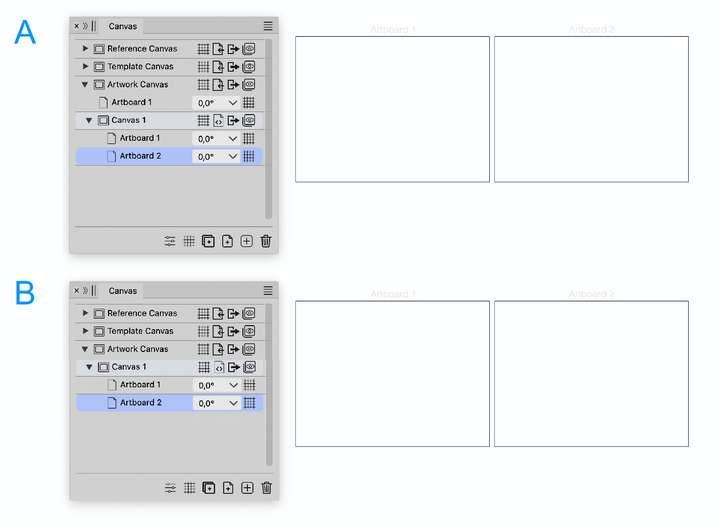
<p dir="auto">If I understand correctly, is B the correct representation?<br />
Then maybe I'll understand<img src="https://www.vectorstyler.com/forum/assets/plugins/nodebb-plugin-emoji/emoji/android/263a.png?v=ec4d969cc53" class="not-responsive emoji emoji-android emoji--relaxed" style="height:23px;width:auto;vertical-align:middle" title=":relaxed:" alt="☺" /></p>
<p dir="auto"><img src="/forum/assets/uploads/files/1720169344718-6c64b6fb-3baf-4f7c-9b03-addf485b9f7c-image-resized.png" alt="0_1720169343335_6c64b6fb-3baf-4f7c-9b03-addf485b9f7c-image.png" class=" img-fluid img-markdown" /></p>
]]></description><link>https://www.vectorstyler.com/forum/post/26211</link><guid isPermaLink="true">https://www.vectorstyler.com/forum/post/26211</guid><dc:creator><![CDATA[Ayo]]></dc:creator><pubDate>Fri, 05 Jul 2024 08:58:18 GMT</pubDate></item><item><title><![CDATA[Reply to Using Canvas in the workflow on Fri, 05 Jul 2024 08:33:07 GMT]]></title><description><![CDATA[<p dir="auto">@Pat said in <a href="/forum/post/26209">Using Canvas in the workflow</a>:</p>
<blockquote>
<p dir="auto">Why is there a default Artboard and a sub-menu with a new Artboard?</p>
</blockquote>
<p dir="auto">The artboards in the canvas category (first level) are a regression from the last build. Artboards can be added there too manually, but it should be none by default.</p>
<blockquote>
<p dir="auto">are these "References" or "Symbols" objects automatically available for other new documents</p>
</blockquote>
<p dir="auto">Not in other documents (unless linked with Document Links). Also: for Reference canvases you must enable a "Role" in the Canvas Options. Then all objects on that canvas will appear as some Style or Symbol based on the Role.</p>
<blockquote>
<p dir="auto">If, by default, these objects are just objects with no specific "definition", what's the point of using these particular Canvas?</p>
</blockquote>
<p dir="auto">You need to enable a Role for the canvas. This is also because otherwise all attributes of the objects would need to be listed as styles, creating a jungle of style references.</p>
]]></description><link>https://www.vectorstyler.com/forum/post/26210</link><guid isPermaLink="true">https://www.vectorstyler.com/forum/post/26210</guid><dc:creator><![CDATA[VectorStyler]]></dc:creator><pubDate>Fri, 05 Jul 2024 08:33:07 GMT</pubDate></item></channel></rss>