<title>
<![CDATA[ Glitches in Transform tab ]]>
</title>
<description>
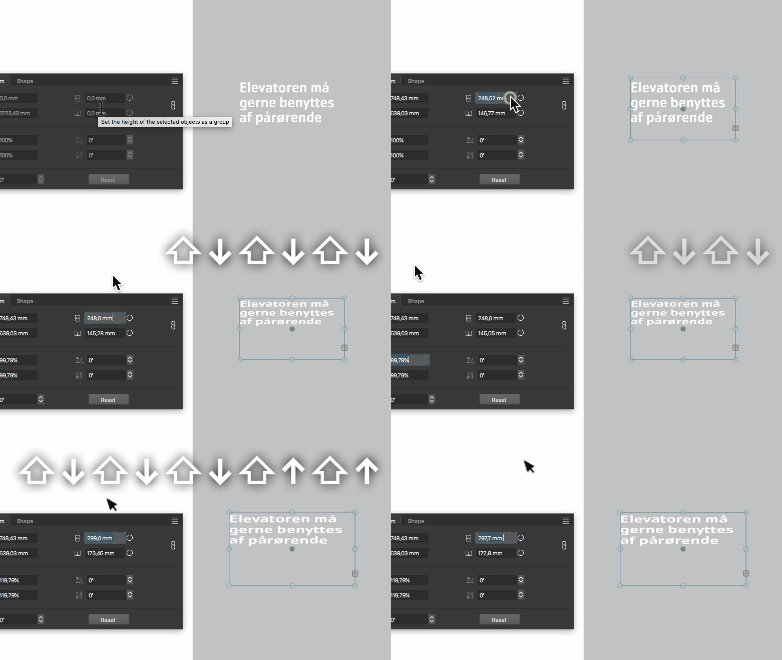
<![CDATA[ <p>The transform tab needs a serious overhaul. The dropdown options appear confusing, redundant and the values manipulation either doesn't apply or applies distorted to object.</p>
<p><a href="/forum/assets/uploads/files/1723794810171-transform-tab-troubles.vstyler">0_1723794809901_Transform-tab-troubles.vstyler</a></p>
<p><img src="https://i.postimg.cc/9fdwhBLt/Transform-tab-troubles.gif" alt="alt text" class="img-responsive img-markdown" /></p>
]]>
</description>
<link>https://www.vectorstyler.com/forum//topic/4588/glitches-in-transform-tab</link>
<generator>RSS for Node</generator>
<lastBuildDate>Fri, 06 Jun 2025 05:27:28 GMT</lastBuildDate>
<atom:link href="https://www.vectorstyler.com/forum//topic/4588.rss" rel="self" type="application/rss+xml"/>
<pubDate>Fri, 16 Aug 2024 07:54:30 GMT</pubDate>
<ttl>60</ttl>
<item>
<title>
<![CDATA[ Reply to Glitches in Transform tab on Invalid Date ]]>
</title>
<description>
<![CDATA[ <p>The transform tab needs a serious overhaul. The dropdown options appear confusing, redundant and the values manipulation either doesn't apply or applies distorted to object.</p>
<p><a href="/forum/assets/uploads/files/1723794810171-transform-tab-troubles.vstyler">0_1723794809901_Transform-tab-troubles.vstyler</a></p>
<p><img src="https://i.postimg.cc/9fdwhBLt/Transform-tab-troubles.gif" alt="alt text" class="img-responsive img-markdown" /></p>
]]>
</description>
<link>https://www.vectorstyler.com/forum//post/26795</link>
<guid isPermaLink="true">https://www.vectorstyler.com/forum//post/26795</guid>
<dc:creator>
...</dc:creator>
<pubDate>Invalid Date</pubDate>
</item>
<item>
<title>
<![CDATA[ Reply to Glitches in Transform tab on Invalid Date ]]>
</title>
<description>
<![CDATA[ <p><a class="plugin-mentions-user plugin-mentions-a" href="https://www.vectorstyler.com/forum//uid/186">@Raaskot</a></p>
<blockquote>
<p>values manipulation either doesn't apply or applies distorted to object.</p>
</blockquote>
<p>Not clear what is the issue.<br />
All I can see from the recording that the width or horizontal scale values are changed and the proportional option seems to be on.</p>
]]>
</description>
<link>https://www.vectorstyler.com/forum//post/26796</link>
<guid isPermaLink="true">https://www.vectorstyler.com/forum//post/26796</guid>
<dc:creator>
<![CDATA[ VectorStyler ]]>
</dc:creator>
<pubDate>Invalid Date</pubDate>
</item>
<item>
<title>
<![CDATA[ Reply to Glitches in Transform tab on Fri, 16 Aug 2024 08:56:19 GMT ]]>
</title>
<description>
<![CDATA[ <p><a class="plugin-mentions-user plugin-mentions-a" href="https://www.vectorstyler.com/forum//uid/1">@VectorStyler</a><br />
Sorry, I was unclear:</p>
<ol>
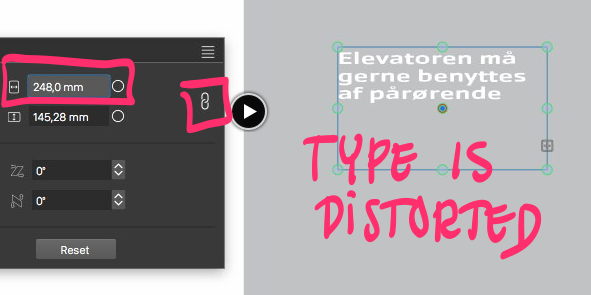
<li>type is distorted when changing x-values (proportional on)</li>
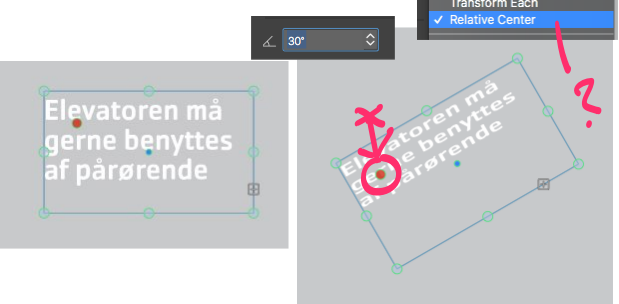
<li>cannot make rotate values respect altered centerpoint</li>
</ol>
<p><img src="/forum/assets/uploads/files/1723797836618-6b5a0baf-ccbd-4fe0-afb7-15096183345a-billede.png" alt="0_1723797835562_6b5a0baf-ccbd-4fe0-afb7-15096183345a-billede.png" class="img-responsive img-markdown" /></p>
<p><img src="/forum/assets/uploads/files/1723798346655-4f421c83-5eb1-4a83-8f4c-42de312959bb-billede.png" alt="0_1723798346273_4f421c83-5eb1-4a83-8f4c-42de312959bb-billede.png" class="img-responsive img-markdown" /></p>
]]>
</description>
<link>https://www.vectorstyler.com/forum//post/26797</link>
<guid isPermaLink="true">https://www.vectorstyler.com/forum//post/26797</guid>
<dc:creator>
...</dc:creator>
<pubDate>Fri, 16 Aug 2024 08:56:19 GMT</pubDate>
</item>
<item>
<title>
<![CDATA[ Reply to Glitches in Transform tab on Invalid Date ]]>
</title>
<description>
<![CDATA[ <p><a class="plugin-mentions-user plugin-mentions-a" href="https://www.vectorstyler.com/forum//uid/186">@Raaskot</a> I will try to replicate and fix these.</p>
]]>
</description>
<link>https://www.vectorstyler.com/forum//post/26798</link>
<guid isPermaLink="true">https://www.vectorstyler.com/forum//post/26798</guid>
<dc:creator>
<![CDATA[ VectorStyler ]]>
</dc:creator>
<pubDate>Invalid Date</pubDate>
</item>
<item>
<title>
<![CDATA[ Reply to Glitches in Transform tab on Invalid Date ]]>
</title>
<description>
<![CDATA[ <p><a class="plugin-mentions-user plugin-mentions-a" href="https://www.vectorstyler.com/forum//uid/186">@Raaskot</a> I'm trying to replicate this with default text frame attributes, but here the type is not distorted.<br />
Can you send me the file shown in that example? Thanks!</p>
]]>
</description>
<link>https://www.vectorstyler.com/forum//post/26841</link>
<guid isPermaLink="true">https://www.vectorstyler.com/forum//post/26841</guid>
<dc:creator>
<![CDATA[ VectorStyler ]]>
</dc:creator>
<pubDate>Invalid Date</pubDate>
</item>
<item>
<title>
<![CDATA[ Reply to Glitches in Transform tab on Invalid Date ]]>
</title>
<description>
<![CDATA[ <p><a class="plugin-mentions-user plugin-mentions-a" href="https://www.vectorstyler.com/forum//uid/1">@VectorStyler</a><br />
The file is attached in OP.</p>
<p>Regards, raaskot</p>
]]>
</description>
<link>https://www.vectorstyler.com/forum//post/26847</link>
<guid isPermaLink="true">https://www.vectorstyler.com/forum//post/26847</guid>
<dc:creator>
...</dc:creator>
<pubDate>Invalid Date</pubDate>
</item>
<item>
<title>
<![CDATA[ Reply to Glitches in Transform tab on Invalid Date ]]>
</title>
<description>
<![CDATA[ <p><a class="plugin-mentions-user plugin-mentions-a" href="https://www.vectorstyler.com/forum//uid/186">@Raaskot</a> The text frame has multiple other transforms already applied, and this causes the text distortion.<br />
Use the Effects -> Remove All Shape Effects command to clear these.</p>
<p>For point (2), the pivot point is used in the transform panel only if the transform pivot selection is disabled in the upper-left pivot knob, this can be done by clicking on the selected pivot knob.</p>
]]>
</description>
<link>https://www.vectorstyler.com/forum//post/26848</link>
<guid isPermaLink="true">https://www.vectorstyler.com/forum//post/26848</guid>
<dc:creator>
<![CDATA[ VectorStyler ]]>
</dc:creator>
<pubDate>Invalid Date</pubDate>
</item>
<item>
<title>
<![CDATA[ Reply to Glitches in Transform tab on Invalid Date ]]>
</title>
<description>
<![CDATA[ <p><a class="plugin-mentions-user plugin-mentions-a" href="https://www.vectorstyler.com/forum//uid/1">@VectorStyler</a><br />
"other transforms already applied" -- makes sense, thank you<img
src="https://www.vectorstyler.com/forum//plugins/nodebb-plugin-emoji/emoji/android/1f60a.png?v=ihasou065rs"
class="not-responsive emoji emoji-android emoji--blush"
title=":blush:"
alt="😊"
/><br />
Yet one should expect transformation always applies to the latest effect layer/state in the stack only (retaining the objects current visible appearance).</p>
<p>"... the transform pivot selection is disabled". Cool, very helpful. Got it.<br />
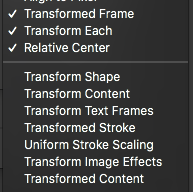
Though I must confess, that the options in the rightclick-dropdwn confuses me with combinated layer groups and textframes. As occasional user (and user of other vectordrawing programs) one have to click and try quite a lot to get the right setup ie. when rotating shapes.</p>
<p><img src="/forum/assets/uploads/files/1724313857080-387c8c6d-e16a-45ee-8b05-15a0efa88ecb-billede.png" alt="0_1724313856157_387c8c6d-e16a-45ee-8b05-15a0efa88ecb-billede.png" class="img-responsive img-markdown" /></p>
]]>
</description>
<link>https://www.vectorstyler.com/forum//post/26850</link>
<guid isPermaLink="true">https://www.vectorstyler.com/forum//post/26850</guid>
<dc:creator>
...</dc:creator>
<pubDate>Invalid Date</pubDate>
</item>