VectorStyler
    • Categories
    • Unread
    • Recent
    • Tags
    • Popular
    • Register
    • Login

    XLS for features and ideas - Megathread

    Scheduled Pinned Locked Moved Features and Ideas
    191 Posts 11 Posters 570.1k Views 9 Watching
    Loading More Posts
    • Oldest to Newest
    • Newest to Oldest
    • Most Votes
    Reply
    • Reply as topic
    Log in to reply
    This topic has been deleted. Only users with topic management privileges can see it.
    • DanielD Offline
      Daniel
      last edited by

      Thumbnail view on hover over the files tab. If multiple files are open in VS, allow a thumbnail view on hovering over the tabs.

      Work: Windows 11 | Intel i9 14900HS (24 Cores/32 Threads) | GeForce RTX 4070 | 64 GB RAM
      Personal: Windows 11 | Amd Ryzen 9 7950X (16 Core, 32 Threads) | GeForce RTX 3060 | 32 GB RAM

      1 Reply Last reply Reply Quote 1
      • VectorStylerV Offline
        VectorStyler @Daniel
        last edited by

        @Daniel said in XLS for features and ideas - Mega Thread:

        Close all files without saving and return to files, to the current scroll location in each file.

        This is not clear: where is the current scroll location ? Is the a "reveal file" type of action?

        DanielD 1 Reply Last reply Reply Quote 0
        • DanielD Offline
          Daniel @VectorStyler
          last edited by Daniel

          @VectorStyler: What I mean is, if I am working on multiple untitled files and don't have the time to save it all, then I just want to close the program without a prompt to save. Then when I reopen the program, I want to come back to where I left off. And in each file, I want to be able to find myself in the same zoom level and scroll location. Scroll location might be confusing because VS does artboards and not pages. Think of a multipage document and you're on page 15. You close and come back to the exact same spot. Every time. In VS's case, this does not apply. You just need to come back to the same artboard and zoom level.

          If I have 5 documents, and on document 1, you have three artboards, and you're zoomed into 1500% on an object on artboard 3. Then, when I close and come back, I want to come back to the same place, where I left off. I want to have this in each of the 5 documents.

          For reference, see XDP.

          If you're as disorganised as I am, this is makes life so much better.

          Alternatively, as an addition, there should be a simple tick box within the save prompt window, to "do the same for all files".

          Work: Windows 11 | Intel i9 14900HS (24 Cores/32 Threads) | GeForce RTX 4070 | 64 GB RAM
          Personal: Windows 11 | Amd Ryzen 9 7950X (16 Core, 32 Threads) | GeForce RTX 3060 | 32 GB RAM

          1 Reply Last reply Reply Quote 1
          • DanielD Offline
            Daniel
            last edited by

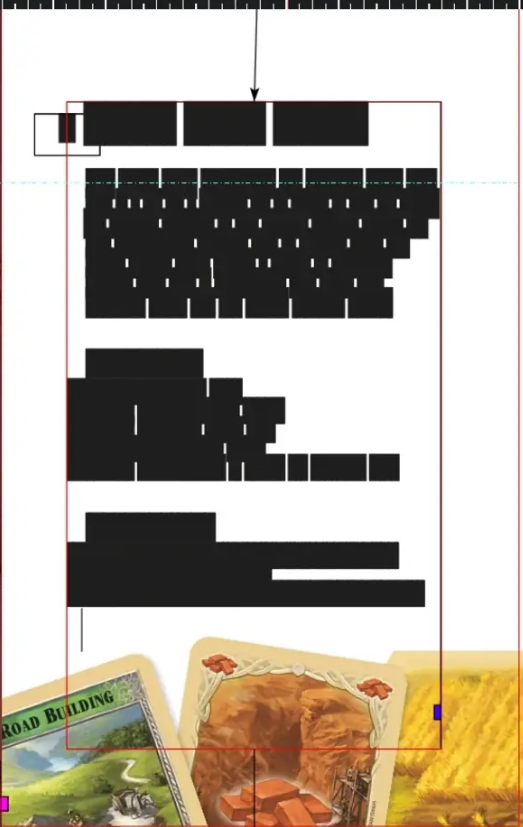
            White Space Preview: A toggle to turn all text into black blocks. Like so:
            0_1743598261734_ff89479f-4310-4c8d-a79f-805db8de6897-image.png

            Useful when trying to see the document for visual impact.

            Work: Windows 11 | Intel i9 14900HS (24 Cores/32 Threads) | GeForce RTX 4070 | 64 GB RAM
            Personal: Windows 11 | Amd Ryzen 9 7950X (16 Core, 32 Threads) | GeForce RTX 3060 | 32 GB RAM

            1 Reply Last reply Reply Quote 2
            • DanielD Offline
              Daniel
              last edited by

              0_1743687432268_8c6e3065-d259-4ba1-bd40-242cf8f4f66c-image.png

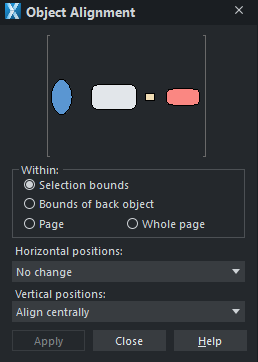
              Visual alignment panel. This is much speedier than the normal iconized alignment options. Providing greater visual feedback. I also think there should be a constraint option baked into alignment. Logically related and sequentially performed. Therefore group tool options.

              Work: Windows 11 | Intel i9 14900HS (24 Cores/32 Threads) | GeForce RTX 4070 | 64 GB RAM
              Personal: Windows 11 | Amd Ryzen 9 7950X (16 Core, 32 Threads) | GeForce RTX 3060 | 32 GB RAM

              VectorStylerV 1 Reply Last reply Reply Quote 1
              • VectorStylerV Offline
                VectorStyler @Daniel
                last edited by

                @Daniel said in XLS for features and ideas - Mega Thread:

                Visual alignment panel. This is much speedier than the normal iconized alignment options.

                The problem with this approach is that it needs a separate "Apply" button. So even if the alignment is just a regular "horizontal-left", you will need 2 clicks to do it. The current approach needs one click only for this.

                DanielD 2 Replies Last reply Reply Quote 1
                • DanielD Offline
                  Daniel @VectorStyler
                  last edited by

                  @VectorStyler: That is true. But as I explained, this is not the only option possible. It is an additional panel alongside the iconized alignment options. And it need not contain the apply button. It can be a simple direct click to apply. Further, having the option to modify click within the panel also reduces cognitive load. I only have to click in one place. Alt click for Horizontal. Ctrl click for vertical. Check this out in XDP to get a feel for it. 🙂

                  Having said that, I think the alignment panel in Inkscape is by far the most advanced and useful of all. If you've not checked it out, highly recommend it.

                  Also, I reckon there should be a node align panel too.

                  Work: Windows 11 | Intel i9 14900HS (24 Cores/32 Threads) | GeForce RTX 4070 | 64 GB RAM
                  Personal: Windows 11 | Amd Ryzen 9 7950X (16 Core, 32 Threads) | GeForce RTX 3060 | 32 GB RAM

                  S M 2 Replies Last reply Reply Quote 1
                  • S Offline
                    Subpath @Daniel
                    last edited by Subpath

                    @Daniel

                    ... Also, I reckon there should be a node align panel too...

                    You can already align nodes using the alignment tools
                    and Node Handles too, so i dont see a reason for that

                    here a video example

                    Win 11
                    CPU: AMD Ryzen 5 9600X, 6-core.
                    GPU: Nvidia Geforce RTX 5070.

                    DanielD 1 Reply Last reply Reply Quote 1
                    • M Offline
                      monsterfox @Daniel
                      last edited by monsterfox

                      This post is deleted!
                      DanielD 1 Reply Last reply Reply Quote 0
                      • DanielD Offline
                        Daniel @Subpath
                        last edited by

                        @Subpath: Yes, this is not necessary. Agreed.

                        Work: Windows 11 | Intel i9 14900HS (24 Cores/32 Threads) | GeForce RTX 4070 | 64 GB RAM
                        Personal: Windows 11 | Amd Ryzen 9 7950X (16 Core, 32 Threads) | GeForce RTX 3060 | 32 GB RAM

                        1 Reply Last reply Reply Quote 1
                        • DanielD Offline
                          Daniel @monsterfox
                          last edited by

                          @monsterfox: Please could you fork this out into a dedicated bug thread. I don't want it to get lost here.
                          🙂 Thank you!

                          Work: Windows 11 | Intel i9 14900HS (24 Cores/32 Threads) | GeForce RTX 4070 | 64 GB RAM
                          Personal: Windows 11 | Amd Ryzen 9 7950X (16 Core, 32 Threads) | GeForce RTX 3060 | 32 GB RAM

                          1 Reply Last reply Reply Quote 0
                          • DanielD Offline
                            Daniel @VectorStyler
                            last edited by Daniel

                            @VectorStyler: Actually, there's a much simpler, more contextual way of doing this. Inkscape got this right. Provide direct, on-screen alignment handles for the the basic and most common alignments. It is exactly similar to aligning text blocks and is very useful.

                            Work: Windows 11 | Intel i9 14900HS (24 Cores/32 Threads) | GeForce RTX 4070 | 64 GB RAM
                            Personal: Windows 11 | Amd Ryzen 9 7950X (16 Core, 32 Threads) | GeForce RTX 3060 | 32 GB RAM

                            1 Reply Last reply Reply Quote 1
                            • DanielD Offline
                              Daniel
                              last edited by

                              Spray symbol without calling the tool. Using + number pad when moving a symbol (or group of symbols).

                              Work: Windows 11 | Intel i9 14900HS (24 Cores/32 Threads) | GeForce RTX 4070 | 64 GB RAM
                              Personal: Windows 11 | Amd Ryzen 9 7950X (16 Core, 32 Threads) | GeForce RTX 3060 | 32 GB RAM

                              VectorStylerV 1 Reply Last reply Reply Quote 0
                              • VectorStylerV Offline
                                VectorStyler @Daniel
                                last edited by

                                @Daniel said in XLS for features and ideas - Mega Thread:

                                Spray symbol without calling the tool. Using + number pad when moving a symbol (or group of symbols).

                                Not clear how this would work. You can insert one or more symbols by dragging from the panel but that will not work as a spray.

                                Would pressing "+" activate the spray symbol tool?

                                DanielD 1 Reply Last reply Reply Quote 0
                                • DanielD Offline
                                  Daniel @VectorStyler
                                  last edited by

                                  @VectorStyler: you have created symbols. Now with the select tool active, you make a sequential selection of all your symbols. Then you press escape. Now, when you press + repeatedly, the select tool places the symbols you selected in the same order you selected them. If there's only one symbol, then, that symbol gets stamped. Every time you plus +.

                                  Work: Windows 11 | Intel i9 14900HS (24 Cores/32 Threads) | GeForce RTX 4070 | 64 GB RAM
                                  Personal: Windows 11 | Amd Ryzen 9 7950X (16 Core, 32 Threads) | GeForce RTX 3060 | 32 GB RAM

                                  VectorStylerV 1 Reply Last reply Reply Quote 0
                                  • VectorStylerV Offline
                                    VectorStyler @Daniel
                                    last edited by

                                    @Daniel said in XLS for features and ideas - Mega Thread:

                                    the select tool places the symbols you selected in the same order you selected them

                                    Sort of "insert symbol at the current mouse position" ?

                                    DanielD 1 Reply Last reply Reply Quote 1
                                    • DanielD Offline
                                      Daniel @VectorStyler
                                      last edited by

                                      @VectorStyler I'll explain this much more clearly tomorrow.

                                      Work: Windows 11 | Intel i9 14900HS (24 Cores/32 Threads) | GeForce RTX 4070 | 64 GB RAM
                                      Personal: Windows 11 | Amd Ryzen 9 7950X (16 Core, 32 Threads) | GeForce RTX 3060 | 32 GB RAM

                                      1 Reply Last reply Reply Quote 0
                                      • debraspicherD Offline
                                        debraspicher @VectorStyler
                                        last edited by debraspicher

                                        @VectorStyler I've used "Continuous Export" for working on themes or templates in Affinity that have a lot of moving parts. Assets that need to be uploaded in either chunk form or .zips.

                                        While useful, it's not critical (well, not always...). I'd say its more for UI people or web designers. It's just more that the Export functions are hidden by another Persona, so having to avoid tabbing is beneficial instead of scrolling through a very lengthy list to export single items. Meanwhile I can go quickly test something I've exported once I've made a change. I don't think the way they implemented it is efficient though. It shouldn't be instantaneous as it has caused hangs. But for the most part, seems to work fine.

                                        Edit: The other consideration, if that user has a template/theme they are working on but it's multiple parts for a particular element, that element involving many parts may need all updated at once. So having this process streamlined makes pushing to production side (running on local system, FTP, etc) and previewing more straightforward.

                                        Windows 11 Build 26200.7171 (25H2)
                                        AMD Ryzen 7 9700X with Gigabyte X870E Aorus Pro Ice
                                        32GB RAM @ 6000MHz
                                        PNY NVIDIA RTX 5070 Ti 16GB; Display 1: 4K @150%; Display 2: 4K @200%
                                        Wacom Intuos Pro L (2025); Wacom Intuos Pro M; Epson ET-8550; Siser Romeo

                                        VectorStylerV 1 Reply Last reply Reply Quote 2
                                        • debraspicherD Offline
                                          debraspicher
                                          last edited by

                                          @Daniel said in XLS for features and ideas - Mega Thread:

                                          Going forward, to avoid splitting conversations, I've created this little xls sheet. I will add all my suggestions in here: https://docs.google.com/spreadsheets/d/1dYra_2F893JPb44kOR_vRcs5stexRBRmm-78f0wF7Ic/edit?usp=sharing.

                                          If others would like to comment or add votes, please feel free to do so. This is just so I can come back to see what I've said in each instance without having to search for threads. Also, it means I won't create requests for features that already exist. 🙂

                                          In there, you have some 15 ideas for features and improvements. I will keep adding.

                                          This is excellent! I started my own Excel sheet on my machine for suggestions for tweaks, suggestions, desires, hopes & dreams, etc, but haven't taken the time to organize them like you have. For the most part, I focus on reporting bugs and recording video and it's hard to split the time. So I just make a suggestion here and there where I can fit in... maybe I should let my thoughts do the work and setup an altar next to my machine instead..

                                          Windows 11 Build 26200.7171 (25H2)
                                          AMD Ryzen 7 9700X with Gigabyte X870E Aorus Pro Ice
                                          32GB RAM @ 6000MHz
                                          PNY NVIDIA RTX 5070 Ti 16GB; Display 1: 4K @150%; Display 2: 4K @200%
                                          Wacom Intuos Pro L (2025); Wacom Intuos Pro M; Epson ET-8550; Siser Romeo

                                          1 Reply Last reply Reply Quote 2
                                          • VectorStylerV Offline
                                            VectorStyler @debraspicher
                                            last edited by

                                            @debraspicher said in XLS for features and ideas - Mega Thread:

                                            "Continuous Export"

                                            I will try to think of a solution for this.
                                            But what if the "Export Again" is added as a toolbar button (top row)? Still not continuous export, but just one click to export again the content.


                                            DanielD debraspicherD 2 Replies Last reply Reply Quote 0
                                            • First post
                                              Last post