VectorStyler
    • Categories
    • Unread
    • Recent
    • Tags
    • Popular
    • Register
    • Login

    Detail optimization and function enhancement

    Scheduled Pinned Locked Moved Questions and Support
    87 Posts 6 Posters 97.0k Views 4 Watching
    Loading More Posts
    • Oldest to Newest
    • Newest to Oldest
    • Most Votes
    Reply
    • Reply as topic
    Log in to reply
    This topic has been deleted. Only users with topic management privileges can see it.
    • VectorStylerV Offline
      VectorStyler @monsterfox
      last edited by

      @monsterfox said in Detail optimization and function enhancement:

      I didn't express it clearly. Is it possible to use the sketch tool to achieve the effect of the right diagram with one operation according to the situation of the left diagram?

      Yes, it can be done with the Path Sketch tool, but it cannot draw lines.

      M 1 Reply Last reply Reply Quote 0
      • M Offline
        monsterfox @VectorStyler
        last edited by

        @VectorStyler How should I operate? Can you record a video for me to see? Thanks.

        VectorStylerV 1 Reply Last reply Reply Quote 0
        • VectorStylerV Offline
          VectorStyler @monsterfox
          last edited by

          @monsterfox https://share.cleanshot.com/zh3SFT5x

          1 Reply Last reply Reply Quote 0
          • M Offline
            monsterfox
            last edited by

            @VectorStyler This operation of yours is the same as mine. What I understand by one operation (one step) is a single action, but the video shows multiple operations. Is it possible to make the sketch tool support single-step operations?

            VectorStylerV 1 Reply Last reply Reply Quote 1
            • VectorStylerV Offline
              VectorStyler @monsterfox
              last edited by

              @monsterfox said in Detail optimization and function enhancement:

              Is it possible to make the sketch tool support single-step operations?

              Not in a single step.

              1 Reply Last reply Reply Quote 0
              • S Offline
                Subpath
                last edited by Subpath

                @monsterfox

                dont know whats that diagram for
                if it could be random or not

                and dont know if it will be useful or not, but here an
                idea i had (works only random) thinking about this

                Here the Video
                Random Diagram

                I have also Solutions for Paragraphic and one for Nodebox.
                Will post them in the General Section if i had record them.
                Both Solutions allows defined lengths (via a list of numbers)
                and random ones

                Win 11
                CPU: AMD Ryzen 5 9600X, 6-core.
                GPU: Nvidia Geforce RTX 5070.

                M 1 Reply Last reply Reply Quote 0
                • M Offline
                  monsterfox @Subpath
                  last edited by

                  @Subpath Thank you. You are a warm-hearted person, and I often see your presence. In my case, there are several unclosed paths. Is there a way to merge every two paths into one with simple operations? For example, after operating on 10 unclosed paths, there will be five unclosed paths. I thought the sketch tool could complete this, so I hope to optimize this sketch function. Now it seems I need to think of other ways.

                  S 1 Reply Last reply Reply Quote 1
                  • S Offline
                    Subpath @monsterfox
                    last edited by Subpath

                    @monsterfox

                    Thank you, It's just my head that immediately starts racing whenever
                    an interesting problem arises and i may learn a few new tricks in VS
                    myself.

                    On alternative way that came into my mind was maybe
                    by the Shape Builder Tool ?
                    (forgot, you just can pick the rectangles with the Shape Builder Tool
                    no need to draw like i did)

                    Here a video

                    Otherwise, I think the path sketcher tool way is not this bad.
                    Sadly there aren't many tools for connecting a bunch of
                    paths.

                    Win 11
                    CPU: AMD Ryzen 5 9600X, 6-core.
                    GPU: Nvidia Geforce RTX 5070.

                    1 Reply Last reply Reply Quote 0
                    • S Offline
                      Subpath
                      last edited by

                      @monsterfox

                      I found another solution.

                      If the length divisions always remain the same, you could
                      create them once, like i did in the Video and copy them, and
                      use them again.

                      Here's the video.

                      Win 11
                      CPU: AMD Ryzen 5 9600X, 6-core.
                      GPU: Nvidia Geforce RTX 5070.

                      M 1 Reply Last reply Reply Quote 1
                      • M Offline
                        monsterfox @Subpath
                        last edited by

                        @Subpath The second method you mentioned is quite unique and has inspired my thinking. Previously, I had the idea of using a trimming tool for operation, which is also a good remedial approach. Thank you again.

                        1 Reply Last reply Reply Quote 2
                        • W Offline
                          William Kansepa @monsterfox
                          last edited by William Kansepa

                          @monsterfox said in Detail optimization and function enhancement:

                          @VectorStyler 0_1747579892289_Image_1747579827534.png I didn't express it clearly. Is it possible to use the sketch tool to achieve the effect of the right diagram with one operation according to the situation of the left diagram? Please ignore the smoothness of the right diagram.
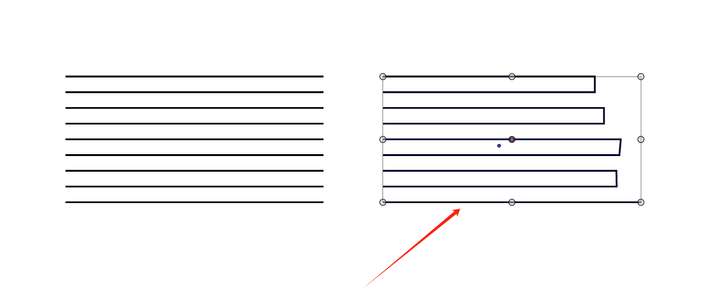
                          How about selecting (at once), all the nodes on the right side with the Node tool and pressing Control + J to join them?
                          Would that work?

                          HP•Windows 11 Pro•11th Gen Intel(R) Core(TM) i7-1165G7 @ 2.80GHz 2.70 GHz• RAM: 16.0 GB (DDR4)

                          VectorStylerV M 2 Replies Last reply Reply Quote 1
                          • VectorStylerV Offline
                            VectorStyler @William Kansepa
                            last edited by

                            @William-Kansepa Select the nodes using the Node tool, and press J. That will connect the lines.

                            M 1 Reply Last reply Reply Quote 0
                            • M Offline
                              monsterfox @VectorStyler
                              last edited by

                              @VectorStyler Haha, actually, it was only in the last few months that I discovered many shortcuts for special situations don't require modifier keys at all. But I haven't integrated them all yet. Is there a place on the forum where I can check them?

                              VectorStylerV 1 Reply Last reply Reply Quote 0
                              • M Offline
                                monsterfox @William Kansepa
                                last edited by

                                @William-Kansepa Thanks for your idea, but I think the quickest way is to use the trim tool, which can make a clean cut. It just requires continuously drawing the number "3".

                                1 Reply Last reply Reply Quote 0
                                • VectorStylerV Offline
                                  VectorStyler @monsterfox
                                  last edited by

                                  @monsterfox said in Detail optimization and function enhancement:

                                  Is there a place on the forum where I can check them?

                                  Not really, but you can see the shortcuts in the Shortcut Editor, select the Context and you can see or edit the shortcuts for that context.

                                  M 1 Reply Last reply Reply Quote 0
                                  • M Offline
                                    monsterfox @VectorStyler
                                    last edited by

                                    @VectorStyler The eraser tool cannot erase unnecessary paths by single-clicking, and can only be operated by clicking and moving the mouse. I also hope this point can be optimized.

                                    VectorStylerV 1 Reply Last reply Reply Quote 1
                                    • VectorStylerV Offline
                                      VectorStyler @monsterfox
                                      last edited by

                                      @monsterfox I will try to improve this.

                                      M 1 Reply Last reply Reply Quote 0
                                      • M Offline
                                        monsterfox @VectorStyler
                                        last edited by

                                        @VectorStyler 0_1748703536459_mmexport1748701979704.png
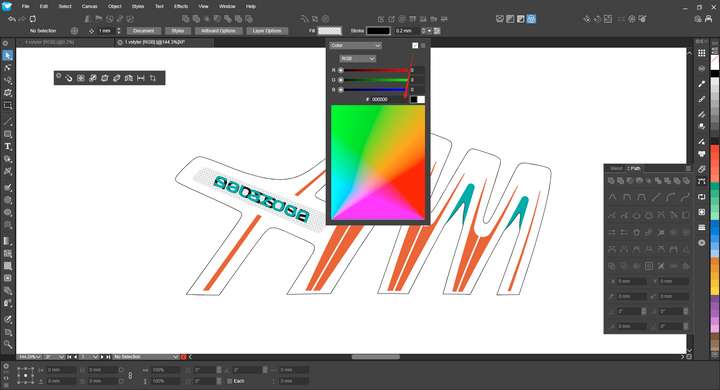
                                        Since I haven't used this function to remove color information for a long time, I was stunned for a few seconds at first glance before finding this icon. It is suggested to move it to the position of the color box below.

                                        VectorStylerV 2 Replies Last reply Reply Quote 1
                                        • VectorStylerV Offline
                                          VectorStyler @monsterfox
                                          last edited by

                                          @monsterfox I added this to the backlog.

                                          1 Reply Last reply Reply Quote 0
                                          • VectorStylerV Offline
                                            VectorStyler @monsterfox
                                            last edited by

                                            @monsterfox said in Detail optimization and function enhancement:

                                            It is suggested to move it to the position of the color box below.

                                            The problem here is that the "remove" icon does not mean removing the "color", but the "fill". That is: it must be available for any of the selections made on the top-left dropbox.

                                            M 2 Replies Last reply Reply Quote 0
                                            • First post
                                              Last post