VectorStyler
    • Categories
    • Unread
    • Recent
    • Tags
    • Popular
    • Register
    • Login

    New user, i stuck with a simple thing
    Scheduled Pinned Locked Moved Questions and Support
    27 Posts 4 Posters 49.0k Views
    Loading More Posts
    • Oldest to Newest
    • Newest to Oldest
    • Most Votes
    Reply
    • Reply as topic
    Log in to reply
    This topic has been deleted. Only users with topic management privileges can see it.
    • S Offline
      Subpath @VectorStyler
      last edited by

      @vectoradmin thank you, will try it.

      Leads me to one further question.
      What is meant a Brush in VectorStyler
      and what a Stroke ? To avoid misconceptions.

      Win 11
      CPU: AMD Ryzen 5 9600X, 6-core.
      GPU: Nvidia Geforce RTX 5070.

      VectorStylerV 1 Reply Last reply Reply Quote 0
      • S Offline
        Subpath @VectorStyler
        last edited by Subpath

        @vectoradmin said in New user, i stuck with a simple thing:

        @Subpath2 How much time of usage it takes to have that broken look? It might be some resource issue.

        Would say that was quick, in the blink of an eye.
        That was when I was trying to figure out how to convert an artistic brush into a shape/curve.

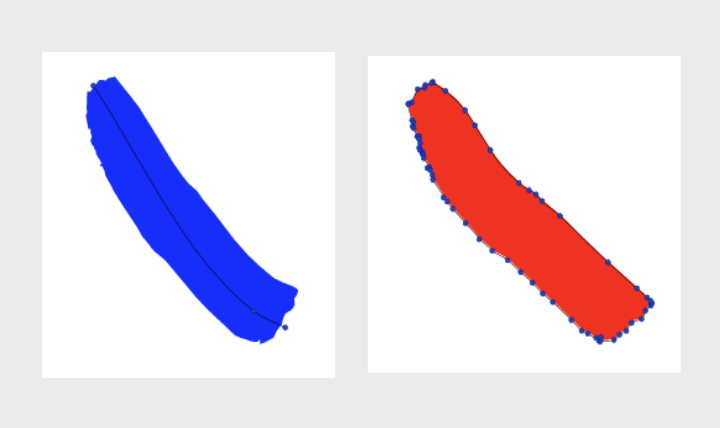
        In the process, I tried a workaround and rasterized the Artistic Brush in a Bitmap and make them to Vector via the tracer.

        About at the point where I was trying to figure out how to edit the tracing results. That's why I pressed a few
        Buttons and tried around, but can't remember which ones. If this happens again, I'll take a screenshot.

        I just found out the function of the expand button in the Tracer Panel today and know now how to make a tracing result editable.

        I didn't see anything serious with the other bugs, I will report them when I see them again. I was too surprised the first time.

        A few of them may have been just a misuse on my part. Because VectorStyler already has a very different concept than I'm used to. And my experience with vector graphics may be more in the way of understanding it.

        Win 11
        CPU: AMD Ryzen 5 9600X, 6-core.
        GPU: Nvidia Geforce RTX 5070.

        1 Reply Last reply Reply Quote 0
        • encartE Offline
          encart @VectorStyler
          last edited by

          @vectoradmin . ...where the VectorStyler interface shattered into pieces and looked like
          modern video art....

          I have experienced the same several times in the last few days. I had VS running for a long time then. Unfortunately, I don't know what exactly caused them.

          Windows 11 Home 10.0.22621

          VectorStylerV BoldlineB 2 Replies Last reply Reply Quote 0
          • VectorStylerV Offline
            VectorStyler @Subpath
            last edited by

            @Subpath2 said in New user, i stuck with a simple thing:

            What is meant a Brush in VectorStyler
            and what a Stroke ? To avoid misconceptions.

            Stroke: the outline attribute of an object with a shape. It can have dashes, stripes and profile (also caps and arrows). Can be filled with a solid color, but also pattern or gradient (including gradient along / across the stroke).

            Brush: a collection vectors, stretched along the object shape, has no dashes or stripes, but can have a profile. It may use a single color to style these vectors, or each vector can have its own color.

            A Brush is more resource intensive than a Stroke, and when expanding, the Brush results in the constituent objects (vectors) grouped and bent along the original shape (using the Bend effect). This is why an extra convert to curve step is needed for the Brush.

            S 1 Reply Last reply Reply Quote 1
            • VectorStylerV Offline
              VectorStyler @encart
              last edited by

              @encart said in New user, i stuck with a simple thing:

              @vectoradmin . ...where the VectorStyler interface shattered into pieces and looked like
              modern video art....

              I have experienced the same several times in the last few days. I had VS running for a long time then. Unfortunately, I don't know what exactly caused them.

              It looks like some sort of resource problem. I will try to replicate this one and find a fix. Meanwhile, as a workaround, VS could be restarted every now and then.
              But please let me know if you still encounter this issue.

              1 Reply Last reply Reply Quote 0
              • S Offline
                Subpath
                last edited by Subpath

                It was not possible to close VectorStyler at that time because the whole
                program area was a mess. There was nothing that looked like a user
                interface anymore.

                Only an impressive video art-like image with smashed abstract things.
                I could quit Vectorstyler or the rest of it, only via the task manager.

                And both cases where it was by me, was when i convert a Artistic Brush
                in Bitmap, trace it and try to figure out how to make the nodes then editable for me.

                Win 11
                CPU: AMD Ryzen 5 9600X, 6-core.
                GPU: Nvidia Geforce RTX 5070.

                VectorStylerV 1 Reply Last reply Reply Quote 1
                • VectorStylerV Offline
                  VectorStyler @Subpath
                  last edited by

                  @Subpath2 Sounds like a DirectX display problem.
                  Artistic brushes are vectors in VS, there should be no need for tracing to expand.
                  Was there some bitmap brush that needed tracing?

                  S 1 Reply Last reply Reply Quote 0
                  • encartE Offline
                    encart
                    last edited by

                    Only closing from the task manager was possible.

                    Windows 11 Home 10.0.22621

                    1 Reply Last reply Reply Quote 0
                    • S Offline
                      Subpath @VectorStyler
                      last edited by Subpath

                      @vectoradmin

                      No, there was no bitmap Brush that need tracing.

                      I know that Artistic Brushes are Vector in VectorStyler.
                      And as i wrote in my above Post i have convert a Artistic Brush to a
                      Bitmap and trace it only as a "workaround". To convert this way a Artistic
                      Brush in a Shape/Curve.

                      Because at this time i did not know how do Convert
                      the Artistic Brush in Curve/Shape.

                      Win 11
                      CPU: AMD Ryzen 5 9600X, 6-core.
                      GPU: Nvidia Geforce RTX 5070.

                      encartE 1 Reply Last reply Reply Quote 1
                      • BoldlineB Offline
                        Boldline @encart
                        last edited by

                        @vectorstyler I primarily use VS on my Mac, but I do have VS on a Windows laptop as well. Is there anything specific we can do to help you find these bugs in the Windows version?

                        🍎 macOS Tahoe 26.2, Mac mini (M1, 2020), Chip Apple M1, Memory 16 GB
                        Cintiq 27QHD Display and LG Ultra HD Display

                        VectorStylerV 1 Reply Last reply Reply Quote 0
                        • VectorStylerV Offline
                          VectorStyler @Boldline
                          last edited by

                          @Boldline It looks like after long time of use, the UI display might break. Not clear yet how long it need to be used.
                          Seems to be some kind of resource leak.

                          I added this to the backlog and will try to replicate it.

                          S 1 Reply Last reply Reply Quote 0
                          • encartE Offline
                            encart @Subpath
                            last edited by encart

                            @Subpath2
                            0_1632487033390_screenshot_20210924_142924.png
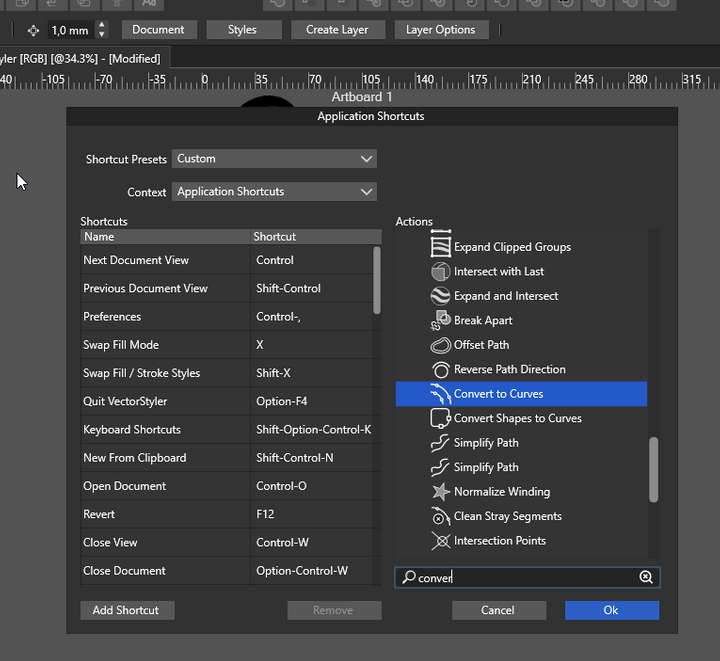
                            View> Customize>Keyboard Shortcuts.

                            It maybe useful for you. Sometimes when I'm not sure if something is possible Im typing in search field keyword .
                            A few day ago I was wondering if I can select locked object, and the answer was there

                            The entire customize menu is worth attention:)

                            Windows 11 Home 10.0.22621

                            S 1 Reply Last reply Reply Quote 2
                            • S Offline
                              Subpath @encart
                              last edited by

                              @encart , thanks for the tip. I will have a look at it.

                              Win 11
                              CPU: AMD Ryzen 5 9600X, 6-core.
                              GPU: Nvidia Geforce RTX 5070.

                              1 Reply Last reply Reply Quote 0
                              • S Offline
                                Subpath @VectorStyler
                                last edited by

                                @vectoradmin , I am not sure about "... after a long time of use". Because in my cases I think VS ran maybe 1 hour but i think rather lesser. As far as I remember.

                                Win 11
                                CPU: AMD Ryzen 5 9600X, 6-core.
                                GPU: Nvidia Geforce RTX 5070.

                                VectorStylerV 1 Reply Last reply Reply Quote 0
                                • VectorStylerV Offline
                                  VectorStyler @Subpath
                                  last edited by

                                  @Subpath2 said in New user, i stuck with a simple thing:

                                  @vectoradmin , I am not sure about "... after a long time of use". Because in my cases I think VS ran maybe 1 hour but i think rather lesser. As far as I remember.

                                  Good to know. I will try to replicate it.

                                  1 Reply Last reply Reply Quote 0
                                  • S Offline
                                    Subpath @VectorStyler
                                    last edited by

                                    @vectoradmin , thank you for your very clear and well description of the differences between Brush and Stroke in VS. I appreciate it!

                                    Win 11
                                    CPU: AMD Ryzen 5 9600X, 6-core.
                                    GPU: Nvidia Geforce RTX 5070.

                                    1 Reply Last reply Reply Quote 0
                                    • encartE Offline
                                      encart
                                      last edited by

                                      @vectoradmin Have these glitches now.
                                      https://recordit.co/rbaFOh7r1T
                                      Is there anything what would help you? I'm keeping VS opened now.

                                      I left VS opened for a few hours , drew a rectangle, rouunded the corners and clicked an arrow button near stroke input field. I'm showing that at the begining.

                                      Windows 11 Home 10.0.22621

                                      S VectorStylerV 2 Replies Last reply Reply Quote 0
                                      • S Offline
                                        Subpath @encart
                                        last edited by Subpath

                                        @encart , @vectoradmin,

                                        Yes, these glitches looked the same by me.
                                        Apart from the fact that they went over the entire VS Ui area.

                                        Win 11
                                        CPU: AMD Ryzen 5 9600X, 6-core.
                                        GPU: Nvidia Geforce RTX 5070.

                                        1 Reply Last reply Reply Quote 0
                                        • VectorStylerV Offline
                                          VectorStyler @encart
                                          last edited by

                                          @encart said in New user, i stuck with a simple thing:

                                          I left VS opened for a few hours , drew a rectangle, rouunded the corners and clicked an arrow button near stroke input field. I'm showing that at the begining.

                                          I will try to replicate using this. Was VS used while open in those few hours, or just left open and then used?

                                          S 1 Reply Last reply Reply Quote 0
                                          • S Offline
                                            Subpath @VectorStyler
                                            last edited by Subpath

                                            @vectoradmin said in New user, i stuck with a simple thing:

                                            @encart said in New user, i stuck with a simple thing:

                                            I will try to replicate using this. Was VS used while open in those few hours, or just left open and then used?

                                            In both of my two cases it was used.
                                            I fiddled around with vector to bitmap and traced the bitmap to vector.
                                            Then tried to figure out how I could make the result editable.
                                            As I wrote above.

                                            Win 11
                                            CPU: AMD Ryzen 5 9600X, 6-core.
                                            GPU: Nvidia Geforce RTX 5070.

                                            VectorStylerV 1 Reply Last reply Reply Quote 1
                                            • First post
                                              Last post