Subcategories

  • These features and ideas have been implemented in VS as suggested

    180 Topics
    1k Posts
    VectorStylerV
    @Ayo said in About the Snap feature: Wouldn't it be better to change "Snap to Visible Only" to "Snap to View Extend Only" or shorter "Snap to Viewport Only" or even shorter "Snap to View Only" ? There is a big chance of confusion with the term 'visible' which is mainly linked to the layer system. I added this to the backlog.
  • Alternative Ideas for gradient creation

    4
    1 Votes
    4 Posts
    16 Views
    S
    @EricP I'm open to additional ideas; they're welcome. But selecting colors in the palette first and then drag and drop them into the Gradient panel seems a bit cumbersome. If I could simply use "Create Gradient from Color Palette" instead. One of my main ideas for this whole thing is actually "Create Gradient from selected Objects." This would allow me to use larger color areas with larger objects, giving me a better impression of the colors. Selecting colors and choosing colors in the Gradient Panel or the Color Panel is a bit too fiddly in my eyes. Yes, you could copy Gradient Stops via the ALT Key which is nice to have.
  • Advanced Bezier Editing for Logo & Lettering Work

    5
    0 Votes
    5 Posts
    96 Views
    K
    @Honor @vectorstyler This will definitely be a power option to speed up the workflow.
  • 6 Votes
    2 Posts
    27 Views
    VectorStylerV
    @Subpath Thank you!
  • Curvature View & Auto Smooth / Harmonization Tool

    2
    2 Votes
    2 Posts
    29 Views
    VectorStylerV
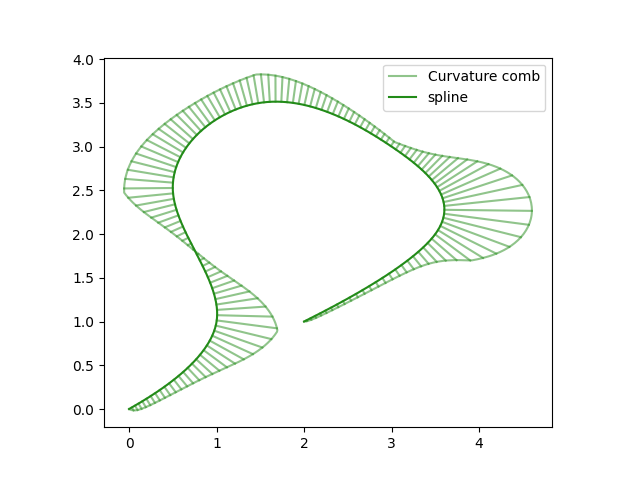
    @Honor I will add this to the backlog for 1.4, some clarifications might be needed later
  • This topic is deleted!

    1
    0 Votes
    1 Posts
    4 Views
    No one has replied
  • Batch export, export selected objects as individual SVG files

    5
    1
    1 Votes
    5 Posts
    19 Views
    S
    @VectorStyler Thank you ! I figure it out also myself a bit, via the Manual. Was a bit irritating to find the Object Export Panel under Menu > Editing. But i can live with that. If i have further Questions, i may come back. Anyway its really nice and handy to have this feature. Thanks again.
  • Add a distance / measurement tool for arbitrary points and objects

    15
    1 Votes
    15 Posts
    565 Views
    J
    @VectorStyler Select the 'measure' tool from the toolbox. Click on the first control point. Click on the second. Bring up the translate dialog-it'll have the measurement between these two points loaded and ready to go. You can have another object selected and it'll translate that object when you hit 'ok'.
  • Connect Tool

    15
    1
    3 Votes
    15 Posts
    97 Views
    VectorStylerV
    @861475_VctSt said in Connect Tool: When lines intersect, the detour method is crucial. That can make it more complicated.
  • could we set VS to recognize it even if it's clipped inside a group?

    3
    2
    1 Votes
    3 Posts
    22 Views
    BoldlineB
    @VectorStyler yes only for expansion. thank you!
  • Create New Layer Icon Too Similar to Create New Sublayer" Icon

    4
    3
    1 Votes
    4 Posts
    33 Views
    IngolfI
    No reason not to build directly on the current VS "regime" that is comparable to the interface in Illustrator: [image: 1770683932446-26b64e2d-ecfe-4d2c-8bc5-69a9942e641f-image.png] Here, Illustrator wins on visual simplicty, though. I can only imagine the VS icons can be simplyfied a bit too. A plus sign in a single square icon is all we need. Sublayer? I dunno, just as gymspiration: [image: 1770684790138-5771e636-20d5-4f4e-aa7f-3a1d123b3800-image.png] [image: 1770685047298-30c9259d-a7f3-4998-a7af-99f19d585a66-image.png] [image: 1770685170190-6678b144-4202-4eee-a19f-d737131f871c-image.png] BTW icon tooltip says new sublayer, right click menu create layer inside.
  • fractal glass effects option?

    2
    1
    1 Votes
    2 Posts
    20 Views
    VectorStylerV
    @Boldline This is a pixel based effect. It could be added later to image effects (no plans for now). Maybe a similar effect can be found in the SVG effects of Inkscape, and those can be imported to VS
  • 2 Votes
    9 Posts
    52 Views
    M
    Yes, i see this from the view of someone that work with books, i guess that is not the focus of most of VS users. You have already 4 buttons for page navigation, "Go to fist page", "Go to previous page" "Go to next page" and "Go to last page". Usually, i use the "Go to next page" to advance in the document. When i press it, and i am in the last page, usually is because i need to add a page, so, "Go to next page" become "add page" dialog only in the case you are positioned in the last page of your document. It will not interfere with navigation.
  • Value slider for pattern size

    3
    1
    1 Votes
    3 Posts
    16 Views
    E
    @VectorStyler thank you
  • 3-Point Rectangle and the 3-Point Circle tools suggested enhancements

    2
    2 Votes
    2 Posts
    26 Views
    VectorStylerV
    @William-Kansepa I added this to the backlog
  • Detail Optimizations for Version 1.3

    31
    3
    1 Votes
    31 Posts
    3k Views
    VectorStylerV
    @monsterfox said in Detail Optimizations for Version 1.3: This is about the Halftone image effect: 1. The color of halftone graphics cannot be changed. I will try to add this if possible (later) 2. As can be seen from the effect in the image, the background cannot be made transparent, with a visible white background. This cannot be done with the image effect, but the vector halftone effect should be able to do it.
  • macOS shortcuts / “Close View” placement

    3
    2 Votes
    3 Posts
    370 Views
    VectorStylerV
    @Ingolf I checked this in other apps (AI, AD), and the "Close" command is the same as the Close View in VectorStyler, it closes a single view of a multiple view document
  • 1 Votes
    4 Posts
    203 Views
    VectorStylerV
    @Boldline @Subpath I added this sto the backlog opf features for 1.4
  • XLS for features and ideas - Megathread

    191
    2 Votes
    191 Posts
    570k Views
    DanielD
    @VectorStyler: I tried this too. Didn't note down how it affected performance. Will report back. Thanks!
  • Personalized popup menu with shortcuts and macros

    18
    1
    3 Votes
    18 Posts
    20k Views
    encartE
    @dezenho The only problem I have is that the side mouse buttons don't trigger.
  • Support a Blob type of vector brush

    38
    0 Votes
    38 Posts
    16k Views
    B
    @VectorStyler I'm using the Wacom Movink DTH135 pen tablet display