Use an Empty path like the knife tool to cut a shape with no visible gap
-
@Boldline Hm… I see no gap width difference here between Divide and the Knife tool result (except for the shapes themselves).
A path/object with no stroke is still vectors — the stroke width doesn't matter when the app performs the Divide operation, as the vector path is the one used to calculate the new shape. -
@b77 Here is what happens if I leave a stroke in there when I use divide to divide up the gray shape.
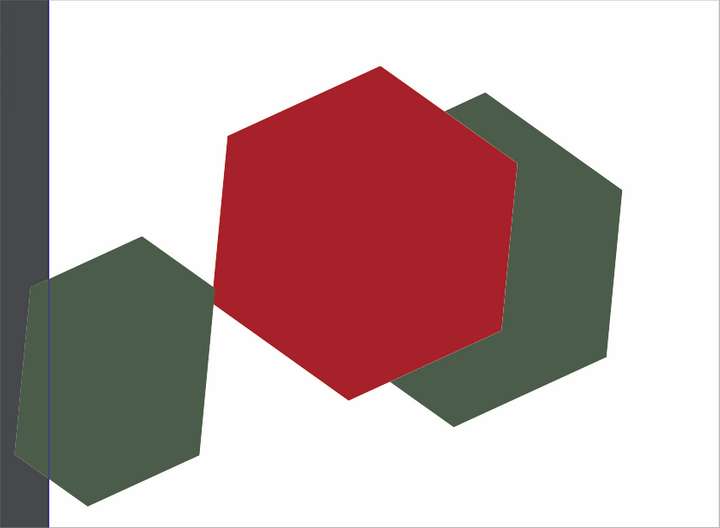
There is left a thin white gap between the two shapesIf I make the same stroke have no width at all, and then try the divide boolean again, the gray shape is not divided at all
Here is the result in Illustrator CS6 if I do the same thing. It requires I ungroup after but the result is what I was seeking - it has no gap between the parts
-
@Boldline said in Use an Empty path like the knife tool to cut a shape with no visible gap:
This topic has been brought up a long time ago - but I was thinking more about it today when I was using the knife tool. One of the "professional" ways I was taught to cut a vector shape in Illustrator for logos was to create a path and set it to no fill/no stroke and use the boolean divide or merge to create a cut line where there is no gap left between the two new sections. I was testing the idea of in VS and it's not possible to do currently
In testing the knife tool - I was wondering if that same knife functionality could be added to any stroke with no fill and no stroke fill? I believe this would be a great addition to VSI am surprised this doesn't work in VS. It is an old school method from before fancy tools like the knife. And in software with no fancy vector features at all - Affinity Designer - this is what Affinity customers have to do without a knife. With the pen tool you can use this method to make some advanced cuts quickly - if you are familiar with the old school trick.

-
@Boldline If it's an open path that has to be used, just give it a fill and get rid of the stroke, and the result from the Divide operation should be what you need.
-
@b77 I understand what you are saying, but why not just add the functionality? There are times you want to keep both sides of a shape and just change the color of them. It's a commonly used tool in Illustrator and it does not seem like it would be a difficult addition (not that I'm a developer)
-
@Boldline Should have specified my suggestion is intended to be a workaround.
I'm not against this working as you describe.
-
@b77 lol no problem! you are correct that is a useful workaround - hoping @vectoradmin will eventually add that functionality as I know many who use that in their work, especially with things like logos that need to be precise
-
@Boldline Shift-X FTW

-
@Boldline How about using the CutOut boolean op. It will cut the second selected object using the first one.
-
@vectoradmin hanks for the suggestion. I like the tool overall.
That works ok but still leaves a think white line between the red and green in this case... it's not a bad thing for most purposes, but would be nice to have the option at some point for the totally clean cut. There are certain times that method is preferred.
The cut out method still requires a fill shape, and cannot be a simply a stroke.