Would you share your workflow optimization?
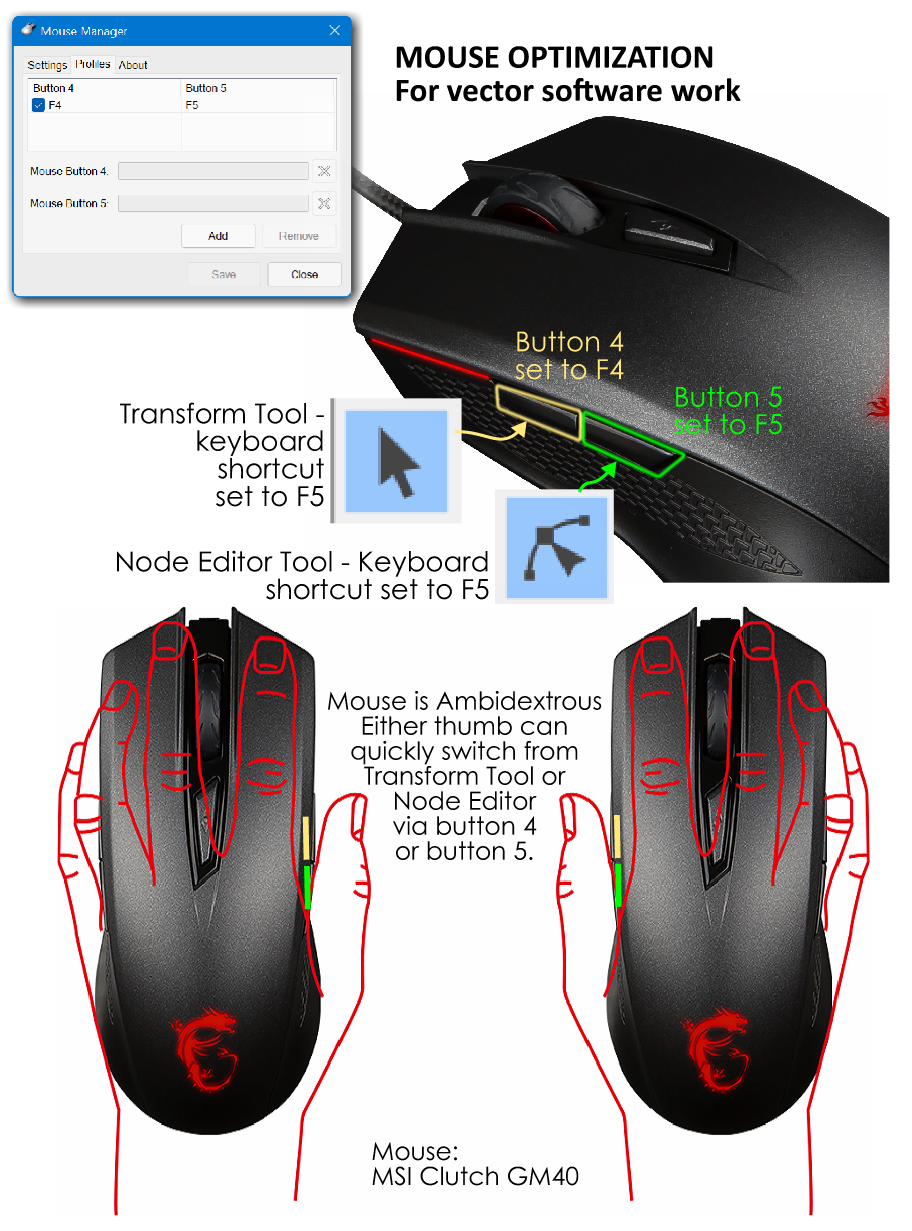
-
@Boldline Thank you! I edited the post to reflect the actual default keys you mentioned. I didn't remember what they were originally set to, so I consulted the manual and I must have misread! Haha.
If you decide to enable those Logitech keys and use them for VS, I am interested in hearing your feedback.
And if you have any time-saving tricks to share, I'd love to hear them! -
@Victor-Vector Great!
I like to experiment in this aspect.
I have already mentioned many times in various threads that I am testing several applications that simplify the use of the most common commands.
Currently I'm stuck with two.- X-mouse Button Control
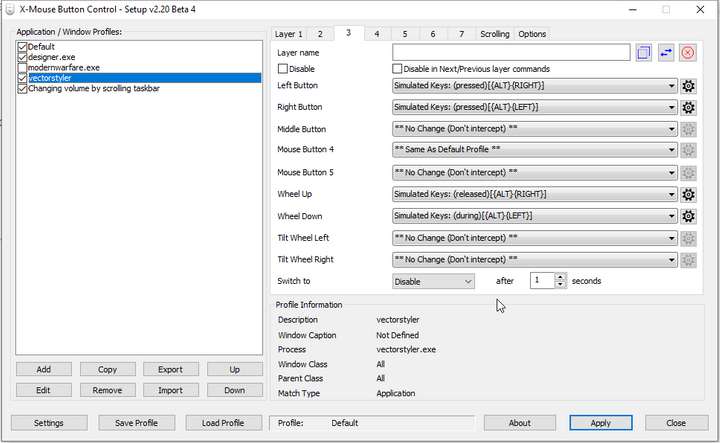
A free program that amazingly extends the possibilities of the mouse.
It allows you to assign any key sequences to them, introduce breaks between them, create layers and a lot of others.
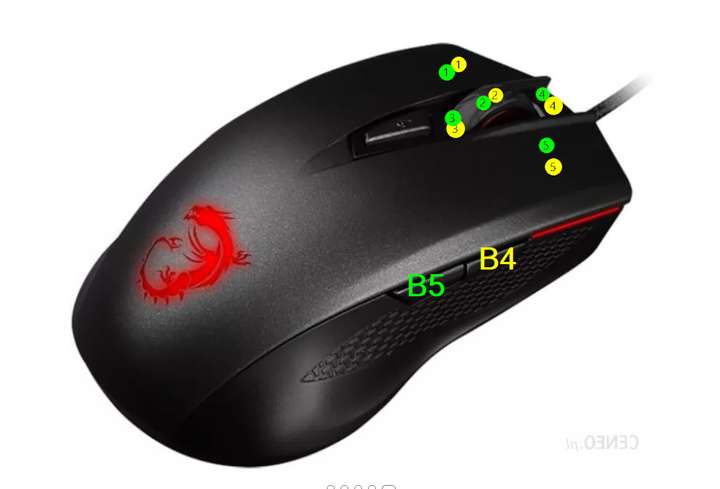
It just so happens that I use exactly the same mouse model
This program allows Button Chords, i.e. pressing and holding one of the side buttons allows you to change the functions of the others. This way, having only 2 side buttons, you have access to about 10 convenient combinations.
In addition, you can create layers that can be triggered by a button on the keyboard. For example, by holding F3 and turning the wheel, I change the Tracking in the text, and under F4 the Stroke width in the same way.
I highly recommend it if someone works on Windows. - AutoHotPie Alpha
https://github.com/dumbeau/AutoHotPie
This is a program that I got using the Radial Menu based on AHK (AutoHotKey). It has slightly smaller possibilities, but better ergonomics and a modern look. The program is currently alpha, but it is stable, but if there is a problem somewhere, it takes a second to reboot.
It allows you to create a pie menu around the cursor with any shortcuts.
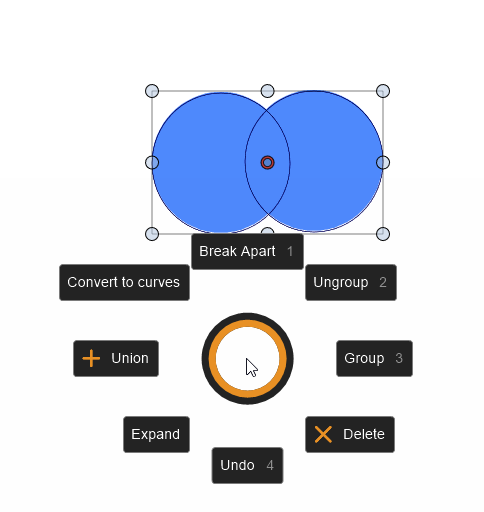
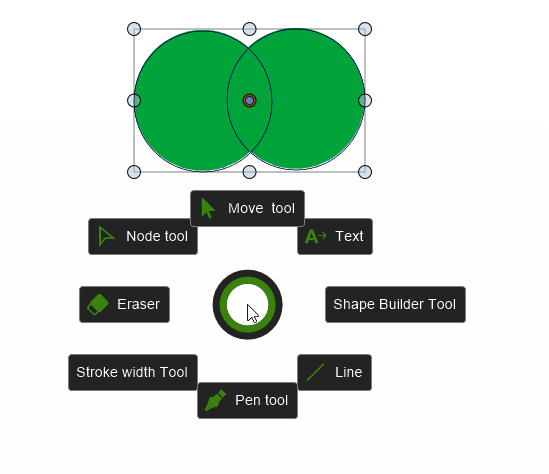
Calling can be done with a mouse button or keyboard.
Personally, I try not to assign more than 8 shortcuts to a single menu - then using gestures is pleasant and fast (the zones are large enough to hit shortcuts). I assigned one menu to the side keys of the mouse. One is tools and the other is frequent shortcuts. When it enters the bloodstream, it speeds up the work.
The only problem I am experiencing is getting out of the text mode that I have already reported.
I am an ardent advocate of introducing this type of functionality in the VS in the future.
Sample video: https://recordit.co/W6BrxlaoDu
(I could not activate some shortcuts while screen recorder was active)
MacBook Air M4 24Gb, Tahoe 26.3.1
- X-mouse Button Control
-
@encart Woah! You have taken what I described to a whole other level X5!!!
This is really exciting and I am so glad you shared this with the forum. I did not realize you had already mentioned this many times on various threads. I have not had the luxury of time to dig into the posts I have missed since I joined, so thank you for summarizing and sharing your optimizations here. I am going to experiment with some of your recommendations.
Clearly there is plenty of room to take my game to the next level!It's funny we are using the same mouse. I chose it not only because the gaming mice are generally more sensitive, robust, and more configurable, but also because it was one of the only mice that offered a truly neutral ambidextrous profile, because I use my mouse left-handed. Do you use your mouse in the left hand as well?
-
@Victor-Vector said in Would you share your workflow optimization?:
It's funny we are using the same mouse. I chose it not only because the gaming mice are generally more sensitive, robust, and more configurable, but also because it was one of the only mice that offered a truly neutral ambidextrous profile, because I use my mouse left-handed. Do you use your mouse in the left hand as well?
Yes, I am also left-handed. It's hard to find a mouse that would be comfortable, fit a large hand and had side buttons.
-
...The only problem I am experiencing is getting out of the text mode
that I have already reported....Edited:
Found the right Command to bring VectorStyler to Front
independent of which document is open.
Its: "WinActivate, ahk_exe VectorStyler.exe"I don't know in which case you want to go out of textmode.
But one workaround that came to my mind would work with a
AutoHotKey script.The AHK script moves the cursor once briefly to the Transform tool
and selects it.There are one thing to note with that script.
-> It works only right if VS is in Maximize Window Mode
because then the Transform Tool is always at the same placeBut it's good enough to show the idea.
Here is the script:; activate VS Window
WinActivate, ahk_exe VectorStyler.exe; get the actual Mouse position
; doesnt work by me because
; AHK save the Mouspos from Scite Editor
; wenn i Run the Script
MouseGetPos, xpos, ypos; slow down the Script to show the movements
Sleep, 1000; save the old position in variables
oldxpos := xpos
oldypos := ypos; click the Transform Tool to get out of Textmode
MouseClick, Left, 22, 144Sleep, 1000
; go back to the old Mosue position
MouseMove, %oldxpos%, %oldypos%Thats all.
-
Nice idea. Well, seems that I am a bit out of line, am a little unsure
if I fit in hereSince I no longer work professionally. Therefore I do not attach
too much importance on an optimized workflow. But of course
it still annoys me when a program is cumbersome to usePersonally i dont like mices with macro keys and so i dont use them.
In VS i just have some Panels open and minimized that i use in a Project.
Dont care that much about Shortcuts, i am no pro no more.
Only Ctrl+C and Ctrl+V of course.But i still have hopes that Vectoradmin will add a Script Language in VS.
( its on the List ) -
@Subpath I think with all that experience under your belt, you definitely fit in to this conversation, as you would potentially have a many tricks you could share with us! That said no pressure on you. I often find even a small trick can really help someone, it can even be things like "Do you have different Panel configurations open for different types of Jobs?", or "Are there any quality control questions you would ask yourself about a design before you sent it off to a client?", or even "How do you present design iterations to a client to ensure the process moves smoothly to conclusion?" Workflow optimizations have so many different levels.
A scripting language will really open up VS to some deep customizations for sure. Exciting you could really dig into that, @Subpath. I imagine great scripting ideas would make it into mainstream VS.
I am a terrible scripter, unless it's Ctrl+C and Ctrl+V of course!
-
As I wrote, I no longer work professionally. So I don't have any
customers/client to satisfy or anything to look out for.In my last job, I worked in digital printing. I mainly did in-house jobs and created
vector graphic files that were then printed or plotted. But i create also custom graphic designs
for customers with special wishes.I've always loved customizing a program to my needs, but mostly using scripts.
AutoHotkey is a very good tool for this. But there are others as well.
With AHK you can control any program as long as it has keyboard shortcuts,
or you can open the menus with Alt and Tab.My main program, in my job, was CorelDraw, Where I created a custom toolbar with
the tools I used the most.
(This is very easy in Corel and seems to be possible in VS as well).One of the reasons I sometimes don't like keyboard shortcuts
are constructions like this Ctrl+Alt+any key and more worst. Where
I asked myself would I create graphics or doing Handyoga. Glady
the print/plotter program we use only requires single key
combinations like "N".Btw. I am not a cool scripter either. But if the script language or the
editor had a single step function, that was always a big help for me.
x
xBack to VS:
The panels I use most often are "Shape," "Alignment," and "Transform."
The others only when needed.One of my main interests at the moment are symmetrical designs and I'm explore
the possibilities of VectorStyler for that and also what other programs have to offer. -
@Subpath
I had never given the Shape Panel much attention, but I can see how it offers some detailed and accurate configurations that are not as easy with the Shape Editor tool in the main window. So thanks for bringing that Panel to my attention.
Symmetrical designs are also interesting to me. I have explored them in Affinity Designer and I have yet to explore them in VectorStyler.
Thanks again for sharing! -
The Affinity Designers Symbols drew my attention to symmetry and patterning.
Symbols is still the best feature in AD in my eyes.
x
x
I can only recommend to have a look at the possibilities of the Shape Panel in VS.
It gives you a much finer control over shapes and everything remains editable!Try Square Star, Gear and Line Grid, you will be amazed at the shapes variety.
And all this can be combined with clipping and clones. VS offers really a lot
for someone who like to play with symmetrical Designs.

