VectorStyler
    • Categories
    • Unread
    • Recent
    • Tags
    • Popular
    • Register
    • Login

    How do we use the current version of the Anchor Point tool?

    Scheduled Pinned Locked Moved Questions and Support
    8 Posts 5 Posters 9.8k Views 4 Watching
    Loading More Posts
    • Oldest to Newest
    • Newest to Oldest
    • Most Votes
    Reply
    • Reply as topic
    Log in to reply
    This topic has been deleted. Only users with topic management privileges can see it.
    • BoldlineB Offline
      Boldline
      last edited by

      The current anchor point tool does not seem to do anything aside from selecting a node. I tried to use to to withdraw both node handles and I also tried to pull out node handles from a node that had them hidden and it did not do either of those tasks like it used to do. Is there other functionality it is used for now or is it a bug?

      🍎 macOS Tahoe 26.2, Mac mini (M1, 2020), Chip Apple M1, Memory 16 GB
      Cintiq 27QHD Display and LG Ultra HD Display

      b77B VectorStylerV 2 Replies Last reply Reply Quote 0
      • b77B Offline
        b77 @Boldline
        last edited by

        @Boldline Here it works but it has some refresh issue, and moving node handles is glitchy.

        MacBook Pro (Intel) running Monterey 12.6.4

        BoldlineB 1 Reply Last reply Reply Quote 0
        • BoldlineB Offline
          Boldline @b77
          last edited by Boldline

          @b77 hmmm ok. this is what I'm getting on my M1 mac.
          It's effectively useless as it does not do anything when I click or drag. I will try it on the intel computer and see what happens

          using VS build 36 on my intel mac I got this odd result:
          "A" shows where the line was originally and "B shows where the anchor point tool modified it to be - but the initial line remains for a while
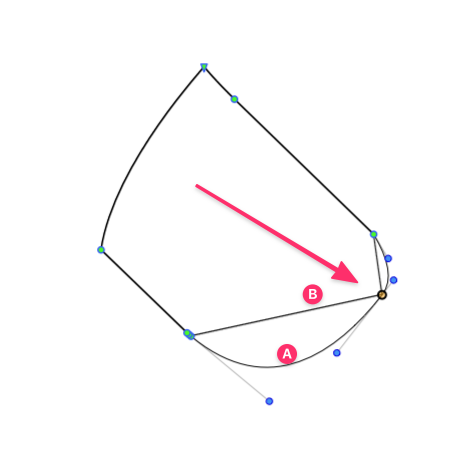
          0_1651182065391_3b8afcce-4056-4968-a566-9ce909bc2b61-image.png

          🍎 macOS Tahoe 26.2, Mac mini (M1, 2020), Chip Apple M1, Memory 16 GB
          Cintiq 27QHD Display and LG Ultra HD Display

          b77B 1 Reply Last reply Reply Quote 0
          • b77B Offline
            b77 @Boldline
            last edited by b77

            @Boldline I tried with an ellipse and its contour stays until you change the tool: https://recordit.co/pfk2twyW2H

            MacBook Pro (Intel) running Monterey 12.6.4

            BoldlineB 1 Reply Last reply Reply Quote 0
            • BoldlineB Offline
              Boldline @b77
              last edited by

              @b77 yeah seems like the intel version has some bugs. I'll try on my windows laptop shortly and a different M1 computer and see if I get the same results I initially posted where it does nothing.

              🍎 macOS Tahoe 26.2, Mac mini (M1, 2020), Chip Apple M1, Memory 16 GB
              Cintiq 27QHD Display and LG Ultra HD Display

              1 Reply Last reply Reply Quote 0
              • B Offline
                B-Vs-V
                last edited by

                I had the same problem (W10) and I was ready to ask a question. Indeed, it is impossible to get the node handles unless you modify the adjacent curves... I thought I had forgotten how to use this tool and went through the documentation.

                W11 Pro 25H2 - 12th Gen Intel(R) i7-12700K 3.61 GHz - RAM 64 Go - NVIDIA GF GTX 4070 Ti - Intuos - Dell UP3216Q / Eizo ColorEdge
                W11 Pro 25H2 - 12th Gen Intel(R) i7-12700KF 3.60 GHz -RAM 64 Go - NVIDIA GF GTX 3080 - IntuosPro- ProArt PA329C

                1 Reply Last reply Reply Quote 0
                • VectorStylerV Offline
                  VectorStyler @Boldline
                  last edited by VectorStyler

                  @Boldline Looks like there are some regressions with the Anchor tool. This could also be specific to the edited path and node types. Send me some examples where it is not working.

                  Victor VectorV 1 Reply Last reply Reply Quote 1
                  • Victor VectorV Offline
                    Victor Vector @VectorStyler
                    last edited by

                    @vectoradmin Gave it a try in Win 11 on VS 1.1.037
                    Had glitches too.
                    File attached.
                    0_1651248685865_Anchor Point Tool issue.vstyler

                    1 Reply Last reply Reply Quote 1
                    • First post
                      Last post
