VectorStyler
    • Categories
    • Unread
    • Recent
    • Tags
    • Popular
    • Register
    • Login

    Node and handle color editor in preferences - did it get moved?

    Scheduled Pinned Locked Moved Questions and Support
    5 Posts 4 Posters 4.8k Views 3 Watching
    Loading More Posts
    • Oldest to Newest
    • Newest to Oldest
    • Most Votes
    Reply
    • Reply as topic
    Log in to reply
    This topic has been deleted. Only users with topic management privileges can see it.
    • BoldlineB Offline
      Boldline
      last edited by Boldline

      There was once a section in the preferences where we could change the color of the node itself and the color of the handles, etc... was that removed or put somewhere else? There were also controls over sizing of handles and nodes there as well. I cannot seem to find it now in the preferences. Thanks!

      🍎 macOS Tahoe 26.2, Mac mini (M1, 2020), Chip Apple M1, Memory 16 GB
      Cintiq 27QHD Display and LG Ultra HD Display

      b77B VectorStylerV 2 Replies Last reply Reply Quote 0
      • b77B Offline
        b77 @Boldline
        last edited by

        @Boldline I don't know where you can change the color of nodes, but their shape and size are under 'Indicator Shapes'.

        MacBook Pro (Intel) running Monterey 12.6.4

        BoldlineB 1 Reply Last reply Reply Quote 1
        • BoldlineB Offline
          Boldline @b77
          last edited by

          @b77 thanks - maybe @vectoradmin removed it? I just remember being able to customize the colors of the nodes and handles and the like - hopefully I just missed it somehow and he'll let me know 🙂

          🍎 macOS Tahoe 26.2, Mac mini (M1, 2020), Chip Apple M1, Memory 16 GB
          Cintiq 27QHD Display and LG Ultra HD Display

          Victor VectorV 1 Reply Last reply Reply Quote 0
          • Victor VectorV Offline
            Victor Vector @Boldline
            last edited by Victor Vector

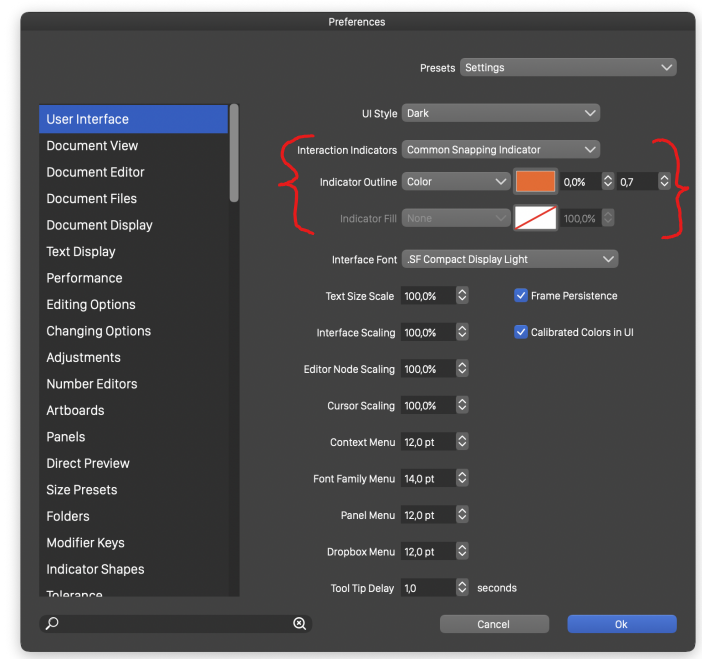
            @Boldline you could indeed change it here:
            0_1651291632745_Preferences - User Interface.png
            I got this image from the 1.1.028 manual, It's now relocated under Edit > Preferences > Editing Options 1, but the "Interaction Indicators" dropdown list seem to no longer be functioning as you mentioned in your bug report here: https://www.vectorstyler.com/forum/topic/1972/the-interaction-indicators-section-of-the-preferences-does-not-seem-to-have-a-dropdown-for-options.

            @vectoradmin is what I said correct?

            1 Reply Last reply Reply Quote 0
            • VectorStylerV Offline
              VectorStyler @Boldline
              last edited by

              @Boldline it got moved to Editing Options 1, but it resulted in a regression, will be fixed as soon as possible.

              1 Reply Last reply Reply Quote 2
              • First post
                Last post
