VectorStyler
    • Categories
    • Unread
    • Recent
    • Tags
    • Popular
    • Register
    • Login

    Strange behavior of multiple lines of Shape Text

    Scheduled Pinned Locked Moved Questions and Support
    6 Posts 3 Posters 5.7k Views 2 Watching
    Loading More Posts
    • Oldest to Newest
    • Newest to Oldest
    • Most Votes
    Reply
    • Reply as topic
    Log in to reply
    This topic has been deleted. Only users with topic management privileges can see it.
    • S Offline
      Subpath
      last edited by

      If i select multiple text lines with the "Shape Editor Tool"
      it will look like this:
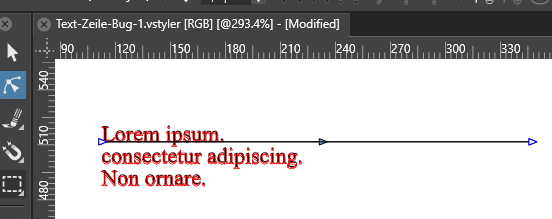
      0_1652104563972_Shape-Editor-Tool-Text-1.png

      And when I move a node of this path, all multiple text lines
      become one single text line on this path.

      0_1652104589405_Text is on one line-2.png

      Its a bit unclear to me why.

      Win 11
      CPU: AMD Ryzen 5 9600X, 6-core.
      GPU: Nvidia Geforce RTX 5070.

      VectorStylerV 1 Reply Last reply Reply Quote 0
      • VectorStylerV Offline
        VectorStyler @Subpath
        last edited by

        @Subpath Yes, this is by design, almost 🙂
        In VS, using the Shape Editor (Node) tool on a shape text will edit the "baseline shape". This is a line by default, but can be turned into any shape, activating a text on path effect.
        But when using text on path with a multiple line text, the lines will be arranged consecutively.

        S 1 Reply Last reply Reply Quote 1
        • S Offline
          Subpath @VectorStyler
          last edited by

          @VectorStyler

          Ok, thanks for the info.
          So far it has not bothered me
          i just wondered.

          Win 11
          CPU: AMD Ryzen 5 9600X, 6-core.
          GPU: Nvidia Geforce RTX 5070.

          VectorStylerV 1 Reply Last reply Reply Quote 0
          • VectorStylerV Offline
            VectorStyler @Subpath
            last edited by

            @Subpath I think it is a useful feature for single line shape (artistic/point) text.

            BoldlineB 1 Reply Last reply Reply Quote 1
            • BoldlineB Offline
              Boldline @VectorStyler
              last edited by

              @VectorStyler said in Strange behavior of multiple lines of Shape Text:

              @Subpath I think it is a useful feature for single line shape (artistic/point) text.

              I agree this is great for single line text that you want to manipulate in a design.
              I like @Subpath's idea though; what if selecting multiple lines of text allowed for adjusting several lines at the same time?

              🍎 macOS Tahoe 26.2, Mac mini (M1, 2020), Chip Apple M1, Memory 16 GB
              Cintiq 27QHD Display and LG Ultra HD Display

              VectorStylerV 1 Reply Last reply Reply Quote 1
              • VectorStylerV Offline
                VectorStyler @Boldline
                last edited by

                @Boldline said in Strange behavior of multiple lines of Shape Text:

                what if selecting multiple lines of text allowed for adjusting several lines at the same time?

                Almost exists, does not work well for open path baselines. Will be fixed in the next build.

                The feature is to select "Expand Path" in the Multiline drop down (Lines tab) of the text on path options.

                1 Reply Last reply Reply Quote 1
                • First post
                  Last post