Type leading
-
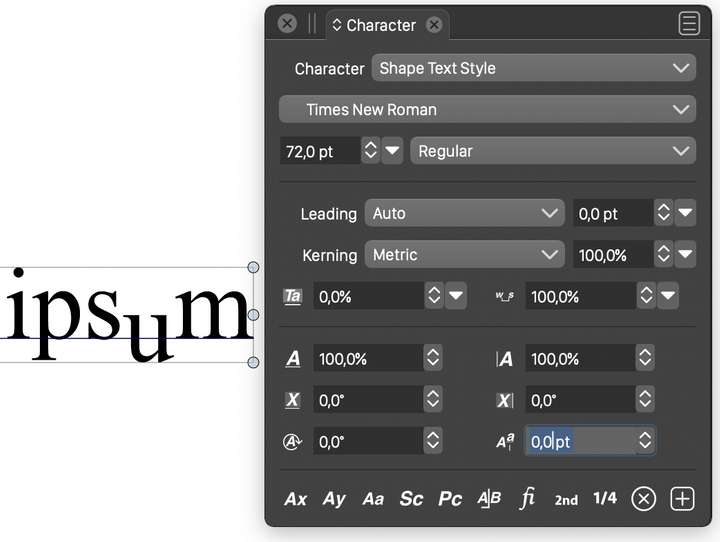
attempting to adjust the leading of one character to sit below baseline. no response to input in character panel. character will not move up or down?
I must say the text greeking below 16 points was confusing. finally managed to discover your method of control through the view menu but extremely unintuitive and unnecessary in the first place to standardize greeting at 15 pts. ?? Just setting up a document with margins was most unintuitive and torturously complicated. why not follow the conventions Adobe has established and millions of design oriented users will understand, when you are borrowing the basic functions of AI anyway? I want you to succeed but I have to say my early perception is of an unfriendly user interface experience -
Edited my post, because it was the same as @vectorstyler post
But this could stay:
I think this could be done via
Menu -> Panel -> Text -> Character -
@electroplated To offset a character baseline, use the baseline offset option in the Character panel lowest row right numeric field.
I checked and the default setting for text greeking is 8 screen pixels (set in the View -> Display -> Display Options). This will of course depend on both zooming and font size.
Should the default be smaller?Yes, many of the features have (somewhat) different UI than other apps. Of course, if there are specific cases that are too complicated, than these will be fixed.
In case of a document setup in VS the options are separated into tabs, and these options are somewhat different than other apps have.
I'm happy to improve any specific UI/UX feature. -
@VectorStyler I also think greeking kicks in a bit too soon.
Is it the 'Boxed Text' value under the Precision tab that changes this? -
@b77 Yes, I set it to a smaller default for the next build.
Also, this one is stored per document, so existing documents are not affected. -
@VectorStyler Sounds good.

But I still don't know where the greeking value is. -
@b77 said in Type leading:
But I still don't know where the greeking value is.
Sorry :), it is the "Boxed Text", I should change that name.
-
@VectorStyler Nice, thanks!
-
Yes there is the little critter I was searching for, hiding in plain sight, thanks. I have to say I continue to be bamboozled by the interface and controls. I drew a text box and could not find a way to precisely size and position it and the odd greeking still exists, persists and the box was filled with placeholder text that I could not delete? I'm just used to AI and looking for a less expensive alternative to produce print related business stationery, posters, flyers etc. I appreciate how capable this app is but maybe just not a typographers dream
-
@electroplated Default greeking should be smaller in the new build.
To precisely size a text frame (or any object), use the Transform panel, just like in AI

-
Ok the quick and easy method I miss is to just click on the page and a dialog pops up to specify measurements but you have it covered thanks. also confused by the document set up that asked for units and rulers and I went old school in Canada here still using 8.5 by 11 paper so chose inches for rulers and points assuming that meant type and stokes and I got a document that had a grid covering the canvas and the whole workspace, artboard? is that the term here for the non printable area? but the grid did not align to the rulers. went to doc setup button and saw 27.7777? and not sure what I changed but the grid snapped to inches and only covered the canvas or printable area. are there good tutorial video guides available because that is what I'm missing
-
@electroplated Yes, there are some differences to other apps.
When setting up a document, it is sufficient to set the "Inch" unit once, subsequent documents will default to that.Selecting an artboard (page) size preset in the "Artboards" tab will also set the corresponding unit type.
About the grid: by default, the grid covers the whole canvas (workspace), that may contain multiple artboards. This allows the same grid to be used on different artboards.
This is can be changed using commands of the the Grid panel menu (Panels->Editing->Grid, no corresponding tool in other app), and it is possible to set up per artboard grids with different spacing, rotation, etc.The grid spacing (along with other grid options) must be set in the Grid panel. Please note that the ruler units and the units used throughout the UI (including grid) may be different, and these can be set in the Document Setup -> General tab. If the ruler / grid use different units, then they will not align.
Also one important VS specific thing: by default the positions (and the ruler) are bottom-up, and the origin (0, 0) is at the bottom-left corner of the first artboard. This can be changed by enabling the "Top-Down Coordinates" in the Document Setup -> General tab.
-
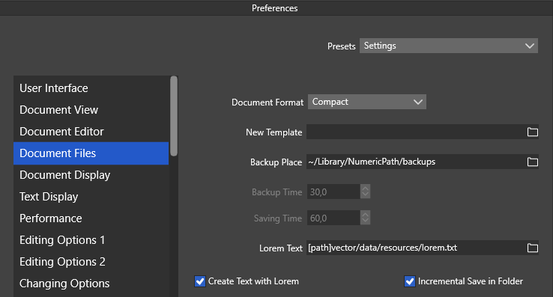
You can define your own default Placeholder Lorem Text in the Preferences.
Or switch off the default Placeholder Text Content by uncheck "Create Text with Lorem"
.

-
very helpful, thanks. that's what I needed to know
-
@VectorStyler excellent, all very helpful, instructive, that's gets me moving thanks. Some further points occur to me as I dig in. Doc setup offers rulers and units...rulers is obv. what does units refer to? I expect to be choosing what units type or strokes are measured in, no?
What does canvas margin actually mean, is that the inner page margins of a document?
I see what you mean by text greeking depending on zoom level but imho not useful and quite annoying. no keyboard shrtct for show/hide grid?
NO way to show hidden characters such as spaces, para returns etc.? Not crucial but helpful.
I'm having problems pasting in a texture either as .png or.eps. I simply copied a file from an external folder and pasted in VS but I get a box with an eps or .png icon, no texture.
-
what does units refer to
Units are for the various number fields (stroke width, etc) in the UI, when the document is active. Different documents can have different units. Of course, a specific number field may set its own unit.
What does canvas margin actually
It is just an additional space around a canvas (not the artboard). Typically this can be left to the default value, but if "Large Canvas" is disabled, it may be useful to set it to something else. (large canvas is also known as infinite canvas in other apps).
BTW: the canvas is the workspace on which artboards are placed. And a VS document may contain multiple canvases (here it gets complicated a bit )text greeking
The default greeking is now smaller. Some greeking is needed, if there is a lot of text and zoomed out to is faster to display.
keyboard shrtct for show/hide grid
Will add one in the next build. BTW: shortcuts can be customized.
NO way to show hidden characters
I added this to the backlog as a feature request.
having problems pasting in a texture
Is this on Windows or Mac? One way to get a file into VS is to just drag & drop onto the canvas.

