VectorStyler
    • Categories
    • Unread
    • Recent
    • Tags
    • Popular
    • Register
    • Login

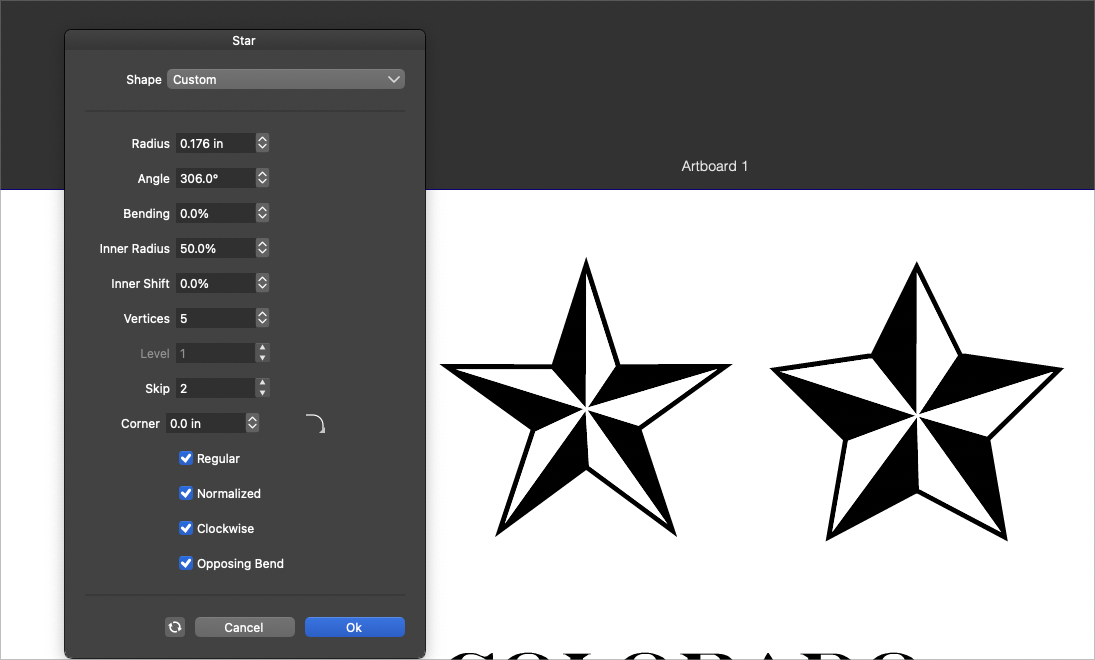
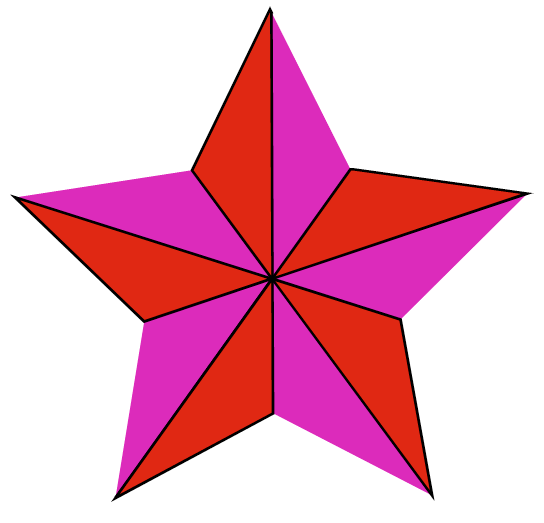
    Default built-in 3D Stars?
    Scheduled Pinned Locked Moved Features and Ideas
    23 Posts 6 Posters 37.7k Views 5 Watching
    Loading More Posts
    • Oldest to Newest
    • Newest to Oldest
    • Most Votes
    Reply
    • Reply as topic
    Log in to reply
    This topic has been deleted. Only users with topic management privileges can see it.
    • VectorStylerV Offline
      VectorStyler @Subpath
      last edited by

      @Subpath The last build contains some improvements to the shape builder tool working with open paths (and lines).
      Using similar steps as @Subpath , but with Snap to Point and the Shape Builder tool: https://recordit.co/WjViOwpZid

      S 1 Reply Last reply Reply Quote 2
      • S Offline
        Subpath @VectorStyler
        last edited by Subpath

        @VectorStyler

        cool, great 👍

        that offers possibilties for other Projects too 🙂

        Win 11
        CPU: AMD Ryzen 5 9600X, 6-core.
        GPU: Nvidia Geforce RTX 5070.

        1 Reply Last reply Reply Quote 0
        • encartE Offline
          encart
          last edited by

          @VectorStyler
          Still have problems on Win10.
          https://recordit.co/FDXtnHutP3

          Windows 11 Home 10.0.22621

          VectorStylerV 1 Reply Last reply Reply Quote 0
          • VectorStylerV Offline
            VectorStyler @encart
            last edited by

            @encart Send me the file, where the shape builder is not working.

            1 Reply Last reply Reply Quote 0
            • S Offline
              Subpath
              last edited by Subpath

              @VectorStyler

              no problem so far, is working
              also under Win 10

              But at the very first point there is
              no snap and no snap indicator
              ( little red circle )

              Edited:
              The peak of the ShapeBuilder results and the resulting oversize
              was, as @Jayanta-Das wrote, because of the stroke applied to
              the outside of the shape

              Video: see here

              .
              0_1652532079322_Star-Shape-Builder1.png

              Win 11
              CPU: AMD Ryzen 5 9600X, 6-core.
              GPU: Nvidia Geforce RTX 5070.

              J 1 Reply Last reply Reply Quote 0
              • J Offline
                Jayanta Das @Subpath
                last edited by

                @Subpath Confirm no issue in Windows 11.
                I think the oversized is due to the stroke applied to the outside of the shape.
                Mac Mini M4 Pro | 24Gb
                WIndows 11 | Intel i5 11Gen
                Wacom Intuos Pro

                S 1 Reply Last reply Reply Quote 1
                • S Offline
                  Subpath @Jayanta Das
                  last edited by Subpath

                  @Jayanta-Das

                  ...I think the oversized is due to the stroke applied to the outside of the shape...

                  yes, your right
                  was probably in sleep mode 😴
                  Did not realize it

                  But the very first point did not snap

                  Win 11
                  CPU: AMD Ryzen 5 9600X, 6-core.
                  GPU: Nvidia Geforce RTX 5070.

                  J 1 Reply Last reply Reply Quote 0
                  • J Offline
                    Jayanta Das @Subpath
                    last edited by

                    @Subpath

                    But the very first point did not snap

                    Yes, didnot snap here also.

                    Mac Mini M4 Pro | 24Gb
                    WIndows 11 | Intel i5 11Gen
                    Wacom Intuos Pro

                    1 Reply Last reply Reply Quote 0
                    • Victor VectorV Offline
                      Victor Vector @VectorStyler
                      last edited by Victor Vector

                      @VectorStyler said in Default built-in 3D Stars?:

                      @encart Added the shape builder issues to the backlog as a bug.

                      When creating shapes with Shape builder, you may want to check the size at which you create the objects. I was having difficulty creating those triquetra knots and the shape builder was giving me some difficulties. If the shapes were too small, so if the artboard was a letter-sized paper, 8.5"x11" (22 cm x 36 cm ), difficulties were happening when the shapes were smaller than about 2" x 2" (5 cm x 5 cm).
                      Making the shape about 50% of the page size or bigger solved the problems for me. So you may want to investigate how scale affects shape builder, @VectorStyler, @encart.

                      S VectorStylerV 2 Replies Last reply Reply Quote 2
                      • S Offline
                        Subpath @Victor Vector
                        last edited by

                        @Victor-Vector

                        interesting

                        Win 11
                        CPU: AMD Ryzen 5 9600X, 6-core.
                        GPU: Nvidia Geforce RTX 5070.

                        1 Reply Last reply Reply Quote 0
                        • VectorStylerV Offline
                          VectorStyler @Victor Vector
                          last edited by

                          @Victor-Vector said in Default built-in 3D Stars?:

                          you may want to investigate how scale affects shape builder

                          Will try to replicate at different size. But yes, size may affect the shape builder (and combine operations), as it affects the precision.
                          If you have an example with the start+lines where the shape builder fails, please send it to me.

                          1 Reply Last reply Reply Quote 0
                          • First post
                            Last post