VectorStyler
    • Categories
    • Unread
    • Recent
    • Tags
    • Popular
    • Register
    • Login

    Skew option on star shape tool

    Scheduled Pinned Locked Moved Features and Ideas
    7 Posts 4 Posters 7.0k Views 3 Watching
    Loading More Posts
    • Oldest to Newest
    • Newest to Oldest
    • Most Votes
    Reply
    • Reply as topic
    Log in to reply
    This topic has been deleted. Only users with topic management privileges can see it.
    • BoldlineB Offline
      Boldline
      last edited by Boldline

      I was playing around with Inkscape and noticed that the star shape tool gives the option to skew the star to make it look like the shutter on a camera lens. I didn't see this option in the star shape tool in VS, so unless I missed it, I'm hoping it can be added. thanks!

      0_1654533681296_c4653281-878d-40ed-ae35-f86c4a078189-BLD 2022-06-06 at 12.41.04.png
      0_1654533650363_d8534f1d-919b-4a02-80c6-73c472ca9389-BLD 2022-06-06 at 12.40.39.png

      🍎 macOS Tahoe 26.2, Mac mini (M1, 2020), Chip Apple M1, Memory 16 GB
      Cintiq 27QHD Display and LG Ultra HD Display

      b77B 1 Reply Last reply Reply Quote 1
      • b77B Offline
        b77 @Boldline
        last edited by b77

        @Boldline Shift-dragging the interior control points in VS does something similar but it snaps them to the imaginary line between two opposing star nodes.
        Not sure which is more useful.

        MacBook Pro (Intel) running Monterey 12.6.4

        BoldlineB 1 Reply Last reply Reply Quote 3
        • BoldlineB Offline
          Boldline @b77
          last edited by Boldline

          @b77 OK I see that now. It seems like the inkscape method gives the user more control and the VS method has predefined spacing stops. I think I'd prefer the inkscape method because it gives that smooth control

          🍎 macOS Tahoe 26.2, Mac mini (M1, 2020), Chip Apple M1, Memory 16 GB
          Cintiq 27QHD Display and LG Ultra HD Display

          VectorStylerV b77B 2 Replies Last reply Reply Quote 1
          • VectorStylerV Offline
            VectorStyler @Boldline
            last edited by

            @Boldline I add this to the backlog of features.

            1 Reply Last reply Reply Quote 1
            • b77B Offline
              b77 @Boldline
              last edited by b77

              @Boldline Just in case you need this now, you can convert the star to curves, then select and rotate just the interior nodes.

              MacBook Pro (Intel) running Monterey 12.6.4

              1 Reply Last reply Reply Quote 3
              • S Offline
                Subpath
                last edited by Subpath

                No need to convert to Curves.

                Create your Star Shape, open the Shape Panel.
                (Btw. Shape Panel seems a very overlooked Feature in VS)

                This Way there are no any predefined spacing stops.

                Then change the Value in "Inner Shift"
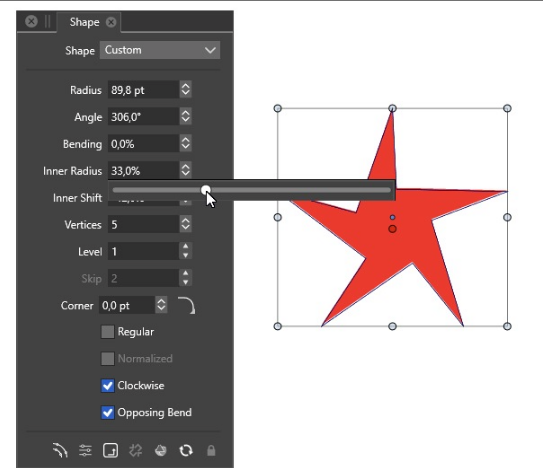
                Look here:

                0_1654600840695_Star Skew in VS.png

                Win 11
                CPU: AMD Ryzen 5 9600X, 6-core.
                GPU: Nvidia Geforce RTX 5070.

                b77B 1 Reply Last reply Reply Quote 1
                • b77B Offline
                  b77 @Subpath
                  last edited by

                  @Subpath is right, no need to convert to curves for this. 👍

                  MacBook Pro (Intel) running Monterey 12.6.4

                  1 Reply Last reply Reply Quote 1
                  • First post
                    Last post