Inspiration from Inkscape development
-
As I told you in other posts, the Inkscape team has released a greatly improved version 1.2 of Inkscape that has a number of major and also minor but much needed new features. In particular, the team has started to improve the user interface in small steps, and that's a good sign! A number of their improvements, which quite probably originate from a large circle of users, are very interesting. This post is for inspiration that may help in the design of Vectorstyler in one way or another.
Release notes:
 Inkscape 1.2 release notes
Release highlightsSome of the improvements I've particularly noticed so far are:
macOS M1 version now available - and it's fast
Inspiration for basic/advanced user interface
Inspiration for method to preview layers individually
Switching between overlapping objects
Improved align and Distribute
General Export Dialog ChangesThe improved export dialog was SO needed!!!

-
Zoom with scroll wheel
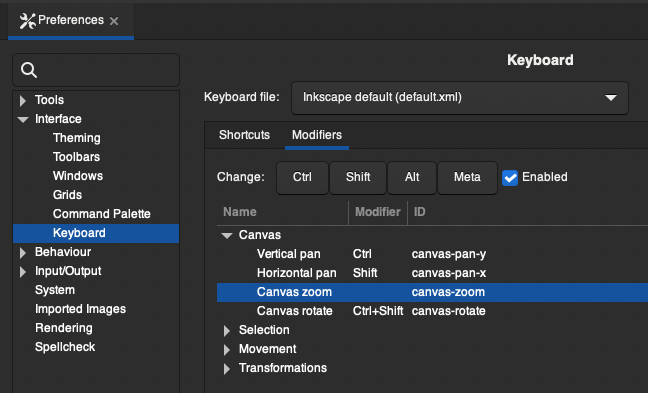
I prefer to scroll with the mouse scroll wheel, and it's not so intuitive to turn on in Inkscape. Preferences like these turn the scroll wheel on:
In order for the scroll wheel to work for zooming, you must remove any modifier associated with "Canvas zoom":
-
@Ingolf BTW: in VS the mouse wheel zooming preference is a single checkbox "Mouse Wheel Zooms".
I see that Inkscape can also customize modifier keys now
-
@VectorStyler said in Inspiration from Inkscape development:
@Ingolf BTW: in VS the mouse wheel zooming preference is a single checkbox "Mouse Wheel Zooms".
I see that Inkscape can also customize modifier keys nowYes, VS is decades ahead of Inkscape on most counts. However, both programs can work on bringing down the complexity of the user interface. And Inkscape has a long way to go.
One thing is the incredibly clumsy way of working with e.g. perspective in Inkscape, another thing is the ultra old fashioned clip path and release clip, which is completely unacceptable when you have used the intuitive method like in VS and Affinity. I simply cannot use Inkscape for real work. Not much has changed since I discovered Inkscape 15+ years ago.
But exciting that they are rising to the challenge - with just one annual release, we probably need 5-10 years before Inkscape becomes a real alternative to commercial programs.

