VectorStyler
    • Categories
    • Unread
    • Recent
    • Tags
    • Popular
    • Register
    • Login

    "Erase" like blend mode?

    Scheduled Pinned Locked Moved Questions and Support
    22 Posts 5 Posters 29.5k Views 4 Watching
    Loading More Posts
    • Oldest to Newest
    • Newest to Oldest
    • Most Votes
    Reply
    • Reply as topic
    Log in to reply
    This topic has been deleted. Only users with topic management privileges can see it.
    • VectorStylerV Offline
      VectorStyler @Guest
      last edited by

      @plrang One way to do this: group the ellipse and the text, and select the Exclude mode in Object -> Composite menu. All objects / text remain editable.
      But this works only as a shape operation, so it cannot be used with multiple different shapes retaining their style.

      ? 1 Reply Last reply Reply Quote 0
      • ? Offline
        A Former User @VectorStyler
        last edited by

        @VectorStyler Doesn't work. I'm not able to reproduce that effect, in Affinity it's a one click solution, which doesn't care about shapes and their styles, just cuts through.

        VectorStylerV IngolfI 2 Replies Last reply Reply Quote 0
        • VectorStylerV Offline
          VectorStyler @Guest
          last edited by

          @plrang I will try to include the Erase blend mode in the next build.
          Attached here the example with exclude:0_1656170358184_excluded.vstyler

          ? 1 Reply Last reply Reply Quote 0
          • IngolfI Offline
            Ingolf @Guest
            last edited by Ingolf

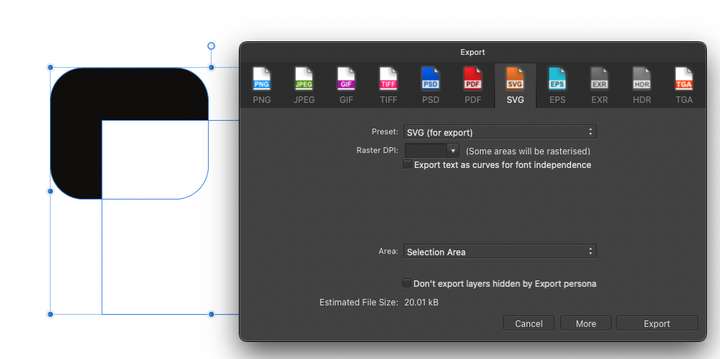
            @plrang Just so you know it, in Affinity "Erase" is a one-click-to-rasterize-those-objects solution:
            0_1656171744027_8111c7b5-aaeb-4621-b241-557f343b0d8d-image.png

            That is why many things are possible in Affinity programs; it is handled by bitmap algorithms and output of those parts of the design will be rasterized. The most frustrating example in Affinity is Recolor. If you expect vector output, you are shit out of luck.
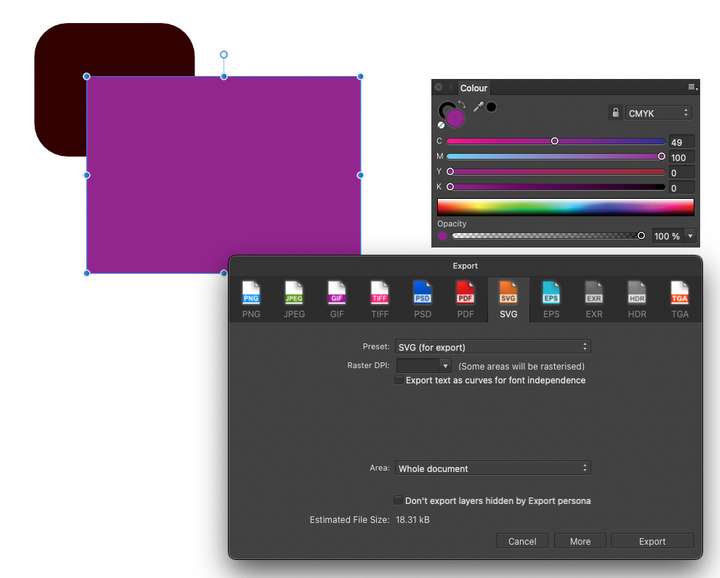
            0_1656171910280_a5cfe571-09d4-44e3-92e7-b0728f43ffe3-image.png

            🍏 macOS Sequoia Apple Silicon

            ? b77B 2 Replies Last reply Reply Quote 0
            • ? Offline
              A Former User @Ingolf
              last edited by

              @Ingolf Affinity is not ideal of course. Yet I don't care how they do it, until that gets the job done. I'm sure it can work also at the vector level, it's all just algorithms and a clever developer. If it can mask or clip, it can erase.
              I hope it will show up one day in VS.

              1 Reply Last reply Reply Quote 0
              • b77B Offline
                b77 @Ingolf
                last edited by b77

                @Ingolf Is the rasterization on export as SVG happening with any blend mode in AD?

                Maybe AD rasterizes only when blend modes that are unsupported by the SVG standard are present. If so, that's understandable.

                MacBook Pro (Intel) running Monterey 12.6.4

                IngolfI 1 Reply Last reply Reply Quote 0
                • ? Offline
                  A Former User @VectorStyler
                  last edited by

                  @VectorStyler Great example, I couldn't do that (fresh user), it's a different philosophy, more like Inkscape or Corel Draw.
                  Unfortunately when I add a stroke to the text it's not used in the Exclude operation. What am I missing?

                  b77B VectorStylerV 2 Replies Last reply Reply Quote 1
                  • b77B Offline
                    b77 @Guest
                    last edited by b77

                    @plrang Adding a thicker stroke doesn't change the result because 'Exclude' is a Boolean operation based on the shape of the text.
                    You could try instead a thicker weight of that font if available.

                    MacBook Pro (Intel) running Monterey 12.6.4

                    ? 1 Reply Last reply Reply Quote 0
                    • VectorStylerV Offline
                      VectorStyler @Guest
                      last edited by

                      @plrang The Shape Effects panel can be used to add an "Offset Path" live effect that expands the path.

                      But none of these workarounds can really replace an Erase composition mode, so I will try to do that ASAP.

                      ? 1 Reply Last reply Reply Quote 1
                      • ? Offline
                        A Former User @VectorStyler
                        last edited by A Former User

                        @VectorStyler Works as it should. I can use it now, although when streamlined it would be a great feature.
                        Thanks a lot for your help. 0_1656191639739_70665251-e006-4635-9c49-e3ccbb909e8d-image.png

                        1 Reply Last reply Reply Quote 1
                        • ? Offline
                          A Former User @b77
                          last edited by b77

                          @b77 Thanks! Yet the key is to keep looking for a solution, computers must do anything we want ;).

                          1 Reply Last reply Reply Quote 2
                          • IngolfI Offline
                            Ingolf @b77
                            last edited by

                            @b77 Affinity exports lousy SVG and too many objects are rasterized. Even gradients at times. And you cannot convert to curves what you made with blend modes or in any way expand your layers in Affinity to make them permanent vectors ready for output.

                            You do not have to export objects with blend modes. But you can use blend modes to create objects that are pure vector. Just not in Affinity.

                            That is why I ONLY use Affinity for bitmap output.

                            @plrang Affinity doesn't have clever vector developers.

                            🍏 macOS Sequoia Apple Silicon

                            IngolfI 1 Reply Last reply Reply Quote 1
                            • IngolfI Offline
                              Ingolf @Ingolf
                              last edited by

                              @Ingolf said in "Erase" like blend mode?:

                              You do not have to export objects with blend modes. But you can use blend modes to create objects that are pure vector. Just not in Affinity.

                              Maybe I was too quick and clever. πŸ˜• Can you actually do that in Vectorstyler?

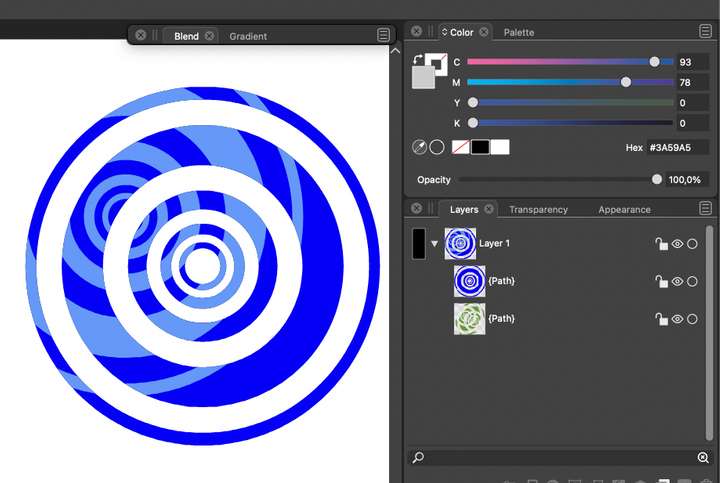
                              Here I have expand and intersected to identical objects into this:
                              0_1656243860197_e8716c74-fc80-4107-924a-7c88badf8f18-image.png

                              If I want the two layers displayed on the screen "finalized" to two layers where the bottom object's colors (green) become the colors that blend mode created (light blue), how do I do that?

                              If you want to create vector graphics where the colors are statistical and no longer the result of active blend modes in SVG or PDF.

                              🍏 macOS Sequoia Apple Silicon

                              b77B 1 Reply Last reply Reply Quote 0
                              • b77B Offline
                                b77 @Ingolf
                                last edited by b77

                                @Ingolf So basically you want a way to perform the (Boolean operation) of Divide AND keep the blend mode for the intersected parts to avoid the need for rasterizing the artwork on export, for those blending modes not supported by the SVG and PDF standards?

                                MacBook Pro (Intel) running Monterey 12.6.4

                                IngolfI 1 Reply Last reply Reply Quote 0
                                • IngolfI Offline
                                  Ingolf @b77
                                  last edited by

                                  @b77 Yes, for example when making a logo where the output must be final, permanent and not dependent on interpretations or algorithms in browsers or printers, but simply finished, done vector in exactly the colors there. Or other scenarios.

                                  There's a lot of craft involved usually, but I'm curious if some sort of vector flattener is possible.

                                  Just curious; I've been doing this sort of thing manually for years.

                                  🍏 macOS Sequoia Apple Silicon

                                  b77B 1 Reply Last reply Reply Quote 1
                                  • b77B Offline
                                    b77 @Ingolf
                                    last edited by b77

                                    @Ingolf 'Vector flattener' is a good term for this. It would be nice to have. πŸ‘

                                    It is easy to implement for two overlapping shapes, I'm sure. Not so sure when multiple overlapping shapes with different fill types and blend modes are involved… πŸ€”

                                    MacBook Pro (Intel) running Monterey 12.6.4

                                    IngolfI 1 Reply Last reply Reply Quote 1
                                    • IngolfI Offline
                                      Ingolf @b77
                                      last edited by

                                      @b77 said in "Erase" like blend mode?:

                                      It is easy to implement for two overlapping shapes, I'm sure. Not so sure if multiple overlapping shapes with different fill types and blend modes are involved… πŸ€”

                                      Yes, I've been thinking the same thing. 😞

                                      🍏 macOS Sequoia Apple Silicon

                                      1 Reply Last reply Reply Quote 0
                                      • First post
                                        Last post
