Font Outline Help Required
-
@Igull after you convert the live text to curves, why not press shift x Abe swap the fill and stroke to get that outline? In the strokes panel you can then set the path to the inside, middle or outside like in illustrator
-
@Subpath, @VectorStyler, @Boldline
Thanks all for the options, unfortunately, none of the tools replicate the result from the default setting in AI.
AI outlines the font on centre, does NOT attempt to outline any underlying and overlapping sub paths, then deletes the original - it needs to be a destructive 'effect' as it's not used as a visual.
The issue in VS is that because some paths are overlapping, the algorithm doesn't seem to take that into account for some reason?
Because single line fonts are just that, the offset needs to be zero
I've attached a file - Test Text.vstyler - it will be easier to review in outline preview mode (command+Y). It shows the original text converted to curves, then the text just picked apart with the shape editor tool to show some of the structure of the underlying paths. Bottom one is the result pasted in from AI.
TIA
Neil
iMac 27" 2015 Catalina 32Gb, MacBook Pro 13" 2016 Monterey 8Gb, Mac Mini M2 2023 8Gb
-
I understand your problem better now. The converted font
looks like single lines but in reality very very thin shapes
where the nodes are very close together.
Would say nearly overlapping. Maybe @VectorStyler knows
a Solution for that.e.g. the "T" consists of two very very thin rectangles instead of two lines
.
.
I used to work with font software as well some years ago, as far as I know
a letter/symbol consists always of a closed shape. Only single Lines was not possibleI still remember that there are "plotter" fonts, do not know the exact term,
that can be seen in CAD. Plotters wrote in a similar way like a laser.Win 11
CPU: AMD Ryzen 5 9600X, 6-core.
GPU: Nvidia Geforce RTX 5070. -
@Igull What was the original font? I will try to replicate the issue.
-
i think the right Font may not really matter here
because he use Truetype Fonts, these will allways
be build of closed shapeshis Problem seems to me the very very thin Shapes
where Nodes nearly overlappingbut he needs single lines
-
but he needs single lines
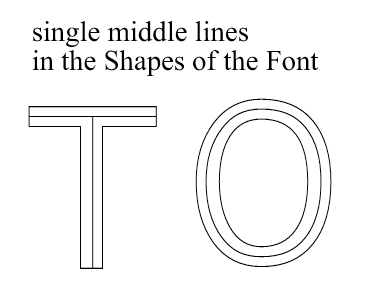
more like this i guess
even if these Shapes are very, very thin
-
This one is Eng_UniversLine Normal, I'd attach the font, but it's a commercial copyright item. However, I can mail it directly for test purposes.
Thanks
Neil -
@Subpath said in Font Outline Help Required:
I used to work with font software as well some years ago, as far as I know
a letter/symbol consists always of a closed shape. Only single Lines was not possible
I still remember that there are "plotter" fonts, do not know the exact term,
that can be seen in CAD. Plotters wrote in a similar way like a laser.Yes, truetype fonts are a closed path - and yes, "plotter" fonts or "stick" fonts were true single line fonts made from as it says on the tin - single lines
Back in the dark days of early CAD systems (when we used flints on slate ), they were also used in screen renderings as the fonts were all essentially bit image and didn't print/plot well when scaled.
They are still used widely in laser engraving and CNC engraving - along with all the other font families of course. They do definitely overlap, it's only when they are "converted to curves" or have "create outlines" applied that you see an occasional slight offset discrepancy - probably due to the algorithms applied to do this.Neil
-
Looked around a bit and found this two things here.
The first one is a Online Single-Stroke-Font Text Creator.
Has seven different single stroke fonts. You can choose
the Font you like and Enter your Text online.
The Output is a SVG File which you could download.
Here the Link:Single-stroke-font text creator Homepage:
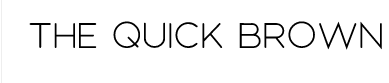
Here an Example:
.
.
The second one is a Inkscape Extension that will do more or less the same.
You need Inkscape the "Hershey Text Extension" for Engraving Fonts.
Here a Link to the Website, where you also find Instruction how to
install that Extension. -
The first one is a Online Single-Stroke-Font Text Creator.
Has seven different single stroke fonts. You can choose
the Font you like and Enter your Text online.
The Output is a SVG File which you could download.The second one is a Inkscape Extension that will do more or less the same.
The SVG thing is very useful, another tool for the web apps folder in my browser - output is definitely single-line with no overlapping and does the job admirably. There are an amazing amount of web apps available now for a multitude of oddball jobs - including some really serious CAD apps too
Please don't suggest that VS goes web 'though LOL I do have inkscape, but never actually use it - it's always been slow (on the Mac) and the latest version - a proper app at least - is only marginally better.
I still possess a physical copy of AI, so can easily resort to that for now. Funny seeing the name Hershey, I seem to remember writing a plugin for Vectorworks (a Mac CAD app) that could output lines from hershey font description files - many, many moons agoThanks a lot for that - hopefully at some point VS will be able to do that.
Neil
-
your welcome
Nice to hear that is useful.At some point, it has become a routine for me to search for web apps
when I need a certain function. It's amazing what can be done with it today....hopefully at some point VS will be able to do that...
You could put it as a feature request in the Ideas and Features section
in this forum


