VectorStyler
    • Categories
    • Unread
    • Recent
    • Tags
    • Popular
    • Register
    • Login

    Canvas Colour

    Scheduled Pinned Locked Moved Questions and Support
    5 Posts 2 Posters 4.4k Views 2 Watching
    Loading More Posts
    • Oldest to Newest
    • Newest to Oldest
    • Most Votes
    Reply
    • Reply as topic
    Log in to reply
    This topic has been deleted. Only users with topic management privileges can see it.
    • IgullI Offline
      Igull
      last edited by

      Hi
      I'm sure it's hidden in plain sight somewhere, but I'm not seeing it ๐Ÿ™‚
      I'd like the UI to be dark, but be able to change the canvas colour to something lighter than the very dark in this theme as I use the canvas as a big scratch area.
      TIA
      Neil

      iMac 27" 2015 Catalina 32Gb, MacBook Pro 13" 2016 Monterey 8Gb, Mac Mini M2 2023 8Gb

      b77B 1 Reply Last reply Reply Quote 0
      • b77B Offline
        b77 @Igull
        last edited by b77

        @Igull Here in File > Document Setup > Guides tab:
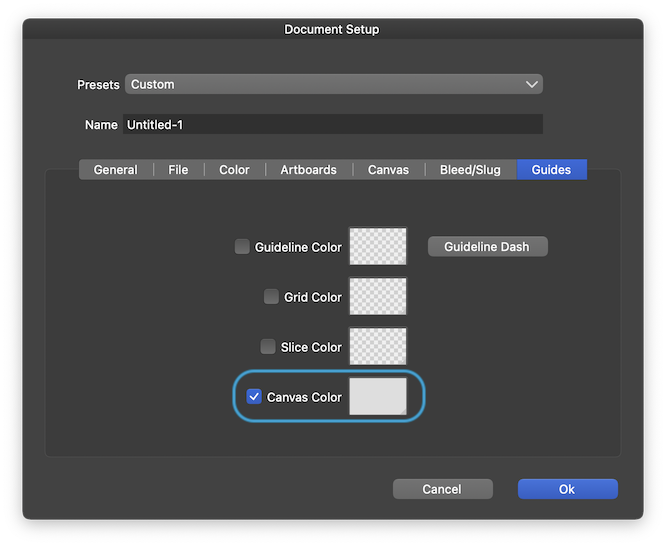
        0_1656343316398_Screenshot 2022-06-27 at 18.20.15.png

        MacBook Pro (Intel) running Monterey 12.6.4

        IgullI 1 Reply Last reply Reply Quote 1
        • IgullI Offline
          Igull @b77
          last edited by

          @b77
          Thanks for that, I did actually see that and tried it, but it seems you need to exit from the colour panel and then exit from the Doc Setup dialogue for any changes to take effect - I stupidly assumed it would be live and didn't go any further ๐Ÿ™‚
          It's also not a global setting, so you need to change it every time - or make a template (which I always do anyway, but that's broken currently).
          I can change my templates for now 'though.
          Thanks again.
          Neil

          iMac 27" 2015 Catalina 32Gb, MacBook Pro 13" 2016 Monterey 8Gb, Mac Mini M2 2023 8Gb

          b77B 1 Reply Last reply Reply Quote 2
          • b77B Offline
            b77 @Igull
            last edited by

            @Igull Not sure if existing documents should adopt the new canvas colorโ€ฆ ๐Ÿ™‚

            But you don't need to change it everytime for new documents โ€“ these are created with the custom color, until you change it or reset it.

            MacBook Pro (Intel) running Monterey 12.6.4

            IgullI 1 Reply Last reply Reply Quote 0
            • IgullI Offline
              Igull @b77
              last edited by

              @b77
              ๐Ÿ‘

              iMac 27" 2015 Catalina 32Gb, MacBook Pro 13" 2016 Monterey 8Gb, Mac Mini M2 2023 8Gb

              1 Reply Last reply Reply Quote 0
              • First post
                Last post