3 questions: font selector, scaling, control nodes
-
Hi, I have 3 questions:
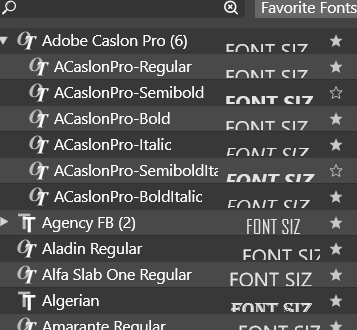
- Can I fix the font preview size in that selector?
-
Is proportional scaling, anchored to an opposite edge, available? I mean I drag the bottom to scale proportionally while the upper edge stays in place?
Dragging midpoints doesn't do that or is there a setting for it? -
Can shape control node colors be changed? Like those scaling ones etc.
-
(1) The first issue (font preview) seems to be a Windows-only issue. Here it is properly centered.
(2) When dragging by a corner of the bounding box, press Shift to preserve the aspect ratio.
If you want, you can enable 'Proportional Object Scaling' in Prefs > Editing Options 2, so you don't need to press Shift for that.
(3) You can change the node colors in Prefs > Editing Options 1 — you need to choose the node type from the second dropdown menu there.
-
slight addition to Point 2:
... enable 'Proportional Object Scaling' in Prefs > Editing Options 2...after you enable that, you still need to press the Shift-Key when:
-- you create a Rectangle or a Circle, once created you doesnt need it
-- if you scale a single Textline "Shape Text" after you have create it -
-
It may be a Windows issue, but it's impossible to determine the font

-
Proportional scaling moves all the edges in/outside. I need to drag the bottom one and scale proportionally to NOT MOVE the upper one, to keep the upper distance to another object.
-
I tried that option before, but the list has SO MANY entries that I thought it's impossible that it's the one I need.
There should be a single (or an additional) option to get all the controls colors set at once. Anyway, it finally looks as it should.
Thanks!
-
-
@plrang said in 3 questions: font selector, scaling, control nodes:
It may be a Windows issue, but it's impossible to determine the font
There seems to be no option to control this, and from the screenshot looks like a bug.
I added this to the list of bugs, will be fixed ASAP. -
@plrang said in 3 questions: font selector, scaling, control nodes:
Proportional scaling moves all the edges in/outside. I need to drag the bottom one and scale proportionally to NOT MOVE the upper one, to keep the upper distance to another object
this is not clear for me, do you have an example, maybe a short recording ? (we use https://recordit.co/ for screen recordings).
EDIT: fixed the https://recordit.co/ link
-
@VectorStyler SURE, btw. that link is wrong.
I'm resizing dragging the bottom edge to keep the distance.
I think the current scaling options in VectorStyler don't allow me to do it? -
@VectorStyler Maybe Ctrl-Shift could be used for this.
-
@plrang @b77 Got it! Looks like a feature that is missing. Shift+ should work when dragging from the side also, added to the backlog.
-
@VectorStyler Amazing, Affinity uses just the SHIFT.

