"Preferences" and menus
-
IMO there is no need for that "Preference Files" in Edit.
I'd move that to the "Preferences" dialog and there near the Presets drop down I'd add visible SAVE/LOAD/RESET buttons.Each additional option in the menu contributes to increasing the program's over-complexity. At times I feel like I'm in GIMP and that's hardly a good design standard.
-
@plrang Yes, this can be changed.
-
@plrang said in "Preferences" and menus:
IMO there is no need for that "Preference Files" in Edit.
I'd move that to the "Preferences" dialog and there near the Presets drop down I'd add visible SAVE/LOAD/RESET buttons.Each additional option in the menu contributes to increasing the program's over-complexity. At times I feel like I'm in GIMP and that's hardly a good design standard.
Under macOS, I'm quite happy with the menu. It's not in the way there, that's because macOS has a fixed menu in all applications for the application itself, which is an excellent idea. But agree, in Windows' edit menu it ends up in GIMP-like menu item overkill.
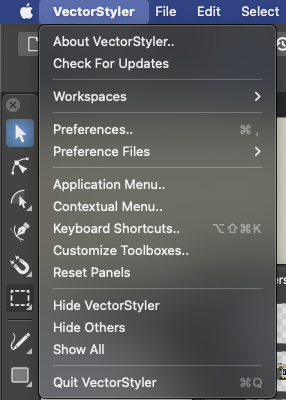
However, I can agree with the functionality being moved over to the preferences dialog to simplify the application.
One thing I wish in this context is that VS can somehow remember the last preferences I used, or at least last file location. I usually have to browse to the folder my favorite options are located in. Again.
-
@Ingolf Yes, some options are featured in so many places. Those menus can be cut down 3 times in size. there is so many cool features, the interface doesn't need to be so loud.
-
@plrang said in "Preferences" and menus:
@Ingolf Yes, some options are featured in so many places. Those menus can be cut down 3 times in size. there is so many cool features, the interface doesn't need to be so loud.
Yes, the menus can be simplified and much of the program too.

This particular entry is not available in the edit menu under macOS, though. Only in the Vectorstyler menu.
@vectorstyler had to find new homes in the menu structure for several of these entries that have a logical home under macOS when porting VS to Windows.
-
In the meantime, I took the opportunity to create my own Toolbar, check this out: https://www.vectorstyler.com/forum/topic/2164/customizing-the-toolboxes/4

