Presets or default options within VS for text on a curve options

-
I often put text on the top and bottom of a circle in my designs and did so in this one I completed tonight
The process of adding text to a path, especially adding text on two parts is never simple - (though it was never simple in Illustrator either). I ran into so many issues trying to copy the first circle and text and trying to paste it and rotate it around the circle only to have to not be a copy anymore and be moving and editing the original. I ended up doing the text on the circles in this example four or five times before it all worked properly. Granted, some of that is probably user error as well lol!
I was thinking how nice it would be for the more complex situations where someone wants text encircling the design in a way like I have here i n the example, or similar situations - for there to be a option in VS that sets that up instantly... an option for top text and bottom text flipped like I have it - and also not flipped.
Maybe this is something I need to set up as a preset? I am still thinking on this idea, but it would have default text in it already and the layout option chosen much like we do now with warping for example
I just want to see it done in a quick and seamless way that makes the laborious practice more enjoyable each time.

🍎 macOS Tahoe 26.2, Mac mini (M1, 2020), Chip Apple M1, Memory 16 GB
Cintiq 27QHD Display and LG Ultra HD Display -
Hi
If I understood you correctly.
Is the option "Check to reverse the direction of the Path" not helpful for that ?
In the "Text on Path" panel.
(the fourth icon from the left at the Panel bottom)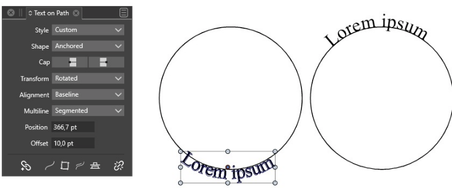
Win 11
CPU: AMD Ryzen 5 9600X, 6-core.
GPU: Nvidia Geforce RTX 5070. -
@Boldline Added this to the backlog. I will try to figure out a way.
-
@Subpath thank you for your video and suggestion. Yes that is a good way to do it, but I run into some issues when I want text in both locations and need to duplicate my circle for the second line of text - it interferes with the original circle and text below itself and either removes the original circle and text or changes the text to what the bottom text should say, etc. I will try to make a video showing this in action when I get a chance today. Maybe it's just user error but it's not currently a pleasant experience!
My thought was whether it was worthwhile to have some presets built in for common text arrangement setups to make the process easier and speed up workflow - I also don't want to clog up VS with "stuff" unnecessarily. In the broader picture, I'm also thinking about it all in terms of ease of use - one thing I love about VS is that many functions have a quick and easy solution upfront and a panel with MANY options for dialing in specifics if the user cares to do so. I'm thinking about ease of use and helping new users and speeding up workflows for veteran users by having presets/templates, etc...
This also reminds me of the similar thoughts I have whether there should be a dedicated triangle shape option in the toolbar alongside the ellipse and rectangle, etc... yes it can be accomplished with the star tool and can also be made from a rectangle by double-clicking a node to set a new node at the center point and pull it out (awesome feature!) The question is, does adding a dedicated triangle shape into the shapes toolbar section cause more clutter or help efficiency?
The answer for the triangle and for the text on a path layout options may be me customizing VS as I need to - creating and saving presets for the many common shapes I use often (triangle, heart, shamrock, crescents, etc).
It would be great to have a preset option like we can already do with customized shapes
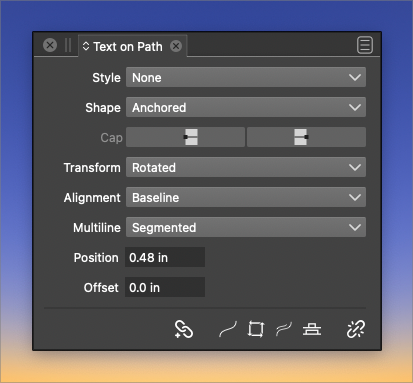
If an option to save text on a pth presets was considered - perhaps it could be an option within the text on a path panel?
-
yes, would like an option to save such presets.
Tried a bit in VS. It seems like you can't avoid some problems by grouping Circle and Text together.
Place your first text at a circle then select both and group it.
Then copy this group and switch the text down on the copy.
Until then you could align both.Must correct myself, VS has proven me wrong.
When I simply copy a group like this, the text is flipped back.
Seems to be a bug.Dealt with text on a circle many times in my last job and know the issues.
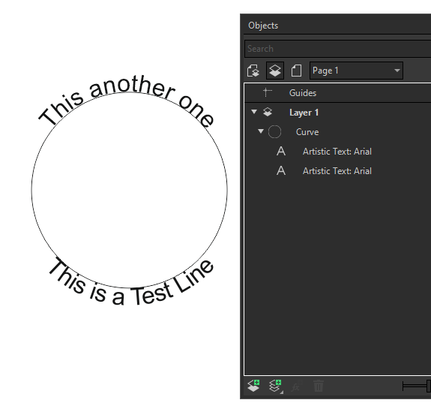
Btw. in Coreldraw the upper and and the bottom Text could be on the same Path and independently edit.is just one Path
-
-
@Subpath Please send me that file, I will try to replicate it.
-
File has been sent
-
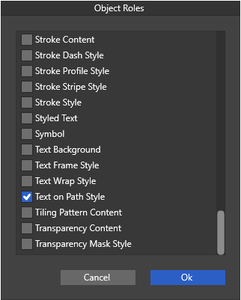
It's late, but I'd like to point out a find i made in Object Roles.
While I was looking for something different.Found it in Object > Object Role > More Roles.
There is a Role called "Text on Path Style".The Manual says:
"The object's text-on-path settings act like a text-on-path style".It's unclear to me how that works.
But looks like some kind of preset for Text on Path?