VectorStyler
    • Categories
    • Unread
    • Recent
    • Tags
    • Popular
    • Register
    • Login

    Delete Path Segment

    Scheduled Pinned Locked Moved Features and Ideas
    19 Posts 6 Posters 14.7k Views 5 Watching
    Loading More Posts
    • Oldest to Newest
    • Newest to Oldest
    • Most Votes
    Reply
    • Reply as topic
    Log in to reply
    This topic has been deleted. Only users with topic management privileges can see it.
    • IgullI Offline
      Igull
      last edited by

      Is it possible when selecting a path segment (path between two nodes) with the Shape Editor tool to simply delete the segment that the triangle marker is on rather than delete the complete path ?
      This would leave all other editing features intact and no change other than deleting the segment rather than the complete path.

      Neil

      iMac 27" 2015 Catalina 32Gb, MacBook Pro 13" 2016 Monterey 8Gb, Mac Mini M2 2023 8Gb

      VectorStylerV 1 Reply Last reply Reply Quote 2
      • VectorStylerV Offline
        VectorStyler @Igull
        last edited by

        @Igull I add this to the backlog, it should not be difficult to implement.

        IgullI BoldlineB 2 Replies Last reply Reply Quote 1
        • IgullI Offline
          Igull @VectorStyler
          last edited by

          @VectorStyler

          That's great, thanks !

          Neil

          iMac 27" 2015 Catalina 32Gb, MacBook Pro 13" 2016 Monterey 8Gb, Mac Mini M2 2023 8Gb

          1 Reply Last reply Reply Quote 0
          • BoldlineB Offline
            Boldline @VectorStyler
            last edited by Boldline

            @VectorStyler Would this take away the current ability to hit delete twice on a selected node while using the node tool and have the entire path delete? I may not be fully understanding what @Igull is looking for, but i wanted to chime in just in case it affects that other feature. Is there a way to include what he is requesting and still leave the current feature? Ideally that current feature would remain. It's a big time saver in editing vectors

            🍎 macOS Tahoe 26.2, Mac mini (M1, 2020), Chip Apple M1, Memory 16 GB
            Cintiq 27QHD Display and LG Ultra HD Display

            VectorStylerV IgullI 2 Replies Last reply Reply Quote 0
            • VectorStylerV Offline
              VectorStyler @Boldline
              last edited by

              @Boldline said in Delete Path Segment:

              Would this take away the current ability to hit delete twice on a selected node while using the node tool and have the entire path delete

              No. This would be a sort of "segment" delete.

              1 Reply Last reply Reply Quote 1
              • S Offline
                Subpath
                last edited by Subpath

                @Boldline

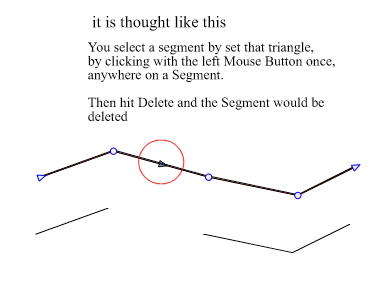
                See Picture here for Explanation
                (the Triangle Marker is already in use in placing Nodes)

                0_1658859316375_Segment delete.png

                Win 11
                CPU: AMD Ryzen 5 9600X, 6-core.
                GPU: Nvidia Geforce RTX 5070.

                1 Reply Last reply Reply Quote 1
                • IgullI Offline
                  Igull @Boldline
                  last edited by

                  @Boldline said in Delete Path Segment:

                  hit delete twice on a selected node while using the node tool and have the entire path delete

                  Yet another way to completely delete a path that I didn't know about - maybe there should be a new manual section for it ...

                  VectorStyler - 50 Ways To Delete That Path !
                  VectorStyler - Knock Three Times To Delete That Path !

                  🙂

                  Currently, just clicking on a segment then hitting delete will also delete the whole path. What I am suggesting is that it only deletes the selected segment, your method would still remain (odd though it seems to me - not something you would find by chance or prior knowledge 🙂 )

                  Neil

                  iMac 27" 2015 Catalina 32Gb, MacBook Pro 13" 2016 Monterey 8Gb, Mac Mini M2 2023 8Gb

                  IngolfI BoldlineB 2 Replies Last reply Reply Quote 0
                  • IngolfI Offline
                    Ingolf @Igull
                    last edited by

                    @Igull said in Delete Path Segment:

                    Currently, just clicking on a segment then hitting delete will also delete the whole path. What I am suggesting is that it only deletes the selected segment

                    Yes, but in that case the segment itself must be highlighted to make it visually clear that it is this whole part of the object that is in play. It can cause some visual noise if the user just wants to change curves and nodes; I think they will in 99% of all cases.

                    But it's certainly not deeply illogical request; as I recall, in other programs a single click will create a node, quite other programs do nothing, VS leave the direction symbol visible... As if one can expect more.

                    🍏 macOS Sequoia Apple Silicon

                    IgullI 1 Reply Last reply Reply Quote 0
                    • BoldlineB Offline
                      Boldline @Igull
                      last edited by

                      @Igull said in Delete Path Segment:

                      Yet another way to completely delete a path that I didn't know about - maybe there should be a new manual section for it ...

                      HAHA yeah it was a feature in Illustrator that I learned of somehow years ago and came to rely on for a fast method to have a controlled deletion of paths...
                      I dare you to try it - you'll soon be addicted 🙂
                      It was not initially in VS and I specifically requested it - so I was just making sure it stayed 🙂

                      🍎 macOS Tahoe 26.2, Mac mini (M1, 2020), Chip Apple M1, Memory 16 GB
                      Cintiq 27QHD Display and LG Ultra HD Display

                      1 Reply Last reply Reply Quote 0
                      • IgullI Offline
                        Igull @Ingolf
                        last edited by

                        @Ingolf said in Delete Path Segment:

                        Yes, but in that case the segment itself must be highlighted to make it visually clear that it is this whole part of the object that is in play.

                        That's currently NOT the case 🙂

                        If you click on ANY segment then hit delete, the WHOLE object is deleted !

                        The highlight only needs to be the small triangle where you clicked - as it is currently - you're only going to hit the delete key if you want to delete it, you wouldn't hit delete if you wanted to change a curve - and it has no effect on nodes anyway (unless you hit delete - which is what you would do to delete it anyway !) 🙂

                        Neil

                        iMac 27" 2015 Catalina 32Gb, MacBook Pro 13" 2016 Monterey 8Gb, Mac Mini M2 2023 8Gb

                        IngolfI 1 Reply Last reply Reply Quote 0
                        • IngolfI Offline
                          Ingolf @Igull
                          last edited by

                          @Igull said in Delete Path Segment:

                          @Ingolf said in Delete Path Segment:

                          Yes, but in that case the segment itself must be highlighted to make it visually clear that it is this whole part of the object that is in play.

                          That's currently NOT the case 🙂
                          If you click on ANY segment then hit delete, the WHOLE object is deleted !
                          Yes I know

                          The highlight only needs to be the small triangle where you clicked - as it is currently - you're only going to hit the delete key if you want to delete it, you wouldn't hit delete if you wanted to change a curve - and it has no effect on nodes anyway (unless you hit delete - which is what you would do to delete it anyway !) 🙂

                          ... but the triangle - that is always displayed in this scenario - is not enough to reveal to the user that the segment is kind of selected for ie deletion. Especially if this is not how other programs work.

                          🍏 macOS Sequoia Apple Silicon

                          IgullI 1 Reply Last reply Reply Quote 0
                          • IgullI Offline
                            Igull @Ingolf
                            last edited by

                            @Ingolf said in Delete Path Segment:

                            that is always displayed in this scenario

                            Yes, it indicates the selected position, but the triangle only remains stationary in position when you click it otherwise it is not visible unless you are hovering over another part of a path - in which case it is moving. You don't actually need to highlight the segment of the path to know when you have selected it ?

                            If you take the case of AI, it highlights the whole path then deletes only the segment that you selected - REALLY intuitive eh!, but works as you are completely aware of what you are doing.

                            TBH, it's just really simple, use the SE tool, click the segment, hit delete - you don't even need the triangle - it only gives you that warm feeling of having clicked something !

                            And if all else fails, CMD+Z 🙂

                            Neil

                            iMac 27" 2015 Catalina 32Gb, MacBook Pro 13" 2016 Monterey 8Gb, Mac Mini M2 2023 8Gb

                            1 Reply Last reply Reply Quote 0
                            • IngolfI Offline
                              Ingolf
                              last edited by

                              🙂

                              Personally I need more feedback from user interfaces.

                              🍏 macOS Sequoia Apple Silicon

                              b77B 1 Reply Last reply Reply Quote 1
                              • b77B Offline
                                b77 @Ingolf
                                last edited by

                                You guys are repeating the same discussion we had here: https://www.vectorstyler.com/forum/topic/2252/trim-between-two-nodes/3

                                MacBook Pro (Intel) running Monterey 12.6.4

                                IgullI 1 Reply Last reply Reply Quote 1
                                • IgullI Offline
                                  Igull @b77
                                  last edited by

                                  @b77

                                  @b77 said in Delete Path Segment:

                                  You guys are repeating the same discussion

                                  In my own defence, I'm over 70 and reserve the right to repeat myself 🙂

                                  Neil

                                  PS In my own defence, I'm over 70 and reserve the right to repeat myself 🙂

                                  iMac 27" 2015 Catalina 32Gb, MacBook Pro 13" 2016 Monterey 8Gb, Mac Mini M2 2023 8Gb

                                  b77B S 2 Replies Last reply Reply Quote 3
                                  • b77B Offline
                                    b77 @Igull
                                    last edited by b77

                                    Ha ha. 😂

                                    But I guess you repeated yourself because you thought the developer wasn't paying attention to the other thread.

                                    As you can see, independently of my opinion/influence, at least one other user wondered if marking a segment for deletion with the same triangle mark used for adding a node is good enough to get the idea across.

                                    But I would go with it anyway, and think of a way to add the segment highlight later.

                                    MacBook Pro (Intel) running Monterey 12.6.4

                                    S IgullI 2 Replies Last reply Reply Quote 0
                                    • S Offline
                                      Subpath @Igull
                                      last edited by Subpath

                                      @Igull

                                      ...In my own defence, I'm over 70 and reserve the right to repeat myself...

                                      like that saying 🙂
                                      but I'm a little unsure since 70 is supposed to be the new 30/40 for this generation

                                      Win 11
                                      CPU: AMD Ryzen 5 9600X, 6-core.
                                      GPU: Nvidia Geforce RTX 5070.

                                      1 Reply Last reply Reply Quote 1
                                      • S Offline
                                        Subpath @b77
                                        last edited by

                                        @b77

                                        ... at least one other user wondered if marking a segment for deletion with the same triangle mark used for adding a node is good enough to get the idea across...

                                        for me marking it with the Triangle will be enough
                                        and is easy for me remember

                                        Anyone who has been around computer graphics for a while knows that you have to remember
                                        and take into account all sorts of things that are much more complicated than this.

                                        And keeping things childishly easy is impossible in my eyes.

                                        Win 11
                                        CPU: AMD Ryzen 5 9600X, 6-core.
                                        GPU: Nvidia Geforce RTX 5070.

                                        1 Reply Last reply Reply Quote 1
                                        • IgullI Offline
                                          Igull @b77
                                          last edited by

                                          @b77 said in Delete Path Segment:

                                          But I would go with it anyway, and think of a way to add the segment highlight later.

                                          That's exactly my thinking too 🙂

                                          Neil

                                          iMac 27" 2015 Catalina 32Gb, MacBook Pro 13" 2016 Monterey 8Gb, Mac Mini M2 2023 8Gb

                                          1 Reply Last reply Reply Quote 2
                                          • First post
                                            Last post