VectorStyler
    • Categories
    • Unread
    • Recent
    • Tags
    • Popular
    • Register
    • Login

    Separation preview?

    Scheduled Pinned Locked Moved Questions and Support
    33 Posts 4 Posters 41.9k Views 3 Watching
    Loading More Posts
    • Oldest to Newest
    • Newest to Oldest
    • Most Votes
    Reply
    • Reply as topic
    Log in to reply
    This topic has been deleted. Only users with topic management privileges can see it.
    • DazmondoD Offline
      Dazmondo @VectorStyler
      last edited by

      Yes I tested with the uploaded file. When printing, I enabled all color channels (with the icons in the first column) and I just gave a simple file name (test1.pdf).
      I got 6 files with the name augmented by the color channel name.

      Wow that would be ideal - just can't trick it into producing a file - is it because I'm saving to desktop? 0_1658935747002_Screen Grab 2022-07-27 at 4.13.50 pm.png
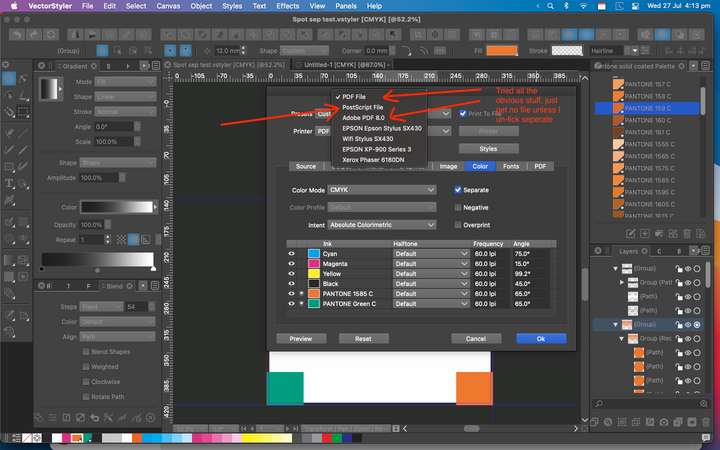
      VectorStylerV 1 Reply Last reply Reply Quote 0
      • VectorStylerV Offline
        VectorStyler @Dazmondo
        last edited by

        @Dazmondo The first option "PDF File" should be working.
        Try disabling "Background Printing" in preferences.

        DazmondoD 1 Reply Last reply Reply Quote 0
        • DazmondoD Offline
          Dazmondo @VectorStyler
          last edited by

          @VectorStyler said in Separation preview?:

          @Dazmondo The first option "PDF File" should be working.
          Try disabling "Background Printing" in preferences.

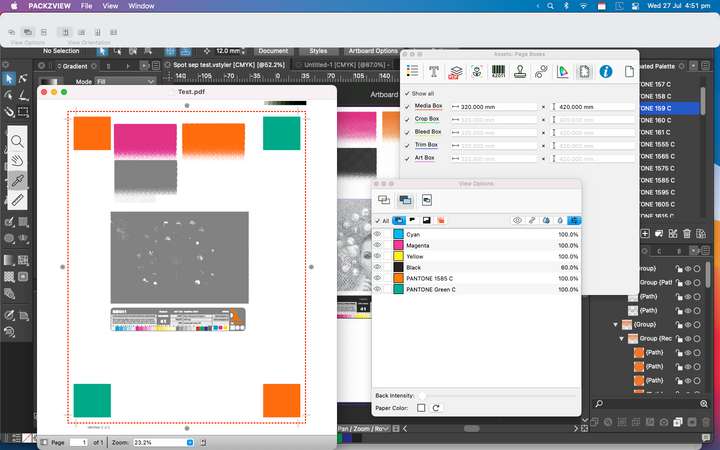
          Tried = no PDF produced so tried unticking seps = great composit PDF with spots intact (see grab) re-tick seps = no output???0_1658937203488_Screen Grab 2022-07-27 at 4.51.41 pm.png
          Would you recommend switching background printing back on?

          VectorStylerV 1 Reply Last reply Reply Quote 0
          • VectorStylerV Offline
            VectorStyler @Dazmondo
            last edited by

            @Dazmondo said in Separation preview?:

            Would you recommend switching background printing back on?

            Yes, at least here it does not affect the output.

            Can you make a recording of the whole thing (with Separate checked). Including the part where the folder and file name for the output is selected.

            DazmondoD 1 Reply Last reply Reply Quote 0
            • DazmondoD Offline
              Dazmondo @VectorStyler
              last edited by

              @VectorStyler said in Separation preview?:

              Can you make a recording of the whole thing (with Separate checked). Including the part where the folder and file name for the output is selected.

              Vid grab: https://drive.google.com/file/d/1L8GPvPbDlN7sHjvoy_joJTQaFpOX5lY3/view?usp=sharing

              Note: The Test.pdf file on my desktop is a composite which produce great - also doing a find for TestA.pdf (the seps pdf produced in the vid grab) finds no match

              Thanks

              VectorStylerV 1 Reply Last reply Reply Quote 0
              • VectorStylerV Offline
                VectorStyler @Dazmondo
                last edited by

                @Dazmondo All looks correct in the recording. But! there could be another issue.

                Do you have it through the App Store?

                This might be a bug the way file names are generated by VS, and the Mac App Store sandboxing.

                DazmondoD 1 Reply Last reply Reply Quote 0
                • DazmondoD Offline
                  Dazmondo @VectorStyler
                  last edited by

                  @VectorStyler said in Separation preview?:

                  Do you have it through the App Store?
                  This might be a bug the way file names are generated by VS, and the Mac App Store sandboxing.

                  Yes boss -- Mac app store version

                  VectorStylerV 1 Reply Last reply Reply Quote 0
                  • VectorStylerV Offline
                    VectorStyler @Dazmondo
                    last edited by

                    @Dazmondo Then that is the issue.

                    VectorStylerV 1 Reply Last reply Reply Quote 0
                    • VectorStylerV Offline
                      VectorStyler @VectorStyler
                      last edited by

                      @VectorStyler You should have a new email with a license for regular VS. If you are willing to try, this one is notarized (Apple) but not sandboxed.

                      DazmondoD 1 Reply Last reply Reply Quote 0
                      • DazmondoD Offline
                        Dazmondo @VectorStyler
                        last edited by

                        @VectorStyler said in Separation preview?:

                        @VectorStyler You should have a new email with a license for regular VS. If you are willing to try, this one is notarized (Apple) but not sandboxed.

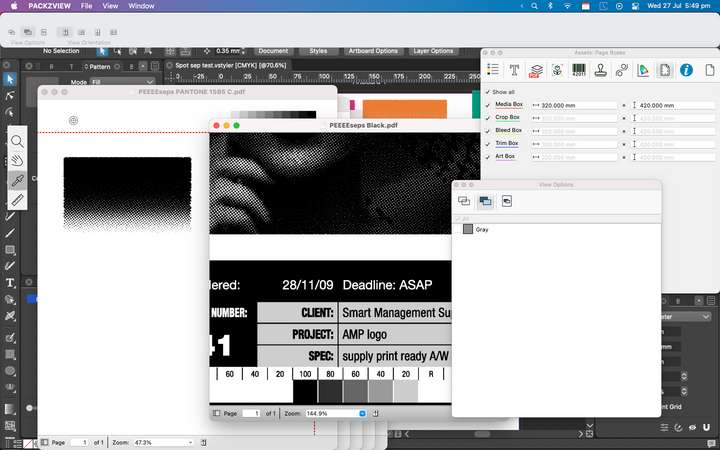
                        Wow you really are a true genius --- 7 separation PDFs produced, now working great👍 👍 👍 0_1658940832084_Screen Grab 2022-07-27 at 5.49.58 pm.png

                        BoldlineB 1 Reply Last reply Reply Quote 3
                        • BoldlineB Offline
                          Boldline @Dazmondo
                          last edited by

                          @Dazmondo Amazing! Awesome job persevering and sticking in there with it all. I want to echo his compliments to you @VectorStyler - you are indeed a genius. I'm impressed so often by what you figure out and solve and how quickly you make it happen


                          🍎 macOS Tahoe 26.2, Mac mini (M1, 2020), Chip Apple M1, Memory 16 GB
                          Cintiq 27QHD Display and LG Ultra HD Display

                          1 Reply Last reply Reply Quote 1
                          • First post
                            Last post