Mac/Win File Swapping
-
Are there currently any known VS file issues swapping back and forth between Mac or Windows ?
I'll not go into the problems I'm having for now as it may have absolutely nothing to do with VS and everything to do with the laser "printer" driver

TIA
Neil
-
@Igull The vstyler files should be fully portable between Mac and Windows.
But there might be a caveat related to printers. The last printing options are stored in the VS fie and when opened on an other machine (or system), the specific printer might be missing.
This should not cause any problem as far as opening file, but the printer settings might be off. -
@VectorStyler said in Mac/Win File Swapping:
This should not cause any problem as far as opening file, but the printer settings might be off.
OK, that shouldn't matter as I'm setting it to another printer anyway.
Here is the issue (there's no point in doing a video
)
If I create a similar file in the windows version of VS (within the emulator) then print to the laser, no problem.
If I open a file created in the Mac version (in the VS Win version) and then use the same printer settings, I get an error from the printer driver ...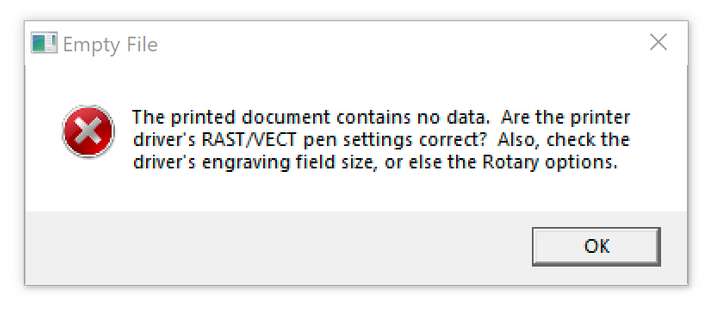
Now, if I use the same file and draw an object beside the original objects on the page - say a rectangle - then use (I) to copy and paste the original file item's attributes ( red 255 stroke 0.05mm and no fill)) - I can print the new rectangle to the laser - BUT, it doesn't print the original data on the file that sits beside it
Another bit of info, if I copy and paste the data from the Mac file across to the Win file, it prints just fine
It's almost as if that data is invisible to the printer driver. I can't see anything in the object options that is different from the win file.
I can get around it for now by copy/pasting the data from the mac file to an empty win file, but that's a bit agricultural, it should just work
TIA
Neil
iMac 27" 2015 Catalina 32Gb, MacBook Pro 13" 2016 Monterey 8Gb, Mac Mini M2 2023 8Gb
-
@Igull said in Mac/Win File Swapping:
If I open a file created in the Mac version (in the VS Win version) and then use the same printer settings, I get an error from the printer driver
This is where the problem is. Do not use the same printer settings. The problem is that doing so, VS will try to reuse the printer settings found in the vstyler file (they are stored).
One way to get around this to print to a PDF/PS file (select PDF File or Postscript File in the Printer drop down), confirm the printing and confirm the file selection.
Then the printer settings are replaced to something that is portable between Mac/Windows.I opened a bug on this one: The printer settings stored in the vstyle file on one OS should not be reused on another OS.
-
@VectorStyler said in Mac/Win File Swapping:
One way to get around this to print to a PDF/PS file
OK, either printing to PDF of exporting a PDF from Mac then opening on Win works OK, both print fine to the laser driver.
However, I do get the same issues when exporting an SVG (which is what I would normally use from Mac to PC
).I assume there must be a similar issue there too ?
What I don't understand is that if I draw on the same Mac *.vstyler file using Win VS, it prints the new object but not the originals ????
Anyway, I assume that you have a handle on it and I look forward to a fix at some point - thanks
Neil
-
@Igull said in Mac/Win File Swapping:
If I open a file created in the Mac version (in the VS Win version) and then use the same printer settings, I get an error from the printer driver
I was trying to replicate this error, but could not.
What was the printer used on Windows?
If there is a file that results in this error when printing on Windows, please send it to me by email. It might help in replicating the error.

