VectorStyler
    • Categories
    • Unread
    • Recent
    • Tags
    • Popular
    • Register
    • Login

    Document Scale

    Scheduled Pinned Locked Moved Questions and Support
    18 Posts 6 Posters 14.2k Views 6 Watching
    Loading More Posts
    • Oldest to Newest
    • Newest to Oldest
    • Most Votes
    Reply
    • Reply as topic
    Log in to reply
    This topic has been deleted. Only users with topic management privileges can see it.
    • S Offline
      Subpath
      last edited by Subpath

      @Igull

      I have already made some experiments with floor plan drawing in VS.

      Here is a method that works via Live Boolean Union
      and allow some live editing.
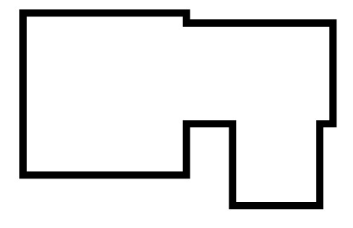
      Here a video about it:

      0_1659790559042_Live.Booleans-1.png

      Win 11
      CPU: AMD Ryzen 5 9600X, 6-core.
      GPU: Nvidia Geforce RTX 5070.

      IgullI 1 Reply Last reply Reply Quote 0
      • IgullI Offline
        Igull @Subpath
        last edited by

        @Subpath said in Document Scale:

        these Panels may be helpful

        Yes, I use these ALL the time when creating stuff and you can certainly dimension large objects and grids (I tried a 100m square), but having a document scale means that it will fit on a bit of paper to print on - TBH, that's probably the only benefit 🙂 I guess you could simply scale at the end before printing, but it just saves all the effort.

        Neil

        iMac 27" 2015 Catalina 32Gb, MacBook Pro 13" 2016 Monterey 8Gb, Mac Mini M2 2023 8Gb

        S b77B 2 Replies Last reply Reply Quote 0
        • IgullI Offline
          Igull @Subpath
          last edited by

          @Subpath

          Yes, that's a useful method - probably better than drawing with double wall-width lines on a grid .

          iMac 27" 2015 Catalina 32Gb, MacBook Pro 13" 2016 Monterey 8Gb, Mac Mini M2 2023 8Gb

          1 Reply Last reply Reply Quote 0
          • S Offline
            Subpath @Igull
            last edited by Subpath

            @Igull

            I see, since I don't print anything from VectorStyler, I'm not that familiar with it in VectorStyler.

            I thought VectorStyler automatically scales that to the selected sheet size.

            Win 11
            CPU: AMD Ryzen 5 9600X, 6-core.
            GPU: Nvidia Geforce RTX 5070.

            1 Reply Last reply Reply Quote 0
            • b77B Offline
              b77 @Igull
              last edited by b77

              @Igull Canvas scaling goes hand in hand with dimension labels for objects — one without the other would be useless.

              MacBook Pro (Intel) running Monterey 12.6.4

              IgullI 1 Reply Last reply Reply Quote 0
              • IgullI Offline
                Igull @Subpath
                last edited by

                @Subpath said in Document Scale:

                Better vector graphics features than affinity designer, in some cases.

                There are certainly some interface features that could be taken from Graphic, it definitely has a 'crisper' feel to it and some of the rounded end editfields with a bit of LCD green colour in there definitely sets it off and makes it easier to read. I hate to say this, but I prefer the Graphic Transform panel to VS - it's all in a single line and takes up less real estate.
                I do like the VS option of being able to scale the GUI, mine now seems to tie in better with the retina display.
                Now, if we could just design our own sets of tool icons ... LOL LOL 🙂

                Neil

                iMac 27" 2015 Catalina 32Gb, MacBook Pro 13" 2016 Monterey 8Gb, Mac Mini M2 2023 8Gb

                1 Reply Last reply Reply Quote 0
                • IgullI Offline
                  Igull @b77
                  last edited by

                  @b77 said in Document Scale:

                  Canvas scaling goes hand in hand with dimension labels for objects — one without the other would be useless.

                  I just took that as read ?

                  iMac 27" 2015 Catalina 32Gb, MacBook Pro 13" 2016 Monterey 8Gb, Mac Mini M2 2023 8Gb

                  b77B 2 Replies Last reply Reply Quote 0
                  • b77B Offline
                    b77 @Igull
                    last edited by b77

                    @Igull I guess I misunderstood one of your posts that seemed to say that canvas scaling would be enough. 👍

                    MacBook Pro (Intel) running Monterey 12.6.4

                    1 Reply Last reply Reply Quote 0
                    • b77B Offline
                      b77 @Igull
                      last edited by

                      @Igull In 'Customize Toolboxes' you have an 'Edit Icon' button that allows you to change the icons.

                      MacBook Pro (Intel) running Monterey 12.6.4

                      IgullI 1 Reply Last reply Reply Quote 0
                      • IgullI Offline
                        Igull @b77
                        last edited by

                        @b77 said in Document Scale:

                        @Igull In 'Customize Toolboxes' you have an 'Edit Icon' button that allows you to change the icons.

                        LOL, back to RTFM 🙂
                        I literally find something new that I like in VS every day 👍
                        I can see myself wasting hours on this, thanks.
                        Neil

                        iMac 27" 2015 Catalina 32Gb, MacBook Pro 13" 2016 Monterey 8Gb, Mac Mini M2 2023 8Gb

                        1 Reply Last reply Reply Quote 0
                        • First post
                          Last post