VectorStyler
    • Categories
    • Unread
    • Recent
    • Tags
    • Popular
    • Register
    • Login

    move stroke below fill

    Scheduled Pinned Locked Moved Questions and Support
    14 Posts 3 Posters 12.1k Views 3 Watching
    Loading More Posts
    • Oldest to Newest
    • Newest to Oldest
    • Most Votes
    Reply
    • Reply as topic
    Log in to reply
    This topic has been deleted. Only users with topic management privileges can see it.
    • S Offline
      Subpath
      last edited by Subpath

      Effects > Outline > Outline Paths
      or Effects > Outline > Offset Paths may also be helpful
      in your case

      Win 11
      CPU: AMD Ryzen 5 9600X, 6-core.
      GPU: Nvidia Geforce RTX 5070.

      J 1 Reply Last reply Reply Quote 0
      • J Offline
        jfraze @Subpath
        last edited by

        @Subpath I hadn't thought that would work with text, but it seems to do the trick. Thanks.

        S 1 Reply Last reply Reply Quote 1
        • S Offline
          Subpath @jfraze
          last edited by Subpath

          @jfraze

          nice that it was helpful

          Win 11
          CPU: AMD Ryzen 5 9600X, 6-core.
          GPU: Nvidia Geforce RTX 5070.

          J 1 Reply Last reply Reply Quote 0
          • J Offline
            jfraze @Subpath
            last edited by jfraze

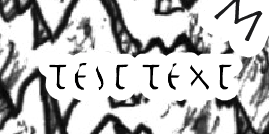
            @Subpath Oops... it apparently only works with large type with very wide tracking. In smaller type with tracking setting of 0 the letters are getting overlapped and disappear into the outline.
            0_1659768944420_626a5006-adcb-474d-a873-061e92449c95-image.png

            1 Reply Last reply Reply Quote 0
            • J Offline
              jfraze @Subpath
              last edited by jfraze

              The workaround could be to duplicate my entire text layer when I'm done and give the bottom layer the stroke while leaving the top layer untouched. But it's surprising that this isn't working as in AI. The attributes in the Appearance Panel seem to be selectable but I can't get them to actually move or change hierarchy. Is this a glitch on my end?

              1 Reply Last reply Reply Quote 0
              • VectorStylerV Offline
                VectorStyler @jfraze
                last edited by

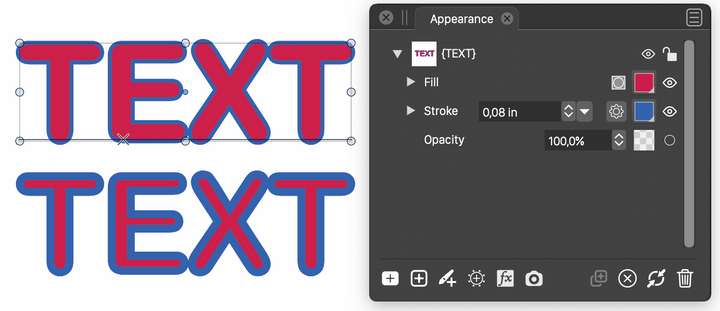
                @jfraze I tested with the Appearance panel (on Mohave) and the stroke can be dragged under the fill for a text.
                Here, the two text objects are exactly the same, except the top has the stroke below the fill as shown in the appearance panel.
                0_1659770351226_strokefill.png

                Aligning the stroke is probably not the best solution for this case.

                S 1 Reply Last reply Reply Quote 1
                • S Offline
                  Subpath @VectorStyler
                  last edited by

                  @VectorStyler

                  i knew there was such a option, but did not remember
                  how this could be done

                  Win 11
                  CPU: AMD Ryzen 5 9600X, 6-core.
                  GPU: Nvidia Geforce RTX 5070.

                  1 Reply Last reply Reply Quote 0
                  • S Offline
                    Subpath
                    last edited by

                    @jfraze

                    i test it, it works as @VectorStyler descriped.

                    Here a Video

                    Win 11
                    CPU: AMD Ryzen 5 9600X, 6-core.
                    GPU: Nvidia Geforce RTX 5070.

                    J 1 Reply Last reply Reply Quote 1
                    • J Offline
                      jfraze @Subpath
                      last edited by

                      @Subpath That's exactly how I would expect it to work. But it doesn't do that for me. Dragging just leaves things in exactly the position they started in. I've tried restarting a few times, but no joy.

                      VectorStylerV 1 Reply Last reply Reply Quote 0
                      • VectorStylerV Offline
                        VectorStyler @jfraze
                        last edited by

                        @jfraze Can you send me an example file where Appearance dragging is not working. I'd like to elliminate a couple of possibilities.

                        J 1 Reply Last reply Reply Quote 0
                        • J Offline
                          jfraze @VectorStyler
                          last edited by

                          0_1659805932329_test.vstyler @VectorStyler I don't think it's in the document, but something to do with my installation. My suspicion is it's going to work as expected on your end.

                          VectorStylerV 1 Reply Last reply Reply Quote 0
                          • VectorStylerV Offline
                            VectorStyler @jfraze
                            last edited by

                            @jfraze It is a bug! when editing the stroke / fill on a text selection.

                            1 Reply Last reply Reply Quote 0
                            • First post
                              Last post