update 1.1.052
-
@VectorStyler said in update 1.1.052:
VectorStyler 1.1.052 release notes
(...) and convert to curve button to the context panel when the shape editor is active.
Thank you for another update and fix.
I am perhaps tired - but I do not see a "convert to curve button" there?
For the masses
 (it is good idea for most users that the button is visible and easily accessible in the toolbar ). Personally I adore having it handy in the right click menu.
-
@Ingolf It is the last one before the Alignment buttons.
Trouble is that when you switch to the Shape Editor (A), the node editing buttons are displayed first and the smart shape's properties get pushed to the right, after them.
I would prefer these to stay put no matter the editing mode (V or A), and display the node editing buttons after them.
-
Oh - I missed it - I think I belived it was a corner adjustment tool (and missed the tooltip, indeed tired).
-
@Ingolf To be fair, the icon would work better for 'Expand Stroke'… maybe that's another reason for not jumping visually.
So… do you like the constant shifting of the [ shape properties group ] with the [ node editing buttons group ] every time you switch to and from 'Select' (V) to 'Shape Editing' (A)?
-
@b77 said in update 1.1.052:
So… do you like the constant shifting of the [ shape properties group ] with the [ node editing buttons group ] every time you switch to and from 'Select' (V) to 'Shape Editing' (A)?
I don't notice it much, I guess, but I've grumbled a bit before about the content in them and about the distribution across the width of the toolbar. I seem to remember that they will be configurable in the future.
I guess I'm a little worried about the future offering that users have to remove a lot for toolbars to become uncluttered, because most people don't, they probably grab their jacket and leave. You don't have customers' time or patience long out in the market.
I'm starting to understand why some applications offer to send anonymous usage data to developers. Is one or the other button used at all...
I know from hard experience in my working life that ten specialist users want it all visible, and the other 10,000 more representative customers don't want it at all, or thrive on all that stuff on the screen. But it's no easy task to minimise. But very easy and cheap to maximise.
-
- Overlapped segment removal should work inside groups and multiple selections also.
Works perfectly now, thanks !
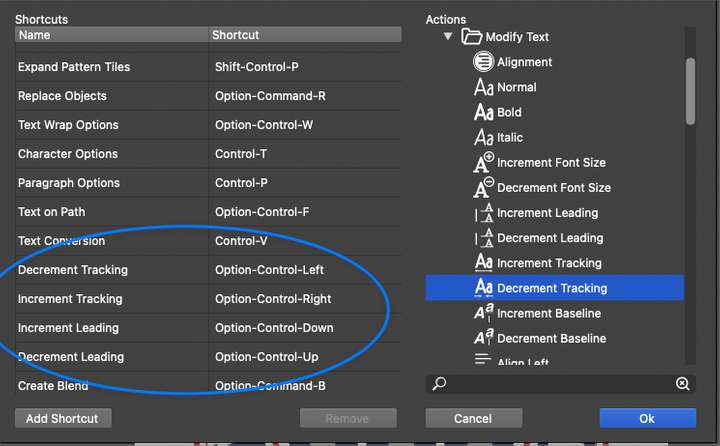
- Changed shortcuts for leading and tracking adjustment.
These still seem to be the same as the originals (ctrl+option+comma/period) ? Was the intention to be option+right/left arrow as per AI or is there a preference now that I've missed ?
Neil
-
@Igull Both tracking and kerning work now with Control-Option-Left/Right Arrow here.
-
@b77 said in update 1.1.052:
@Igull Both tracking and kerning work now with Control-Option-Left/Right Arrow here.
Not here on Mac - it's still ctrl+option+ <(comma) or >(period) ?
I actually thought that it was being changed to just option + arrow ?
Neil
-
Was the keyboard short that adjusted the spacing between words get changed or removed with this recent build update?
-
@Boldline Yes, the word spacing shortcuts were removed. But the actions should be on the right had side list.
If missing, it is a bug.