Something weird is going on with the Stroke
-
I have been trying to set a stroke to a certain object (a curve that I made in & copied from Affinity Designer) and the stroke gets bigger when I try to make it smaller. It will not resize to the stroke I set. See video.
https://recordit.co/V26QBS9jBm
I checked settings in the Stroke Panel and Relative Shift was checked so I tried unchecking that but it didn't seem to make any difference. In Preferences I do not have any type of proportional scaling checked.
Another question...whenever I copy something made in AD on the same Artboard & resolution sizes, it always copies with a smaller stroke and smaller object in general. The same thing happens if I copy some from VS into AD. Does this happen to anyone else and is there a way or setting to adjust it? (I am referring to direct copy & paste, but have had the same issues even with exported svgs.)
Thanks for any help or suggestions.
I have copied and pasted many objects from AD in the past and have never had this stroke issue before.
I am using on older iMac 27" running High Sierrra.
-
It will not resize to the stroke I set
I think this could be caused by some transform on the shape or stroke. If you could send me by email an example, I will try to replicate it.whenever I copy something made in AD on the same Artboard & resolution sizes, it always copies with a smaller stroke and smaller object in general.
I checked this using the Transform panel in both apps, and it seems that I cannot replicate it here. Again it might be some specific example that ends up with an extra transform
-
see only a resizing if i copy and past from
VS into ADif i copy and past from AD to VS
i dont regonize any changewith SVG, PDF Export from VS and Import in AD
i dont regonize any change -
Btw did you know the Style Picker in VS ?
It could be helpful to set the Stroke With
and Styles in general between Objects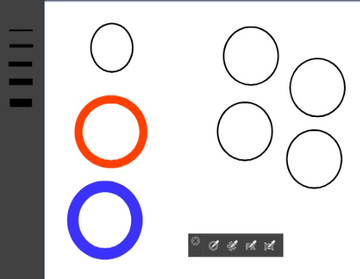
-
@VectorStyler Ok, thanks. I will send the file.
-
@Subpath Thanks so much for testing that. Any ideas about why it resizes from copy and paste between the programs?
I just tested another svg export from AD into VS and it was fine. I'll have to watch for that happening again, it opened fine in VS today.
I appreciate the video. I occasionally use the Style Picker for color but forget it does much more. Thanks--that will be very useful!

-
@KT said in Something weird is going on with the Stroke:
Any ideas about why it resizes from copy and paste between the programs?
Sorry not really, but i guess some File conversion Probs.
That one Program interpret the File Format a bit different
or has Bugs.you could only try different File Formats and use
the one which works best -
@KT said in Something weird is going on with the Stroke:
I occasionally use the Style Picker for color but forget it does much more.
Indeed. And dont forget to try the Shape Picker e.g ....
One additional Tip. If you use any of this Picker you
could press and hold the Ctrl-Key to bring temporally
the Transform Tool up.
( i think Ctrl is the Command key on Mac)This way you could select objects faster without
switching the tool.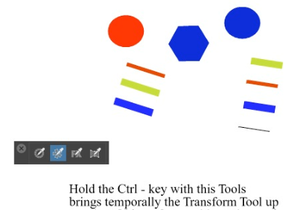
-
@Subpath said in Something weird is going on with the Stroke:
Short Video about that here
Nice! I didn't know about that tip--thanks!
