VectorStyler
    • Categories
    • Unread
    • Recent
    • Tags
    • Popular
    • Register
    • Login

    Blend ranges?

    Scheduled Pinned Locked Moved Questions and Support
    3 Posts 2 Posters 3.3k Views 2 Watching
    Loading More Posts
    • Oldest to Newest
    • Newest to Oldest
    • Most Votes
    Reply
    • Reply as topic
    Log in to reply
    This topic has been deleted. Only users with topic management privileges can see it.
    • DazmondoD Offline
      Dazmondo
      last edited by

      Just wondering if theres an easily accessible way of editing blend ranges in VS?

      I thought that Effects / Colour / adjust range may be the route, but it just seems to replace with colour as opposed to dropping off the opacity

      VectorStylerV 1 Reply Last reply Reply Quote 0
      • VectorStylerV Offline
        VectorStyler @Dazmondo
        last edited by

        @Dazmondo The color filters in the Effects menu do not affect the opacity.

        How would the blend range editing work?
        Would it adjust opacity values based on current opacity of objects?

        DazmondoD 1 Reply Last reply Reply Quote 0
        • DazmondoD Offline
          Dazmondo @VectorStyler
          last edited by

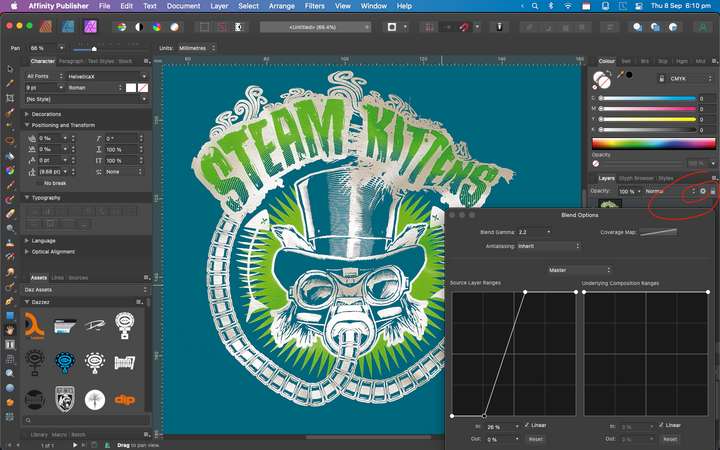
          @VectorStyler In Photoshop it's always been done by double clicking on a layer which gives you access to all layer features including Blend ranges which is done with sliders - in all Affinity apps you click on the cogwheel in the layers panel, which is done with curves - Always good for dropping off the opacity of colour and a really quick and easy way of producing a mask in Affinity which also works on groups.
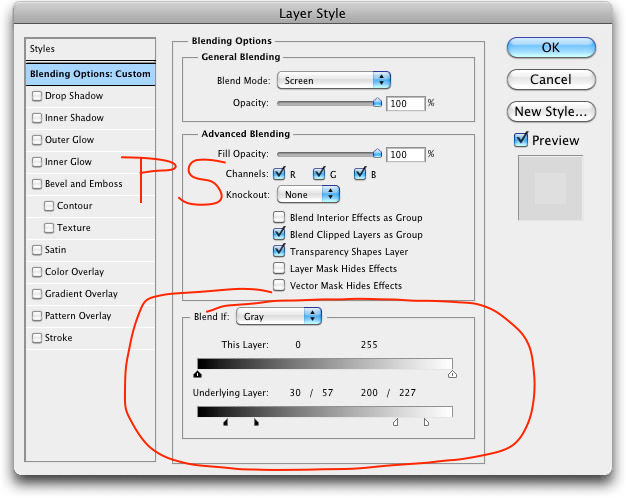
          0_1662657797441_Phoroshop Blend Range.jpg
          1_1662657825077_Screen Grab.png 0_1662657825077_299337144_4405036669621410_7579783955263634809_n.jpg

          1 Reply Last reply Reply Quote 3
          • First post
            Last post