VectorStyler
    • Categories
    • Unread
    • Recent
    • Tags
    • Popular
    • Register
    • Login

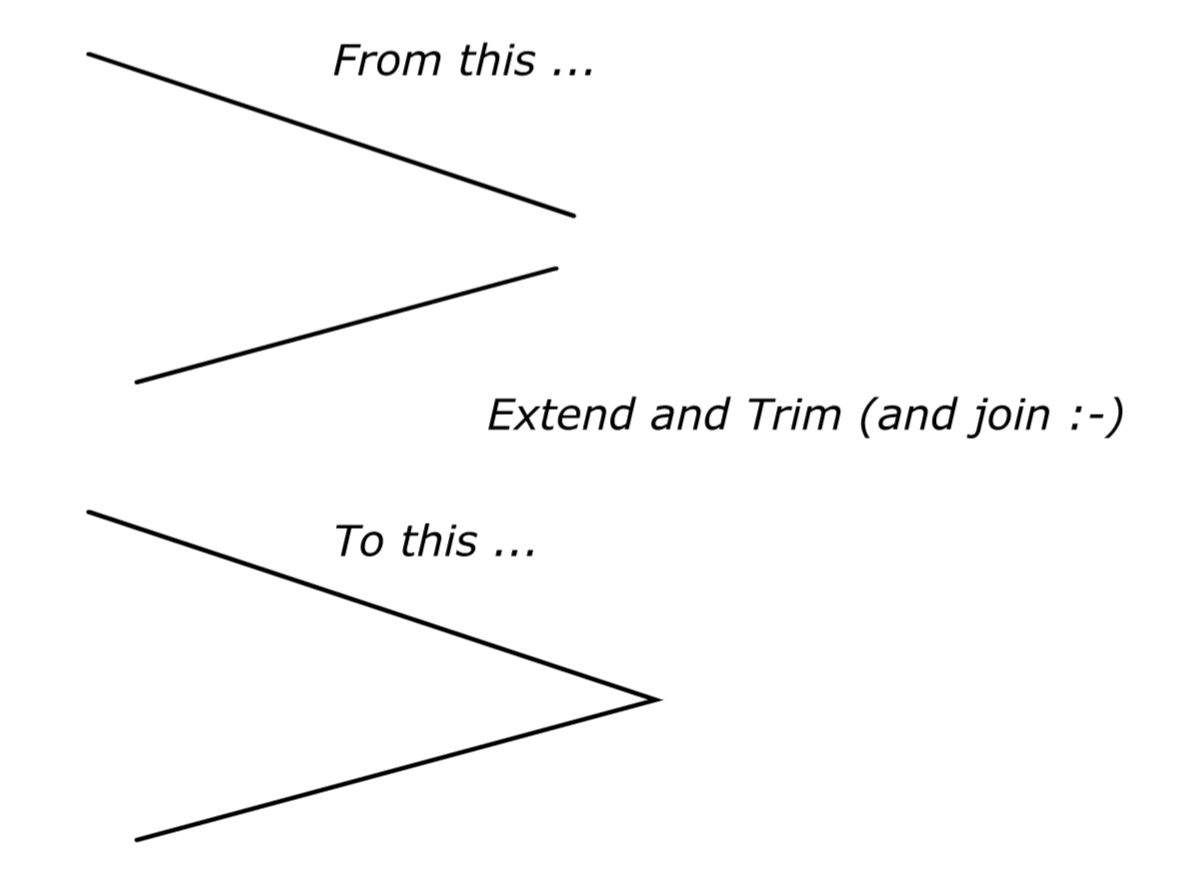
    Extend and Trim ?

    Scheduled Pinned Locked Moved Questions and Support
    16 Posts 5 Posters 14.2k Views 4 Watching
    Loading More Posts
    • Oldest to Newest
    • Newest to Oldest
    • Most Votes
    Reply
    • Reply as topic
    Log in to reply
    This topic has been deleted. Only users with topic management privileges can see it.
    • S Offline
      Subpath
      last edited by Subpath

      and another one in this video
      but i am unshure if this work in every case

      Is also not so relevant anymore
      because the use of Scale works best

      • see my post below

      Win 11
      CPU: AMD Ryzen 5 9600X, 6-core.
      GPU: Nvidia Geforce RTX 5070.

      IgullI 1 Reply Last reply Reply Quote 0
      • VectorStylerV Offline
        VectorStyler @Igull
        last edited by

        @Igull Uniform (Shift+) scaling of each line with the transform tool can be used to extend them. Then use the trim and join tool:
        https://recordit.co/rzmlB2ehcN

        S 1 Reply Last reply Reply Quote 0
        • S Offline
          Subpath @VectorStyler
          last edited by Subpath

          @VectorStyler
          @Igull

          Found Menu > Object > Transform > Scale also useful
          and very easy.
          Because the Panel keep the Setting, useful if you
          have more then one open Spike

          see this Video here

          Win 11
          CPU: AMD Ryzen 5 9600X, 6-core.
          GPU: Nvidia Geforce RTX 5070.

          1 Reply Last reply Reply Quote 0
          • IgullI Offline
            Igull @Subpath
            last edited by

            @Subpath @Vectorstyler

            Thanks for those, that's pretty much what I was doing currently - I had hoped that I was missing a specialist tool in the VS arsenal (maybe command+option+J 🙂 )that would just do it in one LOL 🙂
            However, the scale method using the transform tool is fair enough and not too tedious.

            Curiously, you can't do this in AI the way that you can in VS, in AI, you always hit the constrain (shift) key first and that doesn't allow the line to be extended without moving the origin - and if you don't constrain, you lose the vector angle. In VS, the origin and vector angle remain the same and allow you to extend the line - that's a +1 for VS !

            It's a fairly common type command in the CAD world to extend and join two vector ends.

            Thanks

            Neil

            iMac 27" 2015 Catalina 32Gb, MacBook Pro 13" 2016 Monterey 8Gb, Mac Mini M2 2023 8Gb

            S BoldlineB 3 Replies Last reply Reply Quote 3
            • S Offline
              Subpath @Igull
              last edited by

              @Igull said in Extend and Trim ?:

              It's a fairly common type command in the CAD world to extend and join two vector ends.

              You're welcome, I always find it interesting to look for solutions to other users' problems. Because so I often discover tools that I
              never use in VS 🙂 and find of course new possibilities for me too.

              I also know the possibility to extend lines from CAD programs.
              Which I have used a few.

              Win 11
              CPU: AMD Ryzen 5 9600X, 6-core.
              GPU: Nvidia Geforce RTX 5070.

              1 Reply Last reply Reply Quote 0
              • S Offline
                Subpath @Igull
                last edited by Subpath

                @Igull said in Extend and Trim ?:

                I had hoped that I was missing a specialist tool in the VS arsenal (maybe command+option+J )that would just do it in one LOL

                .
                Maybe a recorded Action could help? To create such a miracle command.

                If you record the Scale via Menu > Object > Transform > Scale Way
                which I showed in my third post

                Win 11
                CPU: AMD Ryzen 5 9600X, 6-core.
                GPU: Nvidia Geforce RTX 5070.

                IgullI 1 Reply Last reply Reply Quote 0
                • IgullI Offline
                  Igull @Subpath
                  last edited by

                  @Subpath said in Extend and Trim ?:

                  Maybe a recorded Action could help? To create such a miracle command.

                  LOL, I didn't even know about actions !

                  In this case, it's probably not really practical as all the extends I would do would be different lengths, but the concept of recording actions is great - I had a pile of scripts written in AI that I used all the time and may do something similar here. Having scripting is handier, but sometimes a repetitive command is just as easily recorded.

                  Thanks for pointing me in that direction. I did struggle to find the actions panel, but eventually found it lurking in the Presets menu 🙂

                  Thanks

                  Neil

                  iMac 27" 2015 Catalina 32Gb, MacBook Pro 13" 2016 Monterey 8Gb, Mac Mini M2 2023 8Gb

                  b77B S 2 Replies Last reply Reply Quote 2
                  • b77B Offline
                    b77 @Igull
                    last edited by

                    @Igull said in Extend and Trim ?:

                    I did struggle to find the actions panel, but eventually found it lurking in the Presets menu 🙂

                    On the Mac the Help menu of most apps has a search field, so it's easy to type something there ('actions', 'convert', etc) and be shown where the command is in the menus.

                    MacBook Pro (Intel) running Monterey 12.6.4

                    1 Reply Last reply Reply Quote 2
                    • S Offline
                      Subpath @Igull
                      last edited by

                      @Igull said in Extend and Trim ?:

                      but eventually found it lurking in the Presets menu

                      yes, Menu > Panel > Presets > Actions

                      Win 11
                      CPU: AMD Ryzen 5 9600X, 6-core.
                      GPU: Nvidia Geforce RTX 5070.

                      1 Reply Last reply Reply Quote 0
                      • BoldlineB Offline
                        Boldline @Igull
                        last edited by

                        @Igull said in Extend and Trim ?:

                        In VS, the origin and vector angle remain the same and allow you to extend the line - that's a +1 for VS !
                        It's a fairly common type command in the CAD world to extend and join two vector ends.

                        Can you explain how you extend the line while the origin and vector angle remain unchanged? Or was scaling it as @Subpath demonstrated in the video what you meant with this?
                        When i was trying to extend the line while keeping the origin and vector angle unchanged, I could not find any way to do this. I certainly leave plenty of room for my own user error in this case!

                        Unless I totally missed it, it would be great to see a modifier key used to constrain the angle and allow for a line to be extended from one side or an option to extend it from both sides at the same time.
                        I also liked the collaborated idea about an action to intersect two lines. So if you had two end nodes selected on different lines, the action would extend them until they met.
                        Both of these would be terrific additions to VS

                        🍎 macOS Tahoe 26.2, Mac mini (M1, 2020), Chip Apple M1, Memory 16 GB
                        Cintiq 27QHD Display and LG Ultra HD Display

                        S 1 Reply Last reply Reply Quote 0
                        • S Offline
                          Subpath @Boldline
                          last edited by

                          @Boldline

                          maybe this video helpful

                          Win 11
                          CPU: AMD Ryzen 5 9600X, 6-core.
                          GPU: Nvidia Geforce RTX 5070.

                          BoldlineB 1 Reply Last reply Reply Quote 0
                          • BoldlineB Offline
                            Boldline @Subpath
                            last edited by

                            @Subpath Thanks - that makes more sense and is a creative solution. However it still feels like a lot of work to accomplish a simple task and if the user has "scale strokes and effects" turned on, they would have the added step of re-sizing the stroke after scaling.
                            @VectorStyler is it possible to add a modifier key to allow a path to be lengthened or shortened by adjusting the end node without compromising the angle or the origin of the other end of that selected line?

                            🍎 macOS Tahoe 26.2, Mac mini (M1, 2020), Chip Apple M1, Memory 16 GB
                            Cintiq 27QHD Display and LG Ultra HD Display

                            VectorStylerV 1 Reply Last reply Reply Quote 0
                            • VectorStylerV Offline
                              VectorStyler @Boldline
                              last edited by

                              @Boldline said in Extend and Trim ?:

                              is it possible to add a modifier key to allow a path to be lengthened or shortened by adjusting the end node without compromising the angle or the origin of the other end of that selected line

                              I added this to the backlog of 1.2. I think a separate action is better suited for this to avoid looking for modifier keys.

                              IgullI 1 Reply Last reply Reply Quote 4
                              • IgullI Offline
                                Igull @VectorStyler
                                last edited by

                                @VectorStyler

                                Thanks, that sounds like a better solution !

                                Neil

                                iMac 27" 2015 Catalina 32Gb, MacBook Pro 13" 2016 Monterey 8Gb, Mac Mini M2 2023 8Gb

                                1 Reply Last reply Reply Quote 0
                                • First post
                                  Last post
