VectorStyler
    • Categories
    • Unread
    • Recent
    • Tags
    • Popular
    • Register
    • Login

    add a background shape/color

    Scheduled Pinned Locked Moved Questions and Support
    3 Posts 2 Posters 3.1k Views 2 Watching
    Loading More Posts
    • Oldest to Newest
    • Newest to Oldest
    • Most Votes
    Reply
    • Reply as topic
    Log in to reply
    This topic has been deleted. Only users with topic management privileges can see it.
    • chillywillyC Offline
      chillywilly
      last edited by

      Right now I have a bunch of shapes on a transparent canvas/artwork. What's the easiest way to add a color to the background of an artboard? It must appear in an SVG export. I fear that if I create a rectangle by hand it will never precisely match up with the dimensions of, or align perfectly with, the artboard.

      2018 Macbook Pro - macOS 11 (Big Sur)

      b77B 1 Reply Last reply Reply Quote 0
      • b77B Offline
        b77 @chillywilly
        last edited by b77

        @chillywilly There is a 'Snap to Artboards' checkbox that if enabled lets you draw a rectangle that snaps to the artboard
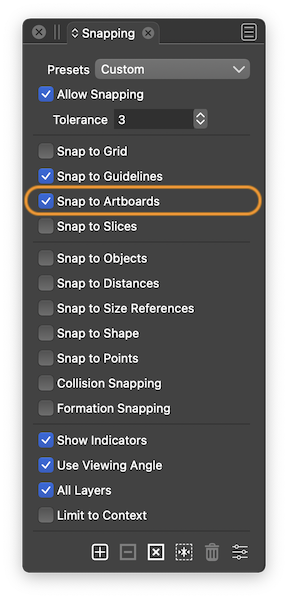
        0_1663354969241_Snapping.png

        Or you can draw a rectangle that is bigger than the artboard and when exporting (File > Export) choose 'Current Artboard' from the Source dropmenu in the Export window.

        Or use File > Export Artboards.

        MacBook Pro (Intel) running Monterey 12.6.4

        1 Reply Last reply Reply Quote 2
        • chillywillyC Offline
          chillywilly
          last edited by

          Thank you so much!

          2018 Macbook Pro - macOS 11 (Big Sur)

          1 Reply Last reply Reply Quote 0
          • First post
            Last post