VectorStyler
    • Categories
    • Unread
    • Recent
    • Tags
    • Popular
    • Register
    • Login

    Disclosure triangle on a path

    Scheduled Pinned Locked Moved Questions and Support
    8 Posts 4 Posters 6.9k Views 4 Watching
    Loading More Posts
    • Oldest to Newest
    • Newest to Oldest
    • Most Votes
    Reply
    • Reply as topic
    Log in to reply
    This topic has been deleted. Only users with topic management privileges can see it.
    • chillywillyC Offline
      chillywilly
      last edited by

      My logo is comprised of letter outlines plus a shape. Here in the Layers panel, the shape features a disclosure triangle to the left. When I click on it, it swings down; and there's nothing to disclose. It's not a group. What is the triangle for?
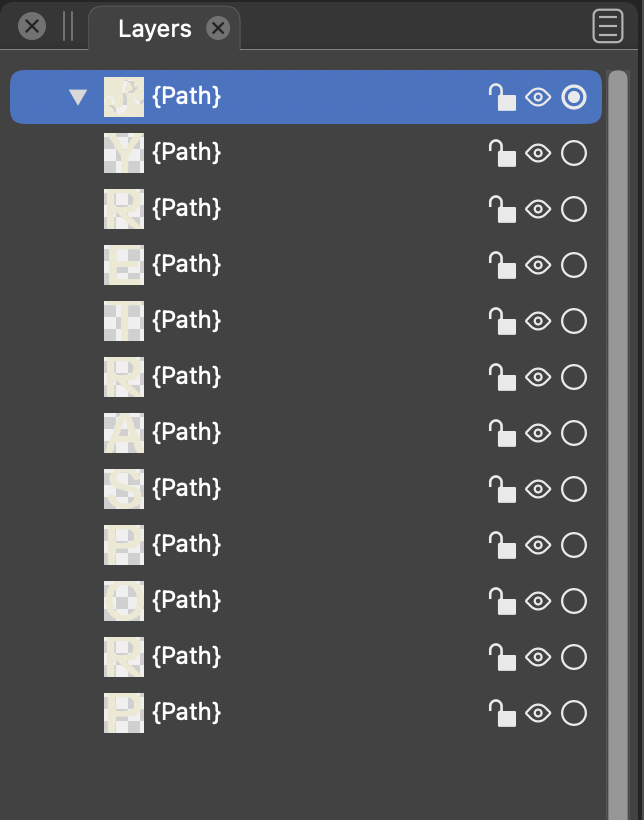
      0_1663353389263_Screen Shot 2022-09-16 at 11.32.13 AM.png

      2018 Macbook Pro - macOS 11 (Big Sur)

      b77B IngolfI 2 Replies Last reply Reply Quote 0
      • b77B Offline
        b77 @chillywilly
        last edited by

        @chillywilly Could be some glitch from importing it.
        If 'Convert to Curves' doesn't "cure" it (Object menu), you can send the original file to the developer to have a look.

        MacBook Pro (Intel) running Monterey 12.6.4

        1 Reply Last reply Reply Quote 0
        • chillywillyC Offline
          chillywilly
          last edited by chillywilly

          Thanks for the idea! "Convert to Curves" had no effect. I did some further experimentation. When I add a new shape it appears under the disclosure triangle as in a clipping group. So I think that triangle indicates that it is a clipping group, but I can't seem to get rid of it.

          2018 Macbook Pro - macOS 11 (Big Sur)

          VectorStylerV 1 Reply Last reply Reply Quote 0
          • chillywillyC Offline
            chillywilly
            last edited by

            Wait — I just got rid of it by duplicating the layer (via copy and paste), moving the copy out of the clipping group, and then deleting the original.

            2018 Macbook Pro - macOS 11 (Big Sur)

            1 Reply Last reply Reply Quote 0
            • IngolfI Offline
              Ingolf @chillywilly
              last edited by Ingolf

              @chillywilly It is some "content" that I still don't understand and we cannot see. You can remove it using Styles - Remove content. Perhaps imported, perhaps from VS itself. I see it from time to time in a pure VS workflow. And remove it.

              It is just confusing and shouldn't happen - but doesn't cause trouble.

              From the help:
              "Remove Content - Remove image or linked file content from the selected objects."

              🍏 macOS Sequoia Apple Silicon

              1 Reply Last reply Reply Quote 2
              • chillywillyC Offline
                chillywilly
                last edited by

                Thanks @Ingolf !

                2018 Macbook Pro - macOS 11 (Big Sur)

                1 Reply Last reply Reply Quote 0
                • VectorStylerV Offline
                  VectorStyler @chillywilly
                  last edited by

                  @chillywilly I think either import or some other operation resulted in an empty (clipped) group here.
                  One way to "cure" this is to go to select the object (on the canvasm or with the small circle in the Layers panel), open the Apparance panel and remove the "Group" in the Appearance panel.

                  1 Reply Last reply Reply Quote 2
                  • chillywillyC Offline
                    chillywilly
                    last edited by

                    Thanks for the solution! I don't have it anymore since I removed it, but next time it happens I'll know what to do.

                    2018 Macbook Pro - macOS 11 (Big Sur)

                    1 Reply Last reply Reply Quote 0
                    • First post
                      Last post
