Windows installation and update observations (minor)
-
A few observations. VS is updated quite often and I experience this:
- A desktop icon is created every time VS is installed/updated
- I don't want program icons there (it should be optional and remembered when an update is performed) so I add it to the process bar and delete the one on the desktop
- A week later I update VS and
-
- The desktop icon is installed once again
- The shortcut on the process bar is now invalid
Shortcuts that refer to the unique ID of an installed application is probably not a good idea if regular updates get a new ID.
I replaced the process bar icon with a shortcut referring to the path.
-
@Ingolf Should the installer not create a desktop icon?
-
@VectorStyler said in Windows installation and update observations (minor):
@Ingolf Should the installer not create a desktop icon?
I would think most Windows users would want a desktop icon automatically. Should it ask if the user wants to create a desktop icon and/or be added to the toolbar at the bottom? I've seen that before when I've used windows.
-
I miss that a VS Update would use the already existing installation path.
Had mentioned this once in the forum.I think it was said that this does not work because of the installer.
After an update, the shortcut also ends up on the desktop here,
which I then just put in the folder where I have my shortcuts.Not creating a shortcut at all would not sit well with me.
However, there are installers where you can select that. -
@VectorStyler said in Windows installation and update observations (minor):
@Ingolf Should the installer not create a desktop icon?
It is quite common that the user is prompted / has a choice when installing and that this choice is remembered when updating forever after.
The icon is also installed in the start menu and the whatever the name is in macOS. The desktop icon is just spam. Everyone has the program in quite sexy menus in both Windows 10/11 and macOS, search is also possible and both OS'es has program bars where it can be added by the users.
Dekstop icons is an old Windows sickness - I hate them - and I don't recall ever starting a program from the desktop. But I have removed tons of shortcuts from it in the early days of Windows. More and more programs started to offer a choice.
It is like the sticker on a Windows PC - Intel Inside - I don't give a rats ass, wrong place to communicate that!

-
Also important to consider where to add the Windows icon. I think you did it right.
Serif placed the unwanted Affinity icon in (I guess) all users profile which requires admin password to remove in a corporate computer setup. But Serif obviously knows zip zero nada nothing about professional users and their setup.
-
@Ingolf said in Windows installation and update observations (minor):
Dekstop icons is an old Windows sickness - I hate them - and I don't recall ever starting a program from the desktop
I'm on the other side of this, I really don't like the windows start menu
and I am fine with a program placing a favorite icon on the desktopBecause I have a folder on my desktop with sorted icons
from which I launch the programs I use. -
@Subpath said in Windows installation and update observations (minor):
@Ingolf said in Windows installation and update observations (minor):
Dekstop icons is an old Windows sickness - I hate them - and I don't recall ever starting a program from the desktop
I'm on the other side of this, I really don't like the windows start menu
and I am fine with a program placing a favorite icon on the desktopBecause I have a folder on my desktop with sorted icons
from which I launch the programs I use.Well, that's the beauty of it being voluntary (when it is)
But, I guess we're not 18 anymore any of us, and desktop icons are a concept from the infancy of computers that probably won't live very long. For many of my colleagues now and over time it has become a mess of mostly historical junk files, and if you look there are also several program shortcuts. Their desktop is declining in value day by day - as a work tool.
I've seen my desktop get trashed in icons I never asked for, and many people who buy a laptop in a department store already have all this junk "Symantec Antivirus" and that kind of crap.
I have a clean physical desktop, and a clean desktop on my computers when I start the work day. Then I can focus on what's relevant, and that's worth its weight in gold when you have to get through busy weeks.
Todays and tomorrows standard
This is what Windows 11 has to offer. Press the Windows key once and all your pinned programs are available right in front of you, in front of other programs. You can search as well (with auto-completion, so a few letters will be enough and Windows will have guessed what you are looking for).
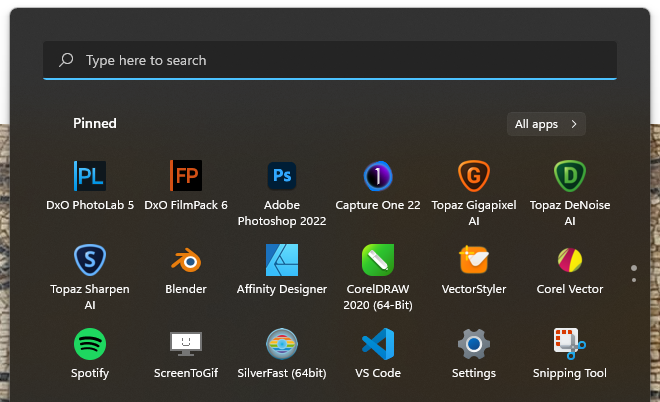
When people are getting used to this old habbits will die. And that is why I warn you people 24/7 that a complex user interface is a thing of the past. If not now in a few years.
-
@Ingolf said in Windows installation and update observations (minor):
This is what Windows 11 has to offer. Press the Windows key once and all your pinned programs are available right in front of you, in front of other programs. You can search as well (with auto-completion, so a few letters will be enough and Windows will have guessed what you are looking for).
I totally agree with you.
My desktop is full of random files and shortcuts. Sometimes I put something from external storage on the desktop for quick use, and there they stay until the moment comes when it needs to be cleaned up. I can't remember when I used the desktop as a place to launch an application. Using the search engine under the Win button is awfully convenient for me. It's quick, available at any time. It searches folders, files and applications.
I don't know how it is in Windows 11, but in 10 I have problems with the global search when I want to import a file into a project from the Import dialog window. The search is limited to the last active folder. You have to manually select the range of directories to search. But I compensate with the Listary app, which gives me the file in a second, no matter where it is on the drive.I also encourage you to try using this method.
-
Who says that a desktop with icons has to be messy ?
This is my system, I stick to it no matter what anyone thinks of it.
( no need to press a window key and i dont like the windows search
have a little tool for that )I also do not care how old fashion this is, or how childish that comes across.
-
@encart said in Windows installation and update observations (minor):
I also encourage you to try using this method.
While I thank you for the offer, is certainly well intended
I would not convert -
One word: optional.
-
@Ingolf said in Windows installation and update observations (minor):
One word: optional.
thats true



