VectorStyler
    • Categories
    • Unread
    • Recent
    • Tags
    • Popular
    • Register
    • Login

    Drop shadow offset

    Scheduled Pinned Locked Moved Features and Ideas
    7 Posts 3 Posters 6.1k Views 3 Watching
    Loading More Posts
    • Oldest to Newest
    • Newest to Oldest
    • Most Votes
    Reply
    • Reply as topic
    Log in to reply
    This topic has been deleted. Only users with topic management privileges can see it.
    • IngolfI Offline
      Ingolf
      last edited by

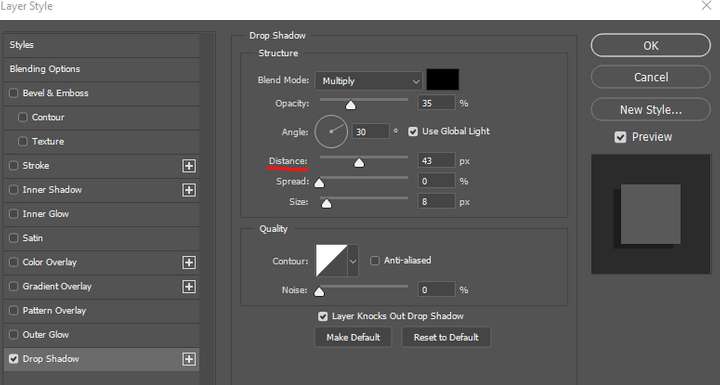
      Suddenly realized we desperately need a shadow offset slider in image effects. Or is it hidden somewhere?

      Shadow offset

      🍏 macOS Sequoia Apple Silicon

      b77B 1 Reply Last reply Reply Quote 1
      • b77B Offline
        b77 @Ingolf
        last edited by

        @Ingolf Probably not the best name, but the Size slider does that.

        MacBook Pro (Intel) running Monterey 12.6.4

        IngolfI 1 Reply Last reply Reply Quote 2
        • IngolfI Offline
          Ingolf @b77
          last edited by

          @b77 said in Drop shadow offset:

          @Ingolf Probably not the best name, but the Size slider does that.

          Thanks. Yes, offset is not my favorite either so I looked in Photoshop:
          0_1667258946289_29bc6015-506b-4a09-9094-501f14eef1ff-image.png

          🍏 macOS Sequoia Apple Silicon

          1 Reply Last reply Reply Quote 1
          • IngolfI Offline
            Ingolf
            last edited by Ingolf

            @VectorStyler BTW when I add a drop shadow effect the color is black but transparent in the image effect settings. If I click it the color is changed to white.

            🍏 macOS Sequoia Apple Silicon

            VectorStylerV 1 Reply Last reply Reply Quote 0
            • IngolfI Offline
              Ingolf
              last edited by

              The effect of the adjustments should be updated "live" while adjusting the sliders. It is more like throwing darts now.

              🍏 macOS Sequoia Apple Silicon

              b77B 1 Reply Last reply Reply Quote 1
              • b77B Offline
                b77 @Ingolf
                last edited by b77

                @Ingolf When changing the values of the effect from the 'Image Effects' panel (Panels > Effects > Image Effects), the adjustments are updated live.

                But indeed, it doesn't work like that when sliders are adjusted from the window that shows the effect. Is it because it's a modal window, @VectorStyler?

                @Ingolf Btw, you can also click the pencil button at the bottom of the 'Image Effects' panel to adjust the values directly on the object.

                MacBook Pro (Intel) running Monterey 12.6.4

                1 Reply Last reply Reply Quote 1
                • VectorStylerV Offline
                  VectorStyler @Ingolf
                  last edited by

                  @Ingolf said in Drop shadow offset:

                  @VectorStyler BTW when I add a drop shadow effect the color is black but transparent in the image effect settings. If I click it the color is changed to white.

                  Will fix this.

                  1 Reply Last reply Reply Quote 0
                  • First post
                    Last post
