update 1.1.065
-
VectorStyler 1.1.065 release notes
- Add size option for image export formats.
- Snap to object pivot points also when object snapping is enabled.
- Smooth node mode in Pen tool (selected in the context panel).
- Fixed regression in the stroke profile editor.
- Automatically close filled shapes for exclude operation.
- Stroke arrow editor should update correctly when stroke shape is moved.
- Selecting the "Scale with Content" option should not duplicate the effect.
- Copy paste between different VS documents should use VS intermediary format (retaining all attributes).
- Color panel to select active gradient color of the gradient panel.
- Zooming to artboard after exiting isolation mode should stay on the current artboard.
- Fixed regression in pattern tool.
- Improved expand stroke on complex shapes.
- Stroke width menu units in pixels should sync with current resolution.
- Converting to curve a rotated shape with gradient should keep the gradient angle (same with patterns).
- Notify if document was not saved correctly.
- Knife tool to correctly cut from composite shapes.
- Deleting should not always previous or next objects.
- Add image effect scaling options to modal view.
- Default image effect scaling mode to be set in document setup.
- Selecting a control point should keep node actions active in the context panel.
- Fixed problems with text highlight for text on path imported from AI.
- Fixed shape distortion effect options in modal view.
- Delete transfer function node using the Delete key.
- Node selection sensitivity for nodes overlapped by their control points.
- Renaming layers or objects should not refresh the preview icons.
- Default color for the drop shadow effect to show black.
- Improved the "Separate At Intersections" command.
- Moving multiple selected nodes with the Shift pressed to constrain the movement direction.
- Document setup fields to use the units selected in the document setup view.
- Keyboard opacity editing in the shape / node editor also.
- Fixed the artboard size preset saving.
- Using blend objects in brushes and tiling patterns.
- Corner editor to correctly detect all smooth corners to skip showing the corner knob.
- Highlight current corner shape in the corner shape popover of the context panel.
- Option to change default corner shape, accessing from the Corner panel menu.
- On Windows, the Layers panel did not allow numbers in names.
- Move panels with table on Windows also.
- Single key shortcut issues on Windows.
- Fixed the repeated transform mode on blend objects.
-
if I close VS (1.1.065) with the "x" in the upper right corner
and choose in the following dialog "Do not save".I still get the following message:
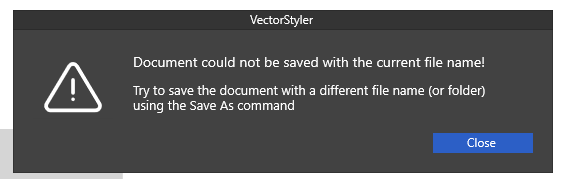
Find this message a bit nonsensical the
because did not want to save.If I first close the document and then close VS
as mentioned above, this message does not appear. -
@Subpath I tried to replicate this on Windows, but here the closing was fine.
It could be again some resource mixup, try removing the workspace.xml and settings.xml files form the VectorStyler user data folder.
-
@VectorStyler said in update 1.1.065:
@Subpath I tried to replicate this on Windows, but here the closing was fine.
It could be again some resource mixup, try removing the workspace.xml and settings.xml files form the VectorStyler user data folder.
Thanks, removing the workspace.xml and settings.xml files from the VectorStyler user data folder
dit fix it. -
@Subpath Ok, but this means that some form of resource mixup does happen here. Next time, if this occurs, send me both the settings.xml and workspace.xml files.
-
@VectorStyler said in update 1.1.065:
@Subpath Ok, but this means that some form of resource mixup does happen here. Next time, if this occurs, send me both the settings.xml and workspace.xml files.
i just renamed the files and put them in another folder.
will send them to you -
Files are send.
-
@VectorStyler said in update 1.1.065:
Deleting should not always previous or next objects.
This works a lot better now in the new build - thanks!