VectorStyler
    • Categories
    • Unread
    • Recent
    • Tags
    • Popular
    • Register
    • Login

    Testing Create adjustment layer: some effects apply to all objects (not only the selected one)
    Scheduled Pinned Locked Moved Questions and Support
    10 Posts 3 Posters 8.2k Views 3 Watching
    Loading More Posts
    • Oldest to Newest
    • Newest to Oldest
    • Most Votes
    Reply
    • Reply as topic
    Log in to reply
    This topic has been deleted. Only users with topic management privileges can see it.
    • B Offline
      B-Vs-V
      last edited by

      I have aselected object on a artboard:
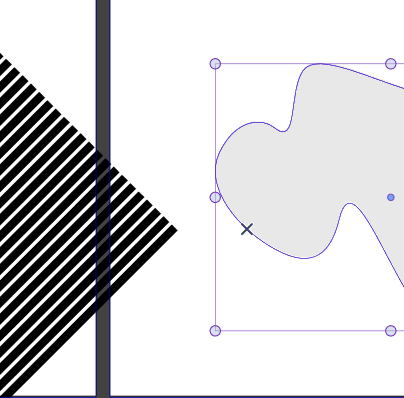
      0_1668629258476_ebf43620-a510-498e-bc13-4bed8ec8cc64-image.png

      I wish to test Object --> Create an adjustment effect --> Colour --> solarize, the effect seems to apply to all objects on the 2 artboards. Also true for other effect like gaussian blur:
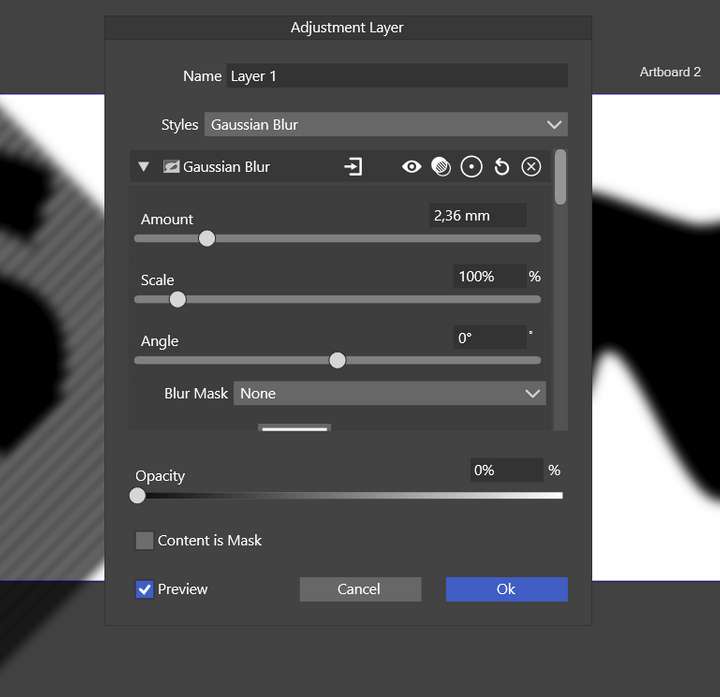
      0_1668629534498_5f3cf81c-c2cb-43b1-ba33-7f0fff858d9a-image.png

      W11 Pro 25H2 - 12th Gen Intel(R) i7-12700K 3.61 GHz - RAM 64 Go - NVIDIA GF GTX 4070 Ti - Intuos - Dell UP3216Q / Eizo ColorEdge
      W11 Pro 25H2 - 12th Gen Intel(R) i7-12700KF 3.60 GHz -RAM 64 Go - NVIDIA GF GTX 3080 - IntuosPro- ProArt PA329C

      b77B VectorStylerV 2 Replies Last reply Reply Quote 0
      • b77B Offline
        b77 @B-Vs-V
        last edited by b77

        @Pat The effects of an adjustment layer are applied to all the objects on that layer — that's how it works.

        Obviusly should have said "on all the layers below".

        MacBook Pro (Intel) running Monterey 12.6.4

        B 1 Reply Last reply Reply Quote 1
        • B Offline
          B-Vs-V @b77
          last edited by

          @b77 I will check tomorrow but I am pretty sure I place them on different layers. Thanks ☺

          W11 Pro 25H2 - 12th Gen Intel(R) i7-12700K 3.61 GHz - RAM 64 Go - NVIDIA GF GTX 4070 Ti - Intuos - Dell UP3216Q / Eizo ColorEdge
          W11 Pro 25H2 - 12th Gen Intel(R) i7-12700KF 3.60 GHz -RAM 64 Go - NVIDIA GF GTX 3080 - IntuosPro- ProArt PA329C

          b77B 1 Reply Last reply Reply Quote 0
          • b77B Offline
            b77 @B-Vs-V
            last edited by b77

            @Pat Sorry, I obviously mis-spoke — should have said:

            The effects of an adjustment layer are applied to all the objects on all the layers below.

            MacBook Pro (Intel) running Monterey 12.6.4

            B 1 Reply Last reply Reply Quote 1
            • B Offline
              B-Vs-V @b77
              last edited by

              @b77 ok, I did the wrong move then.

              W11 Pro 25H2 - 12th Gen Intel(R) i7-12700K 3.61 GHz - RAM 64 Go - NVIDIA GF GTX 4070 Ti - Intuos - Dell UP3216Q / Eizo ColorEdge
              W11 Pro 25H2 - 12th Gen Intel(R) i7-12700KF 3.60 GHz -RAM 64 Go - NVIDIA GF GTX 3080 - IntuosPro- ProArt PA329C

              1 Reply Last reply Reply Quote 0
              • VectorStylerV Offline
                VectorStyler @B-Vs-V
                last edited by

                @Pat The Adjustment Layers are used to add effects on everything below that layer (regardless where it is placed).

                This adjustment effect can be masked using the shape or content of the layer (Layer Options -> Content is Mask, available for adjustment layers).

                I'm not sure, but I think the adjustment layers with effects is not a feature of other vector apps, but it does exist in Photoshop.

                And an interesting trick: any object (with a shape) or a group can be turned into an adjustment layer (not just layers), and then moving / transforming the object will apply the adjustments to different regions of the canvas.

                B b77B 3 Replies Last reply Reply Quote 1
                • B Offline
                  B-Vs-V @VectorStyler
                  last edited by B-Vs-V

                  @VectorStyler Nice, like in a bitmap app. Interesting to know 👍

                  W11 Pro 25H2 - 12th Gen Intel(R) i7-12700K 3.61 GHz - RAM 64 Go - NVIDIA GF GTX 4070 Ti - Intuos - Dell UP3216Q / Eizo ColorEdge
                  W11 Pro 25H2 - 12th Gen Intel(R) i7-12700KF 3.60 GHz -RAM 64 Go - NVIDIA GF GTX 3080 - IntuosPro- ProArt PA329C

                  1 Reply Last reply Reply Quote 0
                  • B Offline
                    B-Vs-V @VectorStyler
                    last edited by B-Vs-V

                    @VectorStyler I wonder then if all adjustments work in this way. It seems to me that 'crystallize' does not affect all objects in all lower layers. I will test again at the end of the day.

                    Edit: it probably works: it's probably because the objects are black !!

                    W11 Pro 25H2 - 12th Gen Intel(R) i7-12700K 3.61 GHz - RAM 64 Go - NVIDIA GF GTX 4070 Ti - Intuos - Dell UP3216Q / Eizo ColorEdge
                    W11 Pro 25H2 - 12th Gen Intel(R) i7-12700KF 3.60 GHz -RAM 64 Go - NVIDIA GF GTX 3080 - IntuosPro- ProArt PA329C

                    VectorStylerV 1 Reply Last reply Reply Quote 1
                    • VectorStylerV Offline
                      VectorStyler @B-Vs-V
                      last edited by

                      @Pat yes, 'crystallize' needs edges or some local variation in colors. Works better on photos, than vectors.

                      1 Reply Last reply Reply Quote 1
                      • b77B Offline
                        b77 @VectorStyler
                        last edited by b77

                        I'm not sure, but I think the adjustment layers with effects is not a feature of other vector apps, but it does exist in Photoshop.

                        It's awesome that we have adjustment layers in a vector graphics app. 👍

                        MacBook Pro (Intel) running Monterey 12.6.4

                        1 Reply Last reply Reply Quote 1
                        • First post
                          Last post
