VectorStyler
    • Categories
    • Unread
    • Recent
    • Tags
    • Popular
    • Register
    • Login

    After Boolean Intersect, no more objects

    Scheduled Pinned Locked Moved Questions and Support
    5 Posts 3 Posters 4.6k Views 3 Watching
    Loading More Posts
    • Oldest to Newest
    • Newest to Oldest
    • Most Votes
    Reply
    • Reply as topic
    Log in to reply
    This topic has been deleted. Only users with topic management privileges can see it.
    • B Offline
      B-Vs-V
      last edited by

      I have:

      • two letters converted to curves
      • several lines converted to curves after having added Outline path.

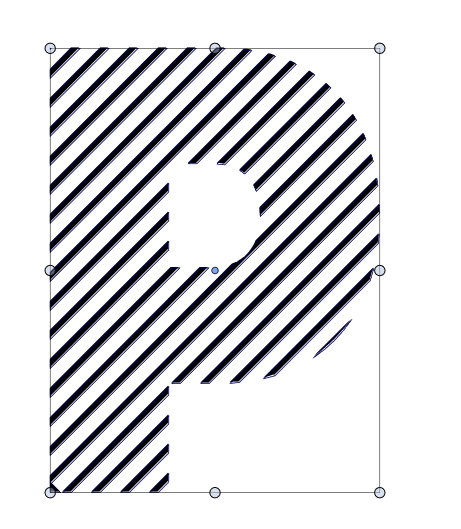
      I wish to have the intersection of all these shapes --> boolean Intersect --> everything disappears

      I have to press on "Exclude shapes from the bottom layer" to only get the intersection of the letter that is at the bottom of the layers:
      0_1668627509872_63d915e1-2d11-4d6a-81df-5edf565ba295-image.png

      W11 Pro 25H2 - 12th Gen Intel(R) i7-12700K 3.61 GHz - RAM 64 Go - NVIDIA GF GTX 4070 Ti - Intuos - Dell UP3216Q / Eizo ColorEdge
      W11 Pro 25H2 - 12th Gen Intel(R) i7-12700KF 3.60 GHz -RAM 64 Go - NVIDIA GF GTX 3080 - IntuosPro- ProArt PA329C

      b77B VectorStylerV 2 Replies Last reply Reply Quote 0
      • b77B Offline
        b77 @B-Vs-V
        last edited by

        @Pat Currently there is a limit with Intersect — if objects are overlapped two by two, selecting all of them and running Intersect won't work.

        MacBook Pro (Intel) running Monterey 12.6.4

        B 1 Reply Last reply Reply Quote 1
        • B Offline
          B-Vs-V @b77
          last edited by

          @b77 It is certainly the issue, thanks ☺

          W11 Pro 25H2 - 12th Gen Intel(R) i7-12700K 3.61 GHz - RAM 64 Go - NVIDIA GF GTX 4070 Ti - Intuos - Dell UP3216Q / Eizo ColorEdge
          W11 Pro 25H2 - 12th Gen Intel(R) i7-12700KF 3.60 GHz -RAM 64 Go - NVIDIA GF GTX 3080 - IntuosPro- ProArt PA329C

          1 Reply Last reply Reply Quote 0
          • VectorStylerV Offline
            VectorStyler @B-Vs-V
            last edited by

            @Pat Select the lines first and then select the shape, and Object -> Intersect with Last.

            Another way for this is to clip those lines into the shape of the letter (P) and then use Object-> Expand Clipped Groups.

            Should plain intersect be also improved, to better handle these kinds of cases?

            B 1 Reply Last reply Reply Quote 1
            • B Offline
              B-Vs-V @VectorStyler
              last edited by B-Vs-V

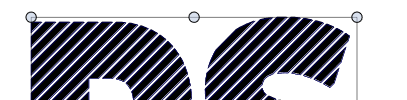
              @VectorStyler In fact, "intersection" works if I merge the two letters first. I can't keep them separated in two distinct layers. Nice !
              0_1668668347305_618bef82-73b7-4127-91d1-cf0a1efe32a3-image.png

              W11 Pro 25H2 - 12th Gen Intel(R) i7-12700K 3.61 GHz - RAM 64 Go - NVIDIA GF GTX 4070 Ti - Intuos - Dell UP3216Q / Eizo ColorEdge
              W11 Pro 25H2 - 12th Gen Intel(R) i7-12700KF 3.60 GHz -RAM 64 Go - NVIDIA GF GTX 3080 - IntuosPro- ProArt PA329C

              1 Reply Last reply Reply Quote 1
              • First post
                Last post
