VectorStyler
    • Categories
    • Unread
    • Recent
    • Tags
    • Popular
    • Register
    • Login

    Editing a gradient colour
    Scheduled Pinned Locked Moved Questions and Support
    15 Posts 3 Posters 9.9k Views 3 Watching
    Loading More Posts
    • Oldest to Newest
    • Newest to Oldest
    • Most Votes
    Reply
    • Reply as topic
    Log in to reply
    This topic has been deleted. Only users with topic management privileges can see it.
    • B Offline
      B-Vs-V @VectorStyler
      last edited by

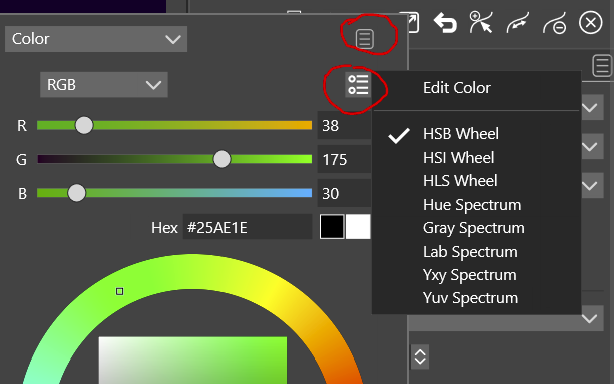
      @VectorStyler Right, I was looking for a plus sign at the bottom... the panel menu of course, sorry for this dumb question ☹

      W11 Pro 25H2 - 12th Gen Intel(R) i7-12700K 3.61 GHz - RAM 64 Go - NVIDIA GF GTX 4070 Ti - Intuos - Dell UP3216Q / Eizo ColorEdge
      W11 Pro 25H2 - 12th Gen Intel(R) i7-12700KF 3.60 GHz -RAM 64 Go - NVIDIA GF GTX 3080 - IntuosPro- ProArt PA329C

      1 Reply Last reply Reply Quote 0
      • B Offline
        B-Vs-V @VectorStyler
        last edited by

        @VectorStyler said in Editing a gradient colour:

        About using the picker: it will not work from the popup color selector, but when a gradient color stop is selected (small white rectangle frame around the knob), the color panel will select the color for that color stop, so the picker can be used from the regular panel:

        https://recordit.co/WNsRiifqU7

        Nice, thanks too for the recording 👍

        W11 Pro 25H2 - 12th Gen Intel(R) i7-12700K 3.61 GHz - RAM 64 Go - NVIDIA GF GTX 4070 Ti - Intuos - Dell UP3216Q / Eizo ColorEdge
        W11 Pro 25H2 - 12th Gen Intel(R) i7-12700KF 3.60 GHz -RAM 64 Go - NVIDIA GF GTX 3080 - IntuosPro- ProArt PA329C

        1 Reply Last reply Reply Quote 0
        • J Offline
          Jayanta Das @VectorStyler
          last edited by Jayanta Das

          About using the picker: it will not work from the popup color selector, but when a gradient color stop is selected (small white rectangle frame around the knob), the color panel will select the color for that color stop, so the picker can be used from the regular panel:

          @VectorStyler I was thinking the other day about the picker in the gradient panel. It is little time comsuming to go to color panel again to pick the color. Please consider to add a picker as in this SS below:
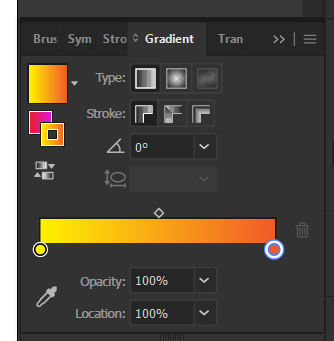
          0_1668781516393_Screenshot_20221118_194747.png

          Mac Mini M4 Pro | 24Gb
          WIndows 11 | Intel i5 11Gen
          Wacom Intuos Pro

          VectorStylerV 1 Reply Last reply Reply Quote 2
          • VectorStylerV Offline
            VectorStyler @Jayanta Das
            last edited by

            @Jayanta-Das said in Editing a gradient colour:

            Please consider to add a picker

            Added this to the backlog.

            J 1 Reply Last reply Reply Quote 2
            • J Offline
              Jayanta Das @VectorStyler
              last edited by

              @VectorStyler I also could not find the option to open my color palette from the panel open from double clicking the color stop.
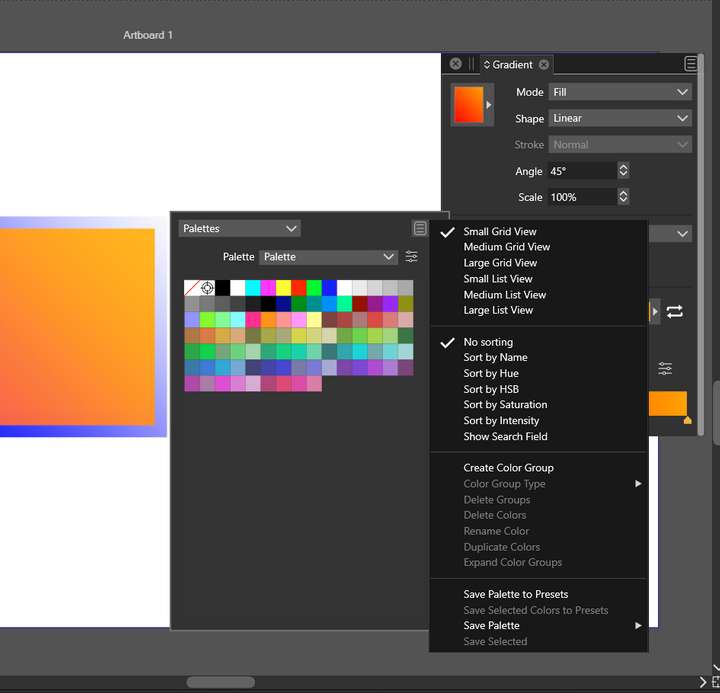
              0_1668783175681_Screenshot_20221118_202244.png

              Mac Mini M4 Pro | 24Gb
              WIndows 11 | Intel i5 11Gen
              Wacom Intuos Pro

              VectorStylerV 2 Replies Last reply Reply Quote 0
              • VectorStylerV Offline
                VectorStyler @Jayanta Das
                last edited by

                @Jayanta-Das It is not in that menu. Click on the "Palette" drop down, and it can be opened from there.

                J 1 Reply Last reply Reply Quote 0
                • J Offline
                  Jayanta Das @VectorStyler
                  last edited by

                  @VectorStyler I tried from that drop down also there an option "preset palette" but nothing open clicking that.

                  Mac Mini M4 Pro | 24Gb
                  WIndows 11 | Intel i5 11Gen
                  Wacom Intuos Pro

                  1 Reply Last reply Reply Quote 0
                  • VectorStylerV Offline
                    VectorStyler @Jayanta Das
                    last edited by

                    @Jayanta-Das Was that custom color palette saved as a preset or as a file?

                    J 1 Reply Last reply Reply Quote 0
                    • J Offline
                      Jayanta Das @VectorStyler
                      last edited by

                      @VectorStyler It was saved as a preset.

                      Mac Mini M4 Pro | 24Gb
                      WIndows 11 | Intel i5 11Gen
                      Wacom Intuos Pro

                      VectorStylerV 1 Reply Last reply Reply Quote 0
                      • VectorStylerV Offline
                        VectorStyler @Jayanta Das
                        last edited by

                        @Jayanta-Das I will try to replicate this issue.

                        1 Reply Last reply Reply Quote 1
                        • First post
                          Last post